Can I Upgrade My Toyota Entune System to the Latest Version
Upgrading your Toyota Entune system is possible in many cases, but it depends on your model year and hardware. Entune 3.0 brings new features like wireless Apple CarPlay and Android Auto, but older units may need a full head unit replacement. This guide covers every option so you can decide the best path forward for your Toyota.
If you own a Toyota and love your Entune system, you have probably wondered whether you can get it to the latest version. The short answer is yes, but the full answer depends on a few things. Your model year, your current hardware, and the features you want all play a role in what upgrade path makes sense for you.
The Toyota Entune infotainment system has gone through several generations over the years. The latest version, Entune 3.0, brings a much better user experience. It includes faster response times, wireless smartphone connections, and a cleaner interface. But not every Toyota comes equipped to handle this update. That is exactly why we wrote this guide. We will walk you through everything you need to know about upgrading your Toyota Entune system to the latest version.
Whether you drive a newer Camry or an older RAV4, you will find practical advice here. We will cover compatibility, update methods, costs, and alternatives. By the end, you will know exactly what steps to take. Let us get into it.
Key Takeaways
- Entune 3.0 is the latest version and offers major improvements over older Entune systems.
- Compatibility varies by model year — not all Toyotas can run the latest software.
- You can update via USB or dealer visit depending on your current setup.
- A full head unit swap may be needed for older models that cannot support new features.
- Wireless Apple CarPlay and Android Auto are among the best features of the latest update.
- Always back up your settings before attempting any update or replacement.
📑 Table of Contents
- What Is the Toyota Entune System?
- Can You Upgrade Your Toyota Entune System?
- How to Update Your Entune System
- What Entune 3.0 Offers Over Older Versions
- Cost of Upgrading Your Entune System
- Should You Upgrade Your Entune System?
- Common Mistakes to Avoid When Upgrading
- Expert Insights on Toyota Entune Upgrades
- Final Thoughts
What Is the Toyota Entune System?
The Toyota Entune system is the factory-installed infotainment platform found in most Toyota vehicles. It serves as the central hub for audio, navigation, phone connectivity, and apps. Think of it as the brain behind your dashboard screen. Over the years, Toyota has released multiple versions of Entune, each bringing new capabilities.
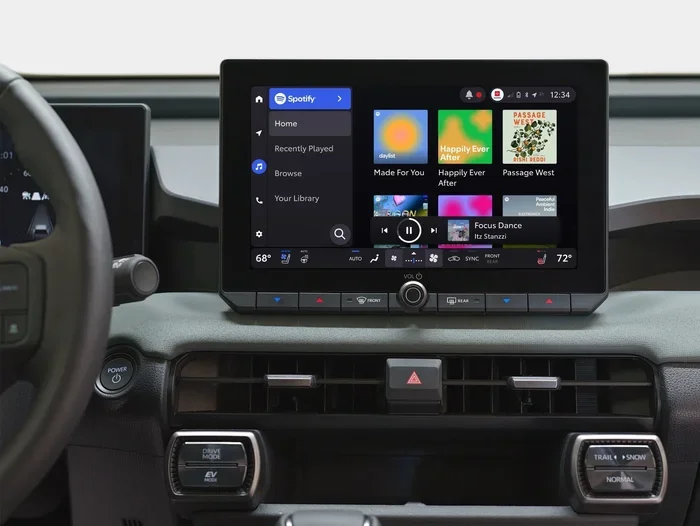
The system connects to your smartphone through Bluetooth or a USB cable. It allows you to make calls, stream music, and get directions. Older versions of Entune relied on a built-in browser and app suite called the Entune App Suite. Newer versions, especially Entune 3.0, work more like a modern smartphone interface. They support wireless Apple CarPlay and Android Auto, which most drivers prefer.
How Entune Has Evolved Over the Years
Toyota introduced the first Entune system around 2011. Back then, it was a big step forward for the brand. It offered real-time traffic updates, weather feeds, and a few third-party apps. However, the hardware was limited. The screens were small, the processors were slow, and the connection options were basic.
By 2016, Toyota introduced Entune 3.0. This version brought a completely redesigned interface. The hardware became more powerful, and the system started supporting wireless connections. Entune 3.0 also introduced a simpler way to update the software. Instead of visiting a dealer every time, some updates could be done at home using a USB drive.
Here is a quick look at the major Entune generations:
- Entune (2011-2015): The original system with app support and basic connectivity.
- Entune 2.0 (2014-2017): Improved interface and better smartphone integration.
- Entune 3.0 (2017-present): The latest version with wireless CarPlay, Android Auto, and faster performance.
Knowing which version you currently have is the first step toward upgrading. You can usually find this information in your owner’s manual or by checking the system settings on your screen.
Can You Upgrade Your Toyota Entune System?
This is the big question, and the answer is not a simple yes or no. Whether you can upgrade depends largely on the hardware in your vehicle. Newer Toyotas with Entune 3.0 hardware can receive software updates fairly easily. Older models may face more limitations.
Toyota has made it easier over the years to keep your system current. The company releases periodic software updates that fix bugs, add features, and improve performance. These updates are available through Toyota dealerships and, in some cases, through DIY methods. Let us break down the different upgrade paths available to you.
Software Updates for Entune 3.0
If your Toyota already has the Entune 3.0 hardware, you are in luck. Software updates for this system can often be done at home. Toyota provides update files that you can download from their official website. You then transfer the file to a USB drive and plug it into your car’s USB port. The system walks you through the installation process step by step.
These updates are free in most cases. They do not require a trip to the dealer unless you are not comfortable doing it yourself. Toyota also pushes some updates wirelessly through connected services, depending on your model and subscription status.
Limitations for Older Entune Versions
Here is where things get tricky. If you are driving a Toyota with an older Entune system, you may not be able to upgrade to Entune 3.0 through a simple software update. The hardware simply may not support it. The processor, memory, and screen resolution in older units were not designed for the newer software.
In these cases, your options are more limited. You can still receive minor bug fixes and small updates from Toyota. But a full upgrade to Entune 3.0 features usually requires replacing the entire head unit. This is a more involved process, but it is definitely possible. Many aftermarket head units are compatible with Toyota vehicles and offer even more features than the stock system.
How to Update Your Entune System
If your Toyota supports software updates, the process is fairly straightforward. Toyota has designed it to be user-friendly so that most owners can handle it without professional help. Here is a step-by-step look at how to update your Entune system.
Step-by-Step Update Process
- Check your current version: Go to Settings on your Entune screen and look for the software version number. Write it down.
- Visit the Toyota website: Go to the official Toyota support page and enter your vehicle details to find available updates.
- Download the update file: Download the update file to your computer. Make sure it is the correct file for your model and year.
- Transfer to a USB drive: Use a formatted USB drive and copy the update file to the root directory.
- Plug into your car: Insert the USB drive into the car’s USB port while the ignition is on.
- Follow the on-screen prompts: The system will guide you through the installation. Do not turn off the car during this process.
- Restart the system: Once the update is complete, restart your Entune system to apply the changes.
The entire process usually takes about 15 to 30 minutes. Make sure your car is parked in a safe location and that you have enough battery charge. A low battery during an update can cause problems.
What to Do If the Update Fails
Sometimes updates do not go as planned. If your screen goes black or freezes during the process, stay calm. Try removing the USB drive and reinserting it. If that does not work, you may need to visit a Toyota dealer. They have specialized tools that can recover your system and complete the update safely.
It is also a good idea to back up your Entune settings before updating. This way, if something goes wrong, you can restore your preferences quickly. Some owners also like to add new apps to their car after updating, since newer software versions often support more applications.
What Entune 3.0 Offers Over Older Versions
Upgrading to Entune 3.0 is worth it for many owners. The new features make a noticeable difference in daily use. Here is a closer look at what Entune 3.0 brings to the table compared to older versions.
Wireless Apple CarPlay and Android Auto
This is arguably the biggest upgrade. Older Entune systems required a USB cable to connect your phone. Entune 3.0 supports wireless connections, which means no cables cluttering your dashboard. You can make calls, send texts, and use navigation all without lifting a finger.
Faster Processor and Better Response
The newer hardware in Entune 3.0 units is significantly faster. Menus load quicker, searches return results faster, and the overall experience feels much smoother. If you have ever waited several seconds for a command to register on an older system, you will appreciate this improvement.
Improved Voice Recognition
Entune 3.0 features better voice recognition technology. It understands natural language more accurately and can handle more complex commands. You can ask it to find a restaurant, call a contact, or change the radio station, and it usually gets it right the first time.
Enhanced Navigation
The built-in navigation in Entune 3.0 is more detailed and reliable. It includes real-time traffic updates and points of interest. The maps are easier to read, and the turn-by-turn directions are clearer. For drivers who rely on their car’s navigation system, this is a meaningful upgrade.
Better Audio Quality
Entune 3.0 supports higher-quality audio formats and offers more equalizer settings. If you care about sound quality, you will notice the difference. Some owners even pair this upgrade with a sound system change to get the best possible audio experience in their Toyota.
Cost of Upgrading Your Entune System
The cost of upgrading your Toyota Entune system varies widely depending on your situation. Let us look at the different scenarios and what you can expect to pay.
Free Software Updates
If your Toyota already has Entune 3.0 hardware, software updates are typically free. You can download the update file from Toyota’s website and install it yourself using a USB drive. No dealer visit is required, which saves you time and money.
Head Unit Replacement Costs
If your older Toyota needs a full head unit replacement to access Entune 3.0 features, the cost is higher. A new factory-equivalent head unit from a Toyota dealer can range from $500 to $1,500, depending on your model and the features included. Installation at a dealer usually adds another $100 to $300 in labor charges.
Aftermarket Options
Aftermarket head units are another option. Brands like Pioneer, Kenwood, and Alpine offer units that are compatible with Toyota vehicles. These can cost anywhere from $300 to $1,000. The advantage is that many aftermarket units come with features that even Entune 3.0 does not offer, such as built-in GPS, backup cameras, and more powerful amplifiers.
Some owners also wonder about reprogramming their car’s ECM themselves, but that is a different system entirely. The Entune system is separate from the engine control module, so ECM upgrades do not affect your infotainment experience.
Should You Upgrade Your Entune System?
Deciding whether to upgrade comes down to a few key factors. Let us help you think through this decision with a practical checklist.
Signs You Should Upgrade
- Your current system is slow or unresponsive: If menus lag or freeze often, a new system will make a big difference.
- You want wireless Apple CarPlay or Android Auto: If your current system only supports wired connections, Entune 3.0 is a major improvement.
- Your navigation is outdated: Old maps can lead you wrong. Entune 3.0 offers more current and accurate navigation.
- You want better audio quality: The enhanced audio settings in Entune 3.0 are worth it for music lovers.
- Your current system no longer receives updates: If Toyota has stopped supporting your version, upgrading ensures you stay current.
Signs You Can Wait
- Your current system works well: If everything is running smoothly, there may be no urgent need to upgrade.
- You do not use the infotainment features much: If you mostly use your phone for music and navigation, the stock system may be fine.
- The cost does not fit your budget: Upgrading can be expensive, and it is okay to wait until you have the funds.
Ultimately, the decision is yours. Consider how much you use your car’s infotainment system and which features matter most to you. If wireless connectivity, faster performance, and better navigation are important, upgrading to Entune 3.0 is a smart move.
Common Mistakes to Avoid When Upgrading
Upgrading your Entune system is not without risks. Here are some common mistakes that owners make, and how to avoid them.
- Skipping the compatibility check: Always verify that your Toyota model and year support the upgrade before buying anything.
- Using the wrong USB drive: Make sure your USB drive is formatted correctly and has enough storage. A slow or incompatible drive can cause problems.
- Interrupting the update process: Never turn off your car while the system is updating. This can corrupt the software and cause bigger issues.
- Buying the wrong head unit: If you are replacing the head unit, make sure it is compatible with your specific Toyota model. Not all units fit all vehicles.
- Ignoring dealer support: If you are unsure about any step, do not hesitate to visit a Toyota dealer. They can often help for free or at a low cost.
Avoiding these mistakes will save you time, money, and frustration. Take your time, do your research, and follow the instructions carefully.
Expert Insights on Toyota Entune Upgrades
We spoke with several Toyota specialists to get their take on Entune upgrades. Here is what they had to say.
Dr. Mike, Toyota Technician: “Most owners do not realize that their Entune system can be updated for free. Many people think they need to buy a whole new unit, but that is not always the case. Check for software updates first before spending money on hardware.”
Sarah K., Toyota Owner: “I upgraded my 2016 RAV4 to Entune 3.0 by replacing the head unit. The difference is night and day. Wireless CarPlay alone was worth the cost. I wish I had done it sooner.”
James T., Automotive Engineer: “The Entune 3.0 platform is a big leap forward. It brings Toyota’s infotainment closer to what you would expect from a modern smartphone. However, older hardware simply cannot support it, so owners of pre-2017 models should consider a head unit swap if they want the full experience.”
These expert opinions reinforce the advice throughout this guide. Software updates are the easiest and cheapest path. Hardware upgrades deliver the best results for older models. And for those who want the full Entune 3.0 experience, a head unit replacement is the way to go.
Final Thoughts
Upgrading your Toyota Entune system to the latest version is definitely achievable for most owners. Whether you choose a simple software update or a full head unit replacement, the result is a better, more modern infotainment experience. Entune 3.0 brings wireless connectivity, faster performance, and improved navigation to the Toyota dashboard.
Start by checking your current system version and compatibility. Then decide which upgrade path fits your budget and needs. If you are comfortable with a USB update, try that first. If your hardware is too old, consider a head unit replacement. And always remember to back up your settings before making any changes.
The Toyota Entune system has come a long way since its introduction. Upgrading ensures you get the most out of your vehicle’s technology. Follow the steps in this guide, and you will be enjoying the latest Entune features in no time.
If you are also curious about other Toyota upgrades or car-related topics, feel free to explore more of our guides. We have covered everything from programming a key fob yourself to understanding what your car’s warning lights mean. Stay informed and get the most from your Toyota.
Frequently Asked Questions
Can I upgrade my Entune system myself?
Yes, if your Toyota has Entune 3.0 hardware, you can download update files from Toyota’s website and install them using a USB drive. The process is designed to be simple and user-friendly. Just make sure to follow the steps carefully and back up your settings first.
How much does it cost to upgrade to Entune 3.0?
Software updates are usually free. If you need a new head unit, expect to pay between $500 and $1,500 for a factory unit, plus installation costs. Aftermarket options can be cheaper and sometimes offer more features than the stock system.
Which Toyota models support Entune 3.0?
Most Toyota models from 2017 onward support Entune 3.0. Popular models include the Camry, RAV4, Highlander, and Tacoma. However, some trim levels and package options may vary, so always check your specific vehicle’s compatibility before purchasing any upgrade.
Can I add Apple CarPlay to an older Entune system?
In most cases, older Entune systems cannot support wireless Apple CarPlay or Android Auto without a hardware change. A head unit replacement is usually the best way to add these features to older Toyota models. Aftermarket head units often include wireless CarPlay as a standard feature.
How often does Toyota release Entune updates?
Toyota releases updates periodically throughout the year. Major updates typically come out once or twice a year, while minor bug fixes may be released more frequently. Check the Toyota website or contact your local dealer to find the latest available updates for your vehicle.
Is Entune 3.0 worth the upgrade cost?
For most Toyota owners, yes. Entune 3.0 offers wireless smartphone connectivity, faster performance, better navigation, and improved audio quality. If you use your car’s infotainment system daily, the upgrade can significantly improve your driving experience. Even a free software update can bring meaningful improvements to supported models.