Can I Add Apps to My Car for a Smarter Driving Experience
Yes, you can add apps to your car and transform the way you drive, listen to music, and navigate roads. Whether you use Apple CarPlay, Android Auto, or an aftermarket head unit, the options are easier than you think. This guide covers everything from built-in systems to wireless connectivity and third-party tools. You will learn which apps boost safety, save fuel, and make every trip more enjoyable. Adding apps to your car is one of the simplest upgrades you can make.
Have you ever sat in your car and thought, “This would be so much better with a few good apps?” You are not alone. Drivers everywhere want more from their vehicles. The good news is that adding apps to your car is not just possible. It is also more affordable and straightforward than most people realize.
Modern cars come packed with technology. But factory systems often feel limited. They may lack the apps you use every day on your phone. Car apps can fill that gap. They bring navigation, music, communication, and even vehicle diagnostics right to your dashboard. Whether you drive a new sedan or an older SUV, there is a way to get more apps on your car screen.
In this guide, we will walk you through every method. You will learn about smartphone integration systems like Apple CarPlay and Android Auto. We will explore aftermarket head units, wireless options, and must-have driving apps. By the end, you will know exactly how to make your car smarter and more connected.
Key Takeaways
- Multiple Ways to Add Apps: Use Apple CarPlay, Android Auto, or upgrade your head unit to access apps on the road.
- Safety First: Driving safety apps and hands-free features keep you focused while behind the wheel.
- Aftermarket Options Are Powerful: A new head unit can unlock apps your factory system never supported.
- Wireless Connectivity Matters: Wireless CarPlay and Android Auto eliminate cable clutter and make setup effortless.
- Small Changes, Big Impact: Even simple apps like GPS and music streamers can dramatically improve your daily commute.
📑 Table of Contents
Understanding How Car Apps Work
Before you dive into adding apps, it helps to understand the basics. Car apps are not like phone apps. They run on a system built into your vehicle or a device you add. The infotainment system is the brain behind your car’s screen. It controls audio, navigation, and connectivity. Some cars have advanced car multimedia systems that already support popular apps. Others need a little help.
Built-In vs. Aftermarket Systems
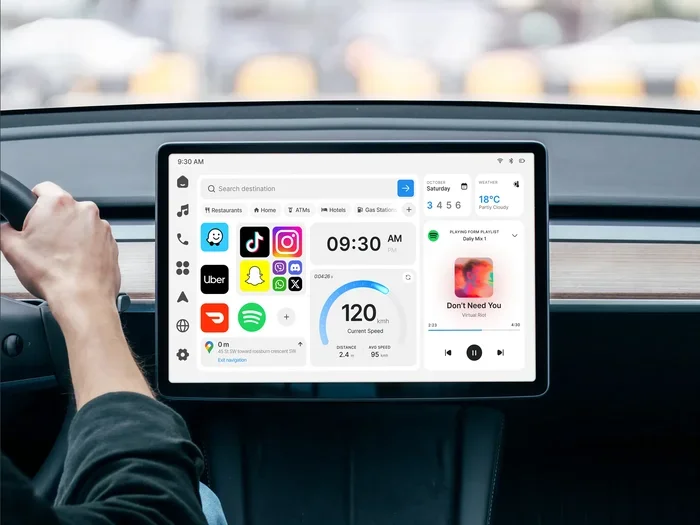
Most new cars today come with built-in infotainment. These systems often include Apple CarPlay or Android Auto support. Smartphone integration lets your car screen mirror your phone. This means your car gets access to the apps already on your phone. It is like giving your car a smart upgrade without buying a new vehicle.
Aftermarket systems work differently. You install a new head unit in place of the factory stereo. This new unit runs its own car operating system. It can support a wider range of car connectivity options. Aftermarket units from brands like Pioneer, Kenwood, and Alpine offer app stores and direct app installation.
How Wireless CarPlay and Android Auto Changed the Game
Wired connections used to be the only option. You plugged your phone into a cable. Today, wireless CarPlay and wireless Android Auto have changed everything. You connect without cables. Your phone pairs with the car through Bluetooth or Wi-Fi. This means fewer cords and a cleaner dashboard.
Wireless connectivity also means faster switching. You get in the car, and your apps are ready. Maps, music, and messages load instantly. This is one of the biggest reasons drivers love wireless systems. It makes the whole experience feel seamless and modern.
Methods to Add Apps to Your Car
There are several ways to get apps on your car screen. Each method has its own benefits. Let us break them down so you can pick the best one for your vehicle and budget.
Method 1: Use Apple CarPlay
Apple CarPlay is one of the most popular ways to bring apps into your car. It works with iPhones and many car brands. When you connect your iPhone, CarPlay shows a simplified version of your phone on the car screen. You get access to Maps, Music, Messages, Phone, and more.
Here is what makes Apple CarPlay great:
- Siri voice control keeps your hands on the wheel
- GPS navigation apps like Google Maps and Waze work perfectly
- Music apps like Spotify, Apple Music, and Pandora are supported
- Messaging apps read texts aloud and let you reply by voice
- Regular software updates add new features and supported apps
Not all cars support CarPlay out of the box. But many new models do. And if your car does not, you can add a CarPlay-compatible head unit through an aftermarket upgrade.
Method 2: Use Android Auto
Android Auto is Google’s answer to CarPlay. It works with Android phones and offers a similar experience. Your phone’s apps appear on the car screen in a driver-friendly layout. Android Auto supports Google Maps, Spotify, Pandora, WhatsApp, and many other driving apps.
Key benefits of Android Auto include:
- Google Assistant for hands-free control
- Live traffic updates through navigation apps
- Customizable home screen with your favorite shortcuts
- Wide app compatibility with thousands of Android apps
- Free to use with no subscription required
Like CarPlay, Android Auto works best with wireless connectivity. Many newer cars and head units now support it. If your car does not, an aftermarket Android Auto head unit is an easy fix.
Method 3: Upgrade Your Head Unit
If your car has an older infotainment system, upgrading the head unit is a powerful option. A new aftermarket head unit can add app support your car never had. You get access to app stores, direct installation, and advanced features like car screen mirroring.
Here is what to look for in a head unit upgrade:
- Wireless CarPlay and Android Auto support
- Built-in GPS navigation with offline maps
- App store access for downloading new tools
- Voice control compatibility
- Backup camera integration for added safety
- Bluetooth 5.0 for stable wireless connections
Head units range from budget-friendly options around $150 to premium units over $1,000. The price depends on features, screen size, and brand. For most drivers, a mid-range unit offers the best value.
Method 4: Use OBD2 Scanner Apps
OBD2 scanner apps are a fantastic way to add functionality to your car. OBD2 stands for On-Board Diagnostics. It is a standard port found in almost all cars made after 1996. You plug a small adapter into this port, and it connects to your phone via Bluetooth.
These vehicle diagnostic apps can:
- Read error codes and explain what they mean
- Monitor engine performance in real time
- Track fuel efficiency and driving habits
- Check tire pressure and battery health
- Reset maintenance lights after repairs
Popular OBD2 apps include Torque Pro, Car Scanner, and OBD Fusion. They turn your phone into a powerful car diagnostic tool. This is one of the most practical aftermarket car apps you can add.
Method 5: Install Dash Cam and Safety Apps
Dash cam apps use your phone’s camera to record your drive. They work in the background while you use navigation or music apps. Some apps also use the phone’s sensors to detect collisions and record events automatically.
Top driving safety apps to consider include:
- Dashcam by Splinix for simple, reliable recording
- FrontDash for combined dash cam and navigation
- Waze for real-time traffic and hazard alerts
- Life360 for family location sharing and crash detection
- GasBuddy for finding the cheapest fuel nearby
These telematics apps add real value to your driving experience. They enhance safety and help you save money on fuel and repairs.
Best Apps for Your Car
Not all car apps are created equal. Some are essential for daily driving. Others add fun or convenience. Here are the best categories and specific apps to consider.
Navigation Apps
GPS navigation apps are the most used driving apps on any phone. They give you turn-by-turn directions, live traffic updates, and estimated arrival times.
Top picks include:
- Google Maps – The most accurate and widely used navigation app
- Waze – Best for real-time traffic and community alerts
- Apple Maps – Great for iPhone users with seamless CarPlay integration
- Sygic – Offers offline maps for areas with no signal
Music and Audio Apps
Music apps make every drive more enjoyable. Most music streaming apps work with both CarPlay and Android Auto.
Popular options include:
- Spotify – Huge music library with personalized playlists
- Apple Music – Native integration with CarPlay
- Pandora – Great for custom radio stations
- Pocket Casts – Best for podcasts on long drives
- Audible – Perfect for audiobook lovers
Fuel and Efficiency Apps
Want to save money at the pump? Fuel efficiency apps track your driving habits and suggest ways to improve gas mileage. These car connectivity tools can genuinely lower your monthly fuel costs.
Recommended apps include:
- GasBuddy – Finds the cheapest fuel near you
- Fuelio – Tracks fuel consumption and expenses
- Drivvo – Comprehensive fuel and cost tracking
Parking and Payment Apps
Finding parking can be stressful. Parking apps show available spots, help you reserve spaces, and even pay for parking without cash.
Top parking apps include:
- ParkMobile – Pay for parking in many cities
- SpotHero – Reserve parking in advance
- Google Maps – Shows parking options near your destination
Quick Tips for Getting the Most from Car Apps
Adding apps is only half the battle. Using them the right way makes all the difference. Here are some quick tips to get the best experience.
1. Keep Your Phone Charged. Apps use battery power, especially navigation. Use a quality car charger to keep your phone powered during long trips.
2. Download Offline Maps. Signal loss can kill your navigation. Download offline map packs before you hit areas with poor coverage.
3. Use Voice Commands. Always prefer voice control over tapping. It keeps your eyes on the road and hands on the wheel.
4. Update Your Apps Regularly. App updates fix bugs and add features. Set your apps to update automatically for the best experience.
5. Minimize Notifications. Turn off non-essential notifications while driving. Fewer distractions mean safer driving.
6. Test Before You Drive. Set up your apps and playlists before you start the engine. This prevents fumbling with your phone on the road.
Common Mistakes to Avoid When Adding Apps
Many people make avoidable mistakes when setting up car apps. Here are the most common ones and how to prevent them.
Choosing the Wrong Head Unit
Not every head unit supports every feature. Some budget units claim CarPlay support but only offer wired connections. Others lack Android Auto entirely. Before you buy, check the specs carefully. Make sure the unit supports wireless connectivity and the apps you need.
Ignoring Software Updates
Both your phone and your car system need updates. Outdated software can cause apps to crash or fail to connect. Always keep your vehicle software update current. Check for updates through your car’s settings or your dealer.
Overloading Your Screen
It is tempting to install every app you can find. But too many apps clutter your screen and slow down performance. Stick to the essentials. Keep your most-used apps on the home screen and remove the rest.
Neglecting Privacy and Security
When you connect your phone to your car, you share data. Some car connectivity apps collect driving habits and location data. Read privacy policies before installing unfamiliar apps. Only download apps from trusted sources like the App Store or Google Play.
Expert Insights on Car App Technology
Industry experts agree that car apps are the future of driving. According to automotive analysts, the connected car market is growing rapidly. More manufacturers are building smart infotainment systems that support third-party apps natively.
“The line between your phone and your car is disappearing,” says technology analyst Mark Harris. “Within a few years, most vehicles will support app ecosystems directly. Drivers will not even need their phones to access their favorite tools.”
Telematics is another area gaining momentum. Insurance companies now use telematics apps to monitor driving behavior and offer personalized rates. Safe drivers can save significant money on premiums. This is a win-win for both drivers and insurers.
Experts also recommend focusing on driving safety apps. Features like collision detection, lane departure warnings, and fatigue alerts are becoming standard in newer vehicles. Adding these capabilities through apps can make older cars safer too.
Conclusion
The answer to “Can I add apps to my car?” is a clear yes. Whether you use Apple CarPlay, Android Auto, or an aftermarket head unit, you have options. Adding apps to your car is one of the easiest and most affordable ways to upgrade your daily driving experience.
From navigation and music to safety and diagnostics, the right car apps make every trip better. You save time, money, and stress. You stay connected without compromising safety. And your car feels modern and smart without buying a new vehicle.
Start with one or two apps that match your needs. Test them on your next drive. Add more as you discover what works best for you. The road to a smarter, more connected driving experience starts with a single app.
Take action today. Explore your options, find the right setup, and enjoy the benefits of apps in your car. Your future self will thank you every time you hit the road.
Frequently Asked Questions
Can I add apps to any car?
Most cars can support apps in some way. If your car has a modern infotainment system, it likely supports Apple CarPlay or Android Auto. Older cars can benefit from an aftermarket head unit or OBD2 adapter. Even basic vehicles can use phone mounts and Bluetooth to access apps hands-free.
Do I need an expensive head unit to use car apps?
No. Many affordable head units under $200 support wireless CarPlay and Android Auto. You do not need a premium unit to enjoy app features. Focus on wireless connectivity and app compatibility rather than price alone.
Are car apps safe to use while driving?
Yes, when used correctly. Both CarPlay and Android Auto are designed with driver safety in mind. They simplify interfaces and support voice commands. Always use hands-free controls and avoid tapping your screen while the car is moving.
Can I install apps directly on my car’s screen?
This depends on your car’s system. Some newer vehicles with built-in app stores allow direct installation. Most cars rely on smartphone integration to access apps. Aftermarket head units often have their own app stores for direct downloads.
Which is better, Apple CarPlay or Android Auto?
It depends on your phone. iPhone users should choose Apple CarPlay. Android users will prefer Android Auto. Both offer similar features including navigation, music, and messaging. Both support wireless connectivity in compatible vehicles.
Do dash cam apps drain my phone battery?
Yes, dash cam apps use significant battery power because they keep the camera running continuously. Use a high-quality car charger to keep your phone powered. Some apps offer low-power modes that reduce battery drain while still recording safely.