How Do I Cancel My Toyota Connected Service Forever
Cancelling your Toyota Connected Service is easier than you think. Whether you want to stop monthly fees or simply don’t need the features anymore, this guide walks you through every step. You will learn the exact methods to cancel Toyota Connected Services, avoid common pitfalls, and understand your refund options. Follow our instructions to disconnect permanently and save money.
So you want to know how to cancel your Toyota Connected Service for good. Maybe the monthly fee is getting to you. Or perhaps you realized you never use those fancy connected features anyway. Whatever the reason, you are in the right place. This guide covers everything you need to know about cancelling Toyota Connected Services without any headaches.
Toyota Connected Services offer a bunch of cool features. Think remote start, vehicle tracking, and emergency assistance. But not everyone needs all of that. And paying for something you do not use just does not make sense. The good news is that cancelling is straightforward once you know the steps. You just need to follow the right path.
In this article, we will break down every method you can use. We will also cover what happens after cancellation. And we will answer the most common questions people ask. By the end, you will feel confident about ending your Toyota subscription for good.
Key Takeaways
- Multiple cancellation methods exist: You can cancel online, by phone, or through your Toyota dealer.
- Check your contract first: Understanding your terms helps avoid early termination fees.
- Confirm cancellation in writing: Always get written proof that your Toyota Connected Service has been cancelled.
- Refunds may be available: Depending on your plan, you could get a partial refund for unused time.
- You can still use basic features: Some Toyota functions work even after cancelling connected car services.
- Timing matters: Cancel before your next billing cycle to avoid extra charges.
📑 Table of Contents
- What Is Toyota Connected Services?
- Why Do People Cancel Toyota Connected Services?
- How to Cancel Toyota Connected Services
- What Happens After You Cancel
- Common Mistakes to Avoid
- Quick Tips for a Smooth Cancellation
- Toyota Connected Services vs. Third-Party Alternatives
- Expert Insights on Cancelling Connected Services
- Final Thoughts on Cancelling Toyota Connected Service
What Is Toyota Connected Services?
Before you cancel, it helps to understand what you are cancelling. Toyota Connected Services is a subscription-based package. It connects your vehicle to the internet and offers various digital features. These services go by different names depending on your model year and trim level.
Some Toyota vehicles come with Toyota Entune technology. Others use the newer Toyota Connected platform. Both offer similar features like remote start, GPS navigation, and emergency calling. The services typically run on a monthly or annual plan.
Common Features Included
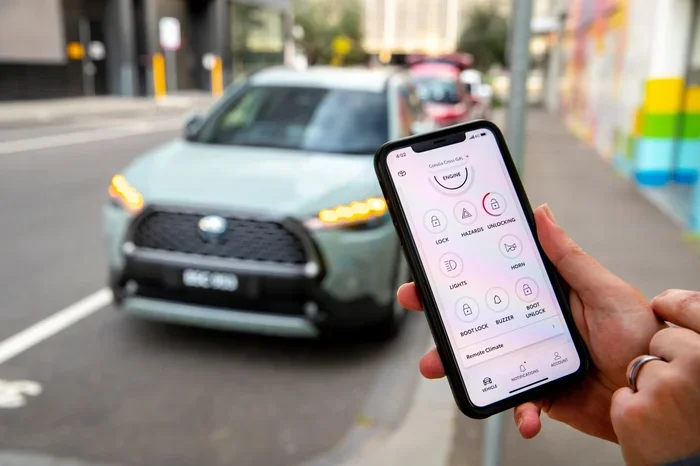
- Remote Connect: Start your car from your phone
- Destination Assistance: Navigation support and points of interest
- Emergency Assistance: Automatic crash notification and roadside help
- Vehicle Health Reports: Maintenance alerts and diagnostics
- Connected Care: Scheduled maintenance reminders and service booking
These features are nice to have. But they come at a cost. And if you are not using them, that cost adds up fast. This is why many owners decide to cancel their Toyota subscription and save some money each month.
Why Do People Cancel Toyota Connected Services?
There are many reasons why drivers choose to disconnect. Let us look at the most common ones. Understanding your reasons can help you make the best decision.
Monthly Costs Add Up
The most obvious reason is money. Toyota Connected Services cost between $80 and $150 per year depending on your plan. That is $6 to $12.50 per month. Over five years, that adds up to serious cash. Many owners prefer to put that money toward their car payment or maintenance instead.
You Do Not Use the Features
Let us be honest. How often do you really use remote start or emergency calling? If the answer is rarely or never, the subscription does not make sense. You should not pay for features you do not need. This is especially true if you already have a smartphone that handles navigation and communication.
You Prefer Simplicity
Some people just want a simple driving experience. No apps, no subscriptions, no notifications. Your car should just work. Cancelling connected car services removes the digital clutter and lets you focus on driving.
You Are Selling or Leasing Your Vehicle
If you plan to sell your Toyota soon, keeping the subscription active does not help you. The next owner can decide whether they want those features. And if you are leasing, the dealership may handle cancellation for you at the end of the lease.
How to Cancel Toyota Connected Services
Now let us get to the good part. Here are the three main ways to cancel your Toyota Connected Service. Each method works, but some are faster than others. Pick the one that suits you best.
Method 1: Cancel Online Through Your Toyota Account
This is the easiest and fastest method. You can do it from your couch at any time. Here is exactly what to do:
- Go to the Toyota website and log into your account
- Navigate to the “My Vehicles” or “My Services” section
- Select the vehicle connected to the service you want to cancel
- Find the “Connected Services” or “Subscription” tab
- Click on “Cancel Subscription” or “Manage Plan”
- Follow the prompts to confirm your cancellation
Make sure you save or screenshot the confirmation page. This serves as proof that you cancelled. Sometimes the confirmation email takes a few minutes to arrive. If you do not see it within 15 minutes, check your spam folder.
You may also want to reprogram your ECM yourself to ensure no residual connected services are running in the background. This is an extra step but can help ensure a clean disconnection.
Method 2: Call Toyota Customer Service
Not comfortable with online cancellation? No problem. You can call Toyota directly. The customer service number is usually found in your owner’s manual or on the Toyota website. Here is what to expect:
- Have your vehicle identification number (VIN) ready
- Know your account login details
- Be prepared to confirm your identity
- Ask the representative to confirm the cancellation in real time
- Request a cancellation confirmation number or email
Calling can take longer than doing it online. But it has one big advantage. You get immediate confirmation from a real person. You can ask questions and clarify any doubts right away. The representative can also tell you about any refund you might be eligible for.
During the call, you might want to ask about adding apps to your car if you plan to switch to a different connected service provider. Some owners find that third-party solutions work better for their needs.
Method 3: Visit Your Toyota Dealership
You can also cancel in person at your local Toyota dealership. This method works well if you are already planning a service visit. Here is how to make it work for you:
- Call ahead and schedule an appointment
- Bring your vehicle registration and ID
- Ask the service advisor to handle the cancellation
- Get written confirmation from the dealership
The dealership route takes the most time. But it is great if you want face-to-face assistance. The service advisor can also check if any other subscriptions or add-ons need attention. They might even help you with things like changing the sound system in my car while you are there.
What Happens After You Cancel
Cancelling is only half the battle. You need to know what happens next. Understanding the post-cancellation process helps you plan ahead.
Access to Connected Features
Once cancelled, you lose access to most connected features. Remote start, emergency assistance, and navigation updates may stop working. However, basic vehicle functions like Bluetooth and USB connectivity usually remain unaffected. Your car still works as a regular car.
Billing and Refunds
Here is something many people do not know. You might be eligible for a partial refund. If you cancel mid-cycle, Toyota may refund the unused portion of your subscription. But this depends on your specific plan and terms. Always ask about refunds when you cancel.
Your next bill should not include the Toyota Connected Services charge. Check your statement carefully to confirm. If you still see the charge, contact Toyota immediately. This is a common issue and usually gets resolved quickly.
Reactivating in the Future
Good news if you change your mind. You can usually reactivate your Toyota subscription later. Simply log into your account or call customer service. Your vehicle profile should still be linked to your account. However, reactivation may come with a new contract or updated pricing. So think carefully before cancelling.
Common Mistakes to Avoid
People make mistakes when cancelling connected car services. Here are the ones you should avoid at all costs.
Forgetting to Confirm in Writing
Never cancel without getting written proof. A verbal confirmation is not enough. Screenshot the online confirmation page. Save the email. Write down the confirmation number. These paper trails protect you if anything goes wrong later.
Canceling at the Wrong Time
Timing is everything. If you cancel right before your billing date, you might lose the entire month. Check your billing cycle first. Cancel a few days before the cycle ends to maximize your value. This small trick can save you money.
Not Checking for Early Termination Fees
Some Toyota service plans have early termination clauses. If you are still within your contract period, cancelling early might cost you extra. Always read the fine print before you cancel. If you are unsure, call customer service and ask directly.
Assuming All Features Stop Immediately
Some features may continue working for a short time after cancellation. This is not a guarantee. Do not rely on continued access to features like remote start or emergency assistance. Plan accordingly and make alternative arrangements if needed.
Quick Tips for a Smooth Cancellation
Follow these tips to make your cancellation process as painless as possible:
- Do it before your next billing cycle: This ensures you do not pay for another month
- Have your VIN ready: The representative will need it to locate your account
- Check for alternative plans: Toyota sometimes offers reduced plans or seasonal options
- Keep all confirmation emails: They serve as proof of cancellation
- Review your bank statement: Make sure the charge stops appearing after cancellation
- Consider pausing instead: Some plans allow temporary suspension rather than full cancellation
Toyota Connected Services vs. Third-Party Alternatives
If you are cancelling because the subscription is too expensive, consider alternatives. Third-party devices and apps can replace many Toyota Connected Services features. Here is a quick comparison:
| Feature | Toyota Connected | Third-Party Alternative |
|---|---|---|
| Remote Start | Included with subscription | Available via aftermarket devices ($50-$200 one-time) |
| GPS Navigation | Built-in with updates | Use smartphone apps (free or low cost) |
| Emergency Assistance | Automatic crash alert | Smartphone emergency features |
| Monthly Cost | $80-$150/year | One-time device cost, no monthly fee |
| Vehicle Integration | Seamless factory integration | May require additional setup |
Third-party options are not always as polished as factory-installed systems. But they can save you a lot of money over time. If you are handy with technology, they are worth considering before you cancel Toyota Connected Services permanently.
Expert Insights on Cancelling Connected Services
Industry experts agree that not everyone needs connected car services. According to automotive analysts, many drivers overpay for features they rarely use. The key is to evaluate your actual usage. If you use remote start less than twice a month, the subscription probably does not justify the cost.
Consumer advocates also recommend reviewing your Toyota subscription annually. Needs change over time. A service that made sense last year might not make sense today. Regular reviews help you stay in control of your spending.
One thing experts strongly advise is to never cancel without understanding the full implications. Some Toyota warranty services are tied to your connected services package. Make sure cancelling one does not accidentally affect the other. When in doubt, ask Toyota directly before proceeding.
Final Thoughts on Cancelling Toyota Connected Service
Cancelling your Toyota Connected Service does not have to be complicated. Whether you choose to cancel online, by phone, or in person, the process is manageable. The key is to be prepared. Know your contract terms, have your information ready, and always get written confirmation.
Remember, you are not locked in forever. If you change your mind, you can usually reactivate your Toyota subscription later. But for now, if you have decided that the connected services are not worth the cost, go ahead and cancel with confidence. Follow the steps in this guide, avoid the common mistakes, and you will be done in no time.
Your wallet will thank you. And you can always enjoy driving your Toyota the old-fashioned way. No subscriptions, no fees, no hassle. Just you and the road.
Frequently Asked Questions
Can I cancel Toyota Connected Services at any time?
Yes, you can cancel at any time. However, check your contract for early termination fees. Some plans require a minimum commitment period. If you are past that period, cancellation is free and straightforward.
Will I get a refund after cancelling my Toyota Connected Service?
You may be eligible for a partial refund. If you cancel mid-billing cycle, Toyota sometimes refunds the unused portion. Contact customer service to ask about your specific refund options. Always confirm refund details before cancelling.
Can I reactivate my Toyota Connected Services after cancelling?
Yes, reactivation is usually possible. Log into your Toyota account or call customer service to restart your subscription. Keep in mind that reactivation may come with updated pricing or a new contract. Your vehicle profile should still be linked to your account.
Do I lose all features immediately after cancelling?
Most connected features stop working after cancellation. However, some basic functions like Bluetooth and USB may continue. Do not rely on features like remote start or emergency assistance after cancelling. Plan alternatives if you depend on those features.
How long does the Toyota Connected Service cancellation process take?
Online cancellation takes just a few minutes. Phone cancellation may take 15 to 30 minutes depending on wait times. Dealership cancellation depends on your appointment availability. Always get written confirmation regardless of the method you choose.
Can I cancel Toyota Connected Services through my dealer?
Yes, you can visit your Toyota dealership to cancel. The service advisor can handle the cancellation for you. Bring your vehicle registration and ID. This method takes longer but offers face-to-face assistance. It is a good option if you are already planning a service visit.
=== CONCLUSION ===
Cancelling your Toyota Connected Service is a smart move if you are not using the features. It saves money and simplifies your driving experience. Use the methods outlined in this guide to cancel quickly and confidently. Always get written confirmation and watch for any remaining charges on your next bill. Take control of your subscriptions today and keep more money in your pocket.