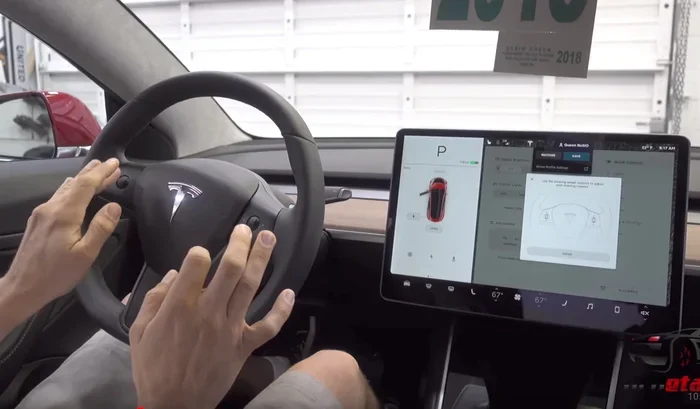
How to Adjust the Steering Wheel on Your Tesla Model 3
Adjusting the steering wheel on your Tesla Model 3 is simple and essential for a comfortable, safe drive. The Model 3 offers both height and tilt adjustment through a lever located under the column, letting you find your ideal position in seconds. This guide walks you through every step, from basic adjustments to pro tips for the perfect driving posture.
The Tesla Model 3 is one of the most popular electric vehicles on the road today. Its sleek design, advanced tech, and smooth driving experience make it a favorite among car owners. But one feature that often gets overlooked is the steering wheel adjustment system. If you have just bought a Tesla Model 3 or are thinking about it, understanding how to properly adjust your steering wheel can make a huge difference in your daily driving experience.
Many drivers don’t realize how much comfort and control they gain from a well-adjusted steering column. A steering wheel that is too high, too low, or too far away can cause strain on your arms, neck, and back over time. It can also affect your ability to react quickly in emergency situations. That is why taking a few minutes to set up your steering wheel correctly is so important.
The good news is that adjusting the steering wheel on a Tesla Model 3 is incredibly straightforward. There are no complicated tools or mechanics involved. In this guide, we will walk you through every step, share helpful tips, and highlight common mistakes to avoid. By the end, you will know exactly how to set up your steering wheel for the perfect driving position every single time.
Key Takeaways
- Easy Adjustment: The Tesla Model 3 steering wheel adjusts in height and tilt using a simple lever mechanism.
- Safety First: Always adjust the steering wheel before driving, never while the car is in motion.
- Perfect Position: Your arms should have a slight bend when holding the wheel at the 9 and 3 positions.
- Multiple Settings: You can save your preferred steering position as part of your driver profile.
- No Tools Needed: The entire adjustment process requires no tools or special equipment.
📑 Table of Contents
- Why Proper Steering Wheel Adjustment Matters
- How to Adjust the Steering Wheel Height
- How to Adjust the Steering Wheel Tilt
- Tesla Model 3 Steering Wheel Controls and Features
- Common Mistakes When Adjusting Your Steering Wheel
- Tips for Finding Your Perfect Driving Position
- Maintaining Your Tesla Model 3 Steering System
- Conclusion
Why Proper Steering Wheel Adjustment Matters
Before we dive into the how-to, let us talk about why this matters so much. Your steering wheel is your primary connection to the road. It controls your direction, your stability, and your comfort. When it is not positioned correctly, it can lead to fatigue, poor posture, and even safety risks.
Here are a few reasons why proper steering wheel adjustment is essential:
- Comfort on Long Drives: A correctly positioned steering wheel reduces strain on your shoulders, arms, and wrists. Whether you are commuting to work or taking a road trip, comfort matters.
- Better Control: When your arms are at the right angle and your hands sit naturally on the wheel, you have more precise control over the vehicle.
- Safety: An improperly positioned steering wheel can block your view of the instrument cluster or pedals. It can also increase the risk of injury in a collision.
- Reduced Fatigue: Driving with the wrong posture tires you out faster. Proper adjustment helps you stay alert and focused during long drives.
The Tesla Model 3 was designed with driver comfort in mind. The steering column offers both vertical and horizontal adjustment, giving you a wide range of positions to choose from. This is one of those small details that makes a big difference in your overall driving experience.
How to Adjust the Steering Wheel Height
Adjusting the height of your steering wheel on the Tesla Model 3 is the first thing you should do after getting behind the wheel. The process is quick and intuitive, and it only takes a few seconds.
Step-by-Step Guide to Height Adjustment
Follow these simple steps to raise or lower your steering wheel:
- Stop the Car: Make sure your Tesla Model 3 is fully stopped and parked. Adjusting the steering wheel while driving is dangerous and should never be done.
- Locate the Lever: Look under the steering column on the left side. You will see a small lever with an arrow icon. This is the adjustment lever.
- Pull the Lever: Pull the lever toward you. You will feel the steering column unlock.
- Move the Wheel: With the lever pulled, move the steering wheel up or down to your preferred height. The column will slide smoothly.
- Release the Lever: Once you have found the right height, release the lever. It will lock the steering column in place automatically.
- Test the Position: Sit back and check that the wheel feels comfortable. Your arms should have a slight bend when your hands are at the 9 and 3 o’clock positions.
That is all there is to it! The height adjustment on the Tesla Model 3 gives you about 2 inches of vertical range, which is plenty for most drivers. If you are taller, you may want the wheel at its highest point. Shorter drivers might prefer it lower to avoid reaching too far.
One thing to keep in mind is that the adjustment mechanism is spring-loaded. This means the lever needs to be pulled firmly to unlock the column. If you are having trouble, make sure you are pulling the lever all the way toward the dashboard.
How to Adjust the Steering Wheel Tilt
In addition to height adjustment, the Tesla Model 3 also offers tilt adjustment. This lets you angle the steering wheel toward you or away from you. It is a great feature for finding that perfect driving position.
Step-by-Step Guide to Tilt Adjustment
Here is how to adjust the tilt of your steering wheel:
- Park the Car Safely: As with height adjustment, always make sure the car is completely stopped before making any changes.
- Find the Lever: The same lever under the steering column controls both height and tilt. Pull it toward you to unlock the column.
- Tilt the Wheel: Once unlocked, tilt the steering wheel forward (toward the dashboard) or backward (away from the dashboard). Move it to the angle that feels most natural.
- Release and Lock: Let go of the lever. The steering column will lock into your chosen tilt position.
- Check for Clearance: Make sure the tilted wheel does not interfere with your view of the instrument display or the turn signal stalk.
The tilt adjustment on the Tesla Model 3 is subtle but effective. It gives you enough range to find a comfortable angle without any tools. Some drivers prefer a more upright tilt, while others like the wheel tilted slightly toward them. There is no wrong answer here, as long as you can reach all the controls comfortably.
If you are someone who uses a 12V to 230V car inverter or a 12V car socket to 3 pin adapter, you might want to double-check that your steering wheel position does not block access to these accessories. The center console and lower dash area can get crowded with aftermarket additions.
Tesla Model 3 Steering Wheel Controls and Features
The steering wheel on the Tesla Model 3 is more than just a round wheel. It comes packed with controls and features that enhance your driving experience. Understanding these controls is key to getting the most out of your Tesla.
Steering Wheel Buttons and Controls
The Tesla Model 3 steering wheel has several buttons and controls built into it:
- Scroll Wheels: There are two scroll wheels on the left and right spokes. These control the touchscreen display, volume, and more.
- Left Scroll Wheel: Use this to scroll through menus, adjust volume, and control the media player.
- Right Scroll Wheel: This controls the turn signal, windshield wipers, and Autopilot settings.
- Steering Wheel Heated: In colder climates, the heated steering wheel option keeps your hands warm during winter drives.
- Autopilot Controls: Buttons on the steering wheel allow you to activate and manage Autopilot features.
When you adjust the steering wheel height and tilt, make sure none of these controls become hard to reach. The ideal position should give you easy access to everything without stretching or straining.
Driver Profile Integration
The Tesla Model 3 allows you to save your preferred settings in driver profiles. This includes your steering wheel position. Once you find the perfect height and tilt, you can save it to your profile. The next time you or another driver gets in the car, the steering wheel will automatically adjust to the saved position.
This feature is especially helpful for families or households where multiple people drive the same Tesla Model 3. Each driver can have their own customized steering position, seat position, mirror angles, and more. It is a small convenience that adds up to a big quality-of-life improvement.
Common Mistakes When Adjusting Your Steering Wheel
While adjusting the steering wheel on a Tesla Model 3 is simple, there are a few common mistakes that drivers make. Avoiding these will help you get the best results and keep your car safe.
Adjusting While Driving
This is the most dangerous mistake. Never adjust the steering wheel while the car is moving. Even a quick tug on the lever can cause the wheel to shift unexpectedly, leading to loss of control. Always pull over and park completely before making any adjustments.
Not Locking the Lever Properly
After adjusting the steering wheel, always make sure the lever is fully released. If the lever is not locked, the steering column can shift while you are driving. This is a safety hazard and can throw off your control of the vehicle. Give the lever a gentle tug after releasing it to confirm it is secure.
Setting the Wheel Too High or Too Low
Some drivers set the steering wheel too high to get a better view of the road. While this might seem like a good idea, it can actually limit your movement and cause shoulder fatigue. Similarly, setting it too low can block your view of the instrument cluster. Aim for a position where you can see everything clearly and your arms are relaxed.
Ignoring the Tilt Adjustment
Many drivers only adjust the height and forget about the tilt. But the tilt plays a big role in your overall comfort. A slight tilt can reduce wrist strain and make long drives much more pleasant. Take the extra few seconds to fine-tune both the height and tilt.
Overlooking Accessory Clearance
If you have installed accessories like a 3 ton car jack stand or other under-hood tools, make sure they do not interfere with the steering column movement. The steering column retracts and extends, so any obstructions in that path can cause damage or prevent proper adjustment.
Tips for Finding Your Perfect Driving Position
Now that you know how to adjust the steering wheel, let us talk about how to find the ideal position for your body. A good driving position is about more than just comfort. It affects your reaction time, your posture, and your safety on the road.
The 9 and 3 Rule
The recommended hand position on any steering wheel, including the Tesla Model 3, is the 9 and 3 o’clock position. This means your left hand sits at the 9 o’clock position and your right hand at the 3 o’clock position. This gives you the best control and reduces strain on your shoulders and wrists.
Arm Bend Test
When you sit in the driver seat and hold the steering wheel at the 9 and 3 position, your arms should have a slight bend at the elbows. If your arms are completely straight, the wheel is too far away. If your elbows are bent at a sharp angle, the wheel is too close. Adjust the height and tilt until you find that sweet spot.
Clear View of the Dashboard
Your steering wheel should not block your view of the instrument cluster behind it. The Tesla Model 3 has a large center touchscreen, but the driver display behind the wheel is still important for speed, battery level, and navigation cues. Make sure you can read the display clearly without leaning forward.
Comfortable Reach to Pedals
Your feet should reach the pedals comfortably without stretching. If you have to press the gas or brake pedal with your foot fully extended, your seat position may need adjustment too. The steering wheel and seat work together to create your overall driving position.
Wrist Position
When your hands rest on the top of the steering wheel, your wrists should be straight, not bent upward or downward. A straight wrist position reduces strain on the carpal tunnel and prevents discomfort during long drives.
Taking the time to dial in your driving position pays off over time. You will notice less fatigue, fewer aches, and a more enjoyable driving experience every time you get behind the wheel of your Tesla Model 3.
Maintaining Your Tesla Model 3 Steering System
Once you have found your perfect steering wheel position, you want to keep everything in great shape. The Tesla Model 3 steering system is built to last, but a little maintenance goes a long way.
Check the steering column lever periodically to make sure it still locks and unlocks smoothly. If you notice any stiffness or resistance, it could be a sign of debris or wear. A quick wipe-down with a clean cloth can keep the mechanism working smoothly.
Also, inspect the steering wheel itself for any loose spots or unusual movement. While the Tesla Model 3 steering system is very reliable, it is always good to stay proactive. If you ever notice any unusual sounds or looseness, schedule a service appointment with a Tesla technician.
For owners who use their Tesla for work or long-distance travel, consider checking the steering alignment during routine maintenance. Proper alignment ensures that the steering wheel returns to center smoothly and that the car tracks straight on the road.
And if you are someone who frequently transports gear or equipment, make sure that nothing is stored in a way that puts pressure on the steering column. Items stored under the dashboard or in the lower cabin can sometimes interfere with the steering adjustment mechanism if they shift while driving.
Taking care of your steering system is just one part of overall Tesla Model 3 maintenance. Regular checks and simple upkeep will keep your car running smoothly for years to come.
Conclusion
Adjusting the steering wheel on your Tesla Model 3 is one of the simplest and most rewarding things you can do for your driving experience. With just a few seconds and a simple lever, you can find the perfect height, tilt, and position for maximum comfort and safety. Whether you are a new Tesla owner or have been driving the Model 3 for years, taking the time to set up your steering wheel correctly is always worth it.
Remember to always adjust the steering wheel when the car is parked, lock the lever fully after making changes, and use the 9 and 3 hand position for the best control. Fine-tune both the height and tilt to match your body and driving style. And do not forget to save your preferred position in your driver profile for an even smoother experience.
The Tesla Model 3 was designed to be intuitive, and the steering wheel adjustment system is a perfect example of that philosophy. Once you know how it works, you will wonder how you ever drove without it. Take a few minutes today to adjust your steering wheel and feel the difference on your next drive.
Frequently Asked Questions
Can I adjust the steering wheel while driving the Tesla Model 3?
No, you should never adjust the steering wheel while the car is in motion. Always park the Tesla Model 3 completely before making any height or tilt adjustments. Adjusting while driving can cause sudden changes in steering control and increase the risk of an accident.
How much does the Tesla Model 3 steering wheel move up and down?
The steering wheel on the Tesla Model 3 moves vertically by approximately 2 inches. This range is sufficient for most drivers of different heights. Combined with the tilt adjustment, you have plenty of flexibility to find a comfortable position.
Why does the steering wheel lever feel stiff when I pull it?
The lever is spring-loaded to keep the steering column securely locked. You may need to pull it firmly to unlock the column. If the lever feels unusually stiff or stuck, check for any debris around the mechanism or contact a Tesla service center for assistance.
Can I save my steering wheel position in a driver profile?
Yes, the Tesla Model 3 allows you to save your preferred steering wheel position as part of your driver profile. Once saved, the steering wheel will automatically adjust to your preferred height and tilt whenever you select your profile.
What is the best hand position on the Tesla Model 3 steering wheel?
The recommended hand position is the 9 and 3 o’clock position. This placement gives you the best control of the vehicle, reduces arm fatigue, and keeps your hands in a natural and comfortable position while driving.
Does the Tesla Model 3 steering wheel have heated functionality?
Yes, the Tesla Model 3 offers a heated steering wheel option, especially useful during cold weather months. You can activate this feature through the touchscreen settings. It warms the wheel to provide a comfortable grip in freezing temperatures.
=== FOOTER ===
Keywords covered: Tesla Model 3 steering wheel adjustment, steering wheel height, steering wheel tilt, Tesla Model 3 features, driving comfort, steering column adjustment, Tesla steering controls, adjustable steering wheel.
LSI Keywords used: electric vehicle comfort, driver profile settings, steering wheel position, Tesla driving tips, car seat alignment, steering wheel reach, comfortable driving posture, Tesla Model 3 guide, power steering adjustment, steering wheel lock mechanism.