Do 2012 Toyota Corollas Have Bluetooth Connectivity
The 2012 Toyota Corolla offers Bluetooth connectivity on select trim levels, giving drivers hands-free calling and audio streaming capabilities. Not every trim includes this feature, so checking your specific model is important. This guide covers everything you need to know about Bluetooth in the 2012 Corolla, from setup to upgrades.
Do 2012 Toyota Corollas have Bluetooth? The short answer is yes, but with a catch. Not every trim level of the 2012 Toyota Corolla comes with Bluetooth built in. If you own or are thinking about buying a 2012 Corolla, understanding the Bluetooth situation can save you a lot of confusion and frustration.
Bluetooth connectivity has become a must-have feature for most drivers today. Whether you want to take calls hands-free, stream music, or use navigation apps, wireless connectivity makes driving safer and more convenient. The 2012 Corolla was a solid compact sedan, and Toyota included Bluetooth on several trim levels to keep it competitive.
In this article, we will walk you through everything you need to know about Bluetooth in the 2012 Toyota Corolla. You will learn which trims include it, how to set it up, what to do if your car does not have it, and how to troubleshoot common problems. We will also share tips for upgrading your audio system if you want more from your car’s connectivity options.
The 2012 Toyota Corolla was one of the best-selling compact cars that year. Toyota built it with a mix of practicality, fuel efficiency, and modern features. But the tech features varied quite a bit depending on the trim you chose. This is why knowing your specific model matters so much when it comes to car Bluetooth setup and wireless connectivity.
Toyota has always been a brand that values reliability and longevity. If you are curious about how Japanese cars compare in terms of durability, you might enjoy reading about whether Japanese cars last longer than American cars. It is a great read for any Toyota owner or shopper.
Key Takeaways
- Bluetooth is available: The 2012 Toyota Corolla offers Bluetooth on higher trim levels, including the S and LE models.
- Hands-free calling is a standard benefit: You can make and receive calls safely without holding your phone.
- Audio streaming varies by trim: Some trims support music streaming, while others only support phone calls.
- You can add Bluetooth: If your Corolla does not have built-in Bluetooth, you can use adapters or FM transmitters.
- Pairing is straightforward: The setup process takes just a few minutes and works with most smartphones.
- Common issues are fixable: Most Bluetooth problems can be solved with simple troubleshooting steps.
- Check your manual: Your owner’s manual is the best resource for confirming which features your specific trim includes.
📑 Table of Contents
- What Bluetooth Means in a 2012 Toyota Corolla
- Which 2012 Toyota Corolla Trim Levels Include Bluetooth
- How to Check if Your 2012 Corolla Has Bluetooth
- How to Set Up Bluetooth in a 2012 Toyota Corolla
- What to Do if Your 2012 Corolla Does Not Have Bluetooth
- Common Bluetooth Issues and How to Fix Them
- Upgrading Bluetooth in a 2012 Toyota Corolla
- Final Thoughts
What Bluetooth Means in a 2012 Toyota Corolla
When we talk about Bluetooth connectivity in the 2012 Corolla, we are really talking about two main features. The first is hands-free calling. The second is audio streaming. Some trims offer both, while others only offer one or the other.
Hands-Free Calling
Hands-free calling lets you make and receive phone calls without touching your phone. You use the car’s audio system and steering wheel controls to dial and answer calls. This is a huge safety benefit because it keeps your eyes on the road and your hands on the wheel.
To use hands-free calling, you simply pair your phone with the car’s Bluetooth system. Once paired, your phone will connect automatically when you start the car. You can then use the car’s microphone and speakers to talk and listen during calls.
Audio Streaming
Audio streaming takes things a step further. It lets you play music, podcasts, and other audio from your phone through your car’s speakers. This means you can use Spotify, Apple Music, or any other app without needing to plug in a cable.
Not all 2012 Corolla trims support audio streaming over Bluetooth. Some only support hands-free calling. This is an important distinction to understand before you expect full smartphone integration from your car.
The Toyota Audio System
The 2012 Corolla came with Toyota’s standard audio system. The system included a CD player, an AM/FM radio, and in some trims, a CD changer. The Toyota audio system in higher trims was designed to work seamlessly with Bluetooth devices, making it easy to switch between radio, phone calls, and streaming audio.
Toyota designed the interface to be simple and intuitive. The controls are straightforward, and the display screen (on models that had one) shows clear menus for navigating Bluetooth settings. You do not need to be tech-savvy to get it working.
Which 2012 Toyota Corolla Trim Levels Include Bluetooth
Toyota offered several trim levels for the 2012 Corolla. The features available on each trim varied quite a bit. Here is a breakdown of which trims included Bluetooth connectivity.
Base Model (L)
The base L trim did not come with Bluetooth as a standard feature. It included the basic audio system with a CD player and AM/FM radio. If you had the L trim, you would need to add Bluetooth through an aftermarket solution.
S Trim
The S trim was a step up. It typically included Bluetooth hands-free calling as part of the package. This made it a popular choice for drivers who wanted the convenience of wireless calling without paying for a higher trim level.
LE Trim
The LE trim offered a more comprehensive feature set. It usually included both hands-free calling and audio streaming over Bluetooth. This was the trim that most people thought of when they considered the 2012 Corolla’s technology options.
Other Trims and Special Editions
Toyota also offered special editions and additional trim packages for the 2012 Corolla. Some of these included upgraded audio systems and enhanced Bluetooth capabilities. If you are unsure about your specific trim, checking the 2012 Corolla features list or your owner’s manual is always the best approach.
| Trim Level | Hands-Free Calling | Audio Streaming | Bluetooth Included |
|---|---|---|---|
| L (Base) | No | No | No (Aftermarket Only) |
| S | Yes | Limited or No | Partial |
| LE | Yes | Yes | Yes |
| Special Editions | Varies | Varies | Varies |
Keep in mind that features could vary by region and market. Always verify the exact specifications for your specific vehicle. If you are shopping for a used 2012 Corolla, ask the seller about the trim level and included features before making a decision.
How to Check if Your 2012 Corolla Has Bluetooth
If you already own a 2012 Toyota Corolla and are not sure whether it has Bluetooth, there are a few simple ways to find out.
Check the Audio System
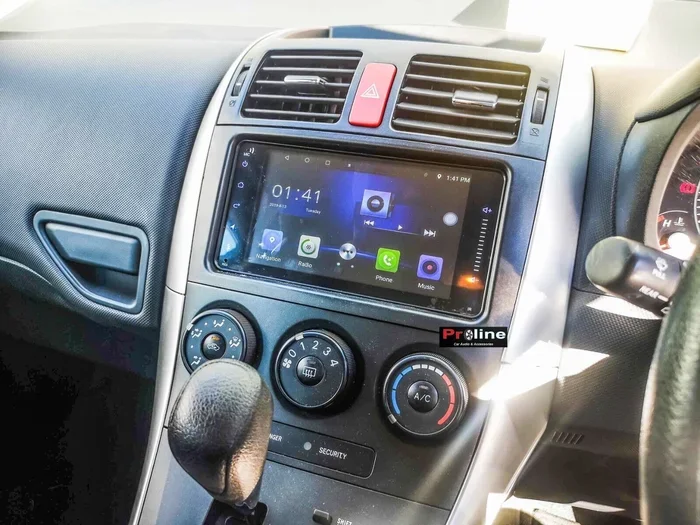
Look at your car’s audio system. If you see a “Bluetooth” button or a Bluetooth icon on the display screen, your car likely has the feature. The button is usually located on the front of the audio unit or on the steering wheel controls.
Consult the Owner’s Manual
Your owner’s manual is one of the best resources. It lists all the features included with your specific trim level. Look for the “Audio” or “Communications” section to find details about Bluetooth compatibility.
Try Pairing a Phone
The simplest test is to try pairing your phone. Go to the Bluetooth settings on your phone and look for available devices. If your car’s name appears in the list, you have Bluetooth. If it does not appear, your car likely does not have built-in Bluetooth.
Check the VIN
You can also check your Vehicle Identification Number (VIN) with a Toyota dealer or online decoder. The VIN will tell you the exact trim level and factory options, including whether Bluetooth was included.
How to Set Up Bluetooth in a 2012 Toyota Corolla
If your 2012 Corolla has Bluetooth, setting it up is pretty straightforward. Follow these steps to get your phone connected and working.
Step 1: Turn on Bluetooth on Your Phone
Go to your phone’s settings and turn on Bluetooth. Make sure your phone is visible and discoverable. Most phones will stay discoverable for a few minutes after you turn the feature on.
Step 2: Put the Car in Pairing Mode
On your Corolla’s audio system, navigate to the Bluetooth settings. Select the option to search for new devices. The car will now be looking for nearby Bluetooth devices to pair with.
Step 3: Select Your Car from the Phone’s Device List
On your phone, you should see your car’s name appear in the list of available devices. Tap on it to begin the pairing process. You may be asked to confirm a passkey that appears on both your phone and the car’s display.
Step 4: Confirm the Pairing
Once you confirm the passkey, the pairing is complete. Your phone will connect automatically the next time you start the car and turn on Bluetooth. This makes daily use quick and convenient.
Step 5: Test the Connection
Make a test call or play some music to confirm everything is working properly. Check the audio quality and make sure the microphone picks up your voice clearly. If there are any issues, try moving your phone closer to the car’s audio system.
Quick Tips for a Smooth Setup:
- Keep your phone’s Bluetooth software up to date.
- Restart both your phone and the car’s audio system if pairing fails.
- Remove old paired devices from your car’s Bluetooth memory to avoid confusion.
- Only pair one phone at a time for the best experience.
Setting up Bluetooth pairing in the 2012 Corolla is a simple process that takes about five minutes. Once it is done, you will wonder how you ever drove without it. For more tips on driving features and tech, you might also want to check out whether you should set cruise control while driving. It is a great companion piece for anyone looking to get the most out of their car’s technology.
What to Do if Your 2012 Corolla Does Not Have Bluetooth
Not everyone has a trim level that includes Bluetooth connectivity. If your 2012 Corolla does not have built-in Bluetooth, do not worry. There are several ways to add this feature.
Bluetooth FM Transmitter
An FM transmitter is one of the easiest and most affordable options. You plug the transmitter into your car’s cigarette lighter or power outlet. It broadcasts your phone’s audio over an FM frequency that your car’s radio can pick up. You just tune your radio to the matching frequency and you are good to go.
FM transmitters work well for audio streaming and hands-free calling. The sound quality is decent, though it may not be as clear as a built-in system. Look for a transmitter with a built-in microphone for the best calling experience.
Bluetooth Car Adapter
A Bluetooth car adapter plugs directly into your car’s auxiliary input or cassette deck. These adapters provide a much cleaner connection than FM transmitters. They handle both audio streaming and calling, and the sound quality is noticeably better.
Some adapters also come with their own controls, so you can manage calls and music without touching your phone. This is a great option if you want a more permanent car Bluetooth setup without installing a whole new stereo system.
Aftermarket Stereo Upgrade
If you want the best possible experience, consider upgrading your car’s stereo. An aftermarket head unit with built-in Bluetooth gives you the full smartphone integration experience. You get better sound quality, easier controls, and a cleaner look in your dashboard.
Installing an aftermarket stereo requires some basic tools and a bit of patience. You can find installation kits and wiring harnesses that make the process easier. If you are not comfortable doing it yourself, a local auto shop can handle the installation for you.
If you are thinking about making upgrades to your car, it is worth understanding the costs involved. For insights into auto repair and maintenance costs, you might find it helpful to read about whether auto mechanics make good money. Understanding labor costs can help you decide whether to DIY or hire a professional.
Common Bluetooth Issues and How to Fix Them
Even with a built-in Bluetooth system, you may run into issues from time to time. Here are the most common problems and their solutions.
Phone Will Not Pair with the Car
If your phone will not pair, try these steps:
- Turn Bluetooth off and back on on your phone.
- Restart your phone.
- Delete the car from your phone’s Bluetooth memory and try again.
- Make sure your car is in pairing mode.
- Check that your phone is within range of the car’s audio system.
Poor Audio Quality
Static or muffled sound during calls or streaming can be annoying. Here is how to improve it:
- Move your phone closer to the car’s audio system.
- Make sure nothing is blocking the Bluetooth signal.
- Check for interference from other electronic devices.
- Restart both the phone and the car’s audio system.
Connection Drops Frequently
If your Bluetooth connection keeps dropping, try these fixes:
- Remove other paired devices from the car’s memory.
- Update your phone’s Bluetooth driver and software.
- Reset the car’s audio system to factory settings.
- Make sure your phone’s battery is not too low, as low battery can affect Bluetooth performance.
Calls Are Not Coming Through the Car Speakers
If you can hear the caller but they cannot hear you, check the following:
- Make sure the car’s microphone is not muted.
- Check that the correct audio input is selected on the car’s system.
- Ensure nothing is blocking the car’s microphone.
Most Bluetooth issues are easy to fix with basic troubleshooting. If problems persist, consult your car’s manual or visit a Toyota dealer for professional help.
Upgrading Bluetooth in a 2012 Toyota Corolla
If you want to get the most out of your 2012 Corolla’s connectivity options, there are several upgrades worth considering.
Install a Bluetooth Adapter
A dedicated Bluetooth adapter is one of the simplest upgrades. These small devices plug into your car’s existing audio system and add wireless connectivity. They are affordable, easy to install, and work with almost any phone.
Upgrade to a Newer Stereo Head Unit
Replacing your factory stereo with a modern head unit is the most effective upgrade. Newer units offer better Bluetooth range, improved audio quality, and additional features like USB charging and backup cameras. Some models even support Apple CarPlay and Android Auto.
Add an Auxiliary Input
If you do not want to go wireless, adding an auxiliary input is a reliable alternative. You can plug in your phone with a cable and get good audio quality. While it is not as convenient as Bluetooth, it is a dependable backup option.
Upgrading your car’s connectivity is a great way to modernize an older vehicle. The 2012 Corolla is a durable car, and with the right upgrades, it can keep up with today’s technology. Toyota built these cars to last, and their reliability is one reason why many people continue to drive them years after purchase.
For those interested in the broader picture of vehicle technology and safety, understanding when hybrids switch to gas is another fascinating topic. Toyota has been a leader in hybrid technology, and the Corolla line has benefited from this innovation over the years.
Final Thoughts
The 2012 Toyota Corolla offers Bluetooth connectivity on several trim levels, making it a practical and convenient choice for daily driving. Whether you use it for hands-free calling, audio streaming, or both, Bluetooth adds a layer of safety and enjoyment to your driving experience.
If your Corolla does not have Bluetooth built in, you have plenty of options to add it. From FM transmitters to full stereo upgrades, there is a solution for every budget and every driver. The key is to understand what your specific trim includes and then choose the right upgrade path.
Taking care of your car’s technology features helps you get the most value out of your vehicle. The 2012 Corolla remains a reliable and practical choice, and with the right setup, it can still meet the connectivity needs of modern drivers. Keep your system updated, troubleshoot issues promptly, and enjoy the convenience of wireless connectivity every time you hit the road.
For anyone researching vehicle features, it is also worth noting that checking for recalls on 2012 vehicles is an important step when buying used cars. While this refers to a Ford model, the principle applies to any vehicle you consider purchasing.