Car Launcher Pro APK The Best Android Launcher App
Car Launcher Pro APK is the top Android launcher app designed specifically for drivers who want a clean, safe, and stylish car dashboard interface. This powerful app transforms your phone into a dedicated driving companion with speed displays, navigation shortcuts, music controls, and much more. Whether you are on a daily commute or a long road trip, this car dashboard app makes your drive smarter, safer, and more enjoyable.
Have you ever wished your phone could work better inside your car? Driving with a cluttered home screen is distracting and frustrating. You tap the wrong icon. You miss important notifications. You fumble through apps while stuck in traffic. That is exactly where a car launcher pro apk changes everything.
A car launcher app turns your Android phone into a dedicated driving dashboard. It strips away the noise. It highlights what matters most while you are on the road. And it gives you quick access to navigation, music, calls, and speed without digging through menus. If you have ever searched for “best android launcher app for driving,” you are in the right place.
In this guide, we will walk you through everything you need to know about Car Launcher Pro. We will cover its features, benefits, setup process, and why it stands out from other driving mode apps on the market. By the end, you will understand why thousands of drivers are switching to this powerful vehicle infotainment tool.
Key Takeaways
- Safe Driving Interface: Car Launcher Pro APK offers a driver-friendly UI that minimizes distractions and keeps your eyes on the road.
- Speed and Navigation Tools: Built-in speedometer, GPS shortcuts, and navigation widgets make it a full-featured car companion.
- Highly Customizable: You can personalize themes, widgets, layouts, and shortcuts to match your car setup perfectly.
- Android Auto Alternative: This app works as a great standalone car mode app without needing Android Auto support.
- Free and Easy to Install: The APK is simple to download and set up on any compatible Android device.
- Battery and Performance Friendly: Designed to run smoothly without draining your phone battery during long drives.
📑 Table of Contents
- What Is Car Launcher Pro APK?
- Top Features of Car Launcher Pro APK
- How to Install and Set Up Car Launcher Pro APK
- Car Launcher Pro vs Other Driving Apps
- Benefits of Using a Car Launcher for Daily Driving
- Common Mistakes to Avoid When Using a Car Launcher
- Expert Tips for Getting the Most Out of Car Launcher Pro
- Who Should Use Car Launcher Pro APK?
- Final Thoughts
What Is Car Launcher Pro APK?
A car launcher pro apk is a specialized application built to transform your Android phone into a car-friendly interface. Unlike standard phone launchers, this type of app is designed with drivers in mind. It simplifies the screen, enlarges touch targets, and prioritizes driving-related functions.
Think of it as a digital dashboard for your phone. When you mount your device on your dashboard or windshield, the launcher presents a clean, easy-to-read interface. You see your speed, navigation, music, and calls all in one place. No clutter. No distractions. Just what you need to drive safely.
The car launcher pro version adds premium features that go beyond basic car mode android functionality. It includes customizable widgets, theme options, speed display overlays, and smart shortcut arrangements. It is built to work with any Android phone that supports launcher apps, making it one of the most versatile driving interface tools available today.
Why Do You Need a Car Launcher App?
Most people use their phones as GPS devices and music players in the car. But the default phone interface is not built for driving. Small icons, complex menus, and pop-up notifications create dangerous distractions. A car dashboard app solves these problems by redesigning the entire user experience for the driver’s seat.
Here are some key reasons why a car launcher pro apk is essential for modern drivers:
- Reduced distractions: The simplified interface removes unnecessary apps and notifications from view while driving.
- Quick access: Navigation, music, and phone controls are always one tap away.
- Better readability: Large fonts and high-contrast designs make the screen easy to read at a glance.
- Hands-free operation: Many launchers support voice commands and steering wheel controls.
- Personalized experience: You can customize the layout to match your car’s dashboard and your personal preferences.
Top Features of Car Launcher Pro APK
The car launcher pro app comes packed with features that make it one of the best android auto alternative options available. Let us break down the most impressive features you will get when you install this app.
Speedometer and Vehicle Data Display
One of the standout features of Car Launcher Pro is the built-in speedometer. The app can display your current speed right on the home screen. This eliminates the need to keep glancing at your car’s dashboard cluster. Some versions even connect to your vehicle’s OBD-II port to show engine data, fuel level, and error codes.
The speed display is large and easy to read. You can customize the color, size, and position of the speed widget. Whether you are driving at night or during bright daylight, the display adjusts to remain clear and readable.
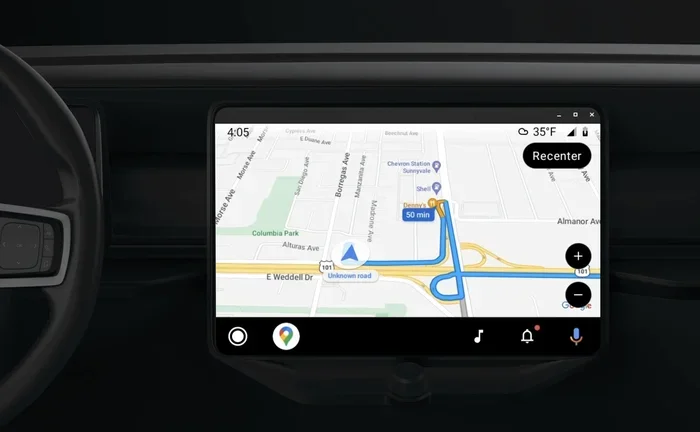
Navigation Shortcuts and GPS Integration
Getting lost on the road is stressful. Car Launcher Pro solves this by integrating GPS navigation shortcuts directly into the home screen. You can set your default navigation app and launch it with a single tap. The app also supports quick destination searches so you can find gas stations, restaurants, and parking spots without leaving the driving interface.
This feature works as a standalone GPS navigation launcher tool. You do not need Android Auto or any special car hardware. As long as you have Google Maps or your preferred navigation app installed, the launcher connects to it seamlessly.
Music and Media Controls
Music makes every drive better. The car dashboard app includes large media control widgets. You can play, pause, skip tracks, and adjust volume directly from the launcher home screen. It supports all major music apps including Spotify, YouTube Music, Apple Music, and your phone’s default media player.
The media controls are designed to be visible and accessible without taking your eyes off the road for too long. The layout keeps album art, track information, and control buttons in a clean, organized arrangement that is easy to interact with at highway speeds.
Customizable Themes and Widgets
No two drivers have the same preferences. That is why Car Launcher Pro offers extensive customization options. You can choose from multiple themes, color schemes, and layout styles. Want a dark interface for night driving? There is a theme for that. Prefer a minimalist look? You can set that up too.
The widget system is another major strength. You can add widgets for weather, calendar events, battery status, Bluetooth connectivity, and more. Each widget is resizable and movable, giving you full control over how your car home screen looks and functions.
Smart Notification Management
Notifications are one of the biggest distractions while driving. Car Launcher Pro handles this intelligently. The app can filter notifications and show only the most important ones while you are in driving mode. Calls from favorite contacts remain visible, but social media alerts and promotional messages are silenced.
You can also set up automatic rules. For example, the app can detect when you connect to your car’s Bluetooth and automatically switch to driving mode. When you park and disconnect, it returns to your normal phone interface. This smart switching makes the drive mode app feel seamless and effortless.
How to Install and Set Up Car Launcher Pro APK
Setting up Car Launcher Pro is straightforward and does not require advanced technical skills. Follow these steps to get started on your Android device.
Step-by-Step Installation Guide
- Download the APK file: Visit a trusted source to download the latest version of the car launcher pro apk.
- Enable unknown sources: Go to your phone settings, navigate to Security, and allow installation from unknown sources.
- Install the app: Tap the downloaded file and follow the on-screen prompts to complete the installation.
- Set as default launcher: Open the app and select it as your default home screen launcher when prompted.
- Customize your dashboard: Choose your theme, add widgets, and arrange shortcuts based on your preferences.
- Test while parked: Before driving, test all features to make sure everything works as expected.
Quick Setup Tips
- Start with the default theme and customize gradually as you learn what works best for you.
- Place the speed widget in the upper center of the screen for the easiest glancing access.
- Connect your preferred music app and navigation app before your first drive.
- Set up Bluetooth auto-switching so the launcher activates automatically when you start your car.
Car Launcher Pro vs Other Driving Apps
The market is full of car mode apps and driving interface tools. So how does Car Launcher Pro compare? Let us look at some key comparisons to help you understand why this app stands out.
Car Launcher Pro vs Android Auto
Android Auto is Google’s official driving solution. It works well but has limitations. It requires compatible car hardware or a specific phone setup. Car Launcher Pro, on the other hand, works on virtually any Android phone without special requirements. It is more flexible and offers deeper customization options.
Where Android Auto excels is in its tight integration with Google services. But for drivers who want full control over their interface, the car launcher pro apk is the better choice.
Car Launcher Pro vs Other Car Launchers
There are several other car launchers available on the Play Store. Some are free but filled with ads. Others lack customization options or have poorly designed interfaces. Car Launcher Pro balances a clean, ad-light experience with powerful features. Its speedometer, widget system, and notification management are among the best in the category.
| Feature | Car Launcher Pro | Android Auto | Other Car Launchers |
|---|---|---|---|
| Customization | High | Low | Medium |
| Speed Display | Built-in | Limited | Varies |
| Works on Any Android | Yes | No (requires support) | Mostly Yes |
| Widget Support | Extensive | Limited | Basic |
| Notification Filtering | Smart | Basic | Minimal |
| Free Version Available | Yes | Yes | Yes |
Benefits of Using a Car Launcher for Daily Driving
Using a car launcher pro apk every day can genuinely improve your driving experience. The benefits go beyond just having a pretty interface. Here is what real-world daily use looks like.
First, safety improves significantly. When your phone interface is designed for driving, you spend less time looking at the screen and more time watching the road. The large touch targets and simplified layout mean fewer mistakes and fewer glances away from traffic.
Second, convenience increases. Everything you need is on one screen. Navigation, music, calls, and vehicle data are all accessible from the car home screen. You do not need to unlock your phone, find the right app, and navigate through menus. One tap gets you where you need to be.
Third, your phone becomes a better vehicle infotainment system. Many cars have outdated or limited infotainment setups. By using a car launcher, you effectively upgrade your phone’s capabilities to match or exceed your car’s built-in system.
Fourth, battery management becomes easier. The launcher can include a battery widget that shows your charge level at a glance. Some versions also optimize background processes to reduce battery drain during long trips, which is a huge benefit for road trip app users.
Common Mistakes to Avoid When Using a Car Launcher
While Car Launcher Pro is designed to be safe and user-friendly, there are some common mistakes drivers should avoid.
- Over-customizing while driving: Adjusting widgets and layouts while on the road is dangerous. Always set up your interface before you start driving.
- Ignoring notification settings: If you do not configure notification filtering, distracting alerts will still appear. Take the time to set up smart rules.
- Using the app without a phone mount: A car launcher works best when your phone is mounted at eye level. Without a mount, you will be tempted to hold the phone, which is unsafe.
- Not updating the app: Updates often include safety improvements and bug fixes. Keep your car mode app up to date for the best experience.
- Relying solely on the launcher for navigation: Always use a dedicated navigation app alongside the launcher. The launcher is a complement, not a replacement for proper GPS tools.
Expert Tips for Getting the Most Out of Car Launcher Pro
To truly maximize your experience with Car Launcher Pro, consider these expert tips from experienced drivers and tech enthusiasts.
Tip 1: Use a high-quality phone mount. The best launcher in the world cannot help if your phone is positioned poorly. Invest in a sturdy dashboard or vent mount that places your screen at natural eye level.
Tip 2: Set up voice commands. Pair the launcher with Google Assistant or a similar voice assistant. You can make calls, start navigation, and change music tracks entirely by voice, keeping your hands on the wheel.
Tip 3: Create driving and parking profiles. Use the app’s automation features to switch between a full driving dashboard and a simplified parking mode. This ensures you always have the right interface for your current situation.
Tip 4: Explore community themes. The car launcher pro community shares custom themes and layouts online. Browse these to find inspiration for your own setup or download ready-made configurations.
Tip 5: Combine with OBD-II for advanced data. If you want real-time vehicle diagnostics, connect an OBD-II adapter to your car and link it with the launcher. You can monitor engine temperature, fuel efficiency, and more directly from your phone screen.
Who Should Use Car Launcher Pro APK?
The car launcher pro apk is perfect for a wide range of users. Daily commuters benefit from the simplified interface and quick access to navigation and music. Long-haul truck drivers appreciate the speed display and fuel monitoring features. Road trippers love the all-in-one dashboard that keeps everything accessible without distraction.
Parents who frequently drive kids to school or activities will find the notification filtering especially useful. It helps them stay focused on the road while still being reachable for important calls. Even casual drivers who simply want a cleaner, more organized phone experience in the car will appreciate what this app offers.
If you own an older car without modern infotainment, this app is a game-changer. It turns your phone into a smart dashboard that adds navigation, media control, and vehicle data to any vehicle. The automotive android app category has many options, but Car Launcher Pro consistently ranks among the best for good reason.
Final Thoughts
The car launcher pro apk is more than just another android launcher app. It is a complete driving companion that makes your phone safer, smarter, and more useful behind the wheel. From the built-in speedometer to the customizable dashboard layout, every feature is designed with the driver in mind.
If you have been looking for a better way to use your phone in the car, this is the solution. It replaces the need for clunky workarounds and half-baked alternatives. With Car Launcher Pro, you get a polished, powerful, and practical car mode app that works on virtually any Android device.
Download the car launcher pro apk today and transform your driving experience. Your phone, your car, and your peace of mind will thank you. Safe travels and happy driving!
Frequently Asked Questions
Is Car Launcher Pro APK safe to use while driving?
Yes, the app is specifically designed to reduce distractions while driving. It uses a simplified interface with large touch targets and smart notification filtering to keep your eyes on the road. However, you should always set up your preferences before starting to drive and avoid making changes while the car is in motion.
Can I use Car Launcher Pro on any Android phone?
Absolutely. The car launcher pro apk works on virtually any Android device that supports launcher apps. You do not need a specific phone model or brand. As long as your Android version is up to date, the app should install and run smoothly without issues.
How is this different from Android Auto?
Android Auto is Google’s official driving platform, but it requires compatible car hardware or a specific setup. Car Launcher Pro works as a standalone app on any Android phone without special requirements. It also offers deeper customization, built-in speed displays, and more flexible widget options than Android Auto.
Does the app drain my phone battery?
Not significantly. The developers designed Car Launcher Pro to be battery-efficient. It uses optimized background processes and does not run heavy tasks while driving. If you notice any battery drain, you can adjust widget settings and disable unnecessary features to conserve power during long trips.
Can I use the app without an internet connection?
Yes, many features work offline. The speedometer, basic media controls, and call functions do not require internet access. However, GPS navigation and real-time traffic updates do need a data connection. You can download offline maps in advance to ensure navigation works even without signal.
Is the Car Launcher Pro APK free to download?
The app offers a free version with core features. Some advanced customization options and premium widgets may require a one-time purchase or subscription. The free version is fully functional and provides an excellent starting point for anyone new to car dashboard apps.