How Do You Reset the Oil Change Service Indicator Today
Resetting the oil change service indicator is a quick and easy task that every car owner should know how to do. Whether your dashboard is flashing a maintenance reminder or your oil change light won’t turn off, this guide walks you through the exact steps. We cover methods for different vehicle brands, common mistakes to avoid, and when to seek professional help. Keep your car running smoothly and your maintenance schedule on track with our simple tips.
Key Takeaways
- Resetting the oil change light is simple: Most vehicles only need a few button presses on the dashboard or steering wheel controls.
- Every car brand has a different reset procedure: We break down the steps for Toyota, Honda, Ford, Chevrolet, and more.
- Always change the oil first: Never reset the indicator without completing the oil change, or you risk engine damage.
- Common mistakes can cause problems: Holding the wrong button or resetting too early are the top errors drivers make.
- Consult your owner’s manual: It contains the exact reset steps for your specific vehicle model and year.
- Seek help when needed: If the light persists after resetting, a mechanic can run a free diagnostic for your car to find the issue.
📑 Table of Contents
- How Do You Reset the Oil Change Service Indicator Today?
- What Is an Oil Change Service Indicator?
- Why You Should Reset the Oil Change Light After Every Oil Change
- How to Reset the Oil Change Service Indicator: Step-by-Step
- Common Mistakes When Resetting the Oil Change Service Indicator
- When to Seek Professional Help With Your Oil Change Service Indicator
- Preventive Maintenance Tips to Keep Your Oil Change System Working
- How Often Should You Change Your Oil?
- Quick Tips for a Successful Oil Change Service Indicator Reset
- Expert Insights on Oil Change Service Indicators
- Key Takeaways
- Conclusion
How Do You Reset the Oil Change Service Indicator Today?
Your car talks to you. One of the most important ways it does that is through the oil change service indicator. That little light on your dashboard is trying to tell you something important. But once you’ve changed the oil, how do you make it go away? Resetting the oil change service indicator is something every driver should know how to do. It’s not hard, and it only takes a few minutes.
The oil change light is part of your car’s maintenance reminder system. When it comes on, it means your vehicle thinks it’s time for an oil change. But here’s the thing — the light doesn’t turn off by itself after you get the oil changed. You have to reset it manually. This guide will show you exactly how to do that for different car brands and models. We’ll also cover common mistakes and tips to keep your car in top shape.
Whether you drive a Toyota, Honda, Ford, or something else entirely, you’ll find the reset steps you need right here. Let’s dive in and get that annoying light off your dashboard for good.
What Is an Oil Change Service Indicator?
The oil change service indicator is a warning light on your dashboard. It tells you when it’s time to replace your engine oil. Think of it as your car’s personal maintenance assistant. Without it, you might forget to change the oil on time, and that can lead to serious engine problems.
Most modern vehicles use an oil life monitoring system. This system tracks your driving habits and engine conditions. It calculates when the oil is no longer effective. Then it triggers the dashboard light. Some older cars use a simple mileage-based reminder instead. Either way, the goal is the same — to protect your engine.
How the Oil Life Monitoring System Works
The oil life monitoring system uses sensors and algorithms. It looks at factors like engine temperature, driving conditions, and mileage. Based on this data, it estimates when the oil needs to be replaced. This is different from a fixed mileage schedule. The system adapts to how you actually drive.
For example, if you drive in stop-and-go traffic a lot, the system might tell you to change the oil sooner. If you mostly drive on highways at steady speeds, it might give you more time. This smart approach helps you get the most out of your oil while keeping your engine safe.
Dashboard Indicator Types
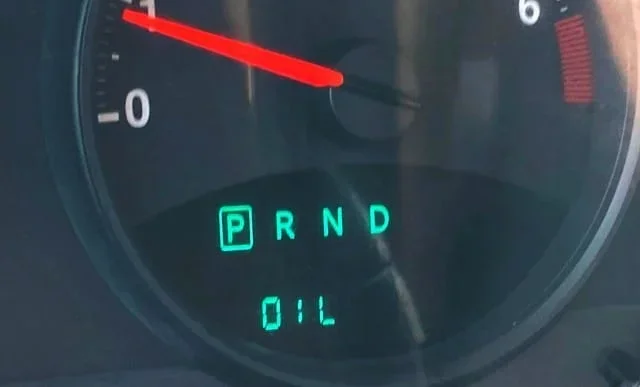
Different cars show the oil change reminder in different ways. Here are the most common types:
- Oil can symbol: This looks like a small oil can with a drip. It’s the most common indicator.
- CHANGE OIL text: Some vehicles simply display text on the dashboard.
- MAINTENANCE REQUIRED light: Common in Toyota and Lexus vehicles.
- Check Engine Light: In some cases, the check engine light can also signal an oil change is needed.
No matter what type your car uses, the reset process is similar. The key is knowing which buttons to press and when to press them.
Why You Should Reset the Oil Change Light After Every Oil Change
Some people wonder if they really need to reset the light. The answer is yes. Here’s why. When the oil change light stays on after you’ve already changed the oil, it can cause confusion. You might forget that you already had the oil changed. Then the next time you look at your maintenance records, you won’t know if the light means the oil is still good or if it’s already overdue.
Resetting the light also helps you track your maintenance schedule more accurately. It gives you a clear starting point for the next oil change interval. This is especially important if you rely on the oil change reminder system to tell you when service is due.
Another reason is resale value. A well-maintained car with a clean maintenance history sells for more. Keeping track of every oil change and resetting the light each time shows potential buyers that you took great care of the vehicle.
How to Reset the Oil Change Service Indicator: Step-by-Step
The reset process varies by car brand and model. Below, we’ve broken down the steps for the most popular vehicle manufacturers. Always refer to your owner’s manual for the exact procedure for your specific vehicle.
Resetting the Oil Change Light on Toyota and Lexus
Toyota and Lexus vehicles are some of the most popular on the road. Here’s how to reset the maintenance required light:
- Turn the ignition to the ON position. Do not start the engine.
- Press the odometer or trip meter button until the odometer shows the total mileage.
- Turn the ignition to the OFF position.
- Press and hold the odometer button.
- While holding the button, turn the ignition back to the ON position.
- Continue holding the button for about 10 seconds until the light starts to flash.
- Release the button. The maintenance light should now be off.
If this doesn’t work for your model, try pressing the trip reset button on the steering wheel instead. Some newer Toyota models have a slightly different process that involves the steering wheel controls.
Resetting the Oil Change Light on Honda and Acura
Honda and Acura vehicles use a straightforward reset method:
- Turn the ignition to the ON position (second notch).
- Press the SELECT/RESET button on the instrument panel until the oil change indicator appears.
- Hold the SELECT/RESET button for about 10 seconds.
- The indicator should blink and then turn off.
- Turn the ignition off and then back on to confirm the reset.
For Honda models with a steering wheel control pad, the process is similar but uses the arrow buttons and the RESET button on the steering wheel. Check your owner’s manual for the exact steps.
Resetting the Oil Change Light on Ford
Ford vehicles have a slightly different approach depending on the model year:
- Use the steering wheel arrows to navigate to the Settings menu on the dashboard display.
- Scroll to Vehicle Information or Maintenance.
- Find the Oil Life System option.
- Select Reset and hold the OK button for a few seconds.
- The oil life percentage should reset to 100%, and the light should turn off.
For older Ford models without a digital display, the process involves cycling the ignition key. Turn the key to RUN (do not start), fully press and release the accelerator pedal three times within 10 seconds, then release the key. The oil change lamp should reset.
Resetting the Oil Change Light on Chevrolet and GMC
GM vehicles like Chevrolet and GMC use the following steps:
- Press the MENU button on the steering wheel.
- Use the arrow buttons to scroll to Vehicle Information.
- Select Oil Life System.
- Choose Reset and confirm.
- The oil life indicator should now show 100%.
If your vehicle doesn’t have a digital infotainment screen, the reset process involves the turn signal stalk. With the vehicle off, press and hold the turn signal stalk down for about 10 seconds until the maintenance light resets.
Resetting the Oil Change Light on Other Brands
Other brands like Nissan, Hyundai, Kia, Volkswagen, and BMW each have their own reset procedures. The general approach is similar — you’ll typically need to access a menu on the dashboard or use a combination of buttons on the steering wheel or instrument panel. When in doubt, the owner’s manual is your best friend. You can also search online for your specific make, model, and year to find the exact steps.
Can You Put Premium Gas in Any Car?
While we’re on the topic of car maintenance, a common question comes up: can you put premium gas in any car? The answer depends on your vehicle’s engine requirements. Using premium gas in a car that doesn’t require it won’t reset the oil change light, but it can affect engine performance. Always use the fuel grade recommended by your manufacturer. For more details, check out our guide on premium gas compatibility.
Common Mistakes When Resetting the Oil Change Service Indicator
Resetting the oil change light seems simple enough, but people make mistakes all the time. Here are the most common ones to avoid.
Resetting Without Changing the Oil First
This is the biggest mistake. Never reset the oil change indicator if you haven’t actually changed the oil. The indicator exists to remind you that an oil change is due. If you reset it without doing the work, you’re just postponing necessary maintenance. Over time, this can lead to engine wear and costly repairs.
Holding the Wrong Buttons
Each vehicle has a specific button combination for resetting the light. Holding the wrong buttons can trigger other functions or even reset other settings on your car. Always double-check the correct sequence for your vehicle before you start pressing buttons.
Not Turning the Ignition to the Correct Position
Many reset procedures require the ignition to be in the ON position, not the START position. If you accidentally start the engine during the reset process, you may need to start over. Be patient and follow each step carefully.
Forgetting to Check for Other Warning Lights
Sometimes the oil change light comes on because of a bigger problem, not just a routine oil change. If the light comes back on shortly after resetting, there may be an underlying issue. In that case, you should get your car checked by a professional. Many auto parts stores offer a free diagnostic for your car that can help identify the real problem.
Ignoring the Reset After Service
Some drivers forget to reset the light even after getting the oil changed at a shop. If you’re not the one who performed the oil change, make sure to ask the mechanic to reset the indicator. It’s a small step that makes a big difference in keeping your maintenance schedule on track.
When to Seek Professional Help With Your Oil Change Service Indicator
Most of the time, resetting the oil change light is a DIY job. But there are situations where you should call in a professional. If the light won’t turn off after following the correct reset procedure, there could be a deeper issue. A faulty oil sensor, a problem with the car’s computer system, or a wiring issue could all be to blame.
Similarly, if the oil change light keeps coming back on shortly after you reset it, don’t ignore it. The light might be telling you something important about your engine’s health. A mechanic can run the right tests and tell you exactly what’s going on.
Some newer vehicles have more complex systems that require specialized tools to reset. If you’re not comfortable working with your car’s electronics, it’s perfectly fine to visit a dealership or trusted mechanic. They can handle the reset quickly and make sure everything is working correctly.
If you’re leaving your car at a service center, you might wonder about the process. Many people ask if they can leave their car at Enterprise or similar services while it’s being worked on. It’s always best to check with the service provider beforehand.
Preventive Maintenance Tips to Keep Your Oil Change System Working
Prevention is always better than cure. Here are some tips to keep your oil change service indicator and your engine in great shape.
- Change your oil on time: Follow the manufacturer’s recommended oil change interval. This is typically every 5,000 to 7,500 miles for modern vehicles, but it varies.
- Use the right oil: Always use the oil grade recommended in your owner’s manual. Using the wrong oil can trigger the service light and harm your engine.
- Check your oil level regularly: A simple monthly check can catch low oil levels before they become a problem.
- Keep your maintenance records: Write down every oil change date and mileage. This helps you stay on track and is useful when selling your car.
- Don’t ignore other warning lights: The oil change light is just one of many dashboard indicators. Learn what each one means so you can respond quickly.
- Drive smoothly: Aggressive driving can degrade oil faster and trigger the service indicator sooner.
Taking care of your car doesn’t have to be complicated. A little regular attention goes a long way toward preventing bigger problems down the road. And knowing how to reset the oil change light is just one part of being a responsible car owner.
How Often Should You Change Your Oil?
The old rule of changing oil every 3,000 miles is outdated for most modern vehicles. Today, many cars can go 7,500 to 10,000 miles between oil changes. The exact interval depends on your vehicle, the type of oil you use, and your driving conditions.
If you drive in severe conditions — such as extreme heat, cold, dusty roads, or frequent short trips — you may need to change your oil more often. Severe driving conditions can cause the oil to break down faster, which means the oil change interval shortens.
Your owner’s manual is the best resource for determining the right interval for your specific vehicle. Don’t rely solely on the dashboard light. Use it as a guide, but also follow the manufacturer’s recommended schedule based on mileage and time.
Quick Tips for a Successful Oil Change Service Indicator Reset
- Have your owner’s manual handy: It contains the exact reset procedure for your vehicle.
- Reset immediately after the oil change: Don’t wait. Reset the light right after the new oil is in and the drain plug is tightened.
- Use the right tools: If your car requires a specialized reset tool, ask your mechanic or auto parts store for help.
- Double-check the reset worked: Start the engine and confirm the light is off before you leave the parking lot.
- Note the date and mileage: Write down when you reset the light so you know when the next oil change is due.
Expert Insights on Oil Change Service Indicators
Automotive experts agree that the oil change service indicator is one of the most important maintenance tools in your vehicle. According to certified mechanics, many engine problems start with neglected oil changes. Fresh oil lubricates the engine, reduces friction, and carries heat away from critical components. When the oil breaks down, it loses these protective qualities.
Experts also recommend pairing your oil changes with other routine maintenance tasks. Check your tire pressure, inspect your brakes, and top off your fluids at the same time. This approach saves time and money while keeping your car running at its best.
One thing mechanics want drivers to understand: the oil change light is not a suggestion. It’s a reminder based on real data from your car’s sensors. Ignoring it for too long can lead to sludge buildup, increased engine wear, and eventually expensive repairs. Respect the light, and your engine will thank you.
Key Takeaways
- Resetting the oil change light is straightforward: Most vehicles require just a few button presses on the dashboard or steering wheel.
- Every car brand has a unique reset procedure: We covered Toyota, Honda, Ford, Chevrolet, and more in this guide.
- Always change the oil before resetting the indicator: Resetting without an oil change defeats the purpose of the maintenance reminder.
- Avoid common mistakes: Don’t hold the wrong buttons, don’t reset without changing the oil, and don’t ignore recurring lights.
- Seek professional help when needed: If the light won’t turn off or keeps coming back, a mechanic can diagnose the real issue.
- Stay on top of preventive maintenance: Regular oil changes and smart driving habits keep your engine healthy for years.
- Your owner’s manual is your best resource: It has the exact reset steps and maintenance schedule for your specific vehicle.
Conclusion
Knowing how to reset the oil change service indicator is an essential skill for every car owner. It’s a simple process that saves time, money, and keeps your vehicle running smoothly. Whether you drive a Toyota, Honda, Ford, or any other brand, the steps we’ve outlined above will help you get that light off your dashboard in no time.
Remember to always change the oil first, follow the correct reset procedure for your vehicle, and never ignore warning lights that keep coming back. Your car’s maintenance reminder system is there to protect your engine and extend the life of your vehicle. Work with it, not against it.
Take a few minutes today to learn your vehicle’s specific reset process. Write it down and keep it in your glove box. The next time your oil change light comes on, you’ll know exactly what to do. That’s the mark of a smart, responsible car owner.
Stay on top of your maintenance schedule, keep your oil fresh, and enjoy the confidence that comes with knowing your car is in great shape. Happy driving!
Frequently Asked Questions
Can I reset the oil change light myself, or do I need a mechanic?
In most cases, you can reset the oil change light yourself without any special tools. The process usually involves a few button presses on the dashboard or steering wheel controls. However, if you’re not comfortable doing it or if the light won’t turn off, a mechanic can help quickly and affordably.
What happens if I don’t reset the oil change indicator after an oil change?
If you don’t reset the indicator, the light will stay on and the maintenance reminder won’t update. This can make it confusing to track when your next oil change is due. The car may also display persistent maintenance messages that can be distracting while driving.
How often should I check my oil level between changes?
Most experts recommend checking your oil level at least once a month. This simple habit helps you catch leaks or low oil levels early before they cause engine damage. It only takes a few minutes and can save you from expensive repairs down the road.
Does resetting the oil change indicator affect my car’s warranty?
No, resetting the oil change indicator does not affect your car’s warranty. The indicator is simply a reminder tool. However, keeping up with your scheduled oil changes is important for maintaining your warranty coverage, so always follow the manufacturer’s recommended service intervals.
Can I drive my car if the oil change light is on?
You can drive short distances with the oil change light on, but it’s not recommended for extended periods. The light means your oil is due for a change, and driving without fresh oil can lead to increased engine wear. Get the oil changed as soon as possible to protect your engine.
Is it normal for the oil change light to come back after resetting?
If the light comes back shortly after resetting, there may be an underlying issue such as a faulty oil sensor, low oil level, or a problem with the oil life monitoring system. In this case, it’s best to have a professional inspect your vehicle. Many shops can run a quick free diagnostic for your car to identify the cause.