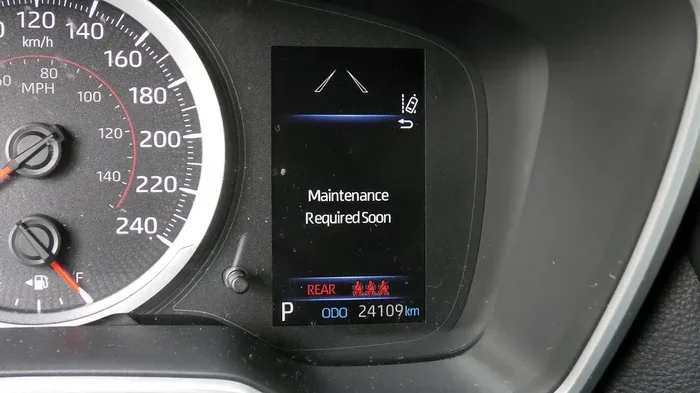
How Do I Reset My Required Maintenance Without Stress
Resetting your required maintenance light is simpler than you think. Whether your dashboard is flashing or your car is reminding you about an oil change, this guide walks you through every method. You will learn how to reset my required maintenance on different vehicles with easy, proven steps.
Your car keeps nagging you with that annoying maintenance light. It flashes on the dashboard and won’t go away. You wonder, “How do I reset my required maintenance?” The good news is that you do not need a mechanic for this. Most vehicles let you clear the light yourself in just a few minutes. This guide shows you exactly how to do it, no matter what kind of car you drive.
We will walk through every method step by step. You will learn about different reset procedures for popular brands like Toyota, Honda, Ford, and BMW. We also share tips to avoid common mistakes and keep your car running smoothly. By the end, you will feel confident handling this task on your own. Let us get started and take that annoying light off your dashboard for good.
Key Takeaways
- Resetting is easy: Most cars let you reset the maintenance light in under five minutes with simple button combos.
- No mechanic needed: You can handle this yourself at home without special tools or expensive shop visits.
- Methods vary by brand: Toyota, Honda, Ford, and BMW all have different reset procedures we cover in detail.
- Avoid common mistakes: Holding the wrong button or skipping steps can cause errors, so follow our guide carefully.
- Stay on top of service: Resetting the light does not replace actual maintenance. Always keep up with your car care schedule.
- Related car tasks help: Understanding your car’s systems, like programming a key fob or checking warning lights, makes maintenance easier.
📑 Table of Contents
- What Does “Required Maintenance” Mean on Your Dashboard?
- Why You Should Reset Your Maintenance Light Yourself
- How to Reset My Required Maintenance: Brand-by-Brand Guide
- Common Mistakes People Make When Resetting the Maintenance Light
- When the Maintenance Light Comes Back After Resetting
- How Does the Maintenance System Work in Modern Cars?
- Related Car Maintenance Tips to Keep Your Vehicle Running Smoothly
- Key Takeaways
- Conclusion
What Does “Required Maintenance” Mean on Your Dashboard?
Your car has a smart system that tracks your driving habits and mileage. When the system thinks it is time for service, it triggers a warning light. This is your maintenance required light. It tells you that something needs attention. Common reasons include oil changes, tire rotations, or scheduled inspections.
The light looks different depending on your car. Some show “MAINT REQD.” Others display a wrench icon or a service symbol. It is not the same as the check engine light. The maintenance light is a friendly reminder, not an emergency. Still, you should not ignore it for too long. Keeping up with scheduled maintenance helps your car last longer and run better.
Why Does the Maintenance Light Come On?
Several things can trigger this light. The most common cause is reaching a mileage interval. Most cars reset the counter every 5,000 to 7,500 miles. Other triggers include time intervals, like every six months. Some vehicles also use driving patterns to decide when service is due. Hard driving, frequent short trips, or towing can speed up the reminder.
Sometimes the light stays on after you already had service done. This happens when the mechanic forgets to reset the system. Or maybe you reset it yourself but the light came back. Either way, the solution is usually simple. You just need to know the right maintenance reset procedure for your specific car.
Why You Should Reset Your Maintenance Light Yourself
Many people drive to the dealership or a shop just to reset a light. This costs money and wastes time. You can do it at home with no special equipment. Learning this simple skill saves you trips and keeps your car running on schedule. It also gives you a better understanding of your vehicle.
When you handle small tasks yourself, you build confidence. You start to understand how your car works. This knowledge helps you spot real problems early. It also makes talking to mechanics easier because you know what they are referring to. Think of it as part of basic routine car care that every driver should know.
Quick Tips Before You Start
- Check your owner’s manual: Every car brand has slightly different steps. Your manual has the exact procedure for your model.
- Have your odometer reading ready: You may need to note your current mileage during the reset process.
- Turn the ignition to the right position: Most reset procedures require the key in the “ON” position, not “START.”
- Be gentle with buttons: Press buttons firmly but do not smash them. You want clean, deliberate presses.
- Note the time and date: After resetting, log the service date in your vehicle maintenance log for future reference.
How to Reset My Required Maintenance: Brand-by-Brand Guide
Every car manufacturer uses a different method. There is no one-size-fits-all answer to “how do I reset my required maintenance.” Below, we cover the most common brands and their specific steps. Follow the one that matches your vehicle.
How to Reset Maintenance Light on Toyota
Toyota makes the process pretty straightforward. Start by turning the ignition key to the “ON” position. Do not start the engine. Next, press the odometer or trip meter button until you see the odometer reading displayed. Then turn the ignition off. Now press and hold the odometer button. While holding it, turn the ignition back to “ON.” Keep holding the button for about 10 to 15 seconds. The maintenance light should start to flash and then turn off. Release the button. Your maintenance required light is now reset.
How to Reset Maintenance Light on Honda
Honda uses a slightly different approach. Turn the ignition to the “ON” position without starting the engine. Press the “Select/Reset” knob on the instrument cluster. Navigate through the menu until you see the maintenance option. Press and hold the knob for several seconds. The indicator should reset to zero. For older Honda models, you may need to hold the knob while turning the ignition off and then back on. Always double-check your specific model year in the manual.
How to Reset Maintenance Light on Ford
Ford vehicles often use the steering wheel controls. Press the “Up” or “Down” arrow on the steering wheel to scroll through the menu on the instrument panel. Find the “Vehicle Information” section. Look for “Maintenance Required” or “Service Due.” Press “OK” or the “Reset” button. Follow the on-screen prompts to clear the message. Some Ford models also allow you to hold the reset button on the instrument cluster for a few seconds while the key is in the “ON” position.
How to Reset Maintenance Light on BMW
BMW vehicles use the iDrive system. Press the “Menu” button on the iDrive controller. Navigate to “Vehicle Status.” Look for “Service Required” or “Maintenance.” Select “Reset” and confirm your choice. The system will clear the service interval counter. Some older BMW models require you to hold the trip button while turning the key to the “ON” position. The process varies quite a bit across BMW model years, so check your manual.
How to Reset Maintenance Light on Chevrolet
For Chevrolet vehicles, start by pressing the “Set” or “Reset” button on the steering wheel. Scroll to the “Vehicle Info” menu. Find the “Tire Pressure” or “Maintenance” option. Press and hold the reset button for about three seconds. The system should clear the maintenance reminder. On some models, you may need to access the trip meter display and hold the select button while turning the key to the “ON” position.
Common Mistakes People Make When Resetting the Maintenance Light
Even though the process is simple, mistakes happen. Here are the most common errors drivers make. Avoid these, and your reset will go smoothly every time.
Mistake 1: Starting the Engine During the Reset
One of the biggest mistakes is starting the engine while you are trying to reset. The reset only works when the key is in the “ON” or “ACC” position. If you start the engine, you will interrupt the process. You may need to start over. Always keep the engine off during the reset procedure.
Mistake 2: Not Holding the Button Long Enough
Some people tap the button too quickly. The system needs you to hold it for a specific amount of time, usually 10 to 15 seconds. If you release too early, the reset will not complete. Wait until you see the light flash or the display change before letting go. Patience is key here.
Mistake 3: Using the Wrong Button
Every car has different buttons for the reset process. The odometer button on a Toyota is not the same as the trip button on a Honda. Using the wrong button will not work and may put your car into a different menu. Always confirm which button to use before you start.
Mistake 4: Forgetting to Check the Result
After you reset the light, always verify it actually turned off. Some lights take a few seconds to disappear. Drive a short distance and check your dashboard. If the light comes back, you may need to repeat the process. Sometimes the light returns because the actual maintenance is still overdue.
When the Maintenance Light Comes Back After Resetting
Sometimes you reset the light and it comes back a few days later. This can be frustrating. There are a few reasons why this happens. The most common reason is that you have not actually performed the service yet. The car’s system tracks real driving data. If the oil has not been changed or the tires have not been rotated, the system will trigger the light again.
Another reason could be a deeper issue with the car’s computer system. In rare cases, the service interval reset does not fully clear the memory. You might need to use a diagnostic tool to fully reset the system. A mechanic or auto parts store can often do this for free. They hook up a scanner that communicates with your car’s computer.
If the light keeps returning, do not just keep resetting it. This is your car trying to tell you something. Check your car maintenance schedule and make sure you are keeping up with all recommended services. Ignoring repeated warnings can lead to bigger problems down the road.
Quick Tip: Keep a Maintenance Log
One of the best habits you can build is keeping a written or digital log of all your car services. Write down every oil change, tire rotation, and inspection. Note the date and mileage. This log helps you stay on track and gives you proof of maintenance if you ever sell the car. It also makes troubleshooting much easier when a light comes back unexpectedly.
How Does the Maintenance System Work in Modern Cars?
Modern vehicles have sophisticated computer systems that monitor many things. The vehicle maintenance log is managed by the car’s onboard computer. This system tracks your mileage, driving conditions, and time since last service. It uses algorithms to determine when maintenance is due. This is more advanced than the old methods that only counted miles.
The computer receives data from various sensors throughout the car. It tracks engine temperature, driving style, fuel usage, and more. Based on this data, it calculates the optimal service interval. This is why some cars have different maintenance reminders than others, even if they are the same model. Your driving habits actually influence when the light comes on.
When you reset the light, you are telling the computer that the service has been completed. The system then starts a fresh countdown based on the service interval. This is why it is important to actually do the maintenance before resetting. Resetting without service just clears the reminder without fixing the underlying need.
Can I Reprogram My ECM Myself?
Some car owners wonder if resetting the maintenance light relates to reprogramming the engine control module, or ECM. The short answer is no. The maintenance reset is a simple procedure that does not involve changing the ECM programming. However, if you are interested in ECM reprogramming, that is a more advanced task. It requires special tools and knowledge. You can learn more about ECM reprogramming on our site if you are curious.
Related Car Maintenance Tips to Keep Your Vehicle Running Smoothly
Resetting your maintenance light is just one part of car ownership. Here are a few other simple tasks that help you stay on top of your vehicle’s health. These small habits make a big difference over time.
First, always check your dashboard warning lights. If your AWD light comes on, do not panic. Learn what it means and when to act. Similarly, if your car ever overheats, know what to do before driving it again. Understanding these warning signs keeps you safe on the road.
Second, keep up with basic fluid checks. Oil, coolant, and brake fluid are essential. Change them on schedule and your car will reward you with smooth performance. Third, if you ever need to tow your car, always make sure you have permission and use the right method. Towing without proper knowledge can damage your vehicle.
Finally, if you want to customize your car, simple upgrades like changing the sound system or adding apps can make driving more enjoyable. Just make sure any modifications do not interfere with your car’s maintenance systems or warning lights.
Key Takeaways
- Resetting is easy: Most cars let you reset the maintenance light in under five minutes with simple button combos.
- No mechanic needed: You can handle this yourself at home without special tools or expensive shop visits.
- Methods vary by brand: Toyota, Honda, Ford, and BMW all have different reset procedures we cover in detail.
- Avoid common mistakes: Holding the wrong button or skipping steps can cause errors, so follow our guide carefully.
- Stay on top of service: Resetting the light does not replace actual maintenance. Always keep up with your car care schedule.
- Related car tasks help: Understanding your car’s systems, like programming a key fob or checking warning lights, makes maintenance easier.
Conclusion
Now you know exactly how to reset my required maintenance light without any stress. The process is simpler than most people think. You do not need to visit a dealership or pay a mechanic. With the right steps for your specific car brand, you can clear that annoying light in minutes. Just remember to follow the correct procedure for your vehicle and always perform the actual service before resetting.
Keep your maintenance schedule up to date. Use the tips in this guide to stay ahead of your car’s needs. A little attention goes a long way toward preventing bigger problems. Your car will run better, last longer, and stay safe on the road. Take that knowledge and put it to use today. Your dashboard and your wallet will thank you.
Frequently Asked Questions
Can I reset the maintenance light without an owner’s manual?
Yes, you can still reset the light without the manual. Most brands follow similar button combinations involving the ignition and trip meter buttons. However, we strongly recommend finding your manual online or checking our brand-specific guides above. The exact steps can vary even between model years of the same car.
Will resetting the maintenance light clear any error codes?
No, the maintenance light reset does not clear error codes. Error codes are stored separately in your car’s computer and require a diagnostic scanner to remove. The maintenance light is just a service reminder. If you have a check engine light or other error codes, those need different tools and procedures to address.
How often should I reset my maintenance light?
You should only reset the light after you have actually completed the service. This means after an oil change, tire rotation, or other scheduled maintenance. Resetting without doing the service defeats the purpose. Most cars need service every 5,000 to 7,500 miles, depending on the model and driving conditions.
What if my maintenance light will not reset?
If the light will not reset, try repeating the procedure carefully. Make sure you are using the right buttons and holding them long enough. If it still will not reset, the issue may be deeper. Visit an auto parts store or mechanic. They can use a diagnostic tool to fully clear the system. Sometimes the light returns because the actual service is still overdue.
Is it safe to drive with the maintenance light on?
Yes, it is generally safe to drive with the maintenance light on. This light is a reminder, not an emergency warning. However, you should not ignore it for too long. Delaying scheduled service can lead to wear and tear on your engine and other components. Address the service need as soon as practical.
Can I turn off the maintenance light permanently without doing service?
You can temporarily turn off the light, but it will likely come back if the service is not done. The car’s computer tracks real driving data and will trigger the reminder again when the interval is reached. The best approach is to actually perform the maintenance and then reset the light. This keeps your car healthy and the reminder system accurate.