Why Is My Lane Assist Not Working Here Is How To Fix It
Your lane assist system may stop working due to dirty sensors, calibration issues, or software glitches. This guide walks you through the most common reasons and easy fixes to get your lane keeping system back up and running. You will learn how to reset your system, when to seek professional help, and how to prevent future problems.
Have you ever been driving down the highway and suddenly noticed that your lane assist light popped on? It can feel unsettling. You know your car has this smart driver assistance system that should be helping you stay in your lane. But instead, it seems to have quit on you.
The good news is that this problem is very common. And in most cases, you can fix it yourself without visiting a mechanic. Whether your lane departure warning has gone silent or your steering assist feels weak, this guide covers everything you need to know.
We will walk through every possible reason your system might be acting up. You will learn how to spot the root cause, apply simple fixes, and know when it is time to call in the experts. Let us get your lane keeping system back on track.
Key Takeaways
- Dirty or blocked sensors are the #1 cause: A dirty camera or sensor lens can easily disable your lane detection system.
- Calibration matters a lot: Even a minor alignment shift can cause your steering assist to fail.
- Software updates can fix bugs: Many lane assist issues are resolved with a simple system update.
- Road conditions play a role: Faded lane lines, heavy rain, and snow can confuse your system.
- Reset often works: A simple system restart can resolve many temporary glitches.
- Know when to see a pro: Some issues need a trained technician and proper diagnostic tools.
- Prevention is easy: Regular cleaning and maintenance keep your lane centering system working smoothly.
📑 Table of Contents
- What Is Lane Assist and How Does It Work?
- Why Is My Lane Assist Not Working: Top Causes
- How To Fix Your Lane Assist Step by Step
- When To See a Professional Mechanic
- How To Prevent Lane Assist Problems in the Future
- Comparison: Common Lane Assist Issues and Fixes
- Understanding Your Dashboard Warning Lights
- Expert Insights on Lane Assist Reliability
- Key Takeaways
- Conclusion
What Is Lane Assist and How Does It Work?
Before we dive into fixes, it helps to understand what your lane assist system actually does. Think of it as a smart co-pilot. It uses cameras and sensors to watch the road lines and gently steer your car back if you drift.
Most modern cars use a forward-facing camera mounted near the rearview mirror. This camera reads the road markings and sends data to your car’s computer. The computer then tells the steering wheel torque system to make small adjustments. All of this happens in milliseconds.
Some cars pair lane assist with adaptive cruise control. Together, these features create a smoother, safer driving experience. But when one part fails, the whole system can shut down. That is when you see the warning light on your dashboard.
Common Types of Lane Assist Systems
Not all lane assist systems are the same. Different car makers use different names and technologies. Here are the most common types you might find in your vehicle.
- Lane Departure Warning: Alerts you with a beep or vibration if you cross lane lines.
- Lane Centering: Actively keeps your car in the middle of the lane.
- Lane Keeping Assist: Applies gentle steering input to guide you back.
- Lane Change Assist: Helps with safe lane changes using turn signals.
Knowing which type your car has helps you troubleshoot better. Each system relies on similar core parts: cameras, sensors, and software.
Why Is My Lane Assist Not Working: Top Causes
When your lane detection system stops working, there is almost always a reason. Sometimes it is something simple you can fix in minutes. Other times, it needs a bit more attention. Let us look at the most common causes.
1. Dirty or Obstructed Camera
This is the number one reason people lose their lane assist feature. The camera sensor sits near your rearview mirror and needs a clear view of the road. If it is covered in dirt, mud, or snow, it cannot read the lane lines.
Think about it like this. If you wear sunglasses covered in mud, you cannot see the road either. The same idea applies to your car’s camera. A quick wipe with a soft cloth often solves this problem.
After a car wash or a long road trip through dirt roads, check the camera area. A little maintenance goes a long way. This simple step prevents many lane alignment issues before they start.
2. Faded or Missing Road Markings
Your lane assist system depends on visible lane lines. If the road markings are faded, cracked, or covered by snow, the system may shut down. This is by design, not a malfunction.
When the camera cannot clearly see the lane boundaries, it stops trying. Your driver warning light may appear, and the system will pause until conditions improve. This is actually a safety feature. The system does not want to guess where the lanes are.
Driving on construction zones or poorly marked roads often triggers this issue. Once you return to a well-marked highway, the system usually turns back on automatically.
3. Sensor Calibration Issues
Your car’s sensor calibration can shift over time. This happens after a windshield replacement, a front-end collision, or even a routine service. When the camera angle changes even slightly, the system loses its reference point.
Calibration means the system needs to relearn where the road is. Without proper calibration, your lane centering feature will not work correctly. You may notice the steering feel off or the system turning on and off randomly.
Calibration usually requires special diagnostic tools. A certified technician can perform this quickly. It is one of those fixes that is easy to do but hard to do on your own.
4. Software Glitches and Outdated Systems
Your car is basically a computer on wheels. And like any computer, it can have software bugs. Sometimes a software update goes wrong or the system needs a fresh start.
Manufacturers release updates that fix known issues with driver assistance features. If your system has been acting strangely, a software update might be all you need. Many modern cars allow you to check for updates through the infotainment screen.
A simple restart can also clear temporary glitches. Turn your car off, wait for 30 seconds, and restart it. This resets the system and often fixes minor software hiccups.
5. Electrical or Wiring Problems
Behind the scenes, your lane assist system relies on a network of wires and connectors. A loose connection, a blown fuse, or damaged wiring can disable the entire system.
This is more common in older vehicles or cars that have been in accidents. Water damage can also corrode connectors over time. If you have checked the camera and the road lines look fine, a wiring issue might be the culprit.
Electrical problems require a professional diagnosis. A mechanic can use diagnostic tools to trace the issue and repair it safely. Do not try to fix wiring problems on your own unless you have experience.
6. Extreme Weather Conditions
Heavy rain, thick fog, and snow can all interfere with your lane detection system. The camera struggles to see through poor visibility. In these conditions, the system may temporarily disable itself.
This is a built-in safety measure. Your car does not want to steer based on unclear data. Once the weather clears, the system should return to normal. If it does not, there may be water trapped in the camera housing.
Extreme heat can also cause issues. In very hot climates, the camera lens can fog up from the inside. This is less common but still worth knowing about.
7. Steering Wheel or Torque Sensor Faults
The steering wheel torque sensor tells your car whether you are actively turning the wheel. If this sensor fails, the system may not know when to assist or when to let you take over.
You might notice the steering feel heavy or unresponsive. In some cases, the lane departure alert will stop working entirely. This type of fault usually requires a scan tool to diagnose properly.
Torque sensor issues are not something you should ignore. They affect your overall steering feel and safety. Get them checked as soon as you notice the problem.
How To Fix Your Lane Assist Step by Step
Now that you know the common causes, let us walk through the fixes. Most of these are simple and take just a few minutes.
Step 1: Clean the Camera and Sensors
Start with the easiest fix. Find the camera lens near your rearview mirror. Gently wipe it with a microfiber cloth. Remove any dirt, water spots, or stickers that might be blocking the view.
Also check other sensors on your car. Many vehicles have sensors in the front bumper or side mirrors. Clean these too. A clean car means a happy lane assist system.
Quick Tip: After a snowy drive or a dusty road trip, make camera cleaning part of your routine. It takes just 30 seconds and can save you a lot of trouble.
Step 2: Restart Your Vehicle
Turn your car completely off. Remove the key or press the start button to shut down. Wait at least 30 seconds. This gives the system time to fully power down.
Start the car again and check if the lane assist light has turned off. A restart clears temporary errors and resets the system. It is like giving your car’s brain a fresh start.
If the light comes back on right away, move to the next step. A persistent problem usually means something deeper is going on.
Step 3: Check for Software Updates
Go to your car’s infotainment system. Look for a settings menu or a vehicle update section. Some cars show available updates right on the home screen.
If an update is available, install it. Updates often fix bugs related to driver assistance features. They can also improve system performance and add new capabilities.
Make sure your car is parked safely and connected to Wi-Fi if possible. Updates can take several minutes. Do not turn off the car while the update is installing.
Step 4: Inspect the Windshield and Camera Area
Look closely at the windshield around the camera mount. Any cracks or chips near the camera can affect its performance. Even a small crack can distort the camera’s view.
If you have recently had your windshield replaced, the camera may need recalibration. This is a very common reason for lane assist failure after glass work. Always mention this to your windshield installer.
Also check for any aftermarket accessories that might block the camera. Phone mounts, dashboard cameras, or even sun shades can interfere if placed in the wrong spot.
Step 5: Perform a System Reset
Many cars have a manual reset option for the lane detection system. Check your owner’s manual for specific instructions. The process varies by car maker and model.
Some cars require you to hold a button on the steering wheel. Others need you to go through the infotainment menu. A reset tells the system to start fresh and recheck all its components.
After resetting, drive slowly on a well-marked road and see if the system engages. If it works, you are all set. If not, it is time to see a professional.
When To See a Professional Mechanic
Not every problem can be fixed at home. Some issues need trained eyes and specialized tools. Here are the signs that it is time to visit a mechanic.
- The lane assist light stays on even after cleaning and restarting.
- You hear grinding or clicking sounds from the steering system.
- The steering feels unusually stiff or unresponsive.
- Your car has been in an accident, even a minor one.
- You recently replaced your windshield or front bumper.
- Diagnostic tools show error codes related to sensors or wiring.
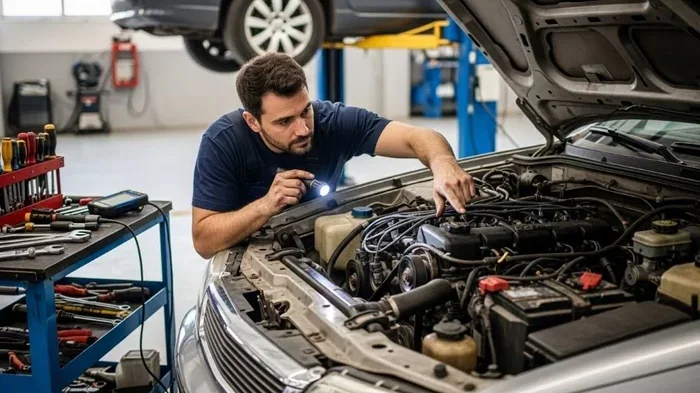
A professional has access to diagnostic scanners that read your car’s error codes. These tools can pinpoint the exact problem fast. Trying to guess and check without proper tools can waste time and money.
Expert Insight: Always choose a mechanic or dealership that has experience with your specific car brand. Each maker has its own lane assist technology. A specialist will know the quirks and common issues for your model.
How To Prevent Lane Assist Problems in the Future
Prevention is always better than repair. A little regular care can keep your lane keeping system working flawlessly for years. Here are simple habits that make a big difference.
1. Keep Your Camera Clean
Make it a habit to wipe down the camera area every time you wash your car. Use a gentle glass cleaner and a soft cloth. Avoid harsh chemicals that can damage the lens coating.
This is especially important in winter. Road salt, mud, and snow can build up quickly. A clean camera means reliable lane alignment in all seasons.
2. Address Windshield Damage Quickly
Even a small chip in your windshield can grow into a crack over time. And cracks near the camera mount can blind your lane detection system. Get chips repaired as soon as you notice them.
When replacing your windshield, always ask the shop to recalibrate your lane assist camera. This small step prevents many post-replacement headaches.
3. Keep Your Software Up to Date
Check for software updates regularly. Many car makers release updates that improve system performance and fix bugs. Staying current keeps your driver assistance system running at its best.
Some cars support over-the-air updates. Others require a visit to the dealership. Either way, staying on top of updates is worth the effort.
4. Drive Carefully in Tough Conditions
Extreme weather puts extra strain on your lane assist system. Heavy rain, fog, and snow reduce visibility and can confuse the camera. In these conditions, be extra cautious and do not rely solely on the system.
Remember that lane assist is a helper, not a replacement for attentive driving. Always keep your hands on the wheel and your eyes on the road.
Comparison: Common Lane Assist Issues and Fixes
| Issue | Likely Cause | Fix Difficulty |
|---|---|---|
| Lane assist light stays on | Dirty camera or calibration issue | Easy to Moderate |
| System turns on and off randomly | Software glitch or wiring problem | Moderate |
| No steering assist at all | Torque sensor failure or electrical fault | Difficult (Pro Required) |
| System does not work in rain or snow | Weather interference or water in camera | Easy |
| Warning after windshield replacement | Camera needs recalibration | Moderate (Pro Required) |
| System disabled on faded roads | Road markings not visible to camera | Not a problem (by design) |
Use this table as a quick reference when troubleshooting. It helps you narrow down the cause and decide whether a DIY fix is possible or if you need professional help.
Understanding Your Dashboard Warning Lights
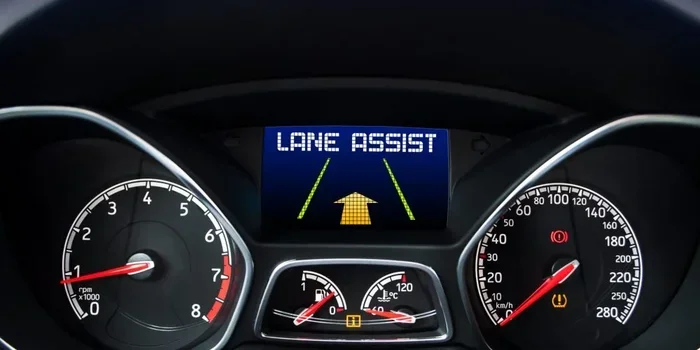
Your dashboard is full of helpful signals. When it comes to your lane assist system, the warning lights tell you exactly what is going on. Learning to read them is a valuable skill.
A yellow or amber light usually means the system is partially disabled. You can still drive, but the lane keeping feature is not fully active. A red light often signals a more serious problem that needs immediate attention.
If you see a flashing light, the system is trying to tell you something. It might be a temporary issue like a dirty camera or a more persistent problem like a sensor failure. Either way, pay attention to what your car is telling you.
Quick Tip: Keep your owner’s manual handy. It has a section on all dashboard lights and what each one means. Knowing the difference between a minor alert and a serious warning can save you time and stress.
Expert Insights on Lane Assist Reliability
Automotive experts agree that lane assist systems have come a long way. They are safer and more reliable than ever. But they are not perfect. Understanding their limitations helps you use them more effectively.
Most experts recommend treating lane assist as a safety net, not a replacement for your own attention. The system works best on highways with clear lane markings. It may struggle in city traffic, construction zones, or bad weather.
Pro Advice: Do not disable your lane assist just because it gave you one false alarm. Frequent use actually helps the system learn your driving patterns. This makes it more accurate over time.
Regular maintenance is the key to long-term reliability. Keep your sensors clean, your software updated, and your windshield in good shape. These simple habits keep your lane departure warning and lane centering features working at their best.
Key Takeaways
- Dirty sensors are the most common cause: A quick clean of the camera lens often restores your lane assist immediately.
- Calibration is crucial after windshield work: Always request recalibration when your windshield is replaced or repaired.
- Software updates fix many issues: Check for updates regularly through your car’s infotainment system.
- Weather affects system performance: Rain, snow, and fog can temporarily disable lane detection. This is normal and safe.
- Restarts resolve temporary glitches: A simple 30-second power cycle can clear many system errors.
- Know your warning lights: Yellow means partial disable. Red means seek help immediately.
- Prevention saves time and money: Regular cleaning and maintenance keep your system running smoothly for years.
Conclusion
Dealing with a lane assist system that is not working can be frustrating. But now you know the most common reasons and how to fix them. From a simple camera cleaning to a professional calibration, you have the tools to tackle this problem with confidence.
Remember that your driver assistance system is designed to help you, not replace your attention. Keep it maintained, keep it updated, and always stay alert behind the wheel. A well-functioning lane keeping system makes every drive safer and more comfortable.
If the problem persists after trying the steps in this guide, do not hesitate to visit a professional. Sometimes a sensor calibration or electrical repair is the only solution. And that is perfectly okay. Your safety is worth it.
Take action today. Clean your camera, check for updates, and reset your system. You will be back to enjoying your lane assist in no time. Happy driving.
Frequently Asked Questions
Can a dirty windshield washer fluid reservoir affect lane assist?
Yes, it can. Some cars use the windshield washer fluid reservoir area to house sensors or cameras. If the reservoir is empty or damaged, it can affect the lane detection system. Always keep your washer fluid full and check for leaks near the camera area.
How much does it cost to recalibrate a lane assist camera?
The cost varies by car maker and model. On average, recalibration costs between $100 and $400. Some dealerships may charge more. If your car is under warranty, the cost might be covered. Always ask for a quote before proceeding.
Is it safe to drive with lane assist turned off?
Yes, it is safe. Your car will still drive normally. The lane assist feature is an added safety layer, not a requirement for driving. However, it is a good idea to get the issue fixed so you have the full assistance available when you need it.
Can aftermarket dash cams interfere with lane assist?
Yes, they can. If a dash cam or phone mount is placed near the windshield camera, it can block the camera’s view. Always install accessories away from the camera area. Check your owner’s manual for the exact camera location.
Does lane assist work at low speeds in city traffic?
It depends on your car. Some systems work at all speeds, while others only activate above 40 or 50 mph. City driving with frequent stops can confuse the system. Check your owner’s manual to understand the speed range for your specific model.
How often should I clean the lane assist camera?
You should clean the camera area at least once a month or whenever you notice the system acting up. In winter or after driving through dusty conditions, clean it more frequently. A quick wipe takes seconds and prevents most common issues.