Where Is the TRAC Off Button Located on Your Vehicle
The TRAC Off Button is typically located on the steering column or dashboard area in most Toyota vehicles. Knowing the exact TRAC Off Button location helps drivers manage traction control, especially in off-road or slippery conditions. This guide shows you where to find it on every major model.
The TRAC Off Button is one of those small switches on your vehicle that can make a big difference. If you have ever squinted at your dashboard or fumbled around the steering column looking for a specific control, you are not alone. Many drivers know the traction control system exists but cannot find the switch to turn it off.
This guide will show you exactly where the TRAC Off Button is located. We will cover different Toyota models, explain what the button does, and tell you when it makes sense to turn it off. Whether you drive a Camry, RAV4, Tacoma, or Highlander, you will find the answers here.
The TRAC Off Button is a simple yet powerful feature. It lets you disable the traction control system when you need more wheel spin. This comes in handy during off-road adventures or when your car gets stuck in snow or mud. Understanding this button gives you better control over your driving experience.
Traction control has been a standard safety feature in vehicles for decades. It prevents wheel slip during acceleration on slippery surfaces. The system uses sensors to detect when a wheel is spinning faster than the others. When it detects slip, it reduces engine power or applies the brakes to that wheel. This keeps your car stable and safe.
However, there are times when you do not want traction control interfering. For example, when you are trying to rock your vehicle out of deep snow, the system may cut engine power too early. That is where the TRAC Off Button becomes useful. It gives you the freedom to override the system when needed.
Key Takeaways
- Common Location: The TRAC Off Button is usually found on the steering column or lower dashboard area.
- Toyota-Specific Design: Most Toyota models place the button on the left side of the steering wheel.
- Dashboard Indicator: A TRAC Off warning light confirms the system has been deactivated.
- Off-Road Use: Turning off TRAC helps when your vehicle gets stuck in snow, mud, or sand.
- Safety First: Always re-enable TRAC for normal driving conditions.
- Model Variations: The button location varies slightly between Toyota models and model years.
- Related Systems: TRAC works closely with VSC (Vehicle Stability Control) and ABS.
📑 Table of Contents
- Where Is the TRAC Off Button Located?
- What Does the TRAC Off Button Do?
- TRAC Off Button Locations by Toyota Model
- When Should You Use the TRAC Off Button?
- Common Mistakes with the TRAC Off Button
- How TRAC Works with Other Safety Systems
- How to Reset the TRAC Off Button
- TRAC Off Button in Different Model Years
- Expert Tips for Using the TRAC Off Button
- Key Takeaways
- Conclusion
Where Is the TRAC Off Button Located?
The TRAC Off Button location depends on your vehicle model and year. Most Toyota vehicles place this button in one of three common spots. Let us explore each location in detail.
Steering Column Area
In many Toyota models, the TRAC Off Button sits just below the steering column. You will find it on the left side of the steering wheel. It is usually a small switch or toggle that you can press with your thumb. The button often has a TRAC symbol on it for easy identification.
For Toyota Camry owners, the TRAC Off Button is typically located on the left side of the steering column. You will see it right below the steering wheel column cover. It sits between the turn signal lever and the gear shifter area. The exact position may vary slightly depending on the model year.
Toyota Corolla models also place the TRAC Off Button in the steering column area. Look on the left side, near the lower portion of the steering wheel. The button is small and may be easy to miss if you are not looking for it. It is usually marked with the TRAC icon.
Dashboard and Center Console
In some Toyota vehicles, the TRAC Off Button is located on the dashboard or center console. This placement is more common in older model years. If your vehicle has the button on the dashboard, look on the left side near the driver’s knee area.
Toyota RAV4 models from certain years place the TRAC Off Button on the left side of the dashboard. It is positioned where the driver can easily reach it while holding the steering wheel. The button is clearly labeled with the TRAC symbol.
For Toyota Tacoma owners, the TRAC Off Button location may vary by trim level. In many configurations, you will find it on the center console near the steering column. It is designed to be accessible without taking your hands off the wheel.
Left Side of the Steering Wheel
The most common and universal location for the TRAC Off Button is on the left side of the steering wheel. This placement allows for easy access while driving. Whether you have a Toyota Highlander, Sienna, or Avalon, check the left side first.
The button is typically a small, round switch with the TRAC logo. It may also display an icon showing a car with wavy lines behind it. This icon represents wheel slip or traction loss. When you press the button, the TRAC Off Indicator Light on your dashboard will illuminate.
What Does the TRAC Off Button Do?
The TRAC Off Button disables the traction control system in your vehicle. Traction control helps prevent your wheels from spinning on slippery surfaces. When the system is active, it monitors wheel speed and adjusts engine power as needed.
When you press the TRAC Off Button, the system shuts down. Your wheels can now spin freely during acceleration. This might sound risky, but there are real situations where disabling traction control is helpful.
For instance, imagine driving through deep snow. Your tires spin and spin but cannot gain traction. The traction control system keeps cutting engine power to prevent wheel spin. This actually makes it harder to move forward. By pressing the TRAC Off Button, you allow the wheels to spin freely and build momentum. This can help you push through snow or mud.
Another scenario is off-roading. When you are driving on rocky terrain or steep inclines, you need precise control over wheel spin. Traction control can interfere with your ability to navigate tricky obstacles. Turning it off with the TRAC Off Button gives you more manual control.
TRAC Off Indicator Light
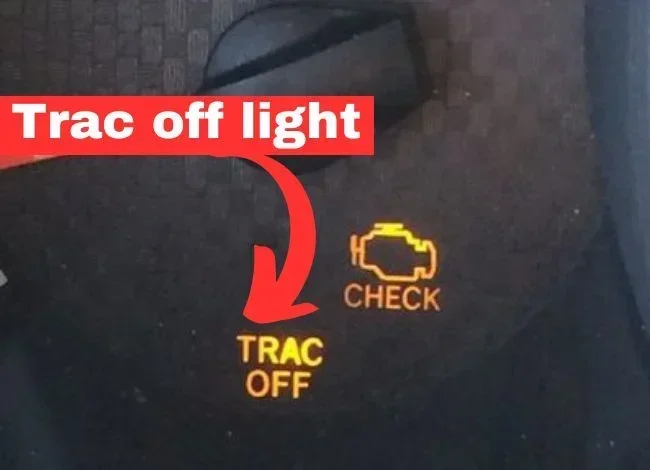
When you activate the TRAC Off Button, a warning light appears on your dashboard. This TRAC Off Indicator Light is usually yellow or amber. It shows the TRAC symbol and confirms the system has been disabled.
The light serves as a constant reminder that traction control is off. You should only drive with the light on when you have a specific reason. Always re-enable the system once you are back on normal roads.
TRAC Off Button Locations by Toyota Model
The TRAC Off Button placement varies across the Toyota lineup. Here is a breakdown of common locations by model.
Toyota Camry
The TRAC Off Button is on the left side of the steering column. Look below the steering wheel near the turn signal lever. Press the button once to deactivate traction control.
Toyota RAV4
In most RAV4 models, the TRAC Off Button sits on the left side of the dashboard. It is within easy reach of the driver’s left hand. Some newer models may have a touchscreen-based traction control setting instead.
Toyota Tacoma
The TRAC Off Button is typically found on the center console near the steering column. It is a small toggle switch labeled with the TRAC symbol. This placement works well for truck drivers who need quick access.
Toyota Highlander
Highlander models place the TRAC Off Button on the left side of the steering column. It is a small button that you press with your thumb. The TRAC Off Indicator Light will appear on the dashboard once pressed.
Toyota Corolla
The TRAC Off Button is located on the left side of the steering column. It is a small switch that sits below the steering wheel. Corolla owners should look for the TRAC symbol on the switch itself.
Toyota Avalon
On the Avalon, the TRAC Off Button is found on the lower left side of the steering column. It is positioned for easy thumb access. The button works the same way across all Avalon trims.
When Should You Use the TRAC Off Button?
Knowing where the TRAC Off Button is only half the battle. You also need to know when to use it. Here are the most common situations where turning off traction control makes sense.
Off-Road Driving
When you are exploring trails or rough terrain, traction control can actually work against you. The system limits wheel spin to maintain stability on paved roads. But on loose gravel, mud, or rocks, you need the wheels to spin freely. Pressing the TRAC Off Button allows for better maneuverability.
Getting Stuck in Snow or Mud
If your vehicle is stuck in snow or mud, traction control may prevent you from getting unstuck. The system detects wheel spin and reduces engine power. This means your wheels cannot build enough momentum to break free. Turning off TRAC lets your wheels spin and dig out of the rut.
Driving Down Steep Hills
On steep downhill grades, some drivers prefer to control wheel spin manually. Traction control may apply brakes in a way that feels unnatural. Using the TRAC Off Button gives you more direct control over your descent.
Performance Driving
Enthusiast drivers sometimes turn off traction control during spirited driving. This allows for controlled wheel spin during acceleration out of corners. However, this should only be done in safe, controlled environments like a track.
Common Mistakes with the TRAC Off Button
Even though the TRAC Off Button is simple to use, drivers sometimes make mistakes. Here are the most common errors to avoid.
Forgetting to Turn TRAC Back On
The biggest mistake is leaving traction control off after you no longer need it. Always re-enable the TRAC Off Button once you are back on normal roads. Driving without traction control on wet or icy pavement increases your risk of accidents.
Confusing TRAC Off with VSC Off
Many Toyota vehicles have separate buttons for TRAC and VSC (Vehicle Stability Control). These are related but different systems. The TRAC Off Button only disables traction control. The VSC system may still be active. Check your owner’s manual to understand the difference.
Using TRAC Off on High-Speed Highways
Never turn off traction control when driving at high speeds on highways. The system helps maintain stability during sudden acceleration or slippery patches. Disabling it on the highway removes an important safety feature.
Ignoring the TRAC Off Indicator Light
If the TRAC Off Indicator Light stays on even when you have not pressed the button, there may be a problem. This could indicate a fault in the traction control system. Have a mechanic check your traction control sensor and related components.
How TRAC Works with Other Safety Systems
The TRAC Off Button does not work in isolation. It is part of a larger network of safety systems in your vehicle. Understanding how these systems interact helps you use the button more effectively.
The traction control system works closely with the anti-lock braking system, or ABS. When traction control detects a spinning wheel, it can apply the brakes to that wheel individually. This is the same principle ABS uses to prevent wheel lockup during hard braking.
The Vehicle Stability Control system is another partner. VSC monitors your vehicle’s direction and compares it to where you are steering. If the car starts to slide, VSC applies brakes to individual wheels to correct the path. The TRAC Off Button may also affect VSC depending on your vehicle model.
Some Toyota vehicles allow you to turn off TRAC independently while keeping VSC active. Other models tie both systems together. Always refer to your owner’s manual for specific details about your vehicle.
The traction control sensor plays a crucial role in the system. These sensors monitor wheel speed at each corner of the vehicle. If one sensor fails, the entire traction control system may malfunction. A faulty sensor can trigger the TRAC warning light and affect vehicle stability.
How to Reset the TRAC Off Button
If you have turned off traction control and want to re-enable it, the process is simple. Just press the TRAC Off Button again. The TRAC Off Indicator Light on your dashboard should turn off.
If the light does not turn off after pressing the button, try these steps. First, turn your vehicle off and restart the engine. This often resets the traction control system. If the light persists, check your owner’s manual for the reset procedure specific to your model.
In some cases, a persistent TRAC warning light indicates a deeper issue. A faulty traction control sensor or a wiring problem could be the cause. Have a qualified mechanic inspect your vehicle if the light remains on after a reset.
TRAC Off Button in Different Model Years
The TRAC Off Button design and placement have evolved over the years. Older Toyota models may have a larger toggle switch. Newer models often feature a smaller, more streamlined button.
Some recent Toyota models have moved away from physical buttons entirely. Instead, they offer traction control settings through the touchscreen infotainment system. If you cannot find a physical TRAC Off Button in your vehicle, check the settings menu on your display screen.
Always consult your owner’s manual for the exact location and operation of the TRAC Off Button in your specific model and year. The manual will also explain any model-specific features or limitations.
Expert Tips for Using the TRAC Off Button
Here are some practical tips to help you get the most out of your TRAC Off Button.
First, familiarize yourself with the button location before you need it. Do not wait until you are stuck in the snow to search for the switch. Take a moment to locate it during your next drive.
Second, test the system in a safe environment. Find an empty parking lot and practice turning TRAC on and off. This builds confidence and helps you understand how the system affects your vehicle’s behavior.
Third, always re-enable traction control after off-road use. Leaving TRAC off for extended periods reduces your safety on regular roads. Make it a habit to check the TRAC Off Indicator Light before merging onto highways.
Fourth, keep your traction control sensor clean. Dirt and debris can accumulate on the sensors, especially after off-road driving. A quick wipe-down can prevent false warnings and system errors.
Fifth, understand the difference between TRAC and VSC. These systems work together but serve different purposes. Knowing when to use each one gives you better control in challenging driving conditions.
Key Takeaways
- Common Location: The TRAC Off Button is usually found on the steering column or lower dashboard area.
- Toyota-Specific Design: Most Toyota models place the button on the left side of the steering wheel.
- Dashboard Indicator: A TRAC Off warning light confirms the system has been deactivated.
- Off-Road Use: Turning off TRAC helps when your vehicle gets stuck in snow, mud, or sand.
- Safety First: Always re-enable TRAC for normal driving conditions.
- Model Variations: The button location varies slightly between Toyota models and model years.
- Related Systems: TRAC works closely with VSC (Vehicle Stability Control) and ABS.
Conclusion
The TRAC Off Button is a simple yet essential feature in Toyota vehicles. Whether it is on the steering column, dashboard, or center console, knowing its location gives you confidence behind the wheel. You now know exactly where to look and when to use it.
Remember that the TRAC Off Button is a tool for specific situations. Off-road driving, getting stuck in snow, and steep hill descents are all valid reasons to disable traction control. But for everyday driving, keep the system enabled for maximum safety.
Take a moment today to locate your TRAC Off Button. Familiarize yourself with its position and the TRAC Off Indicator Light on your dashboard. This small bit of preparation can make a big difference the next time you face a challenging driving situation.
Your vehicle is equipped with advanced safety systems for a reason. The traction control system works hard to keep you stable and secure. Use the TRAC Off Button wisely, and you will enjoy both safety and versatility in your driving experience.
Frequently Asked Questions
Where exactly is the TRAC Off Button on a Toyota Camry?
On most Toyota Camry models, the TRAC Off Button is located on the left side of the steering column. Look just below the steering wheel near the turn signal lever. It is a small switch marked with the TRAC symbol. Press it once to deactivate the traction control system.
What does the TRAC Off Indicator Light mean?
The TRAC Off Indicator Light means the traction control system has been successfully disabled. The light is usually yellow or amber and displays the TRAC symbol on your dashboard. It should turn off when you press the TRAC Off Button again to re-enable the system.
Can I drive with the TRAC Off Button pressed all the time?
You should not drive with TRAC off during normal conditions. The traction control system helps prevent wheel slip on wet, icy, or uneven roads. Only turn it off when you need extra wheel spin for off-roading or getting unstuck. Always re-enable it before returning to regular driving.
Does the TRAC Off Button also turn off VSC?
It depends on your Toyota model. In some vehicles, pressing the TRAC Off Button only disables traction control while VSC remains active. In other models, both systems turn off together. Check your owner’s manual to understand how TRAC and VSC interact in your specific vehicle.
What should I do if the TRAC Off light stays on after I turn the system back on?
If the TRAC Off Indicator Light stays on, first try restarting your engine. This often resets the traction control system. If the light persists, check for a faulty traction control sensor or wiring issue. Have a qualified mechanic inspect your vehicle to diagnose the problem.
Are there Toyota models without a physical TRAC Off Button?
Yes, some newer Toyota models have replaced the physical TRAC Off Button with a touchscreen-based setting. Check your infotainment display for traction control options in the vehicle settings menu. Your owner’s manual will confirm whether your model uses a physical button or a digital control.