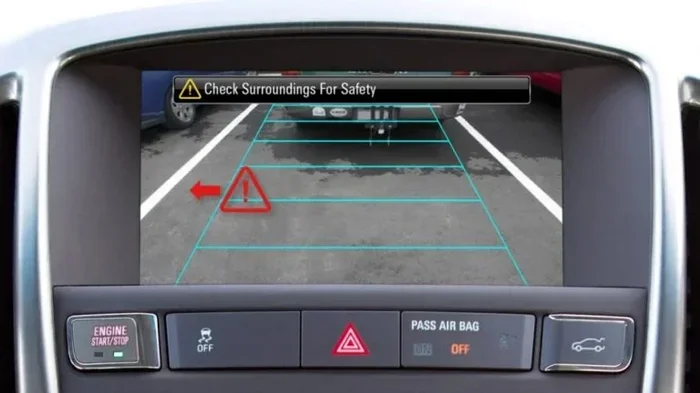
What Is the RCTA Setting and How It Can Help Your Car
The RCTA setting stands for Rear Cross-Traffic Alert, a smart safety feature that helps drivers spot vehicles approaching from the sides when backing up. This system uses sensors in your car’s bumpers to detect traffic, pedestrians, and obstacles you might miss in your mirrors. Understanding the RCTA setting can make your daily driving safer and your parking routines much less stressful. Whether you are a new driver or a seasoned commuter, knowing how to use and customize this feature is a game-changer.
Have you ever backed out of a parking spot and suddenly heard a loud beep from your car? If so, your RCTA setting was probably doing its job. RCTA stands for Rear Cross-Traffic Alert, and it is one of the most helpful safety features in modern vehicles today. Many drivers have this system but do not fully understand what it does or how to get the most out of it.
In this guide, we will break down everything you need to know about the RCTA setting. We will cover how it works, why it matters, and how you can use it to stay safe on the road. By the end, you will feel more confident using this feature every time you park or reverse.
Key Takeaways
- RCTA stands for Rear Cross-Traffic Alert: It is a safety system that warns you of approaching vehicles when reversing.
- The RCTA setting works with sensors and cameras: These detect movement from both sides behind your car.
- It is especially useful in parking lots: Backing out of tight spaces becomes much safer with this feature active.
- You can adjust the RCTA setting: Most cars let you turn it on or off and change sensitivity levels.
- RCTA complements other safety features: It works hand-in-hand with blind spot monitoring and backup cameras.
- Misunderstanding the RCTA setting can cause false alerts: Knowing how it works helps you avoid unnecessary panic.
📑 Table of Contents
- What Does RCTA Stand For?
- How the RCTA Setting Works in Your Car
- Why the RCTA Setting Matters for Daily Driving
- How to Adjust and Customize the RCTA Setting
- RCTA Setting vs. Other Car Safety Features
- Common Mistakes Drivers Make with the RCTA Setting
- Expert Tips for Getting the Most from Your RCTA Setting
- Which Cars Offer the Best RCTA Setting?
- Final Thoughts on the RCTA Setting
What Does RCTA Stand For?
RCTA stands for Rear Cross-Traffic Alert. It is an advanced driver assistance system designed to warn you of approaching vehicles from the left or right side when you are reversing. Think of it as an extra set of eyes watching behind your car while your mirrors leave blind spots.
Most modern cars come with this feature built in. It works closely with other safety systems like blind spot monitoring, parking sensors, and backup cameras. Together, these tools create a strong safety net around your vehicle. The RCTA setting activates automatically when you shift into reverse gear in most cars.
The system relies on radar sensors mounted in the rear bumper. These sensors scan a wide area behind your vehicle. When they detect a fast-approaching object, they send a warning alert to the driver. This can be an audible beep, a visual display, or even a vibration in the steering wheel or seat.
How the RCTA Setting Works in Your Car
Understanding the mechanics behind the RCTA setting helps you trust it more. The system is not complicated, but it is cleverly designed. Here is a closer look at how it all comes together.
Radar Sensors and Detection Zones
Your car has small radar sensors hidden in the rear bumper. These sensors send out signals that bounce off objects behind you. When a vehicle is moving toward your car from the sides while you are reversing, the system picks it up quickly.
The detection zone typically covers about 30 meters (100 feet) behind the car. It extends to the left and right sides as well. This wide coverage means the RCTA setting can catch vehicles you simply cannot see in your mirrors. Some cars even detect bicycles and pedestrians in this zone.
Warning Signals and Alerts
When the system detects cross-traffic, it triggers an alert. The most common alert is an audible beep that gets faster as the object gets closer. Some vehicles also show a visual warning on the dashboard or infotainment screen.
Higher-end models may include a haptic alert, which vibrates the steering wheel or the driver’s seat. This multi-sensory approach ensures you notice the warning even if you are distracted. The RCTA setting is designed to work in both forward and reverse directions on many newer models.
Integration with Other Safety Systems
The RCTA setting does not work alone. It is part of a larger ecosystem of safety features. For example, it often pairs with your backup camera to give you a full picture of what is behind you. It also links with lane departure warning and adaptive cruise control in some vehicles.
This integration creates a layered safety approach. Each system covers a different blind spot or driving scenario. The result is a much safer driving experience overall. When all these systems work together, your risk of a low-speed collision drops significantly.
Why the RCTA Setting Matters for Daily Driving
You might wonder if you really need this feature. After all, you can just look over your shoulder, right? While that works in some situations, the RCTA setting adds a layer of protection that human eyes alone cannot match.
Parking Lot Safety
Parking lots are one of the most common places for low-speed collisions. Cars are parked close together. Pedestrians walk between vehicles. Children can run out unexpectedly. In these busy environments, the RCTA setting becomes invaluable. It scans behind your car while you focus on steering.
Studies show that backover accidents are a leading cause of injury in parking lots. The RCTA setting directly addresses this problem. It alerts you to vehicles approaching from adjacent parked cars or driving through the lot. This simple warning can prevent costly damage and serious injuries.
Driving in Tight Spaces
Narrow driveways and alleyways also benefit from the RCTA setting. When you are reversing out of a tight spot, your side mirrors may not show everything. The system fills in those gaps. It warns you about cars, trucks, or motorcycles approaching from behind.
Even experienced drivers can miss something in their blind spots. The RCTA setting acts as a reliable backup every time. It is especially helpful for larger vehicles like SUVs and trucks, which have bigger rear blind zones.
Nighttime and Low-Visibility Conditions
Reversing at night or in poor weather is risky. Your visibility drops significantly. The RCTA setting works regardless of lighting conditions because it uses radar, not cameras. Rain, fog, or darkness does not stop the sensors from doing their job.
This makes the RCTA setting a reliable tool year-round. Whether it is a dark winter evening or a rainy afternoon, the system keeps watch behind your car. It gives you peace of mind when visibility is limited.
How to Adjust and Customize the RCTA Setting
Most vehicles allow you to tweak the RCTA setting to match your preferences. Knowing how to customize it can improve your experience and reduce annoying false alerts.
Turning the RCTA On or Off
You can usually find the RCTA setting toggle in your car’s infotainment menu or on a button near the gear shift. Some vehicles have a dedicated button on the dashboard. Pressing it turns the system on or off with a quick flash on your display.
It is worth noting that some cars default the RCTA setting to on every time you start the engine. Others remember your last choice. Check your owner’s manual to learn how your specific car handles this.
Adjusting Sensitivity Levels
Many cars let you change how sensitive the RCTA setting is. Higher sensitivity means the system triggers more easily. Lower sensitivity reduces false alarms but might miss some alerts.
If you drive in crowded areas often, keep the sensitivity high. If you are in a quiet residential area with wide open spaces, you might prefer a lower setting. Experiment to find what works best for your daily routine.
Understanding False Alerts
False alerts can be frustrating. The RCTA setting sometimes triggers when there is no real danger. This often happens near metal poles, fences, or guardrails. The radar picks up these stationary objects and mistakes them for moving traffic.
To reduce false alerts, drive slowly when reversing. Give the system time to distinguish between stationary objects and moving vehicles. Also, keep your rear bumper sensors clean. Dirt, snow, or ice can interfere with the radar signal and cause unnecessary warnings.
RCTA Setting vs. Other Car Safety Features
The RCTA setting is often confused with other safety features. Understanding the differences helps you use each system correctly.
RCTA vs. Blind Spot Monitoring
Blind spot monitoring watches the sides of your car while you are driving forward. The RCTA setting focuses on the rear when you are reversing. Both use radar sensors, but they cover different areas and activate in different driving scenarios.
Some cars combine both into one system called Surround View or 360-degree camera. However, RCTA and blind spot monitoring remain separate features with distinct purposes.
RCTA vs. Backup Camera
A backup camera shows you what is directly behind your car on a screen. The RCTA setting goes further by detecting vehicles coming from the sides. The camera gives you a visual; RCTA gives you a warning. Together, they form a powerful safety combination.
Think of it this way. The backup camera is your rearview mirror replacement. The RCTA setting is your extra warning system. You need both for the best protection.
RCTA vs. Parking Sensors
Parking sensors detect stationary objects like walls and other parked cars. The RCTA setting detects moving vehicles approaching from the sides. They serve different but complementary purposes.
Most modern cars have both parking sensors and RCTA. Together, they cover a wide range of reversing scenarios. This combination makes parking and backing out much safer than relying on just one system.
Common Mistakes Drivers Make with the RCTA Setting
Even with a great safety system, mistakes can happen. Here are common errors drivers make with the RCTA setting and how to avoid them.
- Ignoring the alert: Some drivers get so used to the beeping that they start ignoring it. Always take the alert seriously and check your surroundings.
- Relying only on RCTA: The RCTA setting is a helper, not a replacement for checking your mirrors and looking over your shoulder. Always do a quick visual check before reversing.
- Driving too fast in reverse: The system works best at low speeds. Reversing quickly can reduce its effectiveness and give you less time to react.
- Neglecting sensor maintenance: Dirty or blocked rear sensors can cause the RCTA setting to malfunction. Clean your bumper regularly, especially in winter.
- Confusing RCTA with automatic braking: RCTA warns you. It does not always brake automatically. Some cars add automatic emergency braking, but that is a separate feature.
Expert Tips for Getting the Most from Your RCTA Setting
Want to use the RCTA setting like a pro? Follow these practical tips to boost your safety and confidence.
- Do a pre-drive sensor check. Before you start your car, glance at the rear bumper. Make sure the sensors are clear of dirt, snow, or debris. Clean sensors mean accurate alerts from the RCTA setting.
- Use it every time you reverse. Do not turn off the RCTA setting just because it beeps sometimes. The occasional false alert is a small price for real safety.
- Practice in safe environments. If you are new to RCTA, practice in an empty parking lot. This helps you learn how the system feels and sounds without pressure.
- Combine it with your backup camera. Use the RCTA setting and your backup camera together. This gives you both visual confirmation and audible alerts for maximum awareness.
- Keep your software updated. Some car manufacturers release updates that improve the RCTA setting performance. Check with your dealer or owner’s manual for update instructions.
- Teach your passengers. If you carpool or have family members driving your car, make sure everyone knows what the RCTA setting sounds like and what it means.
Which Cars Offer the Best RCTA Setting?
Most new cars today include the RCTA setting as standard or optional equipment. However, the quality and features vary by brand and model. Here are some highlights.
| Brand | RCTA Feature | Additional Notes |
|---|---|---|
| Toyota | Standard on most models | Works with Blind Spot Monitor |
| Honda | Standard on most models | Integrated with Honda Sensing suite |
| Ford | Available on most trims | Part of Ford Co-Pilot360 system |
| Chevrolet | Available on most trims | Works with Rear Vision Camera |
| BMW | Standard on most models | Part of Active Driving Assistant |
| Tesla | Standard on all models | Integrated with Autopilot system |
When shopping for a car, ask the salesperson about the RCTA setting. It is one of the most valuable safety features you can have. Even in used cars, many models from the last five years include this system.
Final Thoughts on the RCTA Setting
The RCTA setting is one of the simplest yet most effective safety features in your car. It watches behind you, warns you of danger, and gives you confidence when reversing. Whether you are navigating a crowded parking lot or backing out of a tight driveway, this system has your back.
Take a few minutes to learn how your specific RCTA setting works. Read your owner’s manual. Adjust the sensitivity to your needs. Keep your sensors clean. These small steps make a big difference in your daily safety.
Driving is full of uncertainties, but technology like RCTA helps you stay ahead of them. Embrace the RCTA setting as part of your driving routine. It is a small feature that delivers big peace of mind every time you hit the road.
Frequently Asked Questions
What does RCTA stand for in a car?
RCTA stands for Rear Cross-Traffic Alert. It is a safety feature that warns drivers of vehicles approaching from the sides when they are reversing. The RCTA setting uses radar sensors in the rear bumper to detect cross-traffic and alert the driver with beeps or visual warnings.
Should I keep the RCTA setting on all the time?
Yes, keeping the RCTA setting on at all times is recommended. The system is designed to activate automatically when you shift into reverse. It provides an extra layer of protection every time you back up. Turning it off removes this valuable safety feature.
Can the RCTA setting detect pedestrians and cyclists?
Many modern RCTA systems can detect pedestrians and cyclists in addition to vehicles. However, detection capabilities vary by car model and manufacturer. Always refer to your vehicle’s manual to understand what the RCTA setting can and cannot detect in your specific car.
Why does my RCTA setting keep giving false alerts?
False alerts often happen when the rear bumper sensors are dirty or blocked. They can also trigger near metal objects like poles or fences that confuse the radar. Cleaning your sensors and adjusting the sensitivity level usually fixes this issue with the RCTA setting.
Is the RCTA setting the same as a backup camera?
No, the RCTA setting and a backup camera are different features. A backup camera shows you a visual feed of what is behind your car. RCTA uses radar to detect moving vehicles approaching from the sides and warns you with alerts. Both are valuable, and they work best together.
Can I add RCTA to an older car?
Yes, you can add aftermarket RCTA setting systems to many older vehicles. Several aftermarket kits are available that use similar radar technology. However, factory-installed RCTA tends to integrate more seamlessly with other safety features in the car.
=== CONCLUSION ===
The RCTA setting is a smart, reliable safety feature that every driver should understand and use. It protects you in parking lots, tight driveways, and low-visibility conditions. By working alongside your backup camera, parking sensors, and blind spot monitoring, it creates a comprehensive safety system around your vehicle.
Take the time to explore your car’s RCTA setting today. Adjust the sensitivity, keep the sensors clean, and use it every time you reverse. Small habits like these add up to a much safer driving experience for you and everyone around you.