How to Disable Tesla Tracking and Protect Your Privacy
Tesla vehicles collect a lot of data about your driving habits, location, and even cabin activity. If you want to disable Tesla tracking and take back control of your personal information, you are in the right place. This guide walks you through every setting, menu, and option available to protect your privacy inside your Tesla. We also cover what you need to know before making changes and how to re-enable features later if you choose.
Owning a Tesla comes with many perks. You get cutting-edge technology, autopilot features, and a sleek driving experience. But there is another side to this that many owners do not think about right away. Your Tesla is always collecting data. It tracks where you go, how you drive, and even what happens inside the cabin. If you value your personal space and want to keep your information private, learning how to disable Tesla tracking is essential. This guide gives you everything you need to know.
The idea of a car watching your every move can feel uncomfortable. And honestly, it should. Modern vehicles have more computing power than some laptops. They use sensors, cameras, and GPS to gather information constantly. Tesla is no exception. The company says this data helps improve safety and services. But that does not mean you have to accept it without question. You have the right to limit what your car collects about you. Let us walk through exactly how to do that.
Key Takeaways
- Tesla tracks more than you think: Your vehicle collects location data, driving behavior, cabin camera footage, and telemetry information by default.
- You can turn off most tracking features: Tesla provides multiple settings that let you disable data collection, though some limitations apply.
- Disable both in-car and app-based tracking: Privacy settings exist in the vehicle menu and the Tesla mobile app for full coverage.
- Some features depend on tracking data: Turning off certain settings may affect navigation, Supercharging, and over-the-air updates.
- Review your Tesla privacy policy regularly: Tesla updates its data practices, so staying informed helps you stay protected.
- Combine settings for maximum privacy: Using multiple privacy controls together gives you the best protection.
📑 Table of Contents
- What Is Tesla Tracking and How Does It Work?
- Why You Should Consider Disabling Tesla Tracking
- Step-by-Step Guide to Disable Tesla Tracking
- Limitations and Things to Know Before You Turn Off Tracking
- Additional Privacy Settings You Should Adjust
- How to Re-Enable Tracking Features When Needed
- Quick Tips for Maximum Tesla Privacy
- Common Mistakes People Make With Tesla Privacy
- Expert Insights on Vehicle Privacy
- Final Thoughts
What Is Tesla Tracking and How Does It Work?
Before you can turn anything off, you need to understand what is actually happening. Tesla tracking refers to the collection of data from your vehicle. This includes your GPS location, speed, acceleration patterns, braking habits, and even how often you use certain features. The car also gathers cabin data through its internal cameras and sensors.
Types of Data Tesla Collects
Tesla collects several categories of data. Here is a breakdown of what your vehicle may be recording:
- Location data: Real-time GPS coordinates, trip history, and frequent destinations.
- Driving behavior: Speed, acceleration, cornering, and braking patterns.
- Cabin data: Images from the cabin camera when Sentry Mode or Dashcam is active.
- Telemetry data: Vehicle health, battery status, and software performance metrics.
- App and connectivity data: How you use the Tesla mobile app and cloud services.
All of this data gets sent to Tesla servers. The company uses it for various purposes. Some of these purposes are helpful, like improving autopilot algorithms. Others feel more invasive, like sharing data with third parties. Understanding what is collected is the first step toward disabling Tesla tracking and protecting your privacy.
Why You Should Consider Disabling Tesla Tracking
You might wonder why anyone would want to turn off tracking. After all, some features rely on data collection. Navigation needs your location. Supercharger routing uses your destination. But the truth is, not all data collection is necessary for a great driving experience. Here are some reasons to consider turning it off.
Privacy Concerns
Your driving patterns reveal a lot about you. They show where you live, where you work, and where you spend your free time. This information is valuable. Insurance companies, advertisers, and even bad actors could misuse it. By learning how to disable Tesla tracking, you reduce the amount of personal data floating around in the digital world.
Data Security Risks
No system is completely safe from breaches. The more data stored on external servers, the bigger the target. Tesla has generally done a good job with security. But every additional data point increases the risk. Minimizing what is collected is a smart precaution. Think of it like locking your doors. You do it not because you expect trouble, but because it is good practice.
Personal Comfort
Some people simply do not like the idea of being watched. That is a completely valid feeling. Your car should serve you, not surveil you. Adjusting your settings gives you peace of mind. It puts you back in control of your own information.
Step-by-Step Guide to Disable Tesla Tracking
Now let us get into the practical part. Here is exactly how you can turn off the major tracking features in your Tesla. The steps are straightforward, but the exact menu names may vary slightly depending on your software version.
Step 1: Turn Off Location Services
Your Tesla uses GPS to provide navigation and location-based features. To reduce tracking, you can limit location access.
- Tap the Controls icon on your touchscreen.
- Go to Settings.
- Select Privacy & Safety.
- Toggle off Location Services.
This stops the car from sharing your real-time GPS data with Tesla servers. Keep in mind that navigation will still work in a limited way. You can still enter destinations manually. But the car will not track where you go after you leave.
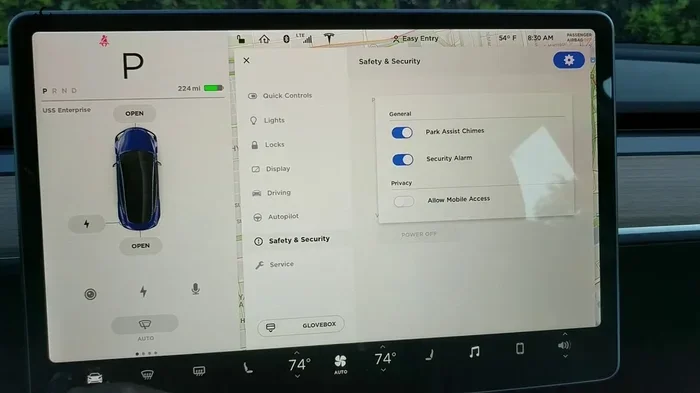
Step 2: Disable Sentry Mode and Dashcam
Sentry Mode and Dashcam are great security tools. But they also record video and store data. If you want to stop this recording, here is what to do:
- Tap the Controls icon.
- Go to Safety & Security.
- Toggle off Sentry Mode.
- Toggle off Dashcam.
You can always turn these back on when you park in a risky area. But for everyday driving, keeping them off reduces the data your car collects.
Step 3: Limit Data Sharing in Tesla Settings
Tesla has a dedicated section for data sharing preferences. This is one of the most important steps for anyone who wants to disable Tesla tracking fully.
- Go to Controls > Settings > Privacy & Safety.
- Look for Data Sharing or Vehicle Data Sharing.
- Toggle off options related to sharing driving data, usage data, and diagnostics.
Turning these off means Tesla will not send your vehicle data back to their servers for analysis. Some features may be affected. For example, Tesla may not be able to provide personalized recommendations. But your privacy will be much stronger.
Step 4: Adjust Tesla Mobile App Permissions
Your phone also plays a role in tracking. The Tesla app collects data from your device. To limit this:
- Open your phone settings.
- Find the Tesla app in the app permissions list.
- Revoke location access, background activity, and any unnecessary permissions.
On iPhones, go to Settings > Privacy & Security > Location Services > Tesla. Set it to Never or While Using. On Android, go to Settings > Apps > Tesla > Permissions and adjust accordingly.
Step 5: Opt Out of Tesla’s Research and Development Program
Tesla runs a program where it uses vehicle data for research and development. You can opt out of this program:
- Go to Controls > Settings > Privacy & Safety.
- Look for Tesla Research and Development Program or similar wording.
- Toggle it off.
This is different from general data sharing. Opting out means your vehicle data will not be used to improve Tesla’s algorithms and features. It is a separate setting that many people overlook.
Limitations and Things to Know Before You Turn Off Tracking
Before you go ahead and turn everything off, there are some important things to understand. Disabling tracking is not always a simple on-off switch. Some features depend on data collection to work properly.
Features That May Be Affected
When you disable tracking, certain Tesla features may change. Here is what to expect:
- Navigation: Real-time traffic updates may be less accurate without location sharing.
- Supercharging: Tesla may not be able to route you to the nearest charger automatically.
- Over-the-air updates: Some updates include diagnostic data that helps Tesla improve delivery.
- Remote features: The Tesla app may not show real-time vehicle status.
- Insurance programs: Tesla Insurance uses driving data for pricing. Turning it off may affect your rates.
How This Compares to Other Car Tracking Systems
It helps to look at how other vehicles handle tracking. Many modern cars collect similar data. For example, some vehicles use a 12V to 230V car inverter to power accessories and may track usage patterns of those accessories. Similarly, the way a car connects its 12V car socket to 3 pin adapter can involve data logging about power usage. Even hybrid vehicles automatically switch power modes based on collected data about your driving habits. These are all examples of how cars gather information behind the scenes. Tesla is more transparent about what it collects, which is actually an advantage. You can see the data and choose to limit it.
What Tesla Says About Data Collection
Tesla states that it collects data to improve safety and functionality. The company argues that aggregated data helps train autopilot and enhance the driving experience. This is true to a degree. But it does not mean you have to participate. Tesla gives you options to opt out. Using those options is your right as a vehicle owner.
Additional Privacy Settings You Should Adjust
Beyond the main tracking settings, there are a few more tweaks that boost your privacy. These are smaller changes that add up to a big difference.
Turn Off Voice Command Data Collection
Tesla’s voice commands send audio clips to servers for processing. To reduce this:
- Go to Controls > Settings > Voice & Speech.
- Disable any option that says Share Voice Data or similar.
This stops Tesla from using your voice commands to train its speech recognition models.
Clear Your Trip History
Tesla stores your trip history by default. You can clear this periodically:
- Go to Controls > Settings > Privacy & Safety.
- Find the option to Clear Trip History.
- Confirm the action.
Doing this regularly ensures old location data does not pile up on Tesla servers.
Disable Wi-Fi and Bluetooth When Not in Use
Your Tesla connects to Wi-Fi and Bluetooth devices. Each connection can be a data point. Turn off Wi-Fi when you do not need it. Forget Bluetooth devices you no longer use. These small steps reduce the data your car shares with the outside world.
How to Re-Enable Tracking Features When Needed
Disabling tracking does not have to be permanent. You can always turn features back on when you need them. Here is a quick guide for re-enabling the main settings:
- Location Services: Go to Controls > Settings > Privacy & Safety and toggle it back on.
- Sentry Mode and Dashcam: Return to Safety & Security and enable them again.
- Data Sharing: Revisit the Privacy & Safety menu and re-enable sharing options.
- App Permissions: Go to your phone settings and restore Tesla app permissions.
The process is simple and takes only a few minutes. You can adjust your settings based on your needs. Some owners keep tracking off during daily driving but turn it on for road trips. Others only enable it when using Superchargers. Find what works best for your lifestyle.
Quick Tips for Maximum Tesla Privacy
Here are some extra tips to help you get the most out of your privacy settings:
- Review settings monthly: Tesla updates its software regularly. New settings may appear or change.
- Use a strong password: Protect your Tesla account with a unique, strong password.
- Enable two-factor authentication: This adds an extra layer of security to your account.
- Read privacy notices: Tesla sends updates about data practices. Take a few minutes to read them.
- Stay informed: The more you know about what your car collects, the better you can protect yourself.
Common Mistakes People Make With Tesla Privacy
Avoid these common pitfalls when trying to disable Tesla tracking:
- Assuming one setting is enough: You need to adjust multiple settings across the car and the app for full coverage.
- Ignoring app permissions: Even if you turn off car tracking, the Tesla app on your phone can still collect data.
- Forgetting to clear trip history: Old data lingers on servers even after you change settings.
- Not checking for software updates: Tesla changes privacy options with each update. What was true six months ago may not be true today.
- Assuming all data collection is optional: Some data is required for basic vehicle operation. Know the difference between essential and optional tracking.
Expert Insights on Vehicle Privacy
Privacy experts agree that car tracking is a growing concern. Modern vehicles are essentially rolling data centers. They collect more information than most people realize. According to digital privacy advocates, the best approach is to minimize data collection by default. Only enable features that you actively need and trust.
Experts also recommend reviewing privacy policies regularly. Companies update their data practices. What was private yesterday may not be private tomorrow. Staying proactive is the best defense. And with Tesla, you have more control than many other automakers. Use that to your advantage.
Some experts suggest treating your car like any other connected device. Just as you would manage permissions on your phone or laptop, manage permissions on your vehicle. This mindset shift makes it easier to stay on top of your privacy settings.
Final Thoughts
Learning how to disable Tesla tracking is one of the smartest things you can do as a vehicle owner. Your car collects a lot of data. Much of it is useful. But not all of it is necessary. By adjusting your settings, you take control of your personal information. You decide what stays on your vehicle and what leaves it.
It is not about being paranoid. It is about being informed. You deserve to know what your car is doing and to have a say in it. The steps in this guide give you the tools to protect your privacy. Use them, review them regularly, and stay in control.
Your Tesla is an amazing machine. It should serve your needs without compromising your personal life. With the right settings, you get the best of both worlds. A great driving experience and peace of mind about your privacy.
Frequently Asked Questions
Can I completely stop Tesla from collecting any data?
You can significantly reduce data collection, but not eliminate it entirely. Some data is essential for basic vehicle functions like navigation and safety features. However, you can disable most optional tracking through the settings we covered above.
Will disabling tracking affect my Tesla warranty?
No, disabling tracking will not void your warranty. Tesla cannot deny a warranty claim simply because you turned off data sharing. These are your rights as a vehicle owner.
Does Tesla share my data with third parties?
Tesla’s privacy policy states that it may share anonymized data with third parties. By turning off data sharing settings, you reduce the amount of data available for sharing. However, always review the latest privacy policy for the most current information.
How often should I review my Tesla privacy settings?
It is a good habit to review your settings once a month. Tesla releases software updates frequently, and new privacy options may appear with each update. Regular reviews ensure you stay in control of your data.
Can I use navigation without enabling location tracking?
Yes, you can still use navigation by manually entering destinations. Real-time traffic updates may be less accurate without location sharing, but basic navigation works fine with location services turned off.
What happens to my trip history after I clear it?
Once you clear your trip history, the data is removed from your vehicle’s local storage. Tesla also stops collecting new trip data for that period if you have disabled data sharing. However, data already sent to Tesla servers before you cleared it may still exist on their systems.
=== CONCLUSION ===
Disabling Tesla tracking is a smart move for anyone who values their privacy. Your Tesla is a powerful and connected vehicle, but that connectivity comes with data collection. By following the steps in this guide, you can significantly reduce what your car shares about you. From turning off location services to adjusting app permissions, each step adds another layer of protection.
Remember, privacy is not all or nothing. You can pick and choose which features to disable based on your comfort level. The goal is to find a balance that works for you. Enjoy the technology Tesla offers while keeping your personal data safe.
Take action today. Spend a few minutes going through the settings we covered. Your future self will thank you for taking control of your privacy now.