How to Disable Location on a Tesla Model Y Explained
Disabling location on your Tesla Model Y is straightforward once you know where to look. This guide walks you through every method, from the touchscreen settings to the Tesla app, so you can take full control of your privacy. You will learn why Tesla tracks your location, how to turn it off, and what happens when you do.
Your Tesla Model Y knows a lot about you. It knows where you live, where you work, and where you like to grab coffee on weekends. This information helps the car give you better routes and suggestions. But not everyone wants their car tracking their every move. If you are reading this, you probably want to know exactly how to disable location on a Tesla Model Y and take back your privacy.
The good news is that Tesla gives you several ways to manage your location settings. Whether you want to turn off GPS tracking completely or just limit what the car stores, you have options. In this guide, we will walk you through every method step by step. We will also explain what happens when you turn off location services and how to get the most out of your Tesla without sacrificing your privacy.
Let us be clear about something upfront. Tesla is a smart car. It collects data to improve your driving experience. But smart does not mean you have to give up control. By the end of this article, you will know exactly how to manage your Tesla Model Y location settings with confidence.
Key Takeaways
- Multiple Methods Available: You can disable location through the touchscreen, Tesla app, and service settings.
- Privacy Matters: Turning off location tracking protects your personal driving data from being stored or shared.
- Some Features May Be Affected: Disabling location can impact navigation, Supercharger routing, and nearby amenities.
- Easy to Re-enable: You can turn location back on anytime with just a few taps.
- Tesla Collects Data by Default: Understanding what Tesla collects helps you make informed privacy decisions.
- No Special Tools Needed: Everything can be done directly from your vehicle or phone.
📑 Table of Contents
- Why Does Tesla Track Your Location?
- How to Disable Location on a Tesla Model Y
- What Happens When You Turn Off Location?
- Comparing Tesla Location Settings
- Privacy Best Practices for Tesla Model Y Owners
- Can You Fully Stop Tesla From Collecting Data?
- How to Re-Enable Location When You Need It
- Final Thoughts on Tesla Model Y Location Privacy
Why Does Tesla Track Your Location?
Before we dive into the how, let us talk about the why. Understanding why Tesla tracks your location helps you make better decisions about turning it off.
Tesla uses location data for several important features. Navigation is the most obvious one. When you ask your car for directions, it needs to know where you are. Supercharger routing also depends on your current location. The car finds the nearest charging station and plots the best route to get you there.
But there is more. Tesla uses location data for:
- Traffic updates: The car adjusts your route based on real-time traffic conditions.
- Nearby amenities: It suggests restaurants, shops, and parks near your destination.
- Climate control: Tesla can pre-condition your cabin based on your home location.
- Sentry Mode alerts: Location data helps identify where events happen around your car.
- Fleet learning: Tesla uses anonymous data to improve its software and features.
All of these features work well because of location tracking. But they also mean Tesla has a detailed picture of your daily habits. Some owners are comfortable with this. Others are not. And that is perfectly fine.
How to Disable Location on a Tesla Model Y
Now let us get to the main event. There are several ways to turn off location tracking on your Tesla Model Y. Each method targets a different aspect of location services. Let us go through them one by one.
Method 1: Disable Location Through the Touchscreen
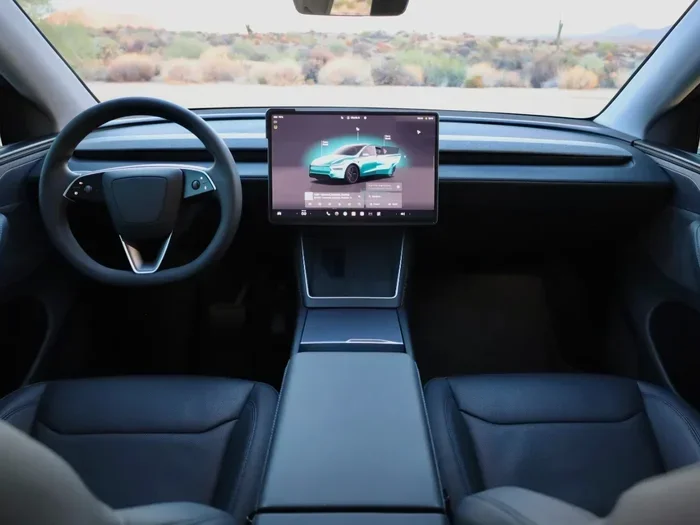
This is the most direct way to turn off location services on your Tesla. Here is exactly what to do:
- Tap the Controls icon on your touchscreen home screen.
- Select Settings from the menu that appears.
- Tap Privacy & Security.
- You will see a toggle for Location Services.
- Switch it Off.
That is it. Your Tesla Model Y will no longer actively track your GPS location. The car will still know where it is in a basic sense for navigation, but it will not store or share your movement data.
Quick Tip: If you cannot find the Privacy & Security menu, make sure your Tesla software is up to date. Tesla adds new privacy options with every major update. Keeping your car updated ensures you have access to the latest settings.
Method 2: Turn Off Location in the Tesla App
You can also manage location settings from your phone. The Tesla app gives you remote control over many features, including location tracking.
- Open the Tesla app on your phone.
- Tap the Vehicle tab at the bottom.
- Go to Settings within the vehicle section.
- Look for Location Sharing or Privacy options.
- Toggle Location Off.
This method is great because it lets you control location settings even when you are not near your car. You can turn off tracking before you leave home or after you arrive at your destination.
Quick Tip: Some Tesla app versions may not show all location options. If you do not see the setting, try updating the app through your device’s app store. Also, check that your car’s software is current.
Method 3: Clear Navigation History and Saved Locations
Even with location services turned off, Tesla may still have stored data from your past trips. Clearing this history is an important step for full privacy.
Here is how to do it:
- Go to Controls > Settings > Privacy & Security on your touchscreen.
- Tap Clear Navigation History.
- Confirm your choice when prompted.
- Also check Saved Locations and remove any addresses you do not want stored.
This step is often overlooked but it matters a lot. Your Tesla stores a record of everywhere you have driven. Clearing it removes that history from the car’s memory.
Method 4: Disable Location Data Sharing with Tesla
Tesla collects data from every vehicle on the road. This data helps the company improve its software and develop new features. But you can opt out of sharing certain data, including location information.
To disable data sharing:
- Go to Controls > Settings > Privacy & Security.
- Look for Data Sharing or Telemetry settings.
- Turn off any options related to location data sharing.
- You may also want to review the Vehicle Data Sharing toggle.
Disabling data sharing means Tesla will not receive your location information for fleet learning purposes. Your driving data stays on your car and your device.
What Happens When You Turn Off Location?
Turning off location services on your Tesla Model Y is not without trade-offs. It is important to understand what changes before you make the switch.
Here are the main things that will be affected:
- Navigation: The car may take longer to find your current position when you start a route. It will still navigate, but it relies on other methods to determine your location.
- Supercharger Routing: Tesla may not automatically suggest the nearest Supercharger. You will need to search manually or input the station address.
- Home and Work Locations: Features that use your home and work addresses may not work as smoothly.
- Nearby Search: Finding restaurants, gas stations, and other points of interest may require more manual input.
- Smart Summon: This feature uses location data to find you. It may not function properly if location is off.
The good news is that most of these features still work in a basic way. You just lose some of the convenience that comes with automatic location tracking.
Quick Tip: You do not have to choose between all or nothing. You can keep location on for navigation while turning off data sharing. This gives you the best of both worlds: useful directions without giving Tesla your driving history.
Comparing Tesla Location Settings
Not all location settings are the same. Here is a quick comparison to help you understand what each setting controls.
| Setting | What It Controls | Impact When Off |
|---|---|---|
| Location Services | GPS tracking and real-time location | Navigation may be slower to start |
| Navigation History | Stored trips and routes | Past trips are deleted |
| Data Sharing | Location data sent to Tesla | Tesla cannot use your data for fleet learning |
| Location Sharing | Sharing location with others via the app | Others cannot see where your car is |
| Saved Locations | Home, work, and favorite addresses | You must enter addresses manually |
As you can see, each setting controls a different part of your location data. You can mix and match these settings based on your comfort level and needs.
Privacy Best Practices for Tesla Model Y Owners
Disabling location is just one part of protecting your privacy. Here are some additional steps you can take to keep your Tesla data secure.
Review Your Privacy Settings Regularly
Tesla updates its software frequently. Each update may change what data is collected and how it is used. Make it a habit to review your privacy settings every few months. This ensures you always know what your car is sharing.
Use Strong Account Passwords
Your Tesla account is linked to your vehicle data. A strong password helps prevent unauthorized access. Use a unique password and enable two-factor authentication if available.
Be Mindful of Third-Party Apps
Some third-party apps and accessories connect to your Tesla. These may request location data. Before connecting any app or device, check what permissions it requires. If you have a 12V to 230V car inverter or a 12V car socket to 3 pin adapter installed, make sure these accessories do not have access to your location data unless you explicitly allow it.
Consider a Dashcam Privacy Setup
Tesla’s dashcam and Sentry Mode record video and can store location data. If you are concerned about privacy, consider turning off location tagging for your camera clips. You can do this in the Settings menu under the Cameras section.
Can You Fully Stop Tesla From Collecting Data?
This is a question many Tesla owners ask. The honest answer is that you cannot stop all data collection. Tesla collects certain basic vehicle data for safety and operational purposes. This includes things like battery health, driving patterns, and software performance.
However, you can significantly limit what Tesla collects. Turning off location services and data sharing removes the most personal information from the equation. You are still contributing some anonymous data, but it is far less than what Tesla collects by default.
Some owners compare their Tesla to a 3D printed car model of their driving habits. The data paints a detailed picture. By limiting what is shared, you keep that picture much more blurry and private.
If you are curious about what data Tesla actually collects, you can review the company’s privacy policy on their website. Tesla is required by law to be transparent about its data practices. The policy gives you a clear picture of what is collected, how it is used, and who it is shared with.
How to Re-Enable Location When You Need It
There may come a time when you want to turn location back on. Maybe you are going on a road trip and need Supercharger routing. Or perhaps you just want the convenience of automatic navigation again.
Re-enabling location is just as easy as turning it off:
- Go to Controls > Settings > Privacy & Security.
- Toggle Location Services back to On.
- Clear any previous settings you had disabled if needed.
- Your Tesla will start tracking your location again immediately.
The car will also ask if you want to restore your saved locations and navigation history. You can choose to restore or start fresh, depending on your preference.
Quick Tip: If you only need location for a specific trip, consider turning it on just before you start navigating and turning it off again when you arrive. This gives you the best of both worlds without leaving location tracking on all the time.
Final Thoughts on Tesla Model Y Location Privacy
Your Tesla Model Y is a powerful and smart vehicle. It gives you incredible features and a driving experience like no other. But with that power comes responsibility, especially when it comes to your personal data.
Learning how to disable location on a Tesla Model Y puts you in the driver’s seat, literally and figuratively. You decide what your car knows about you and what it shares with the world. Whether you turn off location completely or just limit certain data-sharing features, the choice is yours.
Remember that privacy is not an all-or-nothing game. You can make small adjustments that add up to significant protection. Start with the methods in this guide and build a privacy setup that works for you. Your driving data is valuable, and you deserve to control it.
Take a few minutes today to review your Tesla Model Y location settings. Your future self will thank you for it. And if you ever want to explore more about your Tesla’s features, there is always more to learn about how this incredible vehicle works.
Frequently Asked Questions
Can I disable location on my Tesla Model Y without losing navigation?
Yes, you can keep navigation working while limiting location tracking. The key is to turn off data sharing and navigation history while keeping basic location services on for routing. This way, your car can still give you directions without storing or sharing your trip data.
Will turning off location affect my Tesla’s Autopilot features?
Autopilot uses cameras and sensors rather than GPS location to drive the car. However, some features like Smart Summon and automatic navigation may rely on location data. Test your specific features after turning off location to see what still works.
How often does Tesla collect my location data?
Tesla collects location data continuously when location services are enabled. This includes real-time GPS tracking, route history, and destination information. The frequency of data transmission depends on your settings and your car’s software version.
Can I delete my location history from Tesla’s servers?
Yes, you can request Tesla to delete your data from their servers. Go to your Tesla account settings online and look for the data request section. You can also clear your navigation history directly from the car’s touchscreen.
Is it legal for Tesla to track my location?
Tesla is transparent about its data collection practices in its privacy policy. In most regions, companies can collect location data as long as they inform users and get consent. You have the right to opt out of most data sharing features through your Tesla settings.
What is the difference between location services and data sharing on Tesla?
Location services control whether your car uses GPS to track where you are in real time. Data sharing controls whether Tesla receives that location information for fleet learning and improvement purposes. You can turn off one without turning off the other.
=== CONCLUSION ===
Taking control of your Tesla Model Y location settings is easier than you might think. With just a few taps on your touchscreen or phone, you can limit what your car tracks and shares. Whether you are concerned about privacy, data security, or simply prefer a cleaner driving experience, the steps in this guide give you the power to make it happen.
Remember to review your settings regularly and stay informed about new privacy features Tesla adds with each update. Your data is yours, and you have every right to control it. Start today and enjoy peace of mind knowing your Tesla Model Y is working for you, not tracking you.