How to Check Miles on a Tesla Without Any Guesswork
Checking miles on a Tesla is simple once you know where to look. You can view your odometer and trip meter directly on the dashboard, through the Tesla mobile app, or in the vehicle’s service menu. This guide walks you through every method so you never have to guess your Tesla mileage again.
So you just bought a Tesla, or maybe you are thinking about it. Either way, one of the first things you will want to do is figure out how to check miles on a Tesla. It sounds simple, right? But if you have never driven an electric vehicle before, the dashboard can feel a little confusing at first.
The good news is that checking your Tesla mileage is actually very straightforward. Tesla makes it easy to see your total miles, trip distances, and even your estimated range. Whether you are a new Tesla owner or just need a quick refresher, this guide covers everything you need to know. Let us break it down step by step.
Key Takeaways
- Multiple Ways to Check: You can view Tesla miles on the dashboard screen, the mobile app, and the vehicle settings menu.
- Odometer vs. Trip Meter: The odometer shows total lifetime miles, while the trip meter tracks specific journeys.
- Tesla App Makes It Easy: The mobile app gives you real-time mileage data from anywhere.
- Know Your Range: Understanding your mileage helps you plan charging stops and manage EV range effectively.
- Service Records Matter: Your mileage history is important for maintenance and warranty claims.
- No Special Tools Needed: You don’t need any extra equipment to check your Tesla’s miles.
📑 Table of Contents
- Why Checking Your Tesla Miles Matters
- How to Check Total Miles on the Dashboard
- Using the Tesla Mobile App to Track Mileage
- Checking Mileage Through the Vehicle Settings
- Understanding Tesla Mileage and Range
- Tips for Tracking Tesla Miles Accurately
- Common Mistakes People Make When Checking Tesla Miles
- How Tesla Mileage Connects to Your Car’s Overall Health
- When to See a Tesla Service Center About Your Mileage
- Final Thoughts
Why Checking Your Tesla Miles Matters
Before we dive into the “how,” let us talk about the “why.” Knowing your Tesla odometer reading is important for several reasons. It helps you track maintenance schedules, estimate resale value, and plan long road trips with confidence.
When you drive a gas car, the odometer is always front and center. Tesla does things a little differently. The dashboard is digital, and some owners are not sure where to find their mileage at first. That is completely normal. Once you know where to look, it becomes second nature.
Your mileage also plays a big role in your Tesla’s overall health. Regular service intervals are based on miles driven, not just time. So staying on top of your reading helps you keep your car running smoothly for years to come.
How to Check Total Miles on the Dashboard
The most direct way to see your Tesla mileage is right on the center touchscreen. Here is exactly how to do it for different Tesla models.
For Tesla Model 3 and Model Y
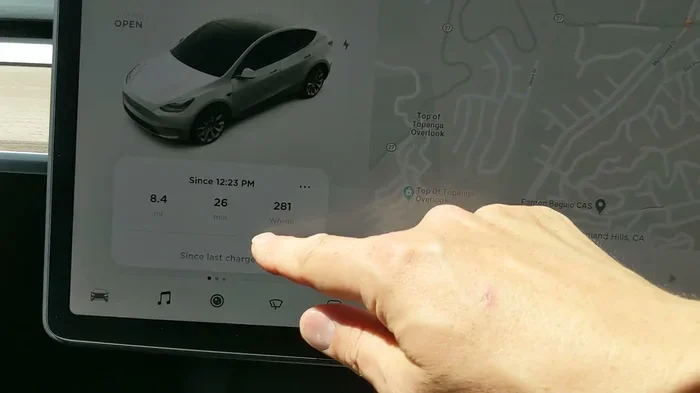
On the Model 3 and Model Y, the process is very simple. Wake up the touchscreen by tapping it. Then look at the bottom of the screen. You will see the odometer reading right there in small text. It shows your total lifetime mileage.
If you want to see more details, tap the “Vehicle” icon on the bottom left. From there, you can scroll to find additional trip information. The Tesla trip meter lets you track individual journeys too. This is handy if you want to know how far you drove on a specific day or trip.
For Tesla Model S and Model X
On the Model S and Model X, the steps are slightly different but just as easy. Tap the “Vehicle” button on the bottom left of the screen. Scroll down to “Trip Calculator.” Here you will find both your total odometer and your current trip distance.
The Model S and Model X also display your estimated driving range on the main dashboard. This number tells you how many miles you can still travel on a full charge. It updates in real time based on your driving habits and conditions.
Using the Tesla Mobile App to Track Mileage
One of the best things about owning a Tesla is the mobile app. You can check your car’s mileage from your phone, even when you are not near the vehicle. This is super useful if you want to track your daily driving or check on a car you are selling.
Setting Up the App for Mileage Tracking
First, make sure you have the Tesla app installed on your phone. Sign in with your Tesla account. Once you are in, tap on your vehicle from the home screen.
You will see a summary of your car’s status. Look for the “Mileage” section. It shows your total miles driven. The app also lets you view trip history and energy usage over time. This data is great for spotting trends in your driving habits.
Why the App Is So Convenient
The app is especially helpful if you share your Tesla with a family member. You can each track your own trips separately. Plus, the app sends push notifications about service reminders based on your mileage. You never have to remember when your next Tesla service appointment is due.
Another cool feature is that the app shows your car’s charge level and estimated range. So if you are planning a trip, you can check your mileage and range before you even leave the house.
Checking Mileage Through the Vehicle Settings
Did you know there is another way to find your Tesla miles? You can access detailed vehicle data through the settings menu. This method is great if you want to see a more complete picture of your car’s usage.
Accessing the Service Menu
To get to the service menu, go to “Controls” on the touchscreen. Then tap “Service.” From here, you can view your vehicle’s odometer reading and other important data points.
The service menu also shows your car’s warranty status and maintenance schedule. This is useful information if you are buying a used Tesla or tracking your car’s history.
What Else You Can Find in the Settings
Beyond just mileage, the settings menu gives you access to a lot of useful data. You can check your energy consumption, tire pressure, and even your car’s software version. All of this information helps you understand how your Tesla is performing day to day.
If you ever need to reset your trip meter, you can do it from here too. Just go to the trip section and select “Reset Trip.” It is a small feature, but it comes in handy when you start a new journey.
Understanding Tesla Mileage and Range
Now that you know how to check your miles, let us talk about what those numbers actually mean. Tesla mileage and EV range are related but different concepts. Understanding the difference will help you get the most out of your car.
What Is Odometer Mileage?
The odometer shows your total lifetime miles. This is the number that matters for resale value and maintenance tracking. Every mile you drive adds to this number. It never goes down. Think of it as your car’s lifetime scorecard.
When you are shopping for a used Tesla, the odometer reading is one of the first things you will look at. Lower miles generally mean more life left in the battery and drivetrain. But Tesla batteries are built to last, so even a car with higher miles can still be a great buy.
What Is Trip Mileage?
The trip meter is a resettable counter. It tracks the distance for a specific journey. You might use it to measure your daily commute or a weekend road trip. Once you reach your destination, you reset it to zero and start fresh.
Trip mileage is also useful for calculating your car’s efficiency. By dividing the miles you drove by the energy you used, you can see how many miles per kilowatt-hour you are getting. This number helps you understand your driving style and how it affects your battery range.
How Range Differs from Mileage
Your range is how far you can go on a full charge. Your mileage is how far you have already gone. These two numbers work together to help you plan your trips. If your range is 300 miles and your trip is 150 miles, you know you have plenty of charge to get there and back.
Keep in mind that your range changes based on driving speed, weather, and terrain. Cold weather can reduce your range by 10 to 20 percent. So if you are planning a long trip in winter, factor that into your planning.
Tips for Tracking Tesla Miles Accurately
Want to make sure your mileage readings are always accurate? Here are some practical tips to keep in mind.
- Check your odometer regularly. Make it a habit to glance at your total miles at least once a week. This keeps you aware of how much you are driving.
- Use the trip meter for specific journeys. Before you start a trip, reset your trip meter. When you arrive, you will know exactly how far you went.
- Monitor your app data. The Tesla app keeps a history of your trips and mileage. Review this data monthly to spot any unusual changes.
- Keep your software updated. Tesla regularly releases updates that improve accuracy and add new features. Always install the latest software to get the best experience.
- Compare with your energy usage. If your mileage seems off, check your energy consumption. A sudden drop in range could indicate a problem worth investigating.
- Visit a Tesla service center if needed. If you ever suspect your mileage reading is incorrect, a service technician can verify it for you.
Common Mistakes People Make When Checking Tesla Miles
Even though checking Tesla mileage is easy, some common mistakes can cause confusion. Here are a few to watch out for.
Confusing the Trip Meter with the Odometer
This is the number one mistake new Tesla owners make. The trip meter resets, but the odometer does not. If you are trying to find your total lifetime miles, make sure you are looking at the odometer, not the trip meter.
Ignoring the Range Estimate
Some people focus only on mileage and forget about their range. Your range tells you how much further you can go. Ignoring it can lead to unexpected charging stops or, worse, running low on charge.
Not Using the Mobile App
The Tesla app is a powerful tool for tracking mileage. Many owners do not use it to its full potential. Take a few minutes to explore the app and see what data it provides. You might be surprised by how much useful information is available at your fingertips.
Forgetting to Reset the Trip Meter
If you do not reset your trip meter after a journey, your next trip reading will be inaccurate. Get into the habit of resetting it every time you start a new trip. It takes just a second and keeps your data clean.
How Tesla Mileage Connects to Your Car’s Overall Health
Your Tesla mileage is more than just a number. It is a key indicator of your car’s overall health and longevity. Let us look at how mileage connects to different aspects of your vehicle.
First, your battery degrades over time based on usage. Higher mileage means more charge cycles. Tesla batteries are designed to last a very long time, but keeping an eye on your miles helps you understand where your battery stands in its lifespan.
Second, your tires wear down with mileage. Regular rotation and alignment become more important as your miles add up. Checking your mileage helps you stay on top of tire maintenance.
Third, your brake pads and other wear parts are also mileage-based. Tesla uses regenerative braking, which reduces wear on traditional brakes. But they still need attention eventually, and your mileage tells you when.
If you ever want to add accessories or make upgrades, your mileage can also matter. For instance, if you are looking at a 12v to 230v car inverter for your Tesla, your mileage and usage patterns help determine which model is right for you. Similarly, understanding your car’s electrical system is important when you are dealing with items like a 12v car socket to 3 pin adapter for older accessories.
And if you are ever wondering about your Tesla’s weight capacity or towing limits, those specifications are tied to your vehicle’s overall design and mileage history. You can learn more about vehicle weight ratings and what they mean for your car.
When to See a Tesla Service Center About Your Mileage
In most cases, your Tesla mileage will be perfectly accurate. But there are times when you should get it checked by a professional. If you notice a sudden jump or drop in your odometer reading, that is a red flag. It could indicate a software glitch or a hardware issue.
You should also have your mileage verified if you are buying a used Tesla. A service center can confirm the reading and check for any discrepancies. This protects you from potential fraud or odometer errors.
During regular service appointments, the technician will always check your mileage. They use it to schedule your next service and track your car’s maintenance history. So keeping accurate records of your trips and mileage is always a good idea.
Final Thoughts
Checking miles on a Tesla does not have to be complicated. Whether you use the dashboard, the mobile app, or the vehicle settings, you have multiple easy options at your fingertips. The key is to understand the difference between your odometer and trip meter, and to use both effectively.
Once you get comfortable with your Tesla’s mileage system, you will wonder how you ever managed without it. The data is clear, the tools are intuitive, and the information is always at your fingertips. So go ahead, check your miles today, and take full control of your electric driving experience.
Knowing your Tesla mileage empowers you to drive smarter, plan better, and enjoy your electric vehicle to the fullest. It is one of those small things that makes a big difference in your ownership experience.
Frequently Asked Questions
Can I check my Tesla mileage from my phone?
Yes, absolutely. The Tesla mobile app shows your total mileage right on the home screen. You can also view trip history and energy usage from the app. It is one of the easiest ways to stay on top of your miles.
What is the difference between the odometer and trip meter on a Tesla?
The odometer shows your total lifetime miles and never resets. The trip meter tracks a specific journey and can be reset to zero whenever you want. Both are accessible from your Tesla’s touchscreen dashboard.
Is the Tesla mileage reading accurate?
Yes, Tesla odometer readings are highly accurate. The system uses the car’s sensors and software to track miles precisely. If you ever have doubts, a Tesla service center can verify the reading for you.
How often should I check my Tesla mileage?
There is no set rule, but checking it weekly is a good habit. This helps you stay aware of your driving patterns and catch any unusual changes early. The Tesla app makes this process quick and effortless.
Can I reset my Tesla trip meter?
Yes, you can reset your trip meter anytime. Go to the trip section on your touchscreen and select “Reset Trip.” This clears the current trip distance so you can start tracking a new journey fresh.
Does Tesla mileage affect my car’s warranty?
Yes, your mileage plays a role in your warranty coverage. Tesla warranties are often mileage-based, so staying within the allowed limits is important. Always check your warranty terms to understand your coverage fully.
=== CONCLUSION ===
Now you know exactly how to check miles on a Tesla, and you have all the tools to do it with confidence. From the dashboard screen to the mobile app, Tesla gives you multiple ways to stay informed about your mileage. Use these methods regularly, and you will always know exactly where your car stands.
Remember, tracking your Tesla mileage is not just about numbers. It is about taking control of your driving experience, planning smarter trips, and keeping your car in top shape. So take a moment today to check your miles and explore the data your Tesla provides. You will be glad you did.