Does the Toyota Highlander Have Wireless Apple CarPlay
The Toyota Highlander does offer wireless Apple CarPlay, but only on certain trims and model years. If you want a truly cable-free smartphone experience in this popular hybrid SUV, you need to choose the right trim level or consider an aftermarket upgrade. Wireless Apple CarPlay makes daily driving more convenient by letting you access maps, music, and messages without plugging in your phone.
It is one of the most common questions people ask when shopping for a Toyota Highlander. Does the Toyota Highlander Have Wireless Apple CarPlay? The answer is not as simple as a yes or no. It depends on the trim level, the model year, and the specific features package you choose.
Wireless Apple CarPlay has become a must-have feature for many drivers. It lets you connect your iPhone to the car’s display without any cables. You get navigation, music, messages, and phone calls all through a wireless connection. It is clean, convenient, and feels modern.
In this guide, we walk through everything you need to know about wireless Apple CarPlay on the Toyota Highlander. We cover which trims have it, how to set it up, what to do if it is not working, and whether you can add it if your car does not come with it. Whether you are shopping for a new Highlander or already own one, this article has you covered.
The Toyota Highlander is a three-row SUV that has been a staple in American families for years. It offers reliability, spacious seating, and a long list of tech features. But when it comes to smartphone integration, not every trim is created equal. Understanding the details of wireless connectivity can save you from disappointment at the dealership.
Key Takeaways
- Wireless Apple CarPlay is available on select Toyota Highlander trims, primarily higher-end configurations.
- Lower trims may only offer wired CarPlay through a USB connection, so check your specific model carefully.
- Setting up wireless CarPlay is straightforward and takes just a few minutes after the initial pairing.
- Aftermarket solutions exist if your Highlander does not come with wireless CarPlay from the factory.
- Wireless connectivity works best when your phone and the car system are kept up to date.
- The Toyota Highlander hybrid version also supports wireless CarPlay on equipped trims.
- Always confirm your trim level before purchasing or assuming wireless capability is included.
📑 Table of Contents
- What Is Wireless Apple CarPlay and Why Does It Matter?
- Does the Toyota Highlander Have Wireless Apple CarPlay?
- How to Set Up Apple CarPlay on the Toyota Highlander
- Toyota Highlander Infotainment System Overview
- Wireless CarPlay vs. Wired CarPlay on the Highlander
- Can You Add Wireless Apple CarPlay to a Highlander That Does Not Have It?
- Tips for Getting the Most Out of Wireless Apple CarPlay
- Final Thoughts and Recommendations
What Is Wireless Apple CarPlay and Why Does It Matter?
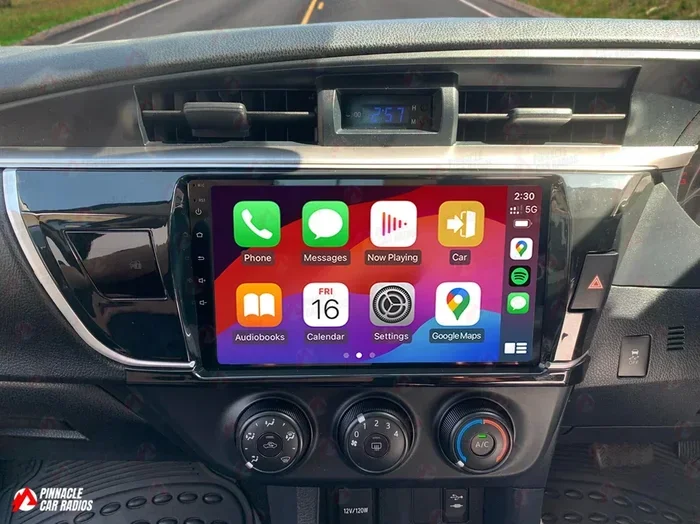
Before we dive into the Toyota Highlander specifics, let us quickly cover what wireless Apple CarPlay actually is. Apple CarPlay is a system that mirrors certain features of your iPhone onto your car’s display screen. It gives you access to maps, music, messages, and phone calls through a simplified interface designed for safety and ease of use.
How Wireless CarPlay Differs from Wired CarPlay
The main difference comes down to one word: cables. With wired CarPlay, you plug your iPhone into a USB port. The car’s infotainment system recognizes the phone and displays the CarPlay interface. It works reliably, but it means a cable is always in the way.
Wireless Apple CarPlay uses Bluetooth and Wi-Fi to connect your phone to the car. There is no cable needed. You pair your iPhone once, and the connection happens automatically every time you get in the car. It is a small convenience that makes a big difference in daily driving.
Why Drivers Love Wireless Connectivity
There are several reasons why wireless CarPlay has become so popular:
- No cable clutter in your cabin or on your dashboard.
- Automatic connection every time you start the car.
- Faster access to your favorite apps and navigation.
- Charging while connected through the car’s electrical system.
- A cleaner, more modern look inside the vehicle.
For many buyers, the presence of wireless Apple CarPlay is a deciding factor when choosing between two similar vehicles. It is no longer a luxury feature. It is becoming a standard expectation. And that is exactly why it matters so much when you are looking at a Toyota Highlander.
Does the Toyota Highlander Have Wireless Apple CarPlay?
Here is the direct answer. Some Toyota Highlander trims come with wireless Apple CarPlay, while others only offer wired CarPlay or no CarPlay at all. The availability depends heavily on the model year and the specific trim level you are looking at.
Wireless CarPlay by Trim Level
Toyota has a wide range of Highlander trims, and the tech features vary significantly from one to the next. Here is a general breakdown of how Apple CarPlay availability works across the trim levels:
- L and LE trims: These base and mid-level trims typically come with a standard infotainment system. In most cases, they offer wired Apple CarPlay through a USB connection. Wireless CarPlay is usually not included on these trims.
- XLE and XSE trims: These mid-to-upper trims often include a more advanced infotainment system. Depending on the model year, wireless Apple CarPlay may be available, sometimes as part of a technology package.
- Limited and Platinum trims: These top-tier trims almost always come with wireless Apple CarPlay as standard. They also include premium audio systems and additional connectivity features that make the overall experience much better.
The key takeaway here is that you need to check the specific trim you are interested in. Do not assume that every Highlander has wireless CarPlay just because the model is popular. Always confirm with the dealer or check the vehicle specifications online before making a purchase decision.
Model Year Differences
Toyota updates the Highlander every few years, and the tech features evolve with each generation. Newer model years tend to come with more advanced wireless connectivity as standard or as a more widely available option.
For example, the 2020 and earlier model years of the Highlander may have more limited CarPlay availability. The 2021 and newer models saw Toyota expanding the availability of wireless features across more trims. If you are shopping for a used Highlander, the model year matters a lot when it comes to smartphone integration features.
If you are looking at a newer Toyota Highlander, the chances of wireless Apple CarPlay being available are much higher. Toyota has been moving toward making wireless connectivity a more standard feature across its lineup. This trend reflects what customers want from their cars today.
How to Set Up Apple CarPlay on the Toyota Highlander
Setting up wireless Apple CarPlay on your Highlander is a fairly simple process. Once you have confirmed that your trim supports it, you can get everything connected in just a few minutes. Here is how it works step by step.
Step-by-Step Setup Guide
- Make sure your iPhone is updated. Go to Settings and check for the latest iOS version. Wireless CarPlay works best with recent software updates.
- Turn on your car and the infotainment system. Make sure the display screen is active and ready for pairing.
- Go to the Settings menu on the car display. Look for the Apple CarPlay or Smartphone Connection option.
- Select Wireless CarPlay. The car will search for available devices nearby.
- Choose your iPhone from the list. Your phone will show a pairing request. Accept it.
- Confirm the connection on both devices. Once paired, the CarPlay interface should appear on the car screen automatically.
After the initial setup, your Highlander should connect to your iPhone automatically every time you get in the car. You will not need to repeat the pairing process unless you reset the system or add a new device.
Troubleshooting Common Issues
Sometimes wireless CarPlay does not connect right away. This is normal and usually easy to fix. Here are a few quick tips:
- Restart your iPhone. A simple reboot often resolves connection issues.
- Restart the car’s infotainment system. Turn the car off, wait a few seconds, and turn it back on.
- Check for software updates. Both your iPhone and the car’s system may need updates for the best compatibility.
- Delete the car from your iPhone’s Bluetooth settings and pair it again from scratch.
- Make sure your phone is not in Low Power Mode. This can sometimes interfere with wireless connections.
If you have tried all of these steps and wireless CarPlay still is not working, it may be a hardware issue. In that case, a visit to your Toyota dealer for a diagnostic check is a good next step.
Toyota Highlander Infotainment System Overview
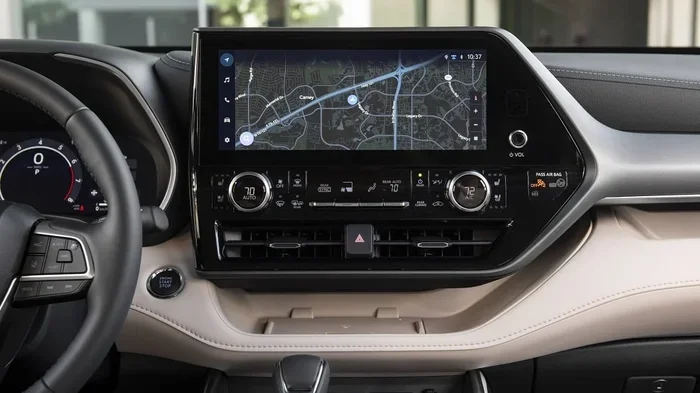
The infotainment system in the Toyota Highlander has improved significantly over the years. The latest versions offer a responsive touchscreen, clear graphics, and a user-friendly interface. But the system is about more than just Apple CarPlay. It includes a range of features that make driving and commuting more enjoyable.
What the Multimedia System Offers
The Toyota Highlander infotainment system includes several features beyond wireless connectivity:
- Bluetooth pairing for hands-free calling and audio streaming.
- Voice commands that let you control CarPlay and other features without taking your hands off the wheel.
- Navigation integration through Apple Maps and supported third-party apps.
- Audio controls for adjusting volume, switching tracks, and managing playlists.
- Phone integration for calling, texting, and replying to messages through the car’s display.
One thing to keep in mind is that the infotainment system also affects other features in the car. For instance, if you are interested in the Homelink garage door opener system that comes with some Highlander models, the overall tech package may influence how these features work together. You can learn more about how Homelink works with your vehicle to understand the full picture of your Highlander’s connected features.
Other Connectivity Features
Beyond Apple CarPlay, the Toyota Highlander offers several other connectivity options:
- Android Auto for Android smartphone users (availability varies by trim).
- Wi-Fi hotspot capability on some trims, allowing passengers to stay connected on the road.
- USB ports for charging and wired connections.
- Wireless phone charging on select trims, which works hand-in-hand with wireless CarPlay.
If you are considering changing your car’s sound system to improve the overall audio experience alongside CarPlay, you have options. Upgrading your car sound system can complement wireless Apple CarPlay and give you a more immersive listening experience on long road trips.
Wireless CarPlay vs. Wired CarPlay on the Highlander
Now that we know which trims offer wireless Apple CarPlay, let us compare the two options side by side. This comparison helps you understand what you are gaining or missing depending on your trim level.
| Feature | Wireless CarPlay | Wired CarPlay |
|---|---|---|
| Connection Method | Bluetooth and Wi-Fi | USB cable |
| Setup Time | One-time pairing | Plug in every time |
| Cable Required | No | Yes |
| Automatic Connection | Yes | No |
| Available Trims | Higher trims (XLE, Limited, Platinum) | Most trims |
| Phone Charging | Via car’s wireless charger or USB | Via USB cable |
| Connection Reliability | Very good on newer models | Excellent |
From this comparison, it is clear that wireless CarPlay offers a more convenient and modern experience. The one-time setup and automatic connection make it the preferred choice for most drivers. However, wired CarPlay still works perfectly well and may be the only option on lower trims.
Speed and Convenience Comparison
Wireless CarPlay connects slightly slower than a wired connection in some cases. This is because the wireless signal needs to establish a Wi-Fi and Bluetooth connection. However, on newer Toyota systems, this difference is minimal and barely noticeable in everyday use.
The convenience factor heavily favors wireless. You do not have to fumble with a cable every time you get in the car. The connection just happens. For daily commuters and families who use their Highlander regularly, this small convenience adds up over time.
Which Option Is Better for Daily Driving?
For most Toyota Highlander owners, wireless Apple CarPlay is the better choice. It is cleaner, more convenient, and feels more integrated with the car’s overall technology. If you are someone who values a modern, connected driving experience, wireless CarPlay is worth the upgrade to a higher trim level.
That said, if you are on a tighter budget and are looking at a base or mid-level trim, wired CarPlay still delivers all the core functionality you need. Maps, music, messages, and phone calls all work just as well through a cable.
Can You Add Wireless Apple CarPlay to a Highlander That Does Not Have It?
This is a very common question, especially for owners of older Highlander models or lower trims. The good news is that there are options if your Highlander does not come with wireless Apple CarPlay from the factory.
Aftermarket Solutions
Several aftermarket companies make wireless CarPlay adapters that can be added to almost any car. These devices plug into the car’s USB port and create a wireless CarPlay connection. They range in price from around $50 to $300 depending on the brand and features.
Some popular options include wireless CarPlay adapters from brands like Carlinkt, Aoomaal, and Roav. These adapters are relatively easy to install and do not require any permanent modifications to your vehicle. They work with most infotainment systems and can be a cost-effective way to add wireless connectivity.
Things to Consider Before Buying an Adapter
Before you buy an aftermarket wireless CarPlay adapter, keep a few things in mind:
- Compatibility. Make sure the adapter works with your specific Highlander infotainment system.
- Audio quality. Some adapters may slightly reduce audio quality compared to the factory system.
- Setup complexity. Most adapters are plug-and-play, but some may require a bit of technical comfort.
- Warranty implications. Adding aftermarket electronics could potentially affect your vehicle warranty, so check with your dealer first.
Aftermarket solutions are a great way to get wireless Apple CarPlay on an older or lower-trim Highlander. They are not as seamless as factory-installed systems, but they get the job done and offer excellent value for the price.
Tips for Getting the Most Out of Wireless Apple CarPlay
Once you have wireless Apple CarPlay set up on your Toyota Highlander, there are a few tips that can help you get the best experience every time you drive.
First, keep your iPhone and your car’s infotainment system updated. Apple releases iOS updates regularly, and Toyota also releases software updates for the Highlander’s system. These updates often include bug fixes and performance improvements for wireless CarPlay.
Second, organize your CarPlay apps before you get in the car. Apple CarPlay lets you pin your favorite apps to the home screen. Put your most-used navigation app, music app, and messaging app front and center so you can access them quickly.
Third, use voice commands whenever possible. Wireless CarPlay integrates with Siri, so you can make calls, send messages, and get directions without ever touching your phone. This is not only more convenient but also safer while driving.
Fourth, if you have a wireless charging pad in your Highlander, place your phone on it while using CarPlay. This keeps your phone charged throughout your drive and ensures a strong wireless connection.
Fifth, if you notice connection issues, do not ignore them. A weak or dropping wireless CarPlay connection can usually be fixed with a simple restart of your phone or the car’s system. Keeping both devices updated also helps prevent these issues.
For those who drive a hybrid Highlander, it is worth noting that the car’s electrical system supports wireless charging and CarPlay seamlessly. The hybrid battery does not interfere with wireless connectivity or the infotainment system. If you are curious about how other systems in your hybrid Highlander work, you might find it interesting to learn about how the AC system works in a hybrid car and how it complements the overall electrical setup.
Final Thoughts and Recommendations
So, does the Toyota Highlander have wireless Apple CarPlay? The answer is yes, but with conditions. It is available on select trims and model years, and it is one of the features that makes the Highlander feel modern and connected. If wireless CarPlay is important to you, make sure you choose the right trim or consider an aftermarket adapter.
The Toyota Highlander remains one of the best three-row SUVs on the market. It is reliable, spacious, and packed with features. Adding wireless Apple CarPlay to the mix makes it even more appealing for families and daily commuters who want a seamless smartphone integration experience.
Before you buy or assume your current Highlander has wireless CarPlay, take a moment to verify the trim level and model year. A quick check of the vehicle specifications can save you from frustration later. And if you already own a Highlander without wireless CarPlay, an aftermarket adapter is an affordable and effective solution.
Wireless Apple CarPlay is more than just a convenience feature. It is a reflection of how much our phones have become a part of our daily lives. Having a seamless, cable-free connection between your iPhone and your car makes every drive a little smoother and a lot more enjoyable.
Whether you are a first-time Highlander buyer or a long-time owner, understanding your wireless CarPlay options helps you make the most of this excellent SUV. Take the time to explore your trim options, test the system at a dealer, and enjoy the connected driving experience that wireless Apple CarPlay brings to the Toyota Highlander.
Frequently Asked Questions
Can I use Apple CarPlay wirelessly on all Toyota Highlander trims?
No, wireless Apple CarPlay is not available on all Highlander trims. It is typically found on mid-to-upper trims like the XLE, XSE, Limited, and Platinum. Base trims like the L and LE usually only offer wired CarPlay through a USB connection. Always check the specific trim specifications before purchasing.
Does the Toyota Highlander 2023 support wireless Apple CarPlay?
Yes, the 2023 Toyota Highlander supports wireless Apple CarPlay on equipped trims. Toyota expanded wireless connectivity options across its lineup in recent years. The XLE, XSE, Limited, and Platinum trims generally include wireless CarPlay as a standard or available feature.
Do I need an internet connection for wireless Apple CarPlay to work?
No, you do not need an active internet connection for wireless Apple CarPlay to function. The system connects your iPhone to the car via Bluetooth and Wi-Fi, but it does not require data or Wi-Fi from an external source. Navigation and audio work offline using your phone’s stored data and downloaded maps.
Can I charge my phone while using wireless Apple CarPlay?
Yes, you can charge your phone while using wireless Apple CarPlay. If your Highlander has a wireless charging pad, you can place your phone on it and use CarPlay simultaneously. Alternatively, you can plug in a USB cable for charging while still enjoying the wireless CarPlay interface on the display.
Is wireless Apple CarPlay safe to use while driving?
Yes, wireless Apple CarPlay is designed with driver safety in mind. The interface simplifies your phone’s features into a driver-friendly layout. You can use Siri voice commands to make calls, send messages, and get directions without taking your hands off the wheel or your eyes off the road.
What other Toyota models offer wireless Apple CarPlay?
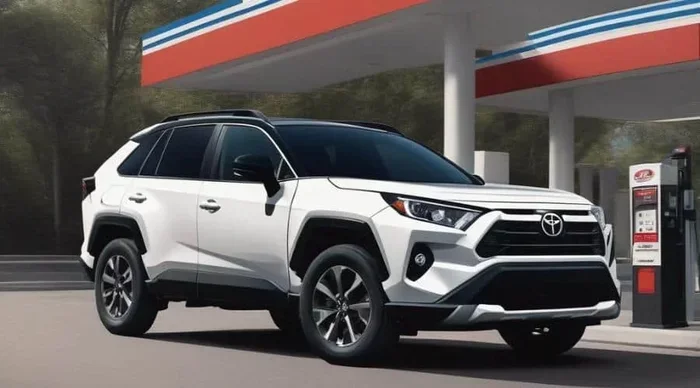
Many Toyota models now offer wireless Apple CarPlay, including the RAV4, Camry, Tacoma, and 4Runner. Availability varies by trim level and model year. Toyota has been steadily expanding wireless CarPlay availability across its entire vehicle lineup in recent years to meet customer demand.