Does the Dodge Charger Have Apple CarPlay Built In
The Dodge Charger offers Apple CarPlay on most recent model years, but availability depends on the trim level and tech package. You can connect your iPhone through a USB cable or, on select trims, enjoy wireless Apple CarPlay for a cable-free experience. Whether you drive the SXT, R/T, or Scat Pack, understanding how Apple CarPlay works on the Charger helps you stay connected, navigate, and stream music safely on every drive.
Key Takeaways
- Apple CarPlay is available on most Dodge Charger trims from 2018 onward, including SXT, R/T, and Scat Pack models.
- Wired Apple CarPlay uses a USB cable and comes standard on many trims, while wireless Apple CarPlay may require a higher trim or tech package.
- The Uconnect infotainment system powers Apple CarPlay integration on the Charger, offering a responsive touchscreen and smooth smartphone mirroring.
- Not all model years or trims include Apple CarPlay, so always check the specific features before buying.
- Android Auto is also supported on most Chargers, giving you flexibility regardless of your phone type.
- Siri voice commands work with Apple CarPlay, allowing hands-free control for calls, messages, and navigation.
- An adapter may be needed for older Charger models that do not natively support Apple CarPlay.
📑 Table of Contents
- Does the Dodge Charger Have Apple CarPlay Built In?
- What Is Apple CarPlay and Why Does It Matter?
- Which Dodge Charger Trims Include Apple CarPlay?
- How to Set Up Apple CarPlay on Your Dodge Charger
- Apple CarPlay vs. Android Auto on the Dodge Charger
- Common Issues with Apple CarPlay on the Dodge Charger
- Model Year Differences: Which Chargers Have the Best Apple CarPlay?
- Tips to Get the Most Out of Apple CarPlay on Your Dodge Charger
- Final Thoughts
Does the Dodge Charger Have Apple CarPlay Built In?
If you are shopping for a Dodge Charger and wondering about Apple CarPlay, you are not alone. This is one of the most common questions buyers ask. The short answer is yes, most Dodge Chargers come with Apple CarPlay built in. But the details matter. Not every trim level or model year offers the same connectivity experience.
Apple CarPlay lets you mirror your iPhone on the Charger’s infotainment screen. You get access to maps, music, messages, and calls without taking your hands off the wheel. It is a huge safety upgrade and a convenience feature that modern drivers expect. In this guide, we break down everything you need to know about Apple CarPlay on the Dodge Charger. We cover which trims have it, how to set it up, and what to expect from the experience.
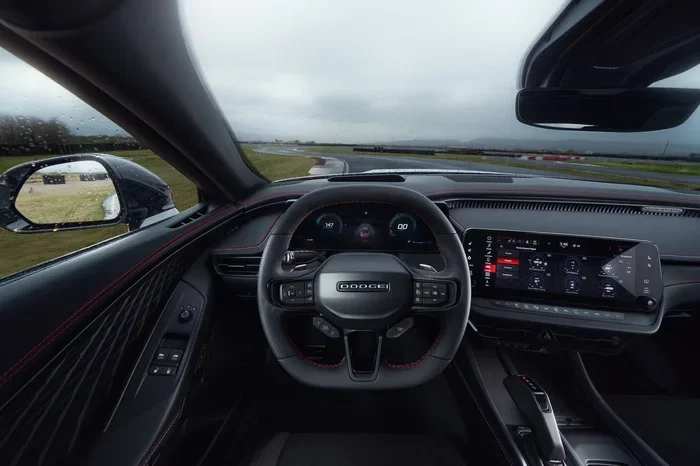
The Dodge Charger has been a staple of the American muscle car scene for decades. Over the years, Dodge has updated its tech offerings to keep up with modern demands. The Uconnect system is the backbone of the Charger’s infotainment. It supports both Apple CarPlay and Android Auto on most recent versions. However, the exact features you get depend on your model year and trim level.
Some buyers also wonder about the Dodge Charger hybrid and how its fuel system works, including at what point a hybrid switches to gas. While that is a different topic, it is worth noting that Dodge has expanded its Charger lineup to include hybrid and electric variants, which also carry the latest tech features, including smartphone integration.
What Is Apple CarPlay and Why Does It Matter?
Apple CarPlay is Apple’s smartphone integration system. It projects your iPhone’s key features onto your car’s display. Think of it as a safe bridge between your phone and your vehicle. You do not need to pick up your phone while driving. Everything happens through the car’s screen and voice commands.
Here is what Apple CarPlay gives you:
- Maps and navigation with real-time traffic updates
- Music streaming from apps like Spotify, Apple Music, and Pandora
- Hands-free calling and messaging through Siri
- Podcast and audiobook playback
- Voice-controlled search for contacts, restaurants, and more
The hands-free aspect is what makes Apple CarPlay so valuable. Studies show that distracted driving causes thousands of accidents every year. By keeping your eyes on the road and hands on the wheel, Apple CarPlay helps you stay safe. On the Dodge Charger, this feature works seamlessly with the Uconnect touchscreen. The interface is intuitive and responsive, making it easy to access your favorite apps with just a tap or a voice command.
Which Dodge Charger Trims Include Apple CarPlay?
Not every Dodge Charger trim comes with Apple CarPlay standard. The availability depends on the model year and the specific trim level. Here is a breakdown of what to expect across the Charger lineup.
Base Trims and Apple CarPlay
The SXT trim is the entry-level Dodge Charger. On most model years from 2018 onward, the SXT comes with a standard Uconnect infotainment system that supports Apple CarPlay. This means even the base model gives you solid smartphone integration. You get a touchscreen display that responds well and supports both wired and, on some versions, wireless Apple CarPlay.
Mid-Range Trims and Enhanced Tech
The GT and R/T trims typically come with upgraded tech packages. These trims often include a larger touchscreen and more advanced connectivity features. The R/T, in particular, offers a premium feel with leather seating and enhanced audio. Apple CarPlay is standard on these trims, and you may also get features like wireless charging and a premium sound system that pairs well with your connected phone.
Performance Trims and Apple CarPlay
The Scat Pack and Daytona variants are the performance-focused models. These trims do not skimp on technology. Apple CarPlay is included as part of the Uconnect system on these higher-end models. The large displays on these trims make navigation and music control easy and clear, even while cruising at highway speeds.
How to Set Up Apple CarPlay on Your Dodge Charger
Setting up Apple CarPlay on your Dodge Charger is straightforward. Whether you have a wired or wireless setup, the process is simple and user-friendly.
Wired Apple CarPlay Setup
For wired Apple CarPlay, you need a Lightning cable or a USB-C cable, depending on your iPhone model. Here are the steps:
- Plug your iPhone into the USB port in the center console.
- The Uconnect system should detect your phone automatically.
- Tap the Apple CarPlay icon on the screen.
- Follow the on-screen prompts to grant permissions.
- Your iPhone interface is now mirrored on the Charger’s display.
Wireless Apple CarPlay Setup
Wireless Apple CarPlay eliminates the need for a cable. On supported trims, the setup is even easier:
- Make sure Bluetooth is enabled on both your iPhone and the Charger.
- Go to the Uconnect settings menu.
- Select Apple CarPlay and choose wireless connection.
- Your phone pairs automatically the first time.
- After that, it connects every time you start the car.
If your Charger model does not support wireless Apple CarPlay natively, you can still use a wireless Apple CarPlay adapter. These small devices plug into the USB port and create a wireless bridge between your phone and the car’s system. They are affordable and easy to install.
Apple CarPlay vs. Android Auto on the Dodge Charger
The Dodge Charger supports both Apple CarPlay and Android Auto. This gives you flexibility no matter what type of phone you use. Here is a quick comparison of the two systems on the Charger:
| Feature | Apple CarPlay | Android Auto |
|---|---|---|
| Supported Phones | iPhone | Android devices |
| Connection Type | Wired and wireless | Wired (wireless varies) |
| Voice Assistant | Siri | Google Assistant |
| Navigation Apps | Apple Maps, Google Maps, Waze | Google Maps, Waze |
| Music Apps | Apple Music, Spotify, Pandora | Spotify, YouTube Music, Pandora |
| Setup Process | Simple and intuitive | Simple and intuitive |
Both systems work well on the Charger’s Uconnect display. The choice between them usually comes down to your personal phone preference. If you are an iPhone user, Apple CarPlay is the natural choice. The integration is smooth, and Siri works flawlessly with the Charger’s hands-free calling and messaging features.
Common Issues with Apple CarPlay on the Dodge Charger
While Apple CarPlay on the Dodge Charger works well most of the time, you may run into occasional issues. Here are the most common problems and how to fix them.
Connection Drops or Fails to Connect
If your Apple CarPlay connection drops frequently, try a different USB cable. Cheap or damaged cables are the most common cause. Also, make sure your iPhone is running the latest iOS version. A simple restart of both your phone and the infotainment system often resolves the issue.
Screen Freezes or Becomes Unresponsive
A frozen screen can be frustrating. This usually happens when too many apps are running in the background on your iPhone. Close unnecessary apps before connecting. If the problem persists, a soft reset of the Uconnect system can help. Simply turn off the car, wait a few minutes, and restart.
No Sound Through Car Speakers
If you can see Apple CarPlay on the screen but hear no sound, check your audio settings. Make sure the car’s audio source is set to Apple CarPlay. Also, verify that your phone’s volume is turned up and not muted.
Maps Not Loading Properly
Navigation issues can stem from a weak data connection or outdated maps. Make sure you have a stable cellular data connection. You can also update your map apps through the App Store to get the latest maps and features.
Model Year Differences: Which Chargers Have the Best Apple CarPlay?
The Dodge Charger has evolved over the years, and so has its tech. Here is a quick look at how Apple CarPlay support has changed across different model years.
2015 to 2017 Model Years
Earlier Charger models from 2015 to 2017 may have limited or no native Apple CarPlay support. Some trims in this range came with an older Uconnect system that did not include smartphone integration. If you own one of these models, a retrofit adapter can add Apple CarPlay functionality. These adapters plug into the existing USB port and upgrade the system.
2018 to 2020 Model Years
The 2018 to 2020 model years brought a major tech upgrade. Most trims in this range include standard Apple CarPlay and Android Auto. The Uconnect system became more responsive and user-friendly. Wireless Apple CarPlay started appearing on higher trims during this period.
2021 to 2024 Model Years
The latest Dodge Chargers offer the most advanced tech experience. Wireless Apple CarPlay is more widely available, and the infotainment system is faster and more polished. These models also support the latest features, such as over-the-air updates and enhanced Siri integration. If you want the best Apple CarPlay experience on a Dodge Charger, aim for a model from this range.
Tips to Get the Most Out of Apple CarPlay on Your Dodge Charger
Want to maximize your Apple CarPlay experience? Here are some practical tips:
- Use a high-quality cable. A certified Lightning or USB-C cable ensures a stable wired connection and faster data transfer.
- Keep your iPhone updated. Software updates often include improvements to Apple CarPlay performance and compatibility.
- Use Siri for hands-free control. Say “Hey Siri” to make calls, send messages, or get directions without touching your phone.
- Organize your favorite apps. Apple CarPlay lets you pin your most-used apps to the home screen for quick access.
- Consider a wireless adapter. If your Charger does not have wireless Apple CarPlay, a small adapter can add this convenience for under $50.
- Clear cache regularly. Over time, app data can slow down Apple CarPlay. Clearing the cache on your iPhone helps keep things running smoothly.
Final Thoughts
The Dodge Charger is a powerful, stylish muscle car, and it holds up well in the modern tech landscape. Apple CarPlay is available on most Dodge Charger trims, especially from 2018 onward. Whether you choose a base SXT or a powerful Scat Pack, you can stay connected and entertained on every drive. The Uconnect infotainment system makes setup easy, and the support for both wired and wireless connections adds flexibility.
If you are still deciding which Charger trim to buy, pay close attention to the tech package details. Not every trim includes wireless Apple CarPlay, and some older models may need an adapter. Always confirm the features before making a purchase. With the right setup, Apple CarPlay turns your Dodge Charger into a smarter, safer, and more connected driving machine.
Also, if you are curious about the broader Charger experience, including its hybrid variants and how they manage fuel, you can explore more about the Dodge Charger’s powertrain options and when it switches between power sources. Understanding the full picture of what the Charger offers helps you make a more informed buying decision.
Frequently Asked Questions
Do all Dodge Chargers come with Apple CarPlay?
No, not all Dodge Chargers come with Apple CarPlay. Most models from 2018 onward include it as standard or available on higher trims. Earlier models from 2015 to 2017 may not have native support and could require an adapter to add the feature.
Can I use wireless Apple CarPlay on the Dodge Charger?
Yes, wireless Apple CarPlay is available on select Dodge Charger trims and model years. It is more common on higher trims like the R/T and Scat Pack. If your Charger does not have wireless support built in, you can use a wireless Apple CarPlay adapter to add it.
Does the Dodge Charger support Android Auto too?
Yes, the Dodge Charger supports both Apple CarPlay and Android Auto on most model years. This gives you flexibility whether you use an iPhone or an Android device. Both systems work through the Uconnect infotainment system.
What year Dodge Charger first offered Apple CarPlay?
Apple CarPlay became available on the Dodge Charger starting with the 2018 model year. This was when Dodge updated the Uconnect system to include modern smartphone integration features across most trims.
Do I need a special cable for Apple CarPlay on the Dodge Charger?
For wired Apple CarPlay, you need a Lightning cable or a USB-C cable depending on your iPhone model. A certified cable from Apple or a reputable brand ensures the best connection and reliability. Avoid cheap, uncertified cables that may cause connection issues.
Can I add Apple CarPlay to an older Dodge Charger that doesn’t have it?
Yes, you can add Apple CarPlay to older Chargers using a retrofit adapter. These devices plug into the existing USB port and enable Apple CarPlay functionality. They are easy to install and affordable, making them a great option for older model year Chargers.
=== CONCLUSION ===
The Dodge Charger delivers a strong Apple CarPlay experience on most trims and model years. From the base SXT to the high-performance Scat Pack, you can count on seamless smartphone integration through the Uconnect system. Whether you prefer a wired connection or the convenience of wireless Apple CarPlay, the Charger has you covered. Just remember to check the specific trim and model year details before buying, and consider a wireless adapter if your older model needs an upgrade. Stay connected, stay safe, and enjoy every mile in your Dodge Charger.