Does the Toyota Sienna Have Wireless Apple CarPlay
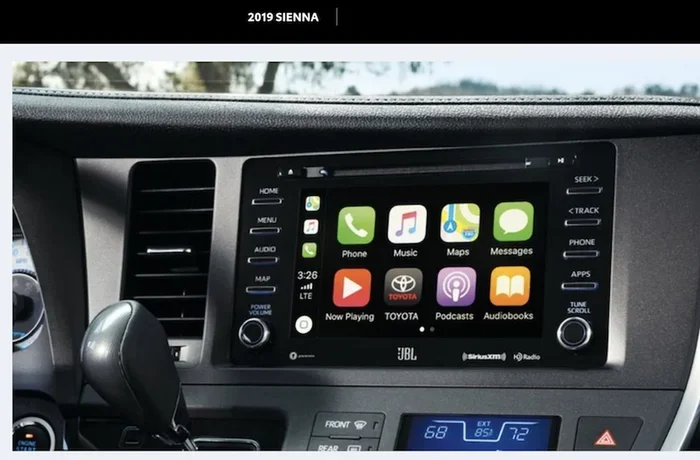
Yes, the Toyota Sienna comes equipped with wireless Apple CarPlay, making it one of the most family-friendly minivans for seamless smartphone integration. This wireless connection lets you stream music, navigate with maps, and make hands-free calls without fumbling with cables. If you are looking for a Toyota Sienna with modern tech convenience, wireless Apple CarPlay is a standout feature that keeps everyone connected on every trip.
Does the Toyota Sienna Have Wireless Apple CarPlay
The Toyota Sienna is one of the most popular minivans on the road today. Families love it for its spacious interior, reliable performance, and modern tech features. One question buyers ask all the time is whether the Toyota Sienna wireless Apple CarPlay comes standard. The short answer is yes, but there are some important details you should know before you buy.
In this guide, I will walk you through everything you need to know about Apple CarPlay wireless in the Toyota Sienna. I will cover which trims include it, how to set it up, what features you get, and how it compares to wired connections. Whether you are shopping for a new Sienna or already own one, this article has you covered.
So, does the Toyota Sienna have wireless Apple CarPlay? Let us dive in and find out.
Key Takeaways
- Wireless Apple CarPlay is available on higher Toyota Sienna trims from 2023 onward.
- You need a 2023 or newer model to get the wireless feature.
- iPhone 12 and later pair effortlessly with the Sienna’s wireless system.
- Older trims only support wired CarPlay via a USB cable connection.
- Setup requires no cables after initial pairing for a clutter-free cabin.
- Android Auto is also wireless on select Sienna trims alongside Apple.
- Always confirm your trim level because wireless CarPlay isn’t standard on all.
📑 Table of Contents
- What Is Wireless Apple CarPlay and Why It Matters
- Does the Toyota Sienna Have Wireless Apple CarPlay
- How to Set Up Wireless Apple CarPlay on the Toyota Sienna
- Toyota Sienna Apple CarPlay Features and Benefits
- Wireless vs Wired Apple CarPlay: What Is the Difference
- Tips for Getting the Most Out of Apple CarPlay in Your Sienna
- Final Thoughts on Toyota Sienna Wireless Apple CarPlay
What Is Wireless Apple CarPlay and Why It Matters
Wireless Apple CarPlay lets you connect your iPhone to your car without plugging in a cable. You get access to your favorite apps, music, maps, and messages right on the touchscreen. It works through a Wi-Fi connection, which means no fumbling with cords every time you get in the car.
This matters because a wired connection can be annoying. Cables get tangled. They wear out over time. And let us be honest, plugging your phone in every single trip gets old fast. Wireless Apple CarPlay removes all of that hassle. You just pair your phone once, and it connects automatically every time you start the engine.
For families using the Toyota Sienna, this is a game changer. Parents can keep their phones charged and connected without cluttering the center console with cables. Kids in the backseat can enjoy their own entertainment while the driver stays connected to navigation and calls.
Does the Toyota Sienna Have Wireless Apple CarPlay
The Toyota Sienna does offer wireless Apple CarPlay, but it depends on the trim level and the model year. Not every Sienna comes with this feature standard. Let me break it down for you so you know exactly what to look for.
Toyota Sienna Trims That Include Wireless Apple CarPlay
The higher-end trims of the Toyota Sienna come with wireless Apple CarPlay as part of the infotainment package. Here is a quick overview:
- Toyota Sienna XLE: The XLE trim offers wireless Apple CarPlay on higher configurations. You will want to make sure the technology package is included when ordering.
- Toyota Sienna XSE: The XSE trim typically includes wireless Apple CarPlay as a standard feature. This is one of the more popular trims for tech-forward buyers.
- Toyota Sienna Platinum: The top-of-the-line Platinum trim comes with wireless Apple CarPlay standard. It also includes a larger touchscreen and premium audio.
If you are looking at the base LE or SE trims, you may only get wired Apple CarPlay. Always check the specific build sheet before you purchase. Dealers can confirm exactly what is included in a particular configuration.
Model Year Considerations
The Toyota Sienna went through a major redesign starting in 2021. The newer models have better technology overall. If you are shopping for a used Sienna, model year matters a lot for wireless Apple CarPlay availability. Earlier model years may not have this feature at all, even on higher trims.
For the 2024 Toyota Sienna, wireless Apple CarPlay is widely available across most trims. Toyota has been making this feature more accessible with each new generation. The 2023 and 2022 model years also support wireless connectivity on the right configurations.
How to Check If Your Specific Sienna Has Wireless Apple CarPlay
Not sure if your Sienna has wireless Apple CarPlay? Here are a few ways to find out:
- Check the owner’s manual. It will list all connectivity features for your specific trim.
- Look at the infotainment screen settings. If you see a CarPlay option without a cable icon, it is likely wireless.
- Ask the dealer. They can pull up your vehicle identification number and confirm the exact features.
- Visit the Toyota website and enter your trim level. The tech specifications page will list connectivity options.
How to Set Up Wireless Apple CarPlay on the Toyota Sienna
Setting up wireless Apple CarPlay on the Toyota Sienna is straightforward. Here is a step-by-step guide to get you connected.
Step 1: Make Sure Your iPhone Is Compatible
Wireless Apple CarPlay requires an iPhone 12 or later. Older models may only support wired connections. Check your iPhone model before assuming wireless compatibility. Also, make sure your iPhone is updated to the latest iOS version. Updates often include improvements to CarPlay connectivity.
Step 2: Enable Apple CarPlay on Your iPhone
Go to Settings on your iPhone. Tap General. Then tap CarPlay. Select your Toyota Sienna from the list of available vehicles. Make sure the toggle for CarPlay is turned on. Some users skip this step and wonder why the connection does not work.
Step 3: Connect Through the Sienna Infotainment System
Start your Toyota Sienna. On the infotainment screen, select the CarPlay icon. Your phone should appear on the screen. Follow the prompts to complete the pairing process. The first connection may take a minute or two. After that, it should connect automatically every time you start the car.
Step 4: Test the Connection
Once connected, open a music app or maps on your phone. It should appear on the Sienna’s touchscreen. Try making a call using Siri voice control. Test navigation with your preferred app. If everything works, you are all set. If not, try restarting both your phone and the infotainment system.
Quick Tips for a Smooth Setup
- Keep your iPhone within a few feet of the center console for the best signal.
- Restart your phone if CarPlay does not connect on the first try.
- Delete and re-pair the connection if you experience frequent disconnections.
- Make sure your car is parked before setting up CarPlay for the first time.
Toyota Sienna Apple CarPlay Features and Benefits
Once you have wireless Apple CarPlay connected to your Toyota Sienna, you unlock a range of useful features. These make driving safer and more enjoyable for everyone in the family.
Hands-Free Calling and Messaging
One of the biggest benefits of Apple CarPlay is hands-free functionality. You can make and receive calls without touching your phone. Siri can read your text messages aloud and dictate replies. This is especially helpful for parents who need to stay focused on the road while managing family logistics.
Navigation With Your Favorite Apps
Apple CarPlay supports popular navigation apps like Google Maps, Waze, and Apple Maps. You get turn-by-turn directions on the Sienna’s large touchscreen. This is far more convenient than using your phone’s small screen or relying on a separate GPS device. The Toyota Sienna infotainment system displays maps clearly, even in bright sunlight.
Music and Podcast Streaming
Stream music from Apple Music, Spotify, Pandora, and other apps directly through your Sienna’s audio system. You can control playback from the touchscreen or use voice commands. Podcasts, audiobooks, and radio apps all work seamlessly with wireless Apple CarPlay. Long road trips become much more entertaining for the whole family.
Siri Voice Control
Siri is deeply integrated with Apple CarPlay. You can ask Siri to find a gas station, call a contact, or send a text. Just hold down the voice command button on your steering wheel and speak. This keeps your eyes on the road and hands on the wheel, which is exactly what Toyota Safety Sense is all about.
Charging While Connected
When you use wireless Apple CarPlay, your iPhone charges through the built-in wireless charging pad (on models that support it). You do not need to carry a separate charger or worry about a dead battery. This is a huge convenience for daily commuters and road trippers alike.
Wireless vs Wired Apple CarPlay: What Is the Difference
Not everyone realizes that Apple CarPlay comes in two versions: wireless and wired. Both give you access to the same apps and features. But there are some real differences worth understanding.
| Feature | Wireless Apple CarPlay | Wired Apple CarPlay |
|---|---|---|
| Connection Method | Wi-Fi | USB cable |
| Setup | Pair once, connects automatically | Plug in cable every time |
| Convenience | Very high | Moderate |
| Phone Charging | Yes (on supported models) | Yes |
| Connection Stability | Very good | Excellent |
| Availability on Sienna | Higher trims only | Available on most trims |
| Cable Needed | No | Yes |
Overall, wireless Apple CarPlay is the better option for most Sienna owners. It is more convenient and keeps your center console clean. Wired connections are more reliable in rare cases where Wi-Fi interference is an issue. But for everyday use, wireless is the clear winner.
When Wired Might Still Make Sense
There are a few situations where a wired connection might be preferable. If you have an older iPhone that does not support wireless CarPlay, you will need a cable. Some users also report that wired connections are slightly faster to establish. If you frequently let passengers use your phone for CarPlay, a wired connection can be quicker to hand over.
Tips for Getting the Most Out of Apple CarPlay in Your Sienna
Once you have wireless Apple CarPlay working in your Toyota Sienna, a few simple tips can help you get the most out of it.
Keep Your iPhone Updated
Apple regularly releases iOS updates that improve CarPlay performance. These updates fix bugs, add new features, and enhance compatibility. Make it a habit to update your iPhone whenever a new version is available. This ensures your Toyota Sienna technology works at its best.
Organize Your CarPlay Apps
You can customize which apps appear on the CarPlay screen. Only the apps you actually use while driving should be visible. This keeps the interface clean and reduces distractions. Rearrange your apps so the ones you use most are easy to find.
Use Siri for Safe Driving
Siri is your best friend when using Apple CarPlay. Instead of tapping the screen while driving, use voice commands. Ask Siri to play your favorite playlist, call a family member, or find the nearest gas station. This keeps your attention where it belongs: on the road.
Troubleshoot Connection Issues
If your wireless Apple CarPlay stops working, do not panic. Try these simple fixes:
- Turn Wi-Fi off and back on on your iPhone.
- Restart your Toyota Sienna infotainment system.
- Forget the CarPlay connection on both your phone and car, then re-pair.
- Check for iOS and infotainment software updates.
- Move your phone closer to the center console.
Maximize Your Sienna’s Infotainment System
The Toyota Sienna’s infotainment system is designed to work hand in hand with Apple CarPlay. Take time to explore the settings. Adjust the screen brightness for daytime visibility. Set your preferred audio balance. Familiarize yourself with the touchscreen layout so you can navigate without taking your eyes off the road for too long.
Consider Your Hybrid Sienna
If you drive a Toyota Sienna hybrid, you will be happy to know that Apple CarPlay works the same way regardless of your powertrain. The hybrid version of the Sienna offers excellent fuel efficiency, which is great for families who drive a lot. You can learn more about how the hybrid system works, including questions like does a hybrid burn gas when idling, to better understand your vehicle’s fuel behavior.
Hybrid Sienna owners should also know that using wireless Apple CarPlay does not significantly impact battery life. The infotainment system draws power from the car’s electrical system, not the hybrid battery. You can enjoy all your connected features without worrying about draining the battery. If you are curious about other hybrid-specific features, check out does AC burn gas in a hybrid car for related insights.
Understanding When the Hybrid System Switches
For hybrid Sienna drivers, understanding your vehicle’s powertrain behavior adds to the overall ownership experience. Knowing at what point does a hybrid switch to gas helps you appreciate how seamlessly the Sienna transitions between electric and gas power. This knowledge complements your tech setup, ensuring you stay informed about every aspect of your vehicle.
Final Thoughts on Toyota Sienna Wireless Apple CarPlay
The Toyota Sienna is a fantastic minivan, and the addition of wireless Apple CarPlay makes it even better. Whether you are commuting to work, taking the kids to school, or embarking on a cross-country road trip, wireless connectivity keeps you connected without the clutter of cables.
The key takeaway is this: not every Sienna trim comes with wireless Apple CarPlay standard. If this feature is important to you, make sure you choose the right trim or add the technology package. The XSE, XLE (with tech package), and Platinum trims are your best bets for wireless Apple CarPlay in the Toyota Sienna.
Setting it up is easy. Once paired, it connects automatically every time you start the car. The features are useful, the interface is intuitive, and the convenience factor is hard to beat. If you are still on the fence about whether the Toyota Sienna is right for your family, the wireless Apple CarPlay experience alone is a strong reason to consider it.
Take the time to test drive a Toyota Sienna with wireless Apple CarPlay. Once you experience the seamless connectivity, you will wonder how you ever drove without it. The Toyota Sienna proves that a family-friendly minivan can also be a tech-savvy ride that keeps up with modern life.
Frequently Asked Questions
Does the Toyota Sienna Have Wireless Apple CarPlay?
Yes, the Toyota Sienna offers wireless Apple CarPlay on most recent model years. This feature lets you connect your iPhone to the infotainment system without plugging in a cable. It is available on higher trim levels and comes standard on many 2021 and newer Sienna models.
Which Toyota Sienna Model Years Offer Wireless Apple CarPlay?
The Toyota Sienna introduced wireless Apple CarPlay starting with the 2021 model year. Earlier models from 2011 to 2020 only offered wired CarPlay connections. If you are shopping for a used Sienna, always confirm the model year and trim to make sure wireless support is included.
How Do You Set Up Wireless Apple CarPlay on a Toyota Sienna?
First, make sure your iPhone is running the latest iOS version and is compatible with CarPlay. Then, tap the CarPlay icon on your Sienna’s touchscreen or go to Settings and select your iPhone. The connection should establish automatically as long as both devices support wireless pairing.
Does the Toyota Sienna Wireless Apple CarPlay Work With All iPhone Models?
Wireless Apple CarPlay works with most iPhone models from the iPhone 8 and later. You will need iOS 13 or newer installed on your device for full functionality. Older iPhones may only support wired CarPlay connections on the Sienna.
Is Wireless Apple CarPlay Available on All Toyota Sienna Trims?
Wireless Apple CarPlay is typically standard on higher trims like the XLE and Limited editions. Base trims such as the LE may only offer wired CarPlay depending on the model year. Always check the specific trim specifications before purchasing to confirm wireless support.
Can You Use Wireless Apple CarPlay and Charge Your Phone at the Same Time on a Toyota Sienna?
Yes, the Toyota Sienna allows you to use wireless Apple CarPlay while your phone charges through the available wireless charging pad. This feature is especially handy on longer road trips when you need navigation and music without draining your battery. Not all trims include a wireless charging pad, so verify this when choosing your Sienna.