Why Isnt My Lane Assist Working On The Open Road Today
Lane assist is a vital safety feature, but it can stop working for many reasons, from dirty sensors to software glitches. If your lane assist isn’t functioning on the open road, you’re not alone—this is one of the most common driver complaints today. In this guide, we’ll walk you through the top causes, simple fixes, and when to call a pro. Understanding your driver assistance system helps you stay safe and avoid costly repairs.
You’re cruising down a long stretch of highway. The road is clear. The sun is shining. And then—your lane assist light flickers on, and the steering starts fighting you. Or worse, it just shuts off completely. You wonder, “Why isn’t my lane assist working?”
This is a frustrating experience. Your lane departure warning and lane centering features are supposed to make driving safer and less tiring. But when they fail, it can leave you feeling unsure and anxious on the road. The good news? Most of the time, the fix is simpler than you think.
In this article, we’ll explore every major reason your lane assist might not be working. We’ll cover sensor problems, software bugs, weather issues, and more. By the end, you’ll know exactly what to check and how to get your driver assistance system back online. Let’s dive in.
Key Takeaways
- Dirty or blocked sensors are the number one reason lane assist stops working.
- Weather conditions like rain, snow, and fog can temporarily disable lane assist.
- Outdated software can cause your driver assistance system to malfunction unexpectedly.
- Low battery voltage or electrical issues often trigger lane assist warnings.
- Misaligned tires or steering components can confuse the lane centering system.
- Regular maintenance keeps your lane keeping system working reliably on every trip.
📑 Table of Contents
- What Is Lane Assist and How Does It Work?
- Common Reasons Why Lane Assist Stops Working
- Weather and Road Conditions That Affect Lane Assist
- How to Fix Lane Assist Issues Yourself
- When to See a Professional Mechanic
- Preventing Lane Assist Problems in the Future
- How Lane Assist Technology Has Evolved
- Key Takeaways
- Conclusion
What Is Lane Assist and How Does It Work?
Lane assist is a smart safety feature found in modern cars. It uses cameras and sensors to watch the road markings around you. When the system notices your car drifting toward a lane line, it either warns you or gently steers you back. Think of it as a helpful co-pilot that never gets tired.
The system relies on a few key parts working together. A windshield camera sits near your rearview mirror. It reads lane lines on the road. Sensors in the steering wheel detect your inputs. An electronic control unit processes all this data in real time. When everything works, it feels almost like magic.
Different brands call it different names. Honda calls it Lane Keeping Assist. Tesla calls it Autopilot. Ford uses Lane Centering. But no matter the name, the basic idea is the same. The car helps you stay in your lane and avoid accidental lane departures.
Types of Lane Assist Systems
Not all lane assist systems are the same. Here are the main types you might find in a vehicle:
- Lane Departure Warning: This system only alerts you when you drift. It beeps or vibrates the steering wheel. It does not steer for you.
- Lane Keeping Assist: This version actively nudges the steering wheel to keep you centered.
- Lane Centering: This is the most advanced type. It continuously adjusts the steering to keep your car perfectly in the lane.
- Lane Change Assist: This helps you change lanes safely by checking blind spots and guiding the steering.
Knowing which type you have matters. A lane departure warning system failure feels different from a lane centering failure. The fix might be different too.
Common Reasons Why Lane Assist Stops Working
If your lane assist has suddenly stopped working, there’s usually a clear reason behind it. Let’s look at the most common culprits.
Dirty or Blocked Camera Lens
This is the number one reason lane assist fails. The windshield camera sits behind your rearview mirror. It needs a clear view of the road ahead. If dirt, mud, snow, or even a sticker blocks the lens, the system can’t read lane lines. Simple as that.
Think about it. You wouldn’t expect a camera to take a clear photo through a muddy lens. Your car’s lane keeping system works the same way. A quick wipe with a soft cloth can often solve this problem. Make it a habit to clean the camera area whenever you wash your car.
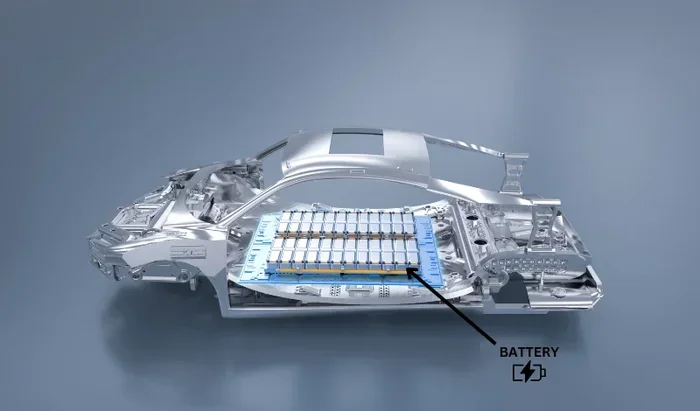
Low Voltage or Battery Problems
Your car’s driver assistance system needs steady electrical power. If your battery is weak or old, the voltage can drop. This confuses the electronic control unit that runs lane assist. The system may shut down as a safety measure.
Signs of a low battery include dim headlights, slow engine cranking, or flickering dashboard lights. If you notice these alongside a lane assist warning, your battery might be the cause. A simple voltage test at any auto parts store can confirm this.
Software Glitches and Outdated Firmware
Modern cars run on software. And like any software, it can have bugs. Sometimes a software update goes wrong. Other times, the system just needs a reboot. A frozen lane centering module can cause the whole lane assist system to stop responding.
Many car makers release software updates through dealerships or over-the-air connections. If your system hasn’t been updated in a while, it might be time to check. An outdated autonomous driving module can cause all sorts of weird behavior.
Sensor Calibration Issues
Your car’s sensors need to be calibrated correctly. This means they must be perfectly aligned to read the road accurately. After a windshield replacement, a front-end repair, or even a minor fender bender, calibration can shift.
When the camera calibration is off, your lane assist might work sometimes and fail other times. You might notice it works on straight highways but not on curved roads. A calibration reset at a qualified shop usually fixes this.
Steering Wheel or Steering Column Problems
The lane assist system relies on the steering column to make adjustments. If there’s an issue with the steering wheel sensors or the electric power steering motor, the system can’t do its job.
Common signs include a stiff steering wheel, clicking sounds when turning, or a steering warning light on the dash. These problems often point to a deeper steering assist issue that needs professional diagnosis.
Tire and Alignment Issues
This one surprises a lot of drivers. Your lane keeping system depends on the car tracking straight. If your tires are underinflated, unevenly worn, or your tire alignment is off, the car might drift. The system then kicks in to correct it—or it might shut down if it thinks there’s a real problem.
Uneven tire wear is a clear sign of alignment trouble. If you notice your car pulling to one side, get your alignment checked. This simple fix can restore your lane assist and improve your overall driving experience.
Weather and Road Conditions That Affect Lane Assist
Your lane assist works best on clear days with well-marked roads. But the real world isn’t always that perfect. Let’s look at how different conditions can affect your system.
Rain, Snow, and Fog
Water, snow, and ice on the windshield can block the camera lens. Even heavy rain can scatter the camera’s view of lane lines. In these conditions, your lane departure warning system may disable itself automatically.
This is actually a safety feature, not a malfunction. The system knows it can’t read the road clearly. It would be dangerous for it to keep steering if it can’t see properly. Once the weather clears and the camera lens is clean, the system should come back on.
Faded or Missing Road Markings
What happens when the road lines are hard to see? Your lane centering system struggles too. Construction zones, rural roads, and older highways often have faded markings. The camera might not be able to detect the lanes at all.
When this happens, the system usually turns off and displays a message on the dash. Don’t panic. This is normal behavior. You’ll need to take full control of the steering until the markings become clear again.
Curves and Complex Road Geometry
Sharp curves, split lanes, and complex intersections can confuse lane assist systems. The camera might not be able to predict the road path fast enough. In these moments, the system may hand control back to you.
This doesn’t mean your system is broken. It means the road is too complex for the current technology. Always stay alert and ready to steer, especially on unfamiliar roads or in construction zones.
How to Fix Lane Assist Issues Yourself
Before you rush to the mechanic, try these simple fixes at home. Many lane assist problems have straightforward solutions.
Step 1: Clean the Camera and Sensors
Start with the basics. Find the camera lens behind your rearview mirror. Gently wipe it with a microfiber cloth. Remove any dirt, bugs, or stickers. Also check the front radar sensors if your car has them. These are usually hidden behind the front grille or bumper.
This one small step fixes the problem more often than you’d think. Make it part of your regular car cleaning routine.
Step 2: Restart the System
Sometimes the driver assistance system just needs a reboot. Turn off your car completely. Wait about 30 seconds. Then start the engine again. This clears temporary glitches and resets the lane centering module.
Think of it like restarting your phone when it acts up. A simple reboot often solves the issue.
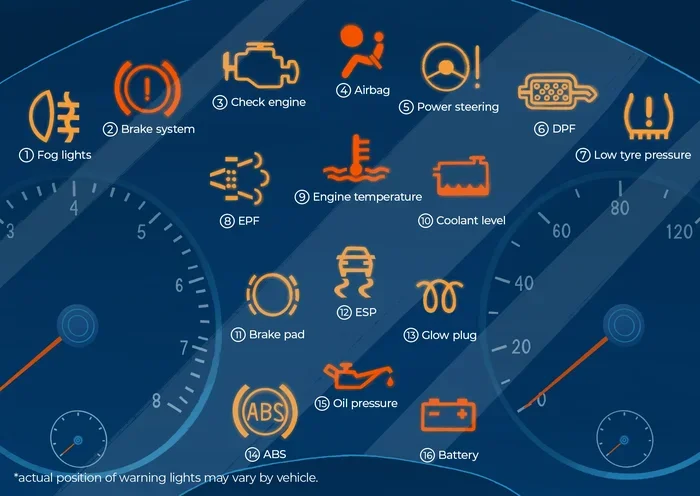
Step 3: Check for Dashboard Warning Lights
Your dashboard is full of clues. Look for any warning lights related to lane assist, steering, or stability control. A steady light usually means a minor issue. A flashing light often signals something more serious.
Write down what you see. This information helps a mechanic diagnose the problem faster and more accurately.
Step 4: Verify Your Tire Pressure
Check all four tires with a pressure gauge. Compare the readings to your owner’s manual. Low tire pressure can cause your car to drift and trigger lane assist warnings. Inflate tires to the recommended PSI and see if the system returns to normal.
Step 5: Update the Software
Check with your dealership or use your car’s infotainment system to look for available software updates. Many modern vehicles support over-the-air updates. Installing the latest software can fix known bugs in the lane assist system.
Quick Tips for Lane Assist Maintenance
- Clean the camera lens every time you wash your car.
- Restart your system once a month to clear temporary errors.
- Keep your tires properly inflated at all times.
- Check for software updates whenever you visit the dealership.
- Avoid placing stickers or accessories near the rearview mirror area.
When to See a Professional Mechanic
Some lane assist problems need expert hands. If the simple fixes above don’t work, it’s time to see a professional. Here’s when to make that call.
Persistent Warning Lights
If your lane assist warning light stays on even after a restart and cleaning, don’t ignore it. A persistent light usually means a deeper issue with the sensors, wiring, or control module.
After a Collision or Repair
Any accident, no matter how minor, can knock your sensors out of alignment. Even a small fender bender can affect your camera calibration and steering wheel sensors. Always get your driver assistance system checked after a collision.
Electrical System Failures
If you notice multiple electrical issues at once—flickering lights, power window problems, and a dead lane assist—you might have a wiring problem. This is not a DIY fix. A professional mechanic can trace the electrical fault and repair it safely.
Steering Motor or Pump Issues
Strange noises, heavy steering, or a steering wheel that won’t center properly are red flags. These symptoms point to a problem with the steering assist hardware. A qualified technician can test the electronic control unit and determine if the motor or pump needs replacement.
When in doubt, get a professional opinion. Trying to repair complex electronics yourself can void your warranty or cause more damage.
Preventing Lane Assist Problems in the Future
The best way to deal with a broken lane assist is to prevent problems before they start. Here’s how to keep your system running smoothly for years to come.
Keep Your Windshield Clean
The camera behind your mirror needs a crystal-clear view. Make cleaning the windshield a regular habit. Pay special attention to the area around the rearview mirror. This small effort goes a long way toward keeping your lane keeping system reliable.
Stay on Top of Software Updates
Car manufacturers constantly improve their driver assistance system software. Updates can fix bugs, improve performance, and add new features. Check for updates at every service appointment. Many newer cars can update themselves over Wi-Fi.
Maintain Your Tires
Properly inflated, evenly worn tires help your car track straight. This takes the burden off your lane centering system. Rotate your tires every 5,000 to 7,500 miles and check alignment at least once a year.
Drive Defensively
Even the best autonomous driving technology has limits. Always stay alert, keep your hands on the wheel, and be ready to take control. Lane assist is a safety aid, not a replacement for attentive driving.
Know Your System’s Limits
Read your owner’s manual and learn exactly what your lane assist can and cannot do. Understanding the system helps you use it correctly and avoid false alarms. It also helps you know when the system is working as intended versus when something is actually wrong.
How Lane Assist Technology Has Evolved
The lane assist systems in today’s cars are far more advanced than those from just five years ago. Early versions only gave audio warnings when you drifted. Modern lane centering systems can steer the car for miles on the highway with minimal driver input.
Advances in camera technology and artificial intelligence have made these systems smarter. They can now read faded lane lines, detect construction zones, and adjust to different road types. But this technology still has limits. Understanding both the strengths and weaknesses of your system helps you use it safely.
Car makers are also working on integrating lane assist with adaptive cruise control and other features. The goal is a fully integrated highway driving experience that reduces driver fatigue and improves safety. These developments are exciting, but they also mean the systems are more complex—and more likely to need proper maintenance.
Key Takeaways
- Dirty or blocked sensors are the number one reason lane assist stops working.
- Weather conditions like rain, snow, and fog can temporarily disable lane assist.
- Outdated software can cause your driver assistance system to malfunction unexpectedly.
- Low battery voltage or electrical issues often trigger lane assist warnings.
- Misaligned tires or steering components can confuse the lane centering system.
- Regular maintenance keeps your lane keeping system working reliably on every trip.
Conclusion
So why isn’t your lane assist working on the open road today? The answer is usually one of a few common issues. A dirty camera lens, a low battery, outdated software, or a calibration problem can all cause the system to fail. The good news is that most of these problems are easy to fix and don’t require expensive repairs.
Start with the simple stuff. Clean the camera. Restart the system. Check your tires and battery. If those steps don’t work, it’s time to visit a professional. Taking care of your lane departure warning and lane centering systems keeps you safer and your car running better.
Remember, lane assist is a tool to help you drive more safely. It works best when you understand how it works and keep it maintained. Next time you hit the open road, you’ll know exactly what to do if your system acts up. Stay safe, stay informed, and enjoy the drive.
Frequently Asked Questions
Can a dirty windshield cause lane assist to stop working?
Yes, absolutely. The lane assist camera sits behind your rearview mirror and needs a clear view of the road. Dirt, mud, ice, or even heavy rain on the windshield can block the camera lens. This prevents the system from reading lane lines properly. Keeping the windshield clean, especially around the camera area, is one of the easiest ways to prevent problems.
Is it safe to drive without lane assist working?
Yes, it’s safe as long as you stay alert and drive carefully. Lane assist is a helpful feature, but it’s not essential for safe driving. Without it, you simply need to pay closer attention to lane markings and keep your hands on the wheel. If the system keeps turning off, address the issue soon to restore this helpful safety net.
How much does it cost to fix lane assist problems?
The cost varies widely depending on the issue. A simple camera cleaning costs nothing. A software update might be free at the dealership. But replacing a damaged windshield camera or electronic control unit can cost several hundred dollars. Always get a diagnosis before committing to repairs so you know exactly what you’re paying for.
Can I reset lane assist myself?
In many cases, yes. Try turning off your car completely, waiting 30 seconds, and restarting the engine. This often clears temporary glitches. Some vehicles also let you reset the system through the infotainment menu. Check your owner’s manual for specific instructions. If a simple reset doesn’t work, a professional diagnosis may be needed.
Does lane assist work in all weather conditions?
No, lane assist systems have limits in bad weather. Heavy rain, thick snow, and dense fog can block the camera’s view of lane lines. In these conditions, the system may automatically disable itself to avoid giving false commands. This is a safety feature, not a malfunction. The system should turn back on once weather conditions improve.
How often should I have my lane assist system checked?
There’s no strict schedule, but regular checks help. Inspect the camera lens every time you wash your car. Ask your mechanic to check the system during routine oil changes or tire rotations. If you notice any warning lights or unusual behavior, don’t wait—get it checked right away. Staying proactive keeps your driver assistance system working reliably.