How Do I Activate My Key Fob A Quick and Easy Guide
Activating your key fob is simpler than you think. This guide walks you through every step, from battery replacement to programming your remote. Whether you drive a sedan or SUV, you will find clear instructions to get your key fob working again fast.
Have you ever stood by your car, pressing the key fob button over and over, hoping it would just work? You are not alone. Millions of drivers face this frustrating moment every single day. The good news is that activating your key fob does not need to be a headache. In this guide, we will walk you through every simple step. You will learn how to program your remote, fix common problems, and keep your fob working like new. We also share tips that car dealers might not tell you. By the end, you will feel confident handling your car key fob on your own. Let us get started.
Your key fob is one of the most used accessories in your vehicle. It locks the doors, unlocks the trunk, and sometimes even starts the engine. When it stops working, it can throw your whole routine off. The good part? Most activation issues are easy to fix. You do not need special tools or expensive trips to the mechanic. A few minutes and some basic knowledge go a long way. This guide covers everything from fresh battery installation to full key fob programming. We keep it simple and practical so anyone can follow along.
Key Takeaways
- Easy Activation: Most key fobs can be activated in under 10 minutes with basic steps.
- Battery Matters: A weak battery is the #1 cause of fob problems. Replacing it is quick and cheap.
- No Dealer Needed: You can program many fobs yourself at home with simple instructions.
- Troubleshooting Helps: Simple resets and signal checks solve most common fob issues.
- Know Your Car: Activation steps vary by brand and model, so check your owner manual too.
📑 Table of Contents
- What Is a Key Fob and How Does It Work
- How to Activate Your Key Fob Step by Step
- Common Key Fob Problems and How to Fix Them
- How to Choose the Right Replacement Key Fob
- Expert Tips to Keep Your Key Fob Working Longer
- When to Call a Professional for Key Fob Help
- Key Fob Activation Quick Reference by Car Brand
- How to Extend Your Key Fob Signal Range
- Key Takeaways
What Is a Key Fob and How Does It Work
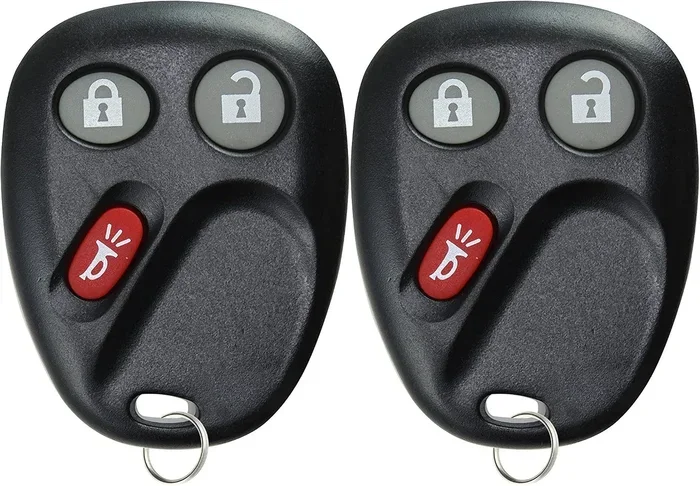
A key fob is a small remote device that communicates with your car using radio signals. When you press a button, the fob sends a coded signal to your vehicle. The car receives that signal and responds by locking, unlocking, or performing another function. Modern car key fobs use rolling codes. This means the code changes every time you press a button. It keeps your vehicle safe from thieves who might try to copy your signal.
Most vehicle key fobs use a small coin battery, usually a CR2025 or CR2032. These batteries last about two to four years depending on how often you use the fob. When the battery gets low, you may notice the signal range shrinking. The buttons might feel less responsive too. Replacing the battery is often the first fix you should try. It costs just a few dollars and takes less than five minutes.
Types of Key Fobs
Not all fobs are the same. Different cars use different kinds of remotes. Here are the most common types you might encounter:
- Standard Remote Fob: Has buttons for lock, unlock, and panic. Works from about 50 to 100 feet away.
- Smart Key Fob: Used in push-button start vehicles. You do not even need to take it out of your pocket.
- Proximity Fob: Detects your presence near the car and unlocks automatically.
- Remote Start Fob: Lets you start the engine from a distance to cool or warm up the car.
Each type has its own activation process. But the basic principles stay the same across all of them. Understanding which type you have helps you follow the right steps.
How to Activate Your Key Fob Step by Step
Activating your key fob is a straightforward process. While exact steps vary by car brand, the general method is similar for most vehicles. Below, we break it down into clear stages you can follow right now.
Step 1: Replace the Battery
Before you try any programming, make sure your fob has a fresh battery. A weak battery causes most activation failures. Here is how to swap it out:
- Find the small seam or notch on the back of your fob.
- Use a small flathead screwdriver or a coin to pry it open gently.
- Remove the old battery and note which side faces up.
- Insert the new battery with the positive side facing up.
- Snap the fob back together until it clicks.
After replacing the battery, test the fob from a short distance first. If the car responds, you are already halfway done. If not, move on to the next step.
Step 2: Get Inside Your Vehicle
Sit in the driver seat and close all doors firmly. You need the car in accessory mode or fully on for programming. Some cars require the ignition to be in the “On” position without starting the engine. Turn the key or press the start button until the dashboard lights come on. This step is important because the car needs to be ready to receive the fob signal.
Step 3: Enter Programming Mode
Entering key fob programming mode depends on your car brand. Here are the most common methods:
- Method A: Press and hold the “Lock” and “Unlock” buttons on the fob simultaneously for about 15 seconds.
- Method B: Turn the ignition on and off three times within five seconds, ending in the “On” position.
- Method C: Press the panic button and hold it while pressing the lock button five times quickly.
Once you hear a door lock click or see the dashboard flash, the car is in programming mode. This tells you it is ready to pair with your fob.
Step 4: Pair the Fob
Now press any button on the fob within 30 seconds. You should hear another confirmation sound or see the lights flash again. This means the car accepted the signal. Repeat this step if you are programming more than one fob. Most cars accept up to three or four remotes at a time.
Step 5: Test the Fob
Turn the ignition off and step outside the car. Test every button on the fob. Try locking, unlocking, and opening the trunk if your fob has that button. Walk about 50 feet away and test again. If all buttons work at a normal range, your key fob activation is complete.
Common Key Fob Problems and How to Fix Them
Even after activation, you might run into issues. Here are the most common key fob problems and simple fixes for each one.
The Fob Does Not Respond at All
If pressing any button does nothing, start with the battery. Nine times out of ten, a dead battery is the culprit. If the battery is fresh, check for physical damage. Drop the fob on a hard surface and the internal circuit board can crack. Water damage is another common issue. If your fob got wet, let it dry completely before trying again. You can also try resetting the fob by holding all buttons at once for 10 seconds.
The Fob Works Only Up Close
If your remote key fob only works when you are right next to the car, the battery might still be weak. Replace it with a brand-new one. Signal interference can also cause this problem. Parking near a tall building or a cell tower sometimes disrupts the fob signal. Try moving to a different spot and testing again.
The Car Does Not Recognize the Fob
This happens when the fob is not properly paired with the car. You may need to re-enter key fob programming mode and pair it again. On some vehicles, you can also try placing the fob directly against the start button. Many modern cars have a backup antenna in the push-button area that reads the fob even when the battery is very low.
The Buttons Feel Sticky or Unresponsive
Over time, dirt and grime build up under the buttons. Clean the fob with a soft cloth dampened with a little rubbing alcohol. Avoid soaking it. If a specific button feels stuck, try pressing it firmly several times to loosen any debris. You can also use compressed air to blow out dust from between the buttons.
How to Choose the Right Replacement Key Fob
Sometimes activation fails because the fob itself is faulty or incompatible. If you need a replacement, choosing the right one matters. Here is what to consider:
- Car Make and Model: Always match the fob to your specific vehicle. A fob made for a Toyota will not work on a Honda without reprogramming.
- Year of the Vehicle: Car manufacturers change fob designs frequently. The year matters just as much as the make.
- OEM vs Aftermarket: OEM fobs come directly from the car manufacturer and are plug-and-play. Aftermarket fobs are cheaper but may need extra programming steps.
- Features: Decide which functions you need. Do you want remote start? A rear trunk release? A panic alarm button?
You can buy replacement car key fobs online or at auto parts stores. Always check the return policy in case you need to exchange it. If you are unsure which fob fits your car, call the store and give them your vehicle identification number. They can look up the exact match for you.
If you loved toy cars as a kid, you might enjoy our article on 10 Lines on My Favourite Toy Car for some fun nostalgia.
Expert Tips to Keep Your Key Fob Working Longer
Taking care of your key fob can save you time and money. Follow these simple habits to keep it in great shape for years.
Store It Properly
Do not leave your fob in direct sunlight or near extreme heat. The plastic shell can warp and the battery can drain faster. Keep it in a cool, dry place, like a jacket pocket or a small pouch in your bag. Avoid storing it next to your phone. Phones can sometimes cause signal interference that drains the fob battery.
Replace the Battery Before It Dies
Do not wait until the fob stops working completely. Most fobs give warning signs first. The signal range gets shorter. The buttons need more pressure to respond. You might also see a warning light on the dashboard. Replace the battery as soon as you notice these signs. It prevents the hassle of being locked out of your car.
Keep a Spare Fob
Having a backup key fob is a smart move. If your primary fob gets lost or damaged, you are not stuck waiting for a replacement. Program the spare fob using the same steps we covered earlier. Store it in a different location, like a drawer at home or a bag you do not use every day.
Clean It Regularly
A quick wipe-down every few weeks keeps your fob looking and working great. Use a soft cloth with a tiny bit of rubbing alcohol. Clean around the buttons carefully. This removes oils from your fingers and prevents buildup that can make buttons feel sticky.
Avoid Getting It Wet
Water damage is one of the fastest ways to kill a key fob. Even water-resistant fobs have limits. Do not leave it in your pocket when doing laundry or washing your hands. If it does get wet, dry it immediately with a towel and remove the battery until it is completely dry inside.
When to Call a Professional for Key Fob Help
Most key fob activation tasks are DIY-friendly. But some situations need professional help. You should call a locksmith or your car dealer if:
- The fob still does not work after replacing the battery and reprogramming it.
- The fob got severely damaged, such as being run over or submerged in water.
- Your car requires a special diagnostic tool for fob programming.
- You lost all fobs for your vehicle and need a new one from scratch.
- The car alarm goes off randomly or the fob locks and unlocks on its own.
A professional locksmith who specializes in automotive keys can often help faster and cheaper than a dealership. Many locksmiths carry a wide range of fobs and can program them on the spot. Always ask for a quote before agreeing to any service. This way, you avoid surprise costs and know exactly what you are paying for.
Key Fob Activation Quick Reference by Car Brand
Every car brand has slightly different steps for fob activation. Here is a quick reference table to help you find your car’s method faster:
- Toyota: Insert the key into the ignition, turn it from “Off” to “On” three times in under 10 seconds, then press any fob button.
- Honda: Turn the ignition to “On,” press and hold the lock button on the fob, then press the unlock button three times within five seconds.
- Ford: Turn the ignition on and off, then press the brake pedal and hold the power button for 10 seconds until the lights flash.
- Chevrolet: Press and hold the lock and unlock buttons on the driver door for 30 seconds, then release and press any fob button.
- BMW: Press the unlock button, then within 10 seconds press and hold the lock button for 5 seconds, then release both.
These are general steps and may vary slightly by model year. Always double-check with your owner manual for the exact process. The manual is your best friend when it comes to key fob programming.
How to Extend Your Key Fob Signal Range
If you find yourself standing right next to your car for the fob to work, there are a few things you can try. First, replace the battery with a fresh one. A new battery sends a stronger signal. Second, check for obstructions. Keys, coins, or other metal objects near the fob can block the signal. Third, try standing in an open area without tall buildings nearby. Buildings and walls absorb radio signals and reduce range. Fourth, make sure the fob antenna inside your car is not damaged. The antenna receives the signal from your fob, and if it is broken, the car will not respond even if the fob works fine.
Some drivers also notice their remote key fob works better when they hold it near their chin or chest. Your body can act as a signal amplifier in some cases. It is not a fix, but it can help you get into the car in an emergency when the fob battery is very low.
Key Takeaways
- Fresh Battery First: Always try a new battery before doing anything else. It solves most problems instantly.
- Programming Is Simple: You can program most fobs yourself in under 10 minutes with the right steps.
- Know Your Car Brand Steps: Each brand has a slightly different activation process. Check the reference table above.
- Keep It Clean and Dry: Regular maintenance prevents most fob issues from developing.
- Have a Spare: A backup fob saves you from being locked out in an emergency.
- Call a Pro When Needed: Some situations require a locksmith or dealer. Do not force it.
Activating your key fob is a skill every car owner should have. It saves time, money, and frustration. With the steps in this guide, you can handle most fob issues on your own. Keep a spare battery in your glove box and a backup fob at home. These small habits make a big difference. Your car key fob works hard for you every day. A little care goes a long way in keeping it running smoothly.
Now that you know how to activate and maintain your fob, you can face any lockout situation with confidence. Share this guide with a friend who might need it too. And remember, when in doubt, your vehicle owner manual is always the best first resource. It has the exact steps for your specific car model. Stay prepared and keep your fob working like new!
Frequently Asked Questions
How do I know if my key fob battery needs replacing?
You will notice the signal range getting shorter and buttons requiring more pressure. Some cars also show a dashboard warning light. Replacing the battery is quick and inexpensive, so try it first before assuming a bigger problem.
Can I activate my key fob without going to a dealer?
Yes, in most cases you can activate and program your key fob yourself at home. The steps vary by car brand, but you do not need any special tools. Your owner manual has the exact programming instructions for your vehicle.
How long does a key fob battery last?
A key fob battery typically lasts two to four years. Heavy daily use can shorten that time. Keeping a spare battery in your glove box ensures you are never caught off guard by a dead fob.
What should I do if my key fob gets water damaged?
Remove the battery immediately and let the fob dry completely for at least 24 hours. Do not try to turn it on while it is still wet. If it still does not work after drying, you may need a replacement fob.
Why does my key fob stop working after replacing the battery?
The new battery might be inserted incorrectly or it might not be fully seated. Remove the battery, check the orientation, and reinsert it firmly. If the fob still does not work, try reprogramming it using your car’s programming mode.
Can two key fobs interfere with each other?
Yes, if you carry multiple fobs close together, they can sometimes send conflicting signals. This is rare but can happen. Keep your fobs in separate pockets or compartments to avoid any interference issues.
=== CONCLUSION ===
Learning how to activate your key fob is one of the easiest car care skills you can develop. It takes just a few minutes and saves you from unnecessary trips to the dealer or locksmith. We covered battery replacement, programming steps, common problems, and expert maintenance tips in this guide. Now you have everything you need to keep your car key fob working perfectly. Try these steps today and see how simple it really is. Your car will thank you with a quick, reliable response every time you press that button.