Master Car Racing Game Steering for Maximum Speed
Car racing game steering is the key to unlocking faster lap times and better control. Steering techniques like hand positioning, drift control, and sensitivity settings can transform your gameplay. This guide covers everything from beginner basics to advanced racing wheel setups.
Key Takeaways
- Master hand positioning for precise car racing game steering control.
- Choose the right steering setup—budget wheels or keyboards—based on your needs.
- Adjust sensitivity and deadzone to eliminate input lag and improve accuracy.
- Learn drift and trail braking techniques to carry more speed through corners.
- Avoid common mistakes like over-steering and jerky inputs.
- Practice with targeted drills to build muscle memory and consistency.
📑 Table of Contents
Why Car Racing Game Steering Matters
Every great race starts with control. In car racing game steering, the way you turn the wheel determines whether you nail the apex or spin out in the dirt. Unlike casual driving, virtual racing demands precision, rhythm, and an understanding of how your input translates to on-screen behavior. Steering techniques are the foundation of any fast lap. When you master the wheel, you unlock the ability to carry more speed through corners, brake later, and overtake with confidence. This section explains why steering deserves your full attention.
Think of your steering input as a conversation with the car. Every twitch of the joystick or twist of a wheel sends a signal. The game reads that signal and adjusts the front wheels accordingly. If your inputs are jerky, the car reacts with oversteer or understeer. Smooth, deliberate movements create predictable handling. Racing game steering is not about turning the wheel as fast as possible; it’s about guiding the car along the ideal racing line. Whether you use a racing wheel or a standard controller, the principles remain the same.
Quick Tip: Before you start a race, spend two minutes just driving straight. Feel the force feedback or vibration. Notice how the car centers itself. This simple warm-up aligns your hands with the steering response and builds a baseline for your car racing game steering style.
The Physics of Virtual Steering
Virtual cars behave like real ones. They have weight transfer, tire grip limits, and momentum. When you turn the wheel, the front tires generate lateral force. Too much steering angle at high speed breaks traction. That’s why car racing game steering requires you to think ahead. You must anticipate corners and begin turning before you reach them. Steering sensitivity settings can amplify small movements, so finding the right balance is key.
Expert Insight: Professional sim racers often say, “Steer with your eyes, not your hands.” Look where you want to go, and the car will follow. This mental shift reduces jerky corrections and makes your racing game steering fluid.
Choosing the Right Steering Setup
Your hardware shapes your steering experience. A racing wheel provides realistic resistance and precise control. A keyboard works for quick, arcade-style races. The best choice depends on your budget, play style, and the games you prefer. This section compares the options and helps you decide.
Gaming Keyboard vs. Racing Wheel
Keyboards offer instant input and no learning curve. You press a key to turn, and the car responds immediately. However, keyboards lack the nuance of a steering wheel. You can’t feel the road through your fingertips. Car racing game steering on a keyboard is like driving with thick gloves—you have the control, but the feedback is limited.
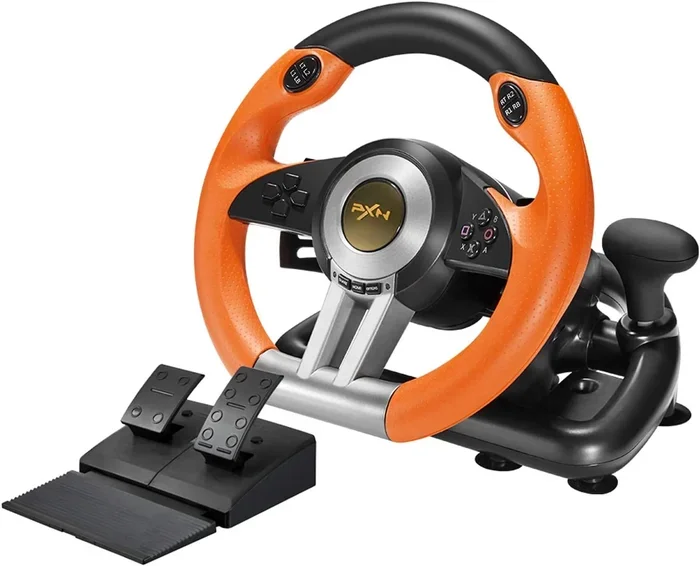
Racing wheels, on the other hand, provide force feedback. You feel the tires scrubbing the pavement, the weight shift during braking, and the rumble of gravel. This tactile information helps you make split-second decisions. For simulation racing, a wheel is almost mandatory. For arcade racing, a keyboard can still deliver thrilling action.
Budget Options and Premium Wheels
You don’t need to spend a fortune to improve your car racing game steering. Entry-level wheels start around $50 and offer basic force feedback and adjustable pedals. Mid-range wheels ($150–$300) add better rotation, metal pedals, and more realistic resistance. Premium wheels ($400+) deliver ultra-precise sensors, dual-motor feedback, and premium materials.
| Feature | Gaming Keyboard | Budget Racing Wheel | Premium Racing Wheel |
|---|---|---|---|
| Force Feedback | None | Basic vibration | Dual-motor, realistic |
| Price Range | $0 (existing) | $50–$150 | $300–$1,000+ |
| Realism | Low | Medium | High |
| Compatibility | All platforms | Most PC/consoles | PC/consoles (check) |
| Best For | Arcade, casual | Enthusiast beginners | Sim racers, pros |
Quick Tip: If you’re on a budget, start with a budget racing wheel and a free steering sensitivity tweak. Many games let you adjust the deadzone and smoothing. Small changes can make a big difference in your car racing game steering feel.
Perfecting Your Hand Position and Technique
Hand position affects everything. Wrong placement leads to slow inputs, hand fatigue, and missed apexes. The way you grip the wheel determines how smoothly you can steer through a series of corners. This section breaks down the best techniques for car racing game steering.
Hand Placement for Precision
The classic “9 and 3” position works best for most racing game steering. Place your left hand at the 9 o’clock position and your right hand at 3 o’clock. This keeps your arms relaxed and allows full rotation without crossing over. When you need a sharp turn, pull down with one hand while the other feeds the wheel around. This “pull-and-feed” method gives you continuous, smooth control.
For drift racing, some players prefer the “10 and 2” position because it offers more leverage for quick counter-steer. Experiment and find what feels natural. The goal is to eliminate dead space between your input and the car’s response. Car racing game steering becomes instinctive when your hands are comfortable.
Drag Racing vs. Circuit Style
Different race formats demand different steering habits. In drag racing, you steer in straight lines and make minor corrections. Your hands stay mostly still, and you focus on throttle and braking. In circuit racing, you constantly feed the wheel through sweeping bends and tight hairpins. Circuit steering requires constant micro-adjustments and a light touch.
Common Mistake: Many beginners death-grip the wheel. A tight grip creates tension in your arms, which leads to jerky movements. Relax your hands, let the force feedback guide you, and make gentle corrections. This single change often improves car racing game steering instantly.
Quick Tips for Smooth Inputs
- Use your whole arm for large turns, not just your wrists.
- Look ahead at the next corner, not directly in front of the car.
- Match your steering to the speed—slow in, fast out.
- Practice one technique at a time in free roam or time trials.
- Take breaks to avoid hand cramp and maintain focus.
Advanced Steering Techniques for Speed
Once you have the basics down, it’s time to push for faster lap times. Advanced car racing game steering techniques separate the average racer from the champion. These skills require practice, but they reward you with smoother lines and better momentum.
Drifting Basics
Drifting is the art of sliding the car through a corner while maintaining control. You initiate a drift by braking hard, then quickly turning the wheel in the opposite direction—the counter-steer. As the rear kicks out, you modulate the throttle to keep the angle. Car racing game steering during a drift feels like a dance: you’re constantly balancing the wheel angle and power.
Not all racing games reward drifting. In simulation titles, a clean line is faster. In arcade games, drifting can be a shortcut. Learn which style your favorite game favors and practice accordingly. Drift techniques like the handbrake turn and the Scandinavian flick are essential tools for any steering enthusiast.
Trail Braking and Weight Transfer
Trail braking means you keep the brake pedal pressed while turning into the corner. This shifts weight to the front tires, increasing grip and allowing you to turn sharper without understeer. As you reach the apex, you gradually release the brake and feed in the throttle. Car racing game steering works best when you combine braking and turning in one fluid motion.
This technique requires precise steering sensitivity settings. If your wheel is too sensitive, trail braking becomes jerky. Lower the sensitivity and increase the deadzone slightly to filter out tiny tremors. The result is a smoother, more confident turn.
Counter-Steering for Oversteer
When the rear of the car slides out, you must counter-steer—turn the wheel in the direction of the slide. This feels counterintuitive at first, but it’s the only way to recover. In car racing game steering, the timing is everything. Too early and you straighten the car too soon; too late and you spin.
Common Mistake: Over-correcting with massive steering inputs. A small, quick correction is more effective than a violent jerk. Think of it as nudging a shopping cart back on track. Counter-steering becomes second nature after a few hours of practice in a safe environment like time trials.
Settings and Adjustments That Make a Difference
Even the best technique can’t overcome poor steering settings. Games offer a range of options that affect how your wheel or controller feels. Tweaking these settings can transform your car racing game steering from frustrating to fantastic.
Steering Sensitivity and Deadzone
Sensitivity controls how much the car turns per degree of wheel movement. High sensitivity means small movements create big turns. Low sensitivity requires larger inputs, giving you more fine control. For simulation racing, lower sensitivity is usually better because it prevents over-correction.
The deadzone is the small range of wheel center where no input is registered. A small deadzone is fine for a racing wheel with precise sensors. A larger deadzone can help filter out noise from a controller or a loose steering wheel. Adjust these values in small increments and test them on a familiar track.
Force Feedback Tweaks
Force feedback vibrates the wheel to simulate road texture and tire slip. Too much force feedback can cause your hands to shake, making it harder to steer accurately. Too little leaves you blind to the car’s limits. Find a balance where you can feel the road without being distracted. Many games let you adjust the force feedback strength and the filter that smooths out harsh vibrations.
Quick Tip: Set the force feedback to around 60–70% of maximum, then test on a gravel road. You should feel the bumps without the wheel fighting your hands. This sweet spot greatly improves car racing game steering consistency.
Controller vs. Wheel Settings
If you use a controller, steering sensitivity is even more critical. Controllers have a smaller range of motion, so a higher sensitivity can compensate. Enable smoothing to reduce the jitter from the analog stick. Some players also add a small deadzone to ignore the stick’s resting drift.
For keyboard users, the only real adjustment is the steering curve. A linear curve gives equal response across the full turn. A progressive curve makes the first half of the turn lighter and the second half sharper. Experiment with these curves to find what suits your racing game steering style.
Practice Drills and Putting It All Together
Knowledge without practice is useless. The best way to improve car racing game steering is to drill specific skills repeatedly. This section gives you a structured practice routine that builds muscle memory and confidence.
Lap Time Improvement Routine
Start with a simple track. Set a target lap time and try to beat it by just half a second. Focus on one thing at a time: first, your braking point; second, your turn-in; third, your steering smoothness. Repeat the lap until you can consistently hit your target. Then move to a harder track and repeat the process.
Expert Insight: Top racers use the “slow in, fast out” mantra. They sacrifice a little speed on entry to gain more on exit. This principle applies directly to car racing game steering: gentle turn-in, hold the line, then unwrap the wheel and throttle out.
Building Muscle Memory
Muscle memory comes from repetition. Spend 15 minutes a day on a single corner. Focus on the exact hand movements needed to turn in, hold the apex, and exit. Over time, your hands will move automatically without you thinking about it. This is the stage where racing game steering becomes effortless and fun.
Common Mistake: Skipping practice and jumping straight into multiplayer races. You’ll reinforce bad habits. Always warm up with solo laps or a practice session. Treat your steering wheel like an instrument—the more you play, the better you sound.
Final Words
Car racing game steering is a skill that grows with patience and deliberate practice. You don’t need the most expensive wheel to improve; you need the right mindset and a willingness to learn. Adjust your settings, perfect your hand position, and embrace advanced techniques like trail braking and counter-steering. Every lap you take is a chance to refine your steering and shave time off your best. Keep at it, and you’ll soon find yourself winning races with ease and style.
Conclusion
Mastering car racing game steering is the fastest way to improve your lap times and enjoy races more. From choosing the right racing wheel to practicing smooth inputs, every tip in this guide builds a stronger foundation. Remember to keep your hands relaxed, adjust your sensitivity, and never stop learning. The track is waiting—now go out there and drive faster than ever before.
Frequently Asked Questions
What is the best steering sensitivity for car racing games?
The ideal sensitivity depends on your hardware and play style. For a racing wheel, start with a lower sensitivity around 50–70% to allow fine control. If you use a keyboard or controller, you may need higher sensitivity to achieve full lock quickly. Always test on a familiar track and adjust in small steps until the car responds exactly how you want.
Do I need a racing wheel to improve my steering skills?
A racing wheel greatly enhances car racing game steering by providing force feedback and precise rotation, but it’s not mandatory. Keyboards and controllers can still deliver excellent results if you adjust sensitivity and practice smooth inputs. Many top players started with a controller and upgraded later as their skills grew.
How can I stop my car from oversteering in racing games?
Oversteering often happens because of jerky steering inputs or overly high sensitivity. Try lowering your steering sensitivity and increasing the deadzone slightly. Focus on smooth, gradual turns rather than sharp snaps. In advanced cases, use trail braking to shift weight forward and improve front tire grip, which reduces oversteer.
What is the difference between force feedback and vibration?
Force feedback uses motors to create realistic resistance and road texture on the wheel, giving you a physical sense of tire slip and surface changes. Vibration is a simpler rumble effect that provides basic feedback. For serious car racing game steering, force feedback is far superior because it communicates subtle details that vibration cannot.
How do I practice counter-steering effectively?
Find a wet or gravel track in the game and deliberately induce a rear slide. Practice turning the wheel quickly in the opposite direction of the slide and then gently unwinding. Start slowly and increase speed as you gain confidence. Consistent counter-steering practice builds the reflexes needed for car racing game steering in tricky situations.
Are keyboard controls good for racing game steering?
Keyboards work well for arcade-style racing where quick, binary inputs are enough. They lack the nuance of a steering wheel, but you can still achieve good results with practice. Use keyboard steering for casual fun or when a wheel is unavailable, but consider upgrading to a wheel if you want to dive into simulation racing.