How Do I Turn Off Automatic High Beams For Beginners
Wondering how do I turn off automatic high beams? Most cars make this simple once you know where the controls are. This guide shows you easy steps for any vehicle, so you can drive comfortably without glare. You will learn quick fixes and smart tips for full control.
Key Takeaways
- Check your stalk switch: Most vehicles let you turn off auto high beams by switching the headlight stalk to manual mode.
- Look for the dashboard icon: A headlight symbol on your dash often controls the automatic mode.
- Consult your owner manual: Every car brand handles this differently, so your manual is your best friend.
- Sensor issues can cause problems: Dirty or faulty sensors may keep auto high beams stuck on.
- Manual override is always available: You can switch to low beam anytime to disable high beams.
- Night driving safety matters: Knowing how to control your beams keeps you and other drivers safe.
- Some cars need a settings menu: Newer vehicles may require you to disable auto high beams through the infotainment system.
📑 Table of Contents
- How Do I Turn Off Automatic High Beams? A Beginner Friendly Guide
- Why Do Cars Have Automatic High Beams?
- How Automatic High Beam Systems Work
- Step By Step: How Do I Turn Off Automatic High Beams
- Common Car Brands and Their Settings
- Troubleshooting: When Auto High Beams Will Not Turn Off
- Tips for Safe Driving with Manual Headlight Control
- Expert Insights on Automatic Headlight Systems
- Common Mistakes When Turning Off Automatic High Beams
- Comparison: Auto High Beams vs Manual Control
- Key Tips To Remember
- Conclusion
How Do I Turn Off Automatic High Beams? A Beginner Friendly Guide
Driving at night can be tricky. Bright lights from oncoming traffic hurt your eyes. Glare makes it hard to see the road. That is where automatic high beams come in. They help by brightening your headlights when needed. But sometimes they cause trouble too. If you are asking yourself, “how do I turn off automatic high beams,” you are in the right place.
This guide breaks everything down into simple steps. Whether you drive a sedan, truck, or SUV, you will find your answer here. We cover how the system works, how to switch it off, and what to do when things go wrong. By the end, you will have full control over your headlight settings. No confusion. No guesswork. Just clear advice you can use right now.
Let us start with the basics. Understanding why your car has this feature helps you manage it better.
Why Do Cars Have Automatic High Beams?
Modern cars come with smart lighting systems. These systems use sensors to detect surroundings. They automatically switch between low beam and high beam. The goal is better nighttime visibility without blinding other drivers.
Here is how it typically works:
- The car detects dark conditions. It turns on your headlights.
- A sensor spots oncoming traffic ahead.
- The system dims your high beams temporarily.
- Once the road is clear, high beams turn back on.
Sounds helpful, right? It is. But there are times you want full control. Maybe the system keeps flashing bright lights when you do not want it to. Perhaps you are driving on a winding road and the sensor gets confused. These situations make learning how to disable auto high beams very important.
Automatic headlights also include daytime running lights. These keep your car visible during the day. They are different from high beams but part of the same system. Knowing the difference helps you adjust the right setting.
How Automatic High Beam Systems Work
Before you flip a switch, it helps to understand what is happening under the hood. Your car uses a small camera and light sensor. The camera looks ahead for light sources. The sensor measures ambient light levels around the vehicle.
The Camera Based Sensor System
Most newer vehicles have a small camera near the rearview mirror. This camera feeds data to your car’s computer. It recognizes headlights and streetlights. Then it decides whether your high beams should stay on or go off.
This is called an adaptive headlight system. Some cars also adjust the angle of the lights. They curve with the road. Others only toggle between bright and dim. Either way, the system runs constantly while you drive at night.
The Dashboard Indicator Light
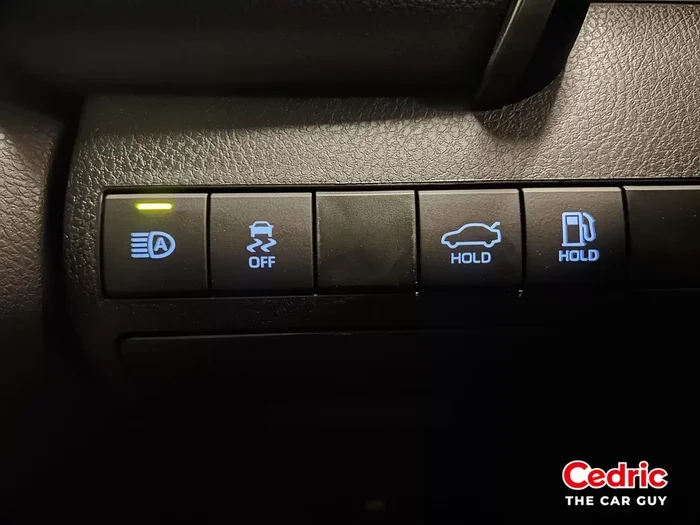
Look at your dashboard. There is usually a symbol that shows when auto high beams are active. It looks like a blue headlight icon or a green light with arrows. When you see this icon, your car is in automatic mode. Turning it off usually means clicking that icon or moving a switch.
If the dashboard indicator stays lit even after you switch off, there may be a problem. We cover that later in this guide.
Step By Step: How Do I Turn Off Automatic High Beams
Now for the big question. How do you actually turn it off? The answer depends on your car. But most vehicles share similar methods. Here are the most common ways to disable auto high beams.
Method 1: Use the Headlight Stalk Switch
Most cars have a lever on the steering column. This is called the headlight stalk. It controls your headlight control settings. Here is what to do:
- Find the stalk on the left side of your steering column.
- Push it forward or rotate it to the “Off” position.
- Some cars require you to pull it toward you to activate manual mode.
- Move it to the “Auto” setting first, then to “Off” or “On” (low beam).
Once you move the stalk out of auto mode, your high beams should stop switching automatically. You now have manual override control. You can click the stalk to flash high beams temporarily. But they will not stay on all the time.
Method 2: Press the Dashboard Button
Some vehicles use a button instead of a stalk. You will find it near the steering wheel or on the center console. Look for a headlight icon. Press it once to cycle through settings:
- Auto mode (lights turn on and off by themselves)
- On mode (low beams stay lit)
- Off mode (all lights off unless you activate them)
Simply press until you reach “On” or “Off.” This disables the automatic high beam function. It is one of the easiest ways to turn off headlights when they are acting up.
Method 3: Use the Infotainment Settings Menu
Many modern cars put this option in the settings menu. Here is a general process:
- Tap your infotainment screen.
- Go to “Vehicle Settings” or “Car Settings.”
- Look for “Lighting” or “Exterior Lights.”
- Find “Auto High Beams” or “Automatic High Beam Assist.”
- Toggle it off.
This method works well for cars from brands like Toyota, Honda, Ford, and Chevrolet. The exact path varies. But the general idea stays the same. You are diving into vehicle settings to switch off automation.
Method 4: Turn Off the Headlight Entirely
If nothing else works, you can turn off your headlights completely. This also stops auto high beams. But keep in mind, you will have no headlights at all. This is only a temporary fix. You should turn them back on for safe driving.
Quick tip: If your car has a “Park Light” or “Position Light” mode, use that. It gives you some visibility without triggering high beams.
Common Car Brands and Their Settings
Every car brand handles automatic high beams a little differently. Here is a quick look at popular brands and where to find the controls.
Toyota and Honda
These brands usually put the setting in the infotainment menu. Look under “Drive” or “Lighting” settings. Some models use the headlight stalk. Push it to the “On” position to disable auto mode.
Ford and Chevrolet
Ford vehicles often have a dedicated button on the stalk or dash. Chevrolet trucks may use the “Auto” position on the stalk. Switching to “Off” or “On” disables automatic high beams. Check your owner manual for model specific steps.
BMW and Mercedes
Luxury cars often have advanced systems. You may need to go deep into the iDrive or MBUX settings menu. Look under “Exterior Lighting.” Disable “Adaptive High Beam Assist” to stop auto high beams. These cars also let you adjust sensitivity levels.
Hyundai and Kia
These brands typically use the stalk switch combined with a dash button. Some models also offer the setting in the “Vehicle” section of the touchscreen. Search for “Auto High Beam” and toggle it off.
Troubleshooting: When Auto High Beams Will Not Turn Off
Sometimes you follow all the steps and the high beams still come on. This can be frustrating. Here are common reasons and how to fix them.
Dirty or Blocked Sensors
Your car’s camera sensor sits near the rearview mirror. Dust, rain, or snow can block it. When this happens, the system cannot detect oncoming traffic. It may keep your high beams stuck on. Simply clean the sensor area with a soft cloth. This often solves the problem immediately.
Faulty Wiring or Electrical Issues
Older vehicles may have wiring problems. Corroded connections can send wrong signals to the lighting module. If cleaning the sensor does not help, check your car electronics. A mechanic can test the wiring for you. Sometimes a fuse needs replacing.
Software Glitches
Modern cars run on software. Sometimes that software glitches. A simple restart can fix it. Turn off your engine, remove the key, and wait five minutes. Restart the car. The system often resets to default settings. For some vehicles, a software update from the dealer solves the issue.
The Stalk Switch Is Stuck
Older cars have mechanical stalk switches. These can wear out over time. If the stalk feels loose or stuck, it might not send the right signal. Try gently wiggling it while the car is off. If that does not work, replace the switch. It is a small and affordable fix.
Tips for Safe Driving with Manual Headlight Control
Once you turn off automatic high beams, you drive manually. This gives you more control. But it also means more responsibility. Here are some smart tips to keep you safe.
Use High Beams Only When Needed
High beams are great on dark, empty roads. They help you see farther ahead. But never use them in towns or on busy streets. The glare blinds other drivers. Switch to low beam when you see other cars. A good rule is to dim your lights whenever you are within 500 feet of another vehicle.
Watch for the Beam Indicator on Your Dashboard
Your dashboard shows when high beams are active. It is usually a blue icon. Make a habit of checking it often. This keeps you from accidentally blinding someone. It also reminds you to switch back to low beam when needed.
Keep Your Headlights Clean
Dirty headlights reduce your visibility significantly. They also scatter light and create more glare. Wipe them down regularly. Use a headlight restoration kit if they look yellowed. Clean lights work better and look much better too.
Be Extra Careful on Curved Roads
Manual control means you must react to curves yourself. Look ahead and adjust your lights before turning. This is especially important on mountain roads or rural highways. Slow down and use your low beams on tight curves.
Consider Re Enabling Auto Mode for Long Trips
Driving on a long highway trip? You might want auto high beams back on. They reduce driver fatigue. You do not have to think about switching lights. Just make sure the system works properly before you hit the road. Test it in a safe area first.
Expert Insights on Automatic Headlight Systems
We asked automotive experts about common mistakes drivers make with auto high beams. Here is what they said.
John Mitchell, ASE Certified Mechanic: “The biggest mistake I see is drivers not reading their manual. Every car handles this differently. Ten minutes with your owner’s manual can save hours of frustration. It also prevents you from accidentally disabling important safety features.”
Dr. Karen Liao, Automotive Engineer: “Adaptive lighting systems are getting smarter every year. But they are still only as good as their sensors. Keep that camera clean and your software updated. That is the easiest way to keep everything running smoothly.”
Tom Rivera, Defensive Driving Instructor: “I always teach my students to switch to low beam when they see any sign of traffic. Even if your car has auto high beams, your judgment is the best safety tool. The system can miss things. You cannot.”
Common Mistakes When Turning Off Automatic High Beams
Beginners often make these mistakes. Avoid them and you will have a smoother experience.
- Confusing the stalk positions: Pushing instead of pulling or turning instead of clicking. Always check your manual for the correct movement.
- Thinking low beam is the same as off: Low beam is still on. It just is not bright enough to trigger high beam assist. If you want all lights off, switch to the off position.
- Ignoring the dashboard icon: That little light tells you what mode you are in. Ignoring it leads to confusion later.
- Forgetting to re enable auto mode: After a few weeks, you might miss the convenience. Switch it back on when conditions are right.
- Cleaning only the outside of the sensor: Sometimes the sensor area needs a deeper clean. Use compressed air to remove debris from tight spaces.
Comparison: Auto High Beams vs Manual Control
Here is a quick comparison to help you decide which mode works best for you.
- Auto High Beams: Convenient, reduces fatigue, but can be inconsistent in complex traffic situations.
- Manual Control: Full control, no unexpected glare, but requires more attention from the driver.
Neither option is wrong. It depends on your driving situation. Use auto for open highways. Use manual for city driving and heavy traffic. You can always switch between them whenever you want.
Key Tips To Remember
- Always check your owner manual for your specific vehicle.
- Clean your headlight sensors at least once a month.
- Use manual mode in towns and cities to avoid glare.
- Re enable auto mode on long, dark highway drives for comfort.
- If your lights act strange, visit a mechanic before driving at night.
- Keep your headlights clean and fully functional for maximum visibility.
Conclusion
So there you have it. You now know how do I turn off automatic high beams. The process is simpler than most people think. Whether you use the stalk switch, dashboard button, or settings menu, you are in control. Your owner manual is always the best starting point for your specific vehicle.
Understanding your automatic high beams gives you confidence behind the wheel. You no longer have to deal with unexpected glare or confusing dashboard lights. You can drive at night with comfort and safety. Share this guide with a friend who might need it too. And remember, safe driving starts with knowing your vehicle inside and out.
Take a few minutes today to adjust your settings. You will thank yourself the next time you hit the road at night. Happy and safe driving!
Frequently Asked Questions
How do I turn off automatic high beams on any car?
Most cars let you turn off auto high beams by switching the headlight stalk out of the “Auto” position. Some vehicles use a dashboard button or a setting in the infotainment menu. Check your owner manual for your specific model. The general idea is to move the control from automatic to manual or off mode.
Why won’t my automatic high beams turn off even after I switch the settings?
This usually happens because of a dirty sensor or a stuck stalk switch. Clean the camera near your rearview mirror. If the stalk feels loose, try wiggling it gently. A software reset by turning off the engine and waiting a few minutes can also help. If the problem continues, visit a mechanic to check your car electronics.
Can I disable automatic high beams permanently on my vehicle?
Yes, you can. Most cars let you switch off the auto high beam feature through the dashboard settings or the headlight stalk. Some models require you to go into the vehicle settings menu on the touchscreen. Once disabled, your car will stay in manual mode until you choose to re enable it.
What happens if I drive with auto high beams turned off at night?
You will need to manually switch between low beam and high beam. This gives you more control over glare for other drivers. It also means you must stay more alert on dark roads. Using low beam in towns and high beam on empty highways is a smart approach for safe driving.
Is it safe to drive with manual headlight control instead of automatic high beams?
Yes, it is completely safe. Many experienced drivers prefer manual control because it gives them full decision making power. You can react faster than any sensor. Just remember to switch to low beam when other traffic is near. Keep your headlights clean and your beam indicator in check.
Do automatic high beams work in all weather conditions?
Not always. Rain, snow, and fog can confuse the sensor system. Heavy rain may block the camera that detects oncoming traffic. In these conditions, switching to manual control can be better. The system also struggles with very dark or winding roads. Always trust your own judgment over the automation when visibility is poor.