Does the Mazda CX-9 Have Wireless CarPlay – Find Out
Yes, the Mazda CX-9 does support wireless Apple CarPlay on most newer model years and trim levels. This wireless connectivity lets you stream music, use navigation, and make calls without plugging in a cable. We break down everything you need to know about Mazda CX-9 CarPlay compatibility, setup, and troubleshooting.
If you own a Mazda CX-9 or are thinking about buying one, you have probably wondered about wireless CarPlay compatibility. The short answer is yes, the Mazda CX-9 does support wireless Apple CarPlay on most recent model years. But the full story is a bit more nuanced, and it depends on your trim level, model year, and a few other factors.
In this guide, we will walk you through everything you need to know about Mazda CX-9 wireless CarPlay. We will cover which trims include it, how to set it up, what to do when things go wrong, and how it compares to other car entertainment systems on the market. Whether you are a tech enthusiast or just someone who wants to make calls hands-free, this article has you covered.
The Mazda CX-9 is a popular three-row midsize SUV that has earned a reputation for sporty handling, upscale interiors, and solid technology. But smartphone integration is one of those features that can make or break the daily driving experience. If your car touchscreen display does not work well with your phone, every trip becomes a hassle. That is exactly why we put together this deep dive on Mazda CX-9 CarPlay capabilities.
Key Takeaways
- Wireless CarPlay is available: Most Mazda CX-9 models from recent years offer wireless Apple CarPlay as a standard or optional feature.
- Setup is simple: You can connect your iPhone to the Mazda infotainment system without any cables in just a few steps.
- Trim level matters: Higher trims like the Signature and Grand Touring are more likely to include wireless CarPlay as standard.
- Troubleshooting is straightforward: Most CarPlay issues can be fixed with a quick reset or software update.
- Pair it with other smart features: CarPlay works alongside Mazda Connect, Bluetooth, and other tech for a full smart driving experience.
- Model year matters: Older CX-9 models may need a retrofit adapter or may only support wired CarPlay.
- Android Auto is also available: The CX-9 supports both Apple CarPlay and Android Auto for maximum smartphone compatibility.
📑 Table of Contents
- What Is Wireless CarPlay and Why Does It Matter?
- Does the Mazda CX-9 Support Wireless CarPlay?
- How to Set Up Wireless CarPlay on Your Mazda CX-9
- What You Can Do with CarPlay in the Mazda CX-9
- Comparing the Mazda CX-9 Infotainment System to Other Brands
- Adding Wireless CarPlay to Older Mazda CX-9 Models
- Tips for Getting the Most Out of CarPlay in Your Mazda CX-9
- Conclusion
What Is Wireless CarPlay and Why Does It Matter?
Before we get into the specifics of the Mazda CX-9, let us talk about what wireless CarPlay actually is and why it has become such an important feature. Apple CarPlay is a system that mirrors key functions of your iPhone onto your car’s infotainment screen. This means you can access maps, music, messages, and phone calls without touching your phone directly.
With wired CarPlay, you connect your iPhone using a Lightning cable. It works fine, but a cable can be annoying. It tangles, it limits your phone’s mobility, and it can wear out over time. Wireless CarPlay eliminates all of that by connecting through Bluetooth and Wi-Fi. Your phone pairs with the car automatically, and you get the same functionality without any cords.
How Wireless CarPlay Works
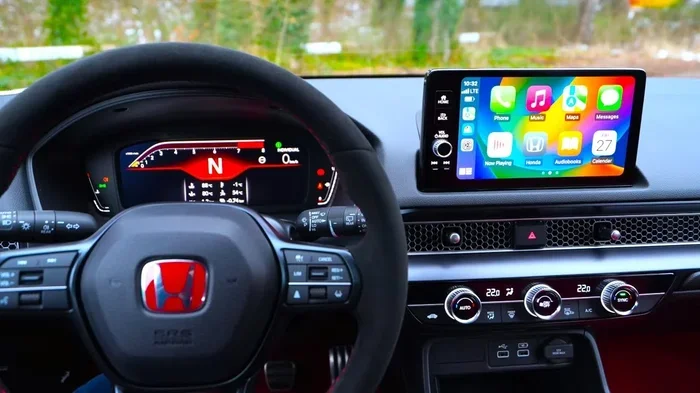
Wireless CarPlay uses a combination of Bluetooth for initial pairing and Wi-Fi for data transfer. Once your phone is connected, the car’s infotainment system takes over the display. You can see your maps, control music, and use Siri all from the car’s screen. The connection is fast and stable in most cases.
One thing to keep in mind is that wireless CarPlay does use more battery than having your phone just sitting on the dashboard. The Wi-Fi connection keeps your phone active, so you may notice your battery draining faster during long drives. That said, most modern phones handle this just fine, especially if you are also charging your device.
Wired vs Wireless CarPlay: What Is the Difference?
The main difference between wired and wireless CarPlay comes down to convenience. Wired connections are slightly more stable and do not rely on Wi-Fi signals, which can sometimes be spotty. However, wireless CarPlay offers a much smoother user experience. You do not have to fumble with cables every time you get in the car.
Here is a quick comparison of the two:
- Wired CarPlay: Requires a cable, very stable connection, no battery drain from Wi-Fi, but less convenient.
- Wireless CarPlay: No cable needed, automatic connection, slightly higher battery usage, and much more convenient for daily use.
For most people, wireless CarPlay is the clear winner. It just makes life easier every time you get behind the wheel.
Does the Mazda CX-9 Support Wireless CarPlay?
Now let us get to the heart of the matter. Does the Mazda CX-9 have wireless CarPlay? The answer is yes, but with some important caveats. Mazda CX-9 wireless CarPlay availability depends on your model year and trim level. Let us break it down.
Mazda CX-9 Trim Levels and CarPlay
The Mazda CX-9 comes in several trim levels, and each one has different technology features. Here is how Apple CarPlay availability breaks down across the trims:
- Sport: The base Sport trim may only include wired CarPlay on older model years. Newer models (2024 and up) tend to include wireless CarPlay even on the Sport trim.
- Touring: The Touring trim typically includes wireless CarPlay as part of the Mazda Connect infotainment package.
- Grand Touring: This mid-level trim almost always comes with wireless CarPlay standard, along with extra tech features.
- Signature: The top-tier Signature trim includes all the latest tech, and wireless CarPlay is definitely part of the package.
If you are shopping for a used CX-9, it is always a good idea to check the specific vehicle’s features. Some older models may only support wired CarPlay, while others may not have CarPlay at all. You can verify this by checking the Mazda Connect system in the car or by reviewing the vehicle’s specs online.
Model Year Differences in Mazda CX-9 CarPlay
Model year plays a big role in CarPlay compatibility. The Mazda CX-9 went through a significant redesign for the 2024 model year, and with that came updated technology. The 2024 CX-9 features a newer infotainment system that supports both wireless Apple CarPlay and Android Auto across most trims.
For the 2023 model year and earlier, wireless CarPlay was available on higher trims but may not have been standard on the base Sport trim. If you have an older CX-9 and wireless CarPlay is important to you, there are aftermarket Apple CarPlay wireless adapters that can add this functionality. We will talk more about those options later in this article.
It is also worth noting that Mazda has been steadily improving its smartphone integration over the years. If you are looking at a used CX-9, aim for models from 2022 or newer for the best wireless connectivity experience.
How to Set Up Wireless CarPlay on Your Mazda CX-9
Setting up wireless CarPlay on your Mazda CX-9 is pretty straightforward. Once you have done it the first time, the system will remember your phone and connect automatically every time you get in the car. Here is how to do it.
Step-by-Step Setup Guide
- Make sure your iPhone is compatible. Wireless CarPlay requires an iPhone 7 or newer running a recent version of iOS. Check that your phone is updated to the latest software.
- Open the Mazda Connect system. Press the home button on the infotainment screen or swipe to access the main menu.
- Go to Settings. Look for the Bluetooth and Device Connection or Smartphone Connection option in the settings menu.
- Select Apple CarPlay. Choose the wireless CarPlay option and follow the on-screen prompts to pair your iPhone.
- Accept the permissions. Your phone will ask you to allow access to contacts, music, and other data. Accept these permissions so CarPlay works fully.
- Test the connection. Once paired, you should see CarPlay on your car touchscreen display. Try opening a map or playing music to confirm everything works.
That is really all there is to it. The Mazda CX-9 makes the pairing process simple, and once your phone is connected, it just works. You can also set CarPlay to activate automatically when you start the car, which saves you a step every time.
Troubleshooting Common CarPlay Issues
Sometimes CarPlay does not connect right away, and that can be frustrating. Here are a few common issues and how to fix them:
- CarPlay not connecting: Try toggling Bluetooth and Wi-Fi off and back on. Restarting your iPhone can also help.
- Screen freezes during CarPlay: Press and hold the power button on the infotainment system to force a restart.
- Audio cuts out: Make sure your phone is not in Low Power Mode, as this can interfere with wireless connectivity.
- No Siri support: Check that Siri is enabled in your iPhone settings under Siri & Search.
If you have tried all of the above and CarPlay still is not working, it may be a software issue. Check for Mazda infotainment updates at your local dealer. Mazda occasionally releases updates that improve smartphone integration and fix bugs.
You should also know that you can change the sound system in your car to improve the audio quality when using CarPlay, which can make a big difference in your overall experience.
What You Can Do with CarPlay in the Mazda CX-9
Once wireless CarPlay is connected, you have access to a wide range of features right on your car’s screen. The Mazda CX-9 infotainment system works well with CarPlay, and the large touchscreen makes it easy to navigate through apps and controls.
Navigation and Maps
One of the most popular uses of CarPlay is navigation. Apps like Google Maps, Apple Maps, Waze, and others all work seamlessly through CarPlay. You get turn-by-turn directions on the big screen, voice-guided prompts, and real-time traffic updates. This is especially useful in the Mazda CX-9, which is a family SUV where navigation can make long trips much easier.
You can also use Siri to get directions hands-free. Just say “Hey Siri, take me home” or “Hey Siri, find a gas station,” and CarPlay will pull up the right app. This keeps your eyes on the road and your hands on the wheel, which is always a good thing.
Music, Podcasts, and Calls
CarPlay gives you access to all your favorite audio apps. Apple Music, Spotify, Podcasts, Audible, and many others work through the Mazda Connect system. You can browse playlists, search for songs, and control playback all from the car’s screen or through the steering wheel controls.
For phone calls, CarPlay uses the car’s microphone and speakers, so you can take calls hands-free. The Mazda CX-9 has excellent audio quality, which makes phone calls through CarPlay very clear. This is a great feature for people who spend a lot of time driving to work or on business trips.
You can also use CarPlay to send and receive text messages using Siri. The system reads your messages aloud and lets you dictate replies, all without ever touching your phone. It is a nice safety feature that keeps you focused on driving.
Comparing the Mazda CX-9 Infotainment System to Other Brands
Every automaker has its own infotainment system, and they all have different strengths and weaknesses. Mazda’s system, called Mazda Connect, is generally well-regarded for its clean design and intuitive layout. Let us see how it stacks up when it comes to smartphone integration.
Mazda Connect vs Other Brands
Mazda Connect is known for being user-friendly and responsive. The interface is clean, with large icons and easy-to-read menus. Wireless CarPlay and Android Auto are both supported, which gives the CX-9 an edge over some competitors that only offer wired connections or limited smartphone features.
One thing Mazda does really well is placing the car touchscreen display at the top of the dashboard, which means it is at eye level and easy to see while driving. This is a small detail that makes a big difference in usability. Some other brands bury their screens lower, which can be distracting.
If you are coming from a car that did not have smartphone integration at all, the Mazda CX-9 with CarPlay will feel like a huge upgrade. And if you are switching from another brand, you may find that Mazda’s system is just as good, if not better, than what you are used to.
For those interested in other smart connectivity features, it is worth noting that Homelink can automatically open your garage door, which pairs nicely with the smart tech ecosystem in a vehicle like the CX-9.
The Role of Sport Mode and Other Mazda CX-9 Features
The Mazda CX-9 is not just about tech. It is also a fun car to drive. The Sport Mode feature enhances throttle response and steering feel, making the CX-9 one of the more engaging SUVs in its class. If you are curious about how sport mode affects performance, you can read more about whether sport mode makes a car faster in our other guides.
Beyond sport mode, the CX-9 comes with features like traction control, blind-spot monitoring, and a premium sound system. All of these work together to make the CX-9 a well-rounded vehicle that is great for both daily commuting and road trips. The wireless CarPlay system ties into this experience by keeping you connected without adding clutter to your cabin.
Adding Wireless CarPlay to Older Mazda CX-9 Models
If you have an older Mazda CX-9 that does not support wireless CarPlay, you are not out of luck. There are aftermarket solutions that can add this functionality to your vehicle. These Apple CarPlay wireless adapters plug into your car’s existing infotainment system and add wireless connectivity.
Some popular options include adapters from brands like Carlinkit and AAWireless. These devices typically cost between $50 and $200, depending on the features. They are easy to install and do not require any permanent modifications to your car. Just plug the adapter into the USB port, pair it with your phone, and you are good to go.
Keep in mind that aftermarket adapters may not offer the same seamless experience as factory-installed wireless CarPlay. There can be slight delays in connection, and some features may not work as smoothly. But for older CX-9 owners who want the convenience of wireless connectivity, these adapters are a solid option.
Tips for Getting the Most Out of CarPlay in Your Mazda CX-9
Want to make sure your CarPlay experience is as good as it can be? Here are some practical tips:
- Keep your iPhone updated. Apple regularly improves CarPlay with new iOS updates. Staying current ensures the best performance.
- Use a quality Wi-Fi network. Wireless CarPlay relies on Wi-Fi, so make sure your car’s system is set to the right frequency band for the best connection.
- Clear your Bluetooth cache. If you are having connection issues, clearing your phone’s Bluetooth cache can often fix the problem.
- Set CarPlay to auto-connect. In your Mazda settings, you can enable automatic CarPlay connection so it starts working the moment you get in the car.
- Explore Siri shortcuts. Learning a few Siri commands can make using CarPlay safer and more convenient while driving.
These small tips can make a big difference in how smoothly CarPlay works in your daily driving routine. Once you get into the habit, you will wonder how you ever drove without it.
It is also worth mentioning that traction control systems and other safety features in the CX-9 work independently of CarPlay, so you do not need to worry about any interference between your safety systems and smartphone connectivity.
Conclusion
The Mazda CX-9 is an excellent SUV that handles wireless CarPlay with ease. Whether you are streaming music, navigating to a new destination, or staying connected with hands-free calls, Mazda CX-9 CarPlay delivers a smooth and reliable experience. Most model years and trim levels support wireless Apple CarPlay, making it one of the better options in the midsize SUV segment for smartphone integration.
If you have a newer CX-9, you can expect seamless wireless connectivity right out of the box. If you have an older model, aftermarket adapters can bridge the gap. Either way, CarPlay is a feature that adds real value to the daily driving experience. We hope this guide has answered all your questions about wireless CarPlay in the Mazda CX-9 and given you the confidence to make the most of this technology.
Take some time to explore the Mazda Connect system, try out different apps, and find the setup that works best for you. Once you experience the convenience of wireless CarPlay, you will not want to go back to a world without it.
Frequently Asked Questions
Can I use Android Auto instead of CarPlay in the Mazda CX-9?
Yes, the Mazda CX-9 supports both Android Auto and Apple CarPlay. You can switch between them depending on your phone type. Both wireless options are available on most recent model years, giving you flexibility regardless of which smartphone ecosystem you prefer.
Why is my wireless CarPlay not connecting in my Mazda CX-9?
There are several reasons CarPlay might not connect, including outdated software, Bluetooth interference, or incorrect settings. Start by restarting both your phone and the infotainment system. If that does not work, try resetting the Bluetooth connection or updating your Mazda’s software through a dealer visit.
Do all Mazda CX-9 trims come with wireless CarPlay?
Not necessarily. Wireless CarPlay availability depends on the trim level and model year. Higher trims like Grand Touring and Signature are more likely to include it as standard. The base Sport trim may only have wired CarPlay on older models, so always check the specific vehicle’s features before purchasing.
Can I use CarPlay while charging my phone?
Yes, you can use CarPlay while your phone is charging. In fact, it is recommended because wireless CarPlay can drain your battery faster than normal use. You can use a wireless charging pad or a USB cable to keep your phone powered during long drives while still enjoying all CarPlay features.
Is there a way to get wireless CarPlay in an older Mazda CX-9?
Yes, you can add wireless CarPlay to older CX-9 models using aftermarket wireless adapters. These devices plug into your car’s USB port and add wireless connectivity. Popular brands include Carlinkit and AAWireless. They are easy to install and range in price from about $50 to $200.
Does CarPlay work when the car is turned off in the Mazda CX-9?
No, CarPlay requires the Mazda’s infotainment system to be powered on, which typically happens when the car is running or in accessory mode. Once you turn off the engine, the screen goes dark and CarPlay disconnects. This is normal behavior and not a cause for concern.