Does Kia Have Apple CarPlay Here Is Everything You Need
Yes, most Kia models come with Apple CarPlay built in. From the Kia Soul to the Kia Telluride, Apple CarPlay is available on nearly every new Kia vehicle. You can use it wired or wirelessly depending on the model and year.
Key Takeaways
- Apple CarPlay is standard on most new Kia models including the Soul, Sportage, Sorento, and Telluride.
- Wireless Apple CarPlay is available on select Kia trims and model years, making your life much easier.
- Older Kia models may need a Kia infotainment upgrade to get Apple CarPlay support.
- Setting up Apple CarPlay in a Kia is simple and only takes a few minutes.
- Common issues like connection drops can usually be fixed with a quick restart or cable swap.
- Kia’s UVO infotainment system works hand in hand with Apple CarPlay for a smooth experience.
- Always check your specific model year since CarPlay compatibility varies across Kia trims.
📑 Table of Contents
- What Is Apple CarPlay and Why Does It Matter?
- Does Kia Have Apple CarPlay Across All Models?
- Which Kia Models Support Apple CarPlay?
- Wireless vs Wired Apple CarPlay in Kia Vehicles
- How to Set Up Apple CarPlay in Your Kia
- Apple CarPlay vs Android Auto: Which Is Better for Kia Owners?
- Common Apple CarPlay Issues and How to Fix Them
- Can You Add Apple CarPlay to an Older Kia?
What Is Apple CarPlay and Why Does It Matter?
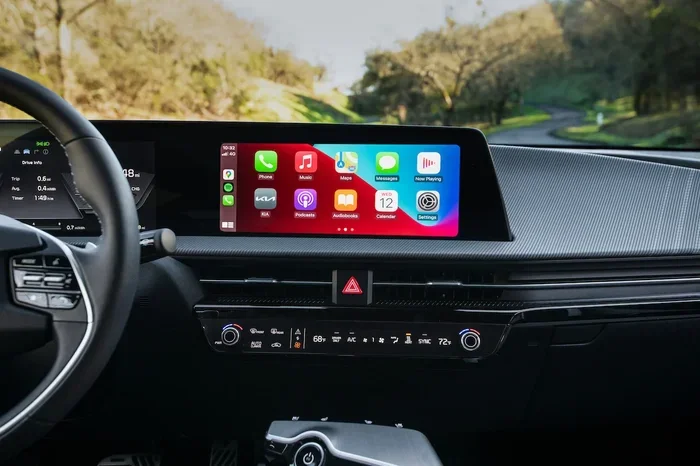
Apple CarPlay is a smart feature that mirrors your iPhone onto your car’s screen. It lets you use apps like Maps, Music, Messages, and Phone without taking your eyes off the road. If you have ever wished you could answer a text or change a song without fumbling with your phone, Apple CarPlay solves that problem.
The system works by connecting your iPhone to your car’s infotainment system. Once connected, you get a simplified, driver-friendly interface. You can use Siri voice commands, tap the screen, or use the car’s physical controls. It is one of the most popular smart driving features available today.
For Kia owners, Apple CarPlay means your phone and your car work together like never before. You get navigation, hands-free calling, and music streaming all in one place. Kia vehicles have embraced this technology across their lineup, making it easy to stay connected and safe on the road.
Why Apple CarPlay Matters for Daily Driving
Think about how much you rely on your phone. You use it for directions, you stream your favorite playlists, and you stay in touch with people you care about. Apple CarPlay brings all of that into your car safely. Instead of holding your phone, you use your car’s screen and voice controls.
This is especially helpful for people who drive long commutes or take frequent road trips. With Apple CarPlay in your Kia vehicle, you can focus on driving while still staying connected. It is a small feature that makes a big difference in your daily routine.
Quick Tip
Keep your iPhone updated to the latest iOS version. Apple CarPlay works best when your phone and your car’s system are both up to date.
Does Kia Have Apple CarPlay Across All Models?
The answer is mostly yes, but with some important details. Does Kia have Apple CarPlay on every single model? Not quite. Apple CarPlay availability depends on the model, the trim level, and the model year. Most Kia models from 2019 onward come with Apple CarPlay as standard or optional equipment.
Newer Kia vehicles from 2021 and beyond almost always include Apple CarPlay. If you are buying a used Kia, check the model year and trim to confirm CarPlay compatibility. Some older models may need an upgrade to support this feature.
Model Year Matters
Here is a quick breakdown of how Apple CarPlay availability works across Kia model years:
- 2014-2016 Kia models: Most do not support Apple CarPlay without an aftermarket upgrade.
- 2017-2018 Kia models: Some trims offer Apple CarPlay as an optional feature.
- 2019-2020 Kia models: Apple CarPlay becomes more widely available across trims.
- 2021 and newer Kia models: Apple CarPlay is standard on nearly all trims.
Key Takeaways
- Apple CarPlay is standard on most Kia models from 2021 onward.
- Older Kia vehicles may require an infotainment upgrade for CarPlay compatibility.
- Always check the trim level because some base trims may not include it.
Which Kia Models Support Apple CarPlay?
Kia offers Apple CarPlay on a wide range of models. Whether you drive a compact car or a large SUV, there is a good chance your Kia vehicle supports this feature. Here is a look at the most popular Kia models that come with Apple CarPlay.
Kia Soul and Apple CarPlay
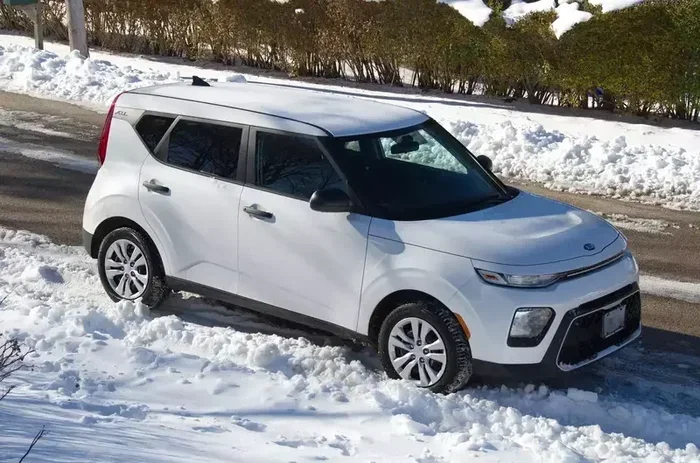
The Kia Soul has been a favorite among urban drivers for years. Starting with the 2017 model year, the Kia Soul began offering Apple CarPlay. On newer models, it is standard on most trims. The Kia Soul infotainment system pairs well with Apple CarPlay, giving you a bright and responsive screen.
Kia Sportage and Apple CarPlay
The Kia Sportage is one of the brand’s best-selling SUVs. Apple CarPlay has been available on the Kia Sportage since the 2017 model year. On the 2021 and newer Kia Sportage models, Apple CarPlay is standard across nearly all trims. This makes the Kia Sportage a great choice for families who want smart connectivity.
Kia Sorento and Apple CarPlay
The Kia Sorento is a three-row SUV that appeals to larger families. Apple CarPlay is available on the Kia Sorento starting from the 2016 model year. On recent Kia Sorento models, Apple CarPlay comes standard on most trims. The larger screen on the Kia Sorento makes Apple CarPlay especially enjoyable to use.
Kia Telluride and Apple CarPlay
The Kia Telluride is Kia’s flagship SUV. It comes packed with features, and Apple CarPlay is one of them. Every Kia Telluride from the 2017 model year onward supports Apple CarPlay. The Kia Telluride offers both wired and wireless Apple CarPlay depending on the trim level.
Kia Stinger and Apple CarPlay
The Kia Stinger is the brand’s sporty sedan. It has offered Apple CarPlay since its launch. The Kia Stinger pairs Apple CarPlay with a premium sound system, making it a great choice for music lovers who also want smart driving features.
Other Kia Models with Apple CarPlay
Beyond the models listed above, many other Kia vehicles support Apple CarPlay. Here are a few more worth mentioning:
- Kia Niro — Apple CarPlay available on hybrid and EV trims
- Kia Forte — Apple CarPlay standard on most trims
- Kia Sedona — Apple CarPlay available on minivan trims
- Kia Seltos — Apple CarPlay standard on recent model years
- Kia Carnival — Apple CarPlay included on most trims
Key Takeaways
- Apple CarPlay is available on nearly every Kia model from the Soul to the Telluride.
- Newer Kia models standardize Apple CarPlay across most trims.
- Always verify CarPlay compatibility when buying a used Kia.
Wireless vs Wired Apple CarPlay in Kia Vehicles
When you ask does Kia have Apple CarPlay, the next question is usually about wireless or wired connection. Both options work great, but they offer different experiences. Understanding the difference helps you choose the right setup for your Kia vehicle.
Wired Apple CarPlay
Wired Apple CarPlay uses a Lightning cable to connect your iPhone to the Kia infotainment system. This has been the traditional method for years. It is reliable and works on almost every Kia model that supports Apple CarPlay. The main downside is that you need to keep a cable in your car and plug it in every time.
Wired connections also tend to be slightly faster and more stable. If you have an older Kia model, wired Apple CarPlay might be your only option. It still works perfectly for navigation, music, and hands-free calling.
Wireless Apple CarPlay
Wireless Apple CarPlay connects your iPhone to your Kia vehicle without any cables. It uses Bluetooth and Wi-Fi to establish a connection. Once paired, your Kia’s infotainment screen displays Apple CarPlay automatically whenever you get in the car.
Not all Kia models offer wireless Apple CarPlay. It is typically available on higher trims of newer models. If you want the convenience of going cable-free, look for wireless Apple CarPlay when shopping for a Kia vehicle.
| Feature | Wired Apple CarPlay | Wireless Apple CarPlay |
|---|---|---|
| Connection Method | Lightning cable | Bluetooth and Wi-Fi |
| Availability in Kia | Nearly all models | Select trims and newer models |
| Setup Time | Plug in cable | Automatic after pairing |
| Stability | Very stable | Stable, occasional reconnects |
| Convenience | Moderate | Very convenient |
| Charging While Connected | Yes | No (unless wireless charging) |
Expert Insight
According to automotive experts, wireless Apple CarPlay is the future. Kia has been gradually adding wireless support to more models each year. If you are buying a Kia today, wireless Apple CarPlay is worth the upgrade for the added convenience.
How to Set Up Apple CarPlay in Your Kia
Setting up Apple CarPlay in your Kia vehicle is straightforward. Whether you have a wired or wireless connection, the process is simple. Here is a step-by-step guide to get you started.
Setting Up Wired Apple CarPlay
- Start your Kia vehicle and turn on the infotainment system.
- Plug your iPhone into the USB port using a Lightning cable.
- Your Kia’s screen should detect the phone automatically.
- Tap the Apple CarPlay icon on the infotainment display.
- Follow any on-screen prompts to grant permissions.
- Once connected, you can access Maps, Music, Messages, and more.
Setting Up Wireless Apple CarPlay
- Make sure Bluetooth and Wi-Fi are turned on in your iPhone settings.
- Start your Kia vehicle and go to the infotainment settings.
- Select Apple CarPlay and choose the wireless option.
- Your Kia’s screen will search for your iPhone.
- Select your iPhone from the list and confirm the pairing.
- Your Apple CarPlay interface will appear automatically from now on.
Quick Tip
If Apple CarPlay does not connect on the first try, try disconnecting and reconnecting your cable or toggling Bluetooth off and on. A simple restart of both your phone and your car’s infotainment system often fixes connection issues.
Common Mistakes to Avoid
- Using a low-quality cable: Cheap Lightning cables can cause connection problems. Always use an Apple-certified cable.
- Not granting permissions: Apple CarPlay needs access to your contacts, maps, and music. Make sure you allow these permissions during setup.
- Ignoring software updates: Both your iPhone and your Kia’s infotainment system should be updated for the best Apple CarPlay experience.
- Forgetting to enable CarPlay in settings: Some Kia models require you to enable Apple CarPlay in the infotainment settings menu.
Key Takeaways
- Wired Apple CarPlay connects via USB cable and works on almost all Kia models.
- Wireless Apple CarPlay connects automatically via Bluetooth and Wi-Fi on supported trims.
- Always use an Apple-certified cable for the most reliable wired connection.
Apple CarPlay vs Android Auto: Which Is Better for Kia Owners?
If you are a Kia owner, you might wonder whether Apple CarPlay or Android Auto is the better choice. Both are excellent smart driving features, but they serve different ecosystems. The right choice depends on what type of phone you use and what features matter most to you.
Apple CarPlay Strengths
- Seamless iPhone integration: Apple CarPlay works flawlessly with iPhones. The interface is clean and intuitive.
- Siri voice commands: You can use Siri to send messages, make calls, and get directions hands-free.
- Wide Kia support: Most Kia models support Apple CarPlay, and it is standard on newer trims.
- Apple Maps and third-party apps: You get access to Apple Maps, Google Maps, Waze, Spotify, and more.
Android Auto Strengths
- Best for Android users: If you have a Samsung or Google Pixel phone, Android Auto is the natural choice.
- Google Maps integration: Android Auto offers deep Google Maps integration with real-time traffic updates.
- Google Assistant: Voice commands through Google Assistant are powerful and accurate.
- Wider app selection: Android Auto supports a broad range of apps including Spotify, Pandora, and WhatsApp.
For Kia owners who use iPhones, Apple CarPlay is the clear winner. It integrates deeply with the Kia infotainment system and offers a smooth, reliable experience. If you use an Android phone, Android Auto is equally great. The good news is that many Kia vehicles support both, giving you flexibility.
Expert Insight
Automotive reviewers often note that Apple CarPlay on Kia vehicles feels especially polished. The Kia UVO infotainment system handles Apple CarPlay with minimal lag and a responsive interface. This makes Kia one of the best brands for smart phone integration.
Key Takeaways
- Apple CarPlay is the best choice for iPhone users in Kia vehicles.
- Android Auto works great for Android users and is also supported by many Kia models.
- Kia vehicles that support both give you the freedom to switch between ecosystems.
Common Apple CarPlay Issues and How to Fix Them
Even with the best Kia vehicles, Apple CarPlay can sometimes have issues. Most problems are easy to fix with simple troubleshooting steps. Here are the most common issues Kia owners face and how to resolve them.
Apple CarPlay Won’t Connect
If Apple CarPlay does not connect when you plug in your iPhone, try these steps:
- Try a different Lightning cable. Damaged cables are the most common cause.
- Restart your iPhone and your Kia’s infotainment system.
- Make sure Apple CarPlay is enabled in your iPhone settings.
- Check that your Kia’s firmware is up to date.
Apple CarPlay Disconnects Frequently
If your Apple CarPlay connection drops often, it could be a Bluetooth or cable issue. For wired connections, a loose cable or dirty Lightning port can cause disruptions. For wireless connections, interference from other Bluetooth devices might be the culprit. Try forgetting the device and re-pairing it to fix the issue.
Apple CarPlay Screen Looks Glitchy
A glitchy or frozen Apple CarPlay screen can be frustrating. This usually happens when your iPhone is running low on storage or memory. Close background apps, free up storage space, and restart your phone. Updating your Kia’s infotainment software can also help resolve display issues.
Quick Tip
Keep a spare Lightning cable in your glove box. A bad cable is the number one reason Apple CarPlay fails to connect in Kia vehicles.
Can You Add Apple CarPlay to an Older Kia?
If you own an older Kia vehicle that does not have Apple CarPlay, you are not out of options. There are ways to add Apple CarPlay to older Kia models that do not come with it from the factory.
Kia Infotainment Upgrade
One of the best options is a Kia infotainment upgrade. Many Kia dealerships and aftermarket shops offer head unit replacements that add Apple CarPlay to older Kia vehicles. These upgraded units look and work just like the factory system, but with modern smart connectivity features.
Aftermarket CarPlay Adapters
Another option is an aftermarket Apple CarPlay adapter. These small devices plug into your Kia’s USB port and add CarPlay support without replacing the entire head unit. They are a more affordable solution, though they may not look as seamless as a factory-installed system.
Before spending money on an upgrade, check with your Kia dealer. They can tell you exactly what your Kia model supports and what upgrade options are available. Sometimes a simple firmware update can add Apple CarPlay to a Kia vehicle that was previously without it.
Key Takeaways
- Older Kia models can get Apple CarPlay through infotainment upgrades or aftermarket adapters.
- Check with your Kia dealer before purchasing any aftermarket solutions.
- A firmware update might be all you need to add CarPlay compatibility to your Kia vehicle.