Does Acura Have Apple CarPlay Everything You Need To Know
Yes, Acura offers Apple CarPlay on most of its newer models. This feature lets you seamlessly connect your iPhone to your Acura’s infotainment system for calls, messages, music, and navigation. Whether you drive a TLX, RDX, or MDX, understanding how Apple CarPlay works in your Acura can make every drive smarter and safer.
Key Takeaways
- Apple CarPlay is available on most 2021 and newer Acura models, including the TLX, RDX, and MDX.
- Both wired and wireless CarPlay options exist depending on the trim level and technology package you choose.
- Setting up Apple CarPlay in your Acura is simple and takes just a few minutes.
- Not all Acura models or model years come with CarPlay, so always check before buying.
- Apple CarPlay enhances safety by keeping your hands on the wheel and eyes on the road.
- Acura’s infotainment system works smoothly with CarPlay for a premium user experience.
📑 Table of Contents
- Does Acura Have Apple CarPlay? Here Is Everything You Need To Know
- What Is Apple CarPlay and Why Does It Matter?
- Which Acura Models Support Apple CarPlay?
- Wired vs Wireless Apple CarPlay in Acura
- How to Set Up Apple CarPlay in Your Acura
- Apple CarPlay Features You Will Love in an Acura
- Does Apple CarPlay Affect Car Performance?
- Common Mistakes Acura Owners Make With Apple CarPlay
- Is Apple CarPlay Worth It in an Acura?
- Final Thoughts
Does Acura Have Apple CarPlay? Here Is Everything You Need To Know
If you are an iPhone user shopping for an Acura, you probably want to know one thing first. Does Acura have Apple CarPlay? The short answer is yes. Most modern Acura models come loaded with Apple CarPlay, and it works really well. But there are some details you should know before you buy. Not every trim level includes it. Not every model year has it. And the way it connects can vary from car to car.
This guide breaks it all down for you. We will cover which Acura models support Apple CarPlay, how to set it up, what features you get, and a few tips to make the most of it. By the end, you will know exactly what to expect from your Acura and your iPhone. So let us dive right in.
What Is Apple CarPlay and Why Does It Matter?
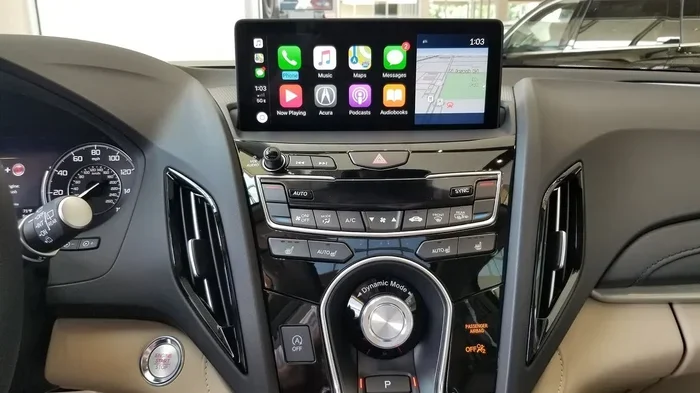
Apple CarPlay is a smart feature that mirrors your iPhone onto your car’s touchscreen. Once connected, you can access your contacts, messages, music, and navigation without digging through your phone. It uses Siri voice commands so you can keep your eyes on the road and your hands on the wheel.
For Acura owners, CarPlay turns the car’s infotainment system into a powerful iPhone hub. You get a clean, easy-to-use interface right on the dashboard. It supports popular apps like Spotify, Google Maps, WhatsApp, and more. Acura’s version of Apple CarPlay is designed to feel natural and responsive, which makes it a standout feature in the luxury compact SUV and sedan segments.
Here is why Apple CarPlay matters so much in an Acura:
- Safety first. CarPlay reduces distractions by letting you control things through voice or the car’s screen.
- Familiar interface. You already know how your iPhone works. CarPlay brings that same experience into your car.
- Better navigation. You can use your preferred mapping app instead of relying on the car’s built-in GPS.
- Seamless connectivity. Your iPhone charges and connects without any hassle.
Which Acura Models Support Apple CarPlay?
Not every Acura on the road has Apple CarPlay. The availability depends on the model, the model year, and the trim level. Here is a breakdown of the Acura models that currently offer Apple CarPlay compatibility.
Acura TLX
The Acura TLX is a sporty luxury sedan that comes with Apple CarPlay as part of its standard tech package. Both the base TLX and the higher-performance TLX Type S support CarPlay. The 2021 and newer TLX models include both wired and wireless Apple CarPlay depending on the trim you select. The TLX is one of the most popular Acura sedans, and CarPlay is a big reason why tech-savvy buyers love it.
Acura RDX
The RDX is Acura’s compact luxury SUV, and it also supports Apple CarPlay. The Acura RDX offers CarPlay on models from 2019 onward. Higher trims, especially the Advance and Type S versions, come with wireless CarPlay as standard. The RDX’s 10.2-inch touchscreen makes CarPlay easy to use and very readable while driving.
Acura MDX
The MDX is Acura’s three-row luxury SUV, and it does not disappoint when it comes to tech. The Acura MDX includes Apple CarPlay on most trims starting from the 2022 model year. The MDX also features a premium 12.3-inch display, which makes the CarPlay experience feel extra smooth and immersive.
Acura Integra
The new Acura Integra, which replaced the ILX, also supports Apple CarPlay. This compact sedan is aimed at younger buyers and tech enthusiasts. The Integra comes with wireless CarPlay as standard, which is a nice bonus for the price point.
Wired vs Wireless Apple CarPlay in Acura
One of the biggest questions people ask is whether Acura offers wireless Apple CarPlay or only the wired version. The answer depends on the model and trim level. Let us break it down.
Wired Apple CarPlay
Wired CarPlay uses a Lightning cable to connect your iPhone to the car’s USB port. This is the older method, but it still works great. The connection is stable and fast. The downside is that you need to keep a cable handy, and your phone charges through the connection. Some lower-trim Acura models only offer wired CarPlay.
Wireless Apple CarPlay
Wireless CarPlay connects through Bluetooth and Wi-Fi. There is no cable needed. You just pair your iPhone, and it connects automatically when you get in the car. This is the more convenient option, and it is available on higher-trim Acura models. If you want wireless CarPlay, look for the Acura technology package or the premium trim levels.
Here is a quick comparison of the two options:
- Wired CarPlay: Uses a USB cable, stable connection, no setup needed, available on more trims.
- Wireless CarPlay: No cable required, automatic connection, available on select trims, slightly more expensive.
Both options give you the same core features. The difference is mainly about convenience. If you do not mind plugging in a cable, wired CarPlay works perfectly fine. If you want a cleaner dashboard and hands-free convenience, go with wireless.
How to Set Up Apple CarPlay in Your Acura
Setting up Apple CarPlay in an Acura is quick and easy. You do not need any special tools or technical skills. Here is a step-by-step guide to get it running.
For Wired CarPlay
- Plug your Lightning cable into your iPhone.
- Connect the other end to the USB port in your Acura.
- The CarPlay icon should appear on your Acura’s touchscreen.
- Tap the icon and follow the on-screen prompts.
- Enable Siri Eyes Free if you want to use voice commands.
For Wireless CarPlay
- Make sure Bluetooth and Wi-Fi are turned on in your iPhone settings.
- Go to your Acura’s infotainment system and select Apple CarPlay.
- Choose the wireless option when prompted.
- Your iPhone will pair automatically.
- CarPlay will now connect every time you start the car.
Once CarPlay is set up, you can customize the layout. You can choose which apps appear on the home screen. You can also adjust the brightness and text size for better visibility. Acura’s infotainment system makes this process straightforward, even for first-time CarPlay users.
Apple CarPlay Features You Will Love in an Acura
Apple CarPlay is not just about making calls. It offers a range of features that make driving safer and more enjoyable. Here are some of the best features you get when you use Apple CarPlay in an Acura.
Siri Voice Commands
Siri is your best friend when using CarPlay. You can say “Hey Siri” to send texts, make calls, set reminders, or get directions without touching your phone. The Siri Eyes Free feature reads your messages aloud and lets you respond by voice. This is especially useful when you are driving in heavy traffic or on long road trips.
Navigation with Your Favorite Apps
One of the best things about CarPlay is that you are not stuck with the car’s built-in navigation. You can use Google Maps, Waze, or Apple Maps instead. These apps often provide better real-time traffic updates and more accurate directions. For Acura owners, this means you get a better navigation experience than what the factory system offers.
Music and Podcasts
CarPlay gives you access to all your favorite audio apps. Apple Music, Spotify, Pandora, Audible, and many more work seamlessly with CarPlay. You can control playback from the car’s screen or through Siri. The Acura audio system pairs beautifully with CarPlay, delivering rich, clear sound through the car’s premium speakers.
Messaging and Calls
CarPlay handles calls and messages with ease. You can see incoming notifications on the car’s screen and respond using voice or the on-screen keyboard. The Acura touchscreen is responsive and makes it easy to scroll through messages or contacts. This feature alone makes CarPlay worth it for anyone who stays connected while driving.
Does Apple CarPlay Affect Car Performance?
Some car buyers worry that using Apple CarPlay might drain the battery or affect the car’s performance. Let us address this directly. Apple CarPlay does not make your Acura use more fuel or reduce engine power. It runs through the car’s infotainment system, which is separate from the engine and drivetrain.
However, there is one thing to keep in mind. If you drive an Acura hybrid, such as the Acura hybrid models, the infotainment system does draw some power from the car’s electrical system. This is true for any car with a large touchscreen, whether or not it has CarPlay. But the impact is minimal and should not affect your fuel economy in any meaningful way.
If you are curious about how your Acura’s hybrid system works, you might also want to read about does AC burn gas in a hybrid car and at what point does a hybrid switch to gas. These articles explain how Acura hybrid technology works under the hood, which can help you understand the bigger picture of your car’s fuel usage.
Also, if you enjoy exploring the driving dynamics of your Acura, check out does sport mode make a car faster to learn more about how Acura’s sport mode enhances performance.
Common Mistakes Acura Owners Make With Apple CarPlay
Even though Apple CarPlay is easy to use, some Acura owners run into common issues. Here are a few mistakes to avoid so you get the best experience.
- Using a low-quality cable. A cheap USB cable can cause connection problems. Use an Apple-certified Lightning cable for the most reliable wired CarPlay experience.
- Not updating iOS. Apple releases updates that improve CarPlay compatibility. Keep your iPhone updated to avoid connection glitches.
- Ignoring Bluetooth settings. For wireless CarPlay, make sure Bluetooth and Wi-Fi are both enabled. Disabling either one will prevent the connection from working.
- Overloading the home screen. CarPlay only shows a limited number of apps on the home screen. Choose the apps you use most instead of trying to add everything.
- Restarting the system. If CarPlay freezes or does not connect, restart your iPhone and the Acura’s infotainment system. This fixes most issues quickly.
Avoiding these simple mistakes will keep your CarPlay connection smooth and reliable every time you get behind the wheel.
Is Apple CarPlay Worth It in an Acura?
The short answer is absolutely yes. Apple CarPlay adds real value to any Acura. It makes your daily commute more enjoyable and your road trips safer. You get access to apps you already love, all controlled through a familiar interface on your car’s screen.
For Acura buyers, CarPlay is especially valuable because Acura already offers a premium infotainment system. Adding Apple CarPlay on top of that makes the experience even better. Whether you are using the Acura TLX for a quick run to the store or taking the Acura MDX on a family road trip, CarPlay keeps you connected without taking your attention away from the road.
If you are still on the fence, consider this. Most new cars in 2024 and beyond are moving toward wireless CarPlay as a standard feature. Acura is already ahead of the curve with both wired and wireless options on many models. Investing in a car with Apple CarPlay is a decision you will not regret.
Final Thoughts
So, does Acura have Apple CarPlay? Yes, it does, and it works really well. From the TLX sedan to the MDX SUV, Acura offers Apple CarPlay across its lineup. Whether you prefer wired or wireless, there is an option that fits your needs and budget. The setup is simple, the features are useful, and the overall experience is smooth and reliable.
Apple CarPlay in an Acura is more than just a tech gimmick. It is a practical tool that makes driving safer, more connected, and more enjoyable. If you are shopping for an Acura, make sure the model and trim you choose include this feature. Your iPhone and your daily drive will thank you.
Frequently Asked Questions
Do all Acura models come with Apple CarPlay?
Most Acura models from 2021 onward include Apple CarPlay, but it depends on the trim level and technology package. Always check the specific model and year before purchasing to confirm CarPlay availability.
Can I use wireless Apple CarPlay in an Acura?
Yes, many Acura models offer wireless Apple CarPlay, especially on higher trims and technology packages. The Acura TLX Type S, RDX Advance, and MDX Type S typically include wireless CarPlay as standard.
Does Apple CarPlay work with Android phones in an Acura?
No, Apple CarPlay is designed exclusively for iPhones. If you use an Android phone, you will need to look into Android Auto, which is a separate system. Acura does not offer Android Auto on its infotainment systems.
Is Apple CarPlay free to use in an Acura?
Yes, Apple CarPlay is free and built into your iPhone. There are no subscription fees or extra charges to use it in your Acura. You only need a compatible cable or a wireless connection.
Can I use Apple CarPlay and the car’s built-in navigation at the same time?
No, when Apple CarPlay is active, it takes over the infotainment screen. You cannot run the car’s built-in navigation and CarPlay simultaneously. However, CarPlay offers its own navigation through apps like Google Maps and Apple Maps.
What Acura models have the best Apple CarPlay experience?
The Acura MDX and Acura TLX offer the best CarPlay experience thanks to their larger, high-resolution touchscreens. The wireless CarPlay feature on higher trims adds extra convenience and makes the overall experience feel premium.
=== CONCLUSION ===
Acura and Apple CarPlay are a great match. Apple CarPlay in an Acura brings your iPhone to life on the car’s screen, making calls, navigation, and music control safer and more convenient. Whether you choose a wired or wireless setup, the experience is smooth and reliable across most Acura models.
Remember to check the specific model year and trim level to confirm CarPlay availability. Use quality cables, keep your iPhone updated, and take advantage of Siri voice commands to get the most out of the feature. With Apple CarPlay, your Acura becomes more than just a car, it becomes a connected extension of your digital life.