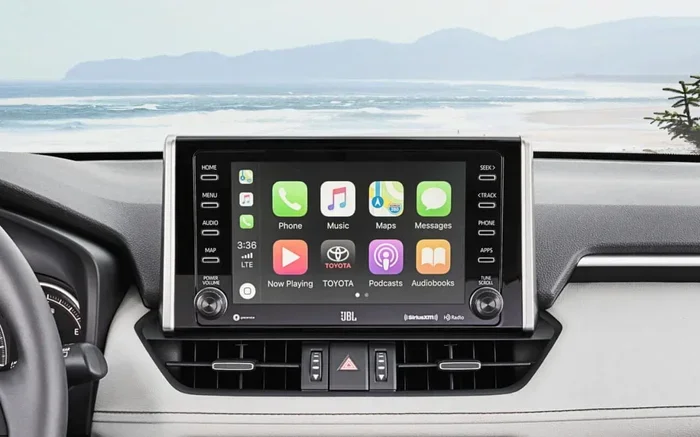
Can You Upgrade Toyota Entune To The Latest Version
Yes, you can upgrade Toyota Entune, but the process depends on your model year and existing system version. Whether you are running Entune 2.0 or Entune 3.0, there are clear paths to get the latest features. This guide covers everything from free updates to paid subscriptions and what you need to know before upgrading.
Toyota Entune is the infotainment system that powers the screens and smart features in many Toyota vehicles. If you have ever wondered can you upgrade Toyota Entune, the short answer is yes. But the full answer depends on a few things like your model year, your current system version, and what features you want to unlock.
In this guide, we will walk you through everything you need to know about upgrading your Toyota Entune system. We will cover the different versions, how to check what you have, and the steps to get the latest software. Whether you drive a Camry, RAV4, or Tacoma, this article has you covered.
The good news is that Toyota has made strides over the years to make infotainment updates more accessible. You no longer need to visit a dealer for every single update. Some upgrades can be done wirelessly, while others may require a simple USB transfer. Let us dive into the details so you can make the most of your Toyota experience.
Key Takeaways
- Entune 3.0 is the current standard: Most newer Toyotas come with Entune 3.0, which offers wireless updates and improved connectivity.
- Older models can still upgrade: Even if you have Entune 2.0 or an older system, you may be able to update through a dealer or USB.
- Some features require a subscription: Services like remote connect and live navigation may need a paid plan after a trial period ends.
- You can do some updates yourself: Certain software updates can be performed at home with a USB drive or through the infotainment system.
- Compatibility matters: Not every Toyota model supports every Entune version, so check your specific vehicle before attempting an upgrade.
- Dealer visits may be required: Some updates can only be installed by a certified Toyota dealer with the right tools.
📑 Table of Contents
- Understanding Toyota Entune Versions
- Can You Upgrade Toyota Entune Yourself?
- How to Check Your Current Entune Version
- Benefits of Upgrading Toyota Entune
- Common Problems and Troubleshooting
- Entune Subscription and Costs
- Expert Insights on Keeping Your Entune Current
- Frequently Asked Questions
- Conclusion
Understanding Toyota Entune Versions
Before you upgrade, it helps to know what version you currently have and what is available. Toyota has released several versions of Entune over the years, and each one brings new capabilities.
Entune 1.0 and 2.0: The Older Systems
Entune 1.0 and 2.0 were the early versions of Toyota’s infotainment platform. These systems were introduced in the mid-2010s and relied mostly on a connected smartphone app called Entune App Suite. The app mirrored some features on your screen, but the system itself had limited built-in functionality.
With Entune 2.0, Toyota added better navigation capabilities and improved audio controls. However, these older systems often required a USB connection to a smartphone to access most features. If you are still running one of these versions, you may be missing out on a lot of modern conveniences.
Entune 3.0: The Game Changer
Entune 3.0 marked a big leap forward. This version introduced a more intuitive interface, better graphics, and wireless smartphone integration. With Entune 3.0, you get features like:
- Wireless Apple CarPlay and Android Auto: No more messy cables cluttering your dashboard.
- Built-in navigation: Turn-by-turn directions without needing your phone.
- Voice recognition: Control music, calls, and navigation with your voice.
- Remote connect: Start your car, lock doors, and check fuel levels from your phone.
If your Toyota came with Entune 3.0, you are already on a solid foundation. But even Entune 3.0 can receive software updates that improve performance, add features, and fix bugs.
Entune 4.0 and Beyond
Toyota has continued evolving its infotainment technology. The newer versions, sometimes branded under Toyota Audio or the latest Entune iterations, offer even more advanced features. These include larger touchscreens, over-the-air update capabilities, and deeper integration with Toyota connected services. If your vehicle is recent enough, you may already have access to these newer platforms.
Can You Upgrade Toyota Entune Yourself?
One of the most common questions is whether you can handle the upgrade on your own. The answer is: it depends on the update and your vehicle.
Over-the-Air Updates
Some newer Toyota models with Entune 3.0 or later support over-the-air (OTA) updates. This means your car can download and install software updates wirelessly, similar to how your phone gets updates. To check for OTA updates:
- Make sure your vehicle is connected to Wi-Fi or a cellular network.
- Go to the settings menu on your infotainment screen.
- Look for a “System Update” or “Software Update” option.
- Follow the on-screen prompts to download and install.
These updates are usually free and can add new features or improve existing ones. They are also the easiest way to keep your system current without leaving your driveway.
USB Updates
If your vehicle does not support OTA updates, you may be able to install software through a USB drive. Toyota occasionally releases update files on their website or through your dealer. You download the file, put it on a USB stick, and plug it into your car’s USB port. The system then guides you through the installation process.
Quick Tip: Always make sure your car is turned on and in park before starting a USB update. Do not turn off the vehicle during the process, as this can cause issues with the system.
When You Need a Dealer Visit
Some updates, especially major version upgrades, require a visit to a Toyota dealer. The dealer has specialized tools and software that can push updates directly to your car’s system. This is also the case for older vehicles that may not support wireless or USB updates.
Visiting a dealer for an update is usually free, but it does cost you time. You may need to schedule an appointment and leave your car for a few hours. Still, it is the safest way to ensure the update goes smoothly.
How to Check Your Current Entune Version
Before upgrading, you need to know what you are working with. Checking your current Entune version is simple:
- Turn on your vehicle and the infotainment screen.
- Navigate to the “Settings” menu.
- Look for “System Information” or “About.”
- Your current software version number will be displayed there.
Write down this version number. You can then visit the Toyota website or contact your dealer to find out what updates are available for your specific version. Knowing your version also helps when troubleshooting issues or asking for support.
Why Your Version Matters
Not all updates are compatible with all versions. For example, a major jump from Entune 2.0 to Entune 3.0 may require hardware changes that are not possible in older vehicles. By checking your version first, you avoid wasting time on updates that will not work for your system.
Benefits of Upgrading Toyota Entune
So why bother upgrading at all? There are several compelling reasons to keep your Toyota Entune system up to date.
Improved Navigation
Updated maps and navigation software mean better route suggestions, real-time traffic data, and more accurate arrival times. If you rely on your car’s built-in navigation, keeping it current is a must.
Bug Fixes and Stability
Every software update addresses known issues. These can range from minor glitches like slow menu loading to more significant problems like Bluetooth pairing failures. Updates keep your system running smoothly and reliably.
New Features
Toyota occasionally adds new features through software updates. This could include new voice commands, improved music streaming integration, or enhanced safety features like collision warnings displayed on your screen.
Better Smartphone Integration
As phones evolve, so do the ways they connect to car systems. Updates ensure that Apple CarPlay and Android Auto continue to work seamlessly with the latest phone models and operating systems.
Enhanced Security
Just like your computer or phone, your car’s infotainment system can have security vulnerabilities. Updates patch these gaps and help protect your personal data, especially if you use remote connect or other connected services.
Common Problems and Troubleshooting
Upgrading your Toyota Entune is usually straightforward, but sometimes things do not go as planned. Here are some common issues and how to handle them.
Update Fails or Freezes
If an update freezes midway, do not panic. Turn the vehicle off completely, wait a few minutes, and restart. In most cases, the system will resume or roll back safely. If the problem persists, a visit to the dealer may be needed.
New Features Not Appearing
Sometimes after an update, new features do not show up right away. Try restarting the infotainment system by holding the power button for about 10 seconds. If that does not work, a full system reboot (turning the car off and back on) usually resolves it.
Connectivity Issues After Update
If you notice Bluetooth or Wi-Fi problems after an update, go to your network settings and try reconnecting your devices. Sometimes the update resets network connections, and you simply need to pair your phone again.
Entune Subscription and Costs
Here is something many Toyota owners do not expect: some Entune features come with a subscription. When you first buy a new Toyota, you often get a free trial period for services like remote connect, live navigation, and connected services.
After the trial ends, you may need to pay a subscription fee to keep using those features. Upgrading your Entune system does not always change this. Even with the latest software, premium services may still require an active subscription.
Quick Tip: Check your Entune app or your Toyota account to see which services are active and whether any subscriptions are pending. This helps you avoid surprise charges and ensures you are getting the most out of your system.
Some updates are completely free and do not require any subscription at all. These include basic software patches, map updates, and general improvements to the user interface. Always confirm with your dealer or check the Toyota website before assuming a feature will cost money.
Expert Insights on Keeping Your Entune Current
Keeping your Toyota Entune system updated is one of the best ways to protect your investment. Think of it like maintaining your engine, but for your car’s brain. A well-updated infotainment system performs better, lasts longer, and provides a more enjoyable driving experience.
Toyota dealers recommend checking for updates at least once every few months. With over-the-air updates becoming more common, this process is getting easier every year. You do not need to be a tech expert to keep your system current.
Also, keep in mind that upgrading your Entune system is different from reprogramming your ECM (Engine Control Module). These are two separate systems. Entune handles your audio, navigation, and connectivity, while the ECM manages your engine performance. If you are curious about ECM upgrades, that is a different process entirely.
Frequently Asked Questions
Can You Upgrade Toyota Entune On Older Models?
Yes, in many cases you can upgrade older Entune systems, but the options are more limited. Older models with Entune 1.0 or 2.0 may only support minor updates through a dealer or USB. Major version upgrades like jumping to Entune 3.0 typically require hardware changes that are not possible without significant modification. Check with your Toyota dealer to see what is available for your specific model year.
Is It Free To Upgrade Toyota Entune?
Many Entune updates are completely free, especially software patches and map updates. However, some features like remote connect or live navigation may require a paid subscription after a free trial period. Always confirm the cost with your dealer or check the Toyota website before starting any update process.
How Long Does A Toyota Entune Update Take?
Most software updates take between 15 and 45 minutes to complete. Over-the-air updates happen in the background while you are parked. USB updates and dealer-installed updates may take a bit longer, especially if multiple updates are being applied at once. Never turn off your vehicle during an update.
Can You Roll Back An Entune Update If Something Goes Wrong?
In most cases, the system will automatically revert to the previous version if an update fails. However, if the system becomes unresponsive, you may need to visit a Toyota dealer for assistance. It is always a good idea to back up any important settings or paired devices before starting an update.
Does Upgrading Entune Affect Your Car Warranty?
No, upgrading your Entune system does not affect your Toyota warranty. In fact, keeping your software up to date is encouraged by Toyota. Just make sure any updates are performed through official channels, whether that is your dealer, the Toyota website, or the OTA update system in your vehicle.
Can You Upgrade Entune If You Do Not Have Wi-Fi In Your Car?
Yes, you can still upgrade without Wi-Fi. Some updates can be downloaded via your smartphone’s hotspot or through a USB drive from a computer. You can also visit a Toyota dealer who can install updates directly. The method you choose depends on your vehicle’s capabilities and your personal preference.
Conclusion
Can you upgrade Toyota Entune? Absolutely. Whether you have an older Entune 2.0 system or the latest Entune 3.0, there are ways to keep your infotainment system current and fully functional. From wireless over-the-air updates to dealer-installed software patches, Toyota has made the process more accessible than ever.
The key is to know your current version, understand what updates are available, and choose the method that works best for you. Keeping your Toyota Entune system updated means better navigation, fewer bugs, new features, and a smoother overall experience every time you get behind the wheel.
Take a few minutes today to check your Entune version and see what updates are waiting for you. Your future self, and your passengers, will thank you for it. A well-maintained infotainment system makes every drive more enjoyable and keeps you connected on the road.
And remember, if you ever need to troubleshoot or if an update does not go as planned, your local Toyota dealer is always a phone call away. They are there to help you get the most out of your vehicle and your Toyota Entune experience.