Do I Have to Pay for My Toyota App or Is It Really Free
Many Toyota owners wonder if the Toyota app costs money to use. The good news is that the base Toyota app is free to download and offers a solid set of features at no charge. However, some premium services and subscription tiers do require a monthly or annual fee, so it pays to understand what is free and what is not before you commit.
Do you own a Toyota and wonder if you have to pay for the Toyota app? You are not alone. Thousands of Toyota owners search for answers every month about the Toyota app cost, what features are included, and whether the free version is enough. This guide breaks it all down in plain language so you know exactly what you are getting into.
The Toyota app has become a must-have tool for modern Toyota owners. It lets you remote start your car, lock and unlock doors, check fuel levels, and even locate your vehicle on a map. But here is the big question: do you have to pay for all of this, or is the Toyota app really free? Let us dive in and find out.
In this article, we will cover everything you need to know about the Toyota app pricing, the free features, the paid plans, and whether the subscription is worth your money. Whether you drive a brand new 2024 RAV4 or an older Camry, this guide has you covered.
Key Takeaways
- The Toyota app is free to download and install on both iOS and Android devices.
- Core features like remote start and lock/unlock are free for a limited trial period.
- Premium subscriptions unlock advanced features such as detailed trip tracking and extended remote services.
- Some Toyota models include complimentary trial periods that let you test premium features risk-free.
- You can add apps to your car through the infotainment system, which may complement the Toyota app experience.
- Always check your specific model and trim because included features vary widely across the Toyota lineup.
📑 Table of Contents
- What Is the Toyota App?
- Is the Toyota App Free to Download?
- Toyota App Pricing and Subscription Plans
- Key Features of the Toyota App
- How the Toyota App Compares to Other Car Apps
- Who Should Pay for the Toyota App Premium Plan?
- Common Mistakes Toyota App Users Make
- Expert Tips for Getting the Most Out of the Toyota App
- Final Thoughts: Is the Toyota App Worth It?
What Is the Toyota App?
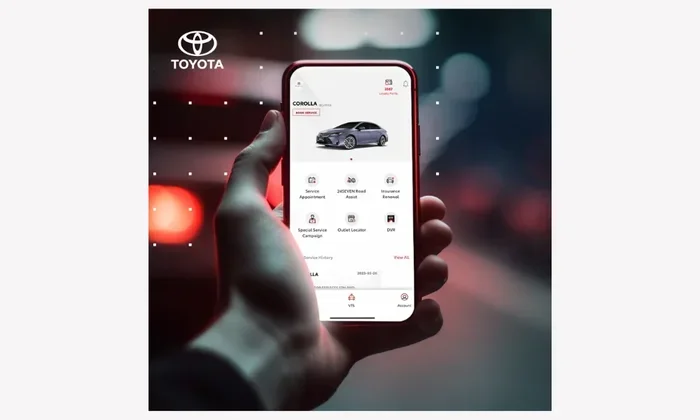
The Toyota app is a mobile application developed by Toyota Motor Corporation. It connects your smartphone to your Toyota vehicle through a system called Toyota Connected Services. The app works with most Toyota models that have the Toyota Remote Connect feature built in.
When you download the Toyota app from the App Store or Google Play, you get access to a dashboard that mirrors many of the controls inside your car. You can check tire pressure, schedule maintenance reminders, and even send destinations directly to your car’s navigation system. The Toyota connected car experience is designed to make owning a Toyota more convenient and connected.
But not all Toyota vehicles support every feature. Older models may have limited functionality, while newer models with the latest Toyota infotainment system offer a much richer experience. Always check your vehicle’s compatibility before assuming you will get the full suite of tools.
Is the Toyota App Free to Download?
Yes, the Toyota app is completely free to download. There is no upfront cost to install it on your iPhone or Android phone. You simply visit the App Store or Google Play, search for “Toyota,” and hit download. The process takes just a few minutes.
Once installed, you create an account and pair it with your vehicle using your Vehicle Identification Number (VIN). After pairing, you can start using the basic features right away. No credit card is required to get started.
Here is what you get for free when you first set up the Toyota app:
- Remote lock and unlock for your doors
- Vehicle location tracking on a map
- Fuel level and tire pressure checks
- Maintenance reminders and service alerts
- Basic trip information and driving stats
These free features are genuinely useful. Many Toyota owners rely on them daily. But the app also offers a premium tier with more advanced tools. That is where the question of cost comes in.
Toyota App Pricing and Subscription Plans
The Toyota app operates on a freemium model. This means the base version is free, but you can upgrade to a paid plan for extra features. Understanding the Toyota app subscription options is key to deciding if the paid plan makes sense for you.
Free Tier vs. Premium Tier
The free tier covers the essentials. You can lock and unlock your car, check its location, and monitor basic vehicle health. For many casual drivers, this is more than enough. You probably do not need anything else.
The premium tier, however, opens up a world of advanced capabilities. Here is a quick look at what each tier offers:
- Free Tier: Remote lock/unlock, location tracking, fuel check, tire pressure, maintenance alerts
- Premium Tier: Everything in the free tier plus remote start, extended trip history, smart charging for hybrids, detailed driving behavior analysis, and priority roadside assistance
How Much Does the Premium Plan Cost?
The Toyota app premium subscription typically costs around $10 to $15 per month or $100 to $150 per year. Prices may vary based on your region and the specific Toyota model you own. Some dealers offer promotional rates for the first few months to lure new users.
It is worth noting that Toyota often includes a free trial period with new vehicles. If you just bought a Toyota, check your welcome packet. You might already have 3 to 6 months of premium access at no extra charge. This gives you a risk-free way to test out the paid features and decide if they are worth keeping.
Are There Hidden Fees?
Toyota is transparent about its pricing, but there are a few things to watch out for. First, the premium subscription auto-renews unless you cancel it. If you forget to turn off auto-renewal, you might get charged without realizing it. Second, some features require a Toyota Connected Services subscription that is separate from the app itself, especially for certain connected car features built into the vehicle’s hardware.
Third, if you let your subscription lapse, you lose access to premium features. Your car does not stop working, but you will not be able to use remote start or advanced trip tracking until you resubscribe. Keep this in mind if you are considering whether the premium plan is right for you.
Key Features of the Toyota App
The Toyota app is packed with features that make owning a Toyota more convenient. Let us walk through the most popular ones so you can see the real value.
Remote Start and Climate Control
This is one of the most loved features. On a cold winter morning, you can remote start your Toyota and crank up the heat from the warmth of your bed. On a hot summer day, you can cool down the interior before you even walk outside. This feature is available through the premium tier and requires your Toyota to have the remote start capability built in.
Vehicle Location and Security
Ever forgotten where you parked in a huge lot? The Toyota app shows your exact vehicle location on a map. You can also trigger the horn and lights to help you find it. In addition, the app sends alerts if someone tries to break into your car or if the alarm goes off. This Toyota security feature gives owners real peace of mind.
Maintenance and Service Scheduling
The app keeps track of your maintenance schedule and sends reminders when it is time for an oil change, tire rotation, or other service. You can even schedule a service appointment directly through the app and get directions to your nearest Toyota dealer. This feature alone saves a lot of time and hassle.
Smart Charging for Hybrid Owners
If you drive a Toyota hybrid, the app offers smart charging features. You can monitor your battery level, set charging schedules, and track your fuel efficiency over time. Some hybrid owners find that the app helps them save money on gas by encouraging more efficient driving habits.
How the Toyota App Compares to Other Car Apps
Toyota is not the only automaker with a mobile app. Ford has FordPass, BMW has My BMW, and Tesla has its own dedicated app. So how does the Toyota app stack up?
One of the biggest advantages of the Toyota app is that it is free to start. Many competing apps require a subscription from day one. Toyota gives you a solid free experience before asking for any money. This is a big plus for budget-conscious owners.
Another strength is the wide range of supported vehicles. Because Toyota sells millions of cars every year, the app is compatible with a huge variety of models and years. Whether you drive a compact Corolla or a full-size Tundra, chances are the Toyota app will work with your vehicle.
That said, some competitors offer more advanced features out of the box. Tesla, for example, includes nearly everything in its app for free. Toyota’s premium features do cost extra, and that is something to consider when comparing options.
If you are interested in adding more apps to your car’s infotainment system, you can explore what apps you can add to your car to enhance your driving experience beyond what the Toyota app alone offers.
Who Should Pay for the Toyota App Premium Plan?
The premium plan is not for everyone. Here is a quick breakdown to help you decide if it is worth the money for your situation.
You should consider the premium plan if:
- You use remote start regularly and value the comfort it provides
- You drive a lot and want detailed trip tracking and driving analysis
- You own a Toyota hybrid and want to monitor charging and fuel efficiency closely
- You travel frequently and want priority roadside assistance
- You have a new Toyota with a complimentary trial and want to test all the premium features
You can skip the premium plan if:
- You only need basic features like lock/unlock and location tracking
- You already have a separate car security system or tracking device
- You do not use remote start often
- You prefer to keep your monthly expenses low
The honest truth is that most casual Toyota owners will be perfectly happy with the free tier. The premium plan is best suited for power users and tech enthusiasts who want every possible feature at their fingertips.
Common Mistakes Toyota App Users Make
Before you dive into the Toyota app, here are a few common mistakes to avoid:
- Forgetting to cancel a free trial: If you start a premium trial, set a reminder to cancel before it converts to a paid subscription. Many people forget and get charged unexpectedly.
- Not updating the app regularly: Toyota releases updates that fix bugs and add new features. Keeping the app updated ensures you get the best experience.
- Ignoring compatibility checks: Not every Toyota model supports every feature. Check your vehicle’s manual or contact your dealer to confirm what your car can do.
- Using the app without a stable connection: The Toyota app relies on a cellular data connection and a working telematics control module in your car. If either one is down, features will not work properly.
- Sharing your login credentials: Your Toyota app account is tied to your vehicle. Sharing your login with others can lead to unauthorized access and potential security issues.
Expert Tips for Getting the Most Out of the Toyota App
Want to squeeze every bit of value from your Toyota app? Here are some expert tips that real Toyota owners swear by:
- Enable push notifications so you get instant alerts about your vehicle’s status, maintenance reminders, and security warnings.
- Use the app to pre-condition your car before long trips. This is especially helpful in extreme weather when you want the cabin to be comfortable from the moment you sit down.
- Pair the Toyota app with your key fob programming knowledge. Understanding how your key fob works alongside the app gives you more control over your vehicle’s security and convenience features.
- Check for dealer promotions regularly. Toyota dealers sometimes offer free or discounted premium subscriptions as part of a sales event or service campaign.
- Explore the Toyota app settings to customize which features you use most. This helps you get the most relevant experience without feeling overwhelmed by options.
Final Thoughts: Is the Toyota App Worth It?
So, do you have to pay for your Toyota app? The short answer is no, not necessarily. The base Toyota app is free, and it offers a solid set of features that most owners will find useful every day. The premium subscription is optional and only makes sense if you specifically need the advanced tools it provides.
If you are a casual driver who just wants to check your fuel level, locate your car, and get maintenance reminders, the free version is more than enough. But if you love technology and want features like remote start, detailed trip analytics, and priority roadside assistance, the premium plan is a reasonable investment at around $10 to $15 per month.
The best approach? Download the app for free, use it for a few weeks, and see how much you actually rely on it. If you find yourself using the premium features daily, then upgrading is a no-brainer. If not, you can stick with the free tier and still enjoy a great connected car experience. The Toyota app is a valuable tool, and the fact that it starts free makes it an easy choice for any Toyota owner.
Remember, you can also enhance your Toyota experience by exploring other car-related tools and services. Whether it is learning about how to program a key fob yourself or understanding your vehicle’s diagnostic features, there is always more you can do to get the most out of your Toyota.
Frequently Asked Questions
Is the Toyota app completely free?
The base Toyota app is free to download and use. It includes core features like remote lock/unlock, vehicle location, and maintenance reminders. However, some advanced features require a premium subscription that costs money.
How much does the Toyota app premium plan cost?
The premium subscription typically costs between $10 and $15 per month or $100 to $150 per year. Prices may vary by region and Toyota model. Always check the current pricing in the app or on Toyota’s official website.
Can I use the Toyota app on any smartphone?
Yes, the Toyota app is available for both iOS and Android devices. You just need a compatible Toyota vehicle and a smartphone with an active data connection to use the app’s remote features.
What happens if I cancel my Toyota app subscription?
If you cancel your premium subscription, you will lose access to the premium features like remote start and advanced trip tracking. Your free tier features will continue to work normally, and you can resubscribe at any time.
Do all Toyota models support the app?
Most newer Toyota models support the app, but the available features depend on your vehicle’s model year and trim level. Older models may have limited functionality or may not be compatible at all. Check with your dealer to confirm your specific vehicle’s capabilities.
Can I add third-party apps to my Toyota’s infotainment system?
Some Toyota models allow you to add apps to your car’s infotainment system, which can complement the Toyota app experience. Check your vehicle’s manual or visit the app store on your car’s display to see what is available for your specific model.