How Do I Reset My Subaru Battery After Replacing It
Resetting your Subaru battery after a replacement is essential to restore your vehicle’s computer settings, radio codes, and optimal performance. This guide walks you through the entire process, from disconnecting the terminals to reprogramming your key fob. Whether you drive a Subaru Outback, Forester, or Legacy, these simple steps will help you get back on the road with confidence.
Replacing a car battery can feel like a small victory. You unbox the new one, clamp the terminals, and boom — your Subaru fires right up. But here is the thing many people miss. That fresh battery does not automatically mean everything is back to normal. Your Subaru’s computer needs a proper reset to recognize the new power source and recalibrate all its systems.
So how do you actually reset your Subaru battery after replacing it? It is simpler than most people think, but there are a few important steps you should not skip. In this guide, we walk you through every step clearly and practically. Whether your Subaru is a 2015 Outback or a 2022 Forester, this guide has you covered.
Resetting your battery does more than just clear a warning light. It resets the idle speed adaptation, fuel trim values, and even your radio security code. Skipping this step can lead to poor fuel economy, erratic shifting, or a car that won’t start again in a few weeks. Let us fix that right now.
Key Takeaways
- Battery reset clears error codes: Replacing your battery resets the ECU, which may trigger warning lights or store error codes that need clearing.
- You’ll need basic tools: A wrench, baking soda solution, and optionally an OBD2 scanner make the process smooth and safe.
- Radio and clock settings reset: Don’t worry if your radio asks for a code or your clock goes back to default after the swap.
- Key fob reprogramming may be needed: Some Subaru models require you to re-sync your key fob after a battery change.
- Drive for 15-20 minutes: After the reset, a short drive allows the ECU to relearn your driving patterns and adapt properly.
- Check for corrosion regularly: Cleaning your battery terminals prevents future starting issues and extends battery life.
📑 Table of Contents
- Why You Need to Reset Your Subaru Battery After Replacement
- Tools and Materials You Will Need
- Step-by-Step Guide to Resetting Your Subaru Battery
- Common Mistakes to Avoid When Resetting Your Subaru Battery
- How Long Does the Reset Process Take?
- Subaru Models and Their Reset Variations
- Maintaining Your New Subaru Battery for Long Life
- When to Seek Professional Help
- Final Thoughts
Why You Need to Reset Your Subaru Battery After Replacement
When you pull the old battery out and snap the new one in, your Subaru’s electrical system does not just quietly accept the change. The car’s computer — known as the Engine Control Unit or ECU — stores learned data based on your old battery’s performance. That data includes idle speed adjustments, fuel mixture ratios, and transmission shift points.
Once the battery is removed, all of that learned data goes away. The ECU essentially starts from scratch. This is actually a good thing in most cases, because it lets the system relearn based on the fresh battery’s full power output.
What Happens If You Skip the Reset?
Some drivers replace their battery and just drive off without doing anything. In many cases, the car runs fine. But over time, you might notice a few problems. The check engine light might pop on for no clear reason. Your radio might ask for a security code every time you turn the key. The idle might feel a little rough when you first start the car in the morning.
In worse cases, your Subaru might not start right after turning it off if the ECU has not fully recalibrated. If you ever run into that issue, check out our guide on why your car won’t start right after turning it off for more troubleshooting tips.
Common Signs Your Battery Needs a Reset
- The check engine light stays on after installing the new battery
- Your radio displays a security code prompt
- The clock and trip meter reset to zero and stay there
- Your transmission shifts feel harsh or delayed at first
- The idle RPM fluctuates more than usual during the first few drives
- Your key fob needs to be reprogrammed to sync with the car
Tools and Materials You Will Need
Before you start, gather everything you need. You do not want to be halfway through the process and realize you are missing a wrench or a cleaning solution. Here is what you should have ready.
Essential Tools
- 10mm or 13mm wrench: Most Subaru battery terminals use one of these sizes
- Baking soda and water solution: A tablespoon of baking soda mixed with a cup of warm water works perfectly for cleaning terminals
- Wire brush or old toothbrush: For scrubbing corrosion off the terminals
- Anti-corrosion grease or petroleum jelly: This protects the new terminals from future buildup
- OBD2 scanner (optional but recommended): Helps you clear error codes quickly and accurately
Recommended Safety Gear
- Safety glasses to protect your eyes from any battery acid
- Work gloves to keep your hands clean and protected
- A clean rag or towel for wiping down the battery area
Step-by-Step Guide to Resetting Your Subaru Battery
Now let us get into the actual process. Follow these steps in order, and your Subaru will be fully recalibrated and running smoothly in no time.
Step 1: Turn Off the Engine and Remove the Key
Make sure your Subaru is completely off. Remove the key from the ignition and place it somewhere safe. If you have a push-button start model, make sure the car is in Park and the brake pedal is pressed. This prevents any electrical shorts while you work on the battery.
Wait at least five minutes after turning off the engine. This gives the electrical system time to power down fully. Working on a live system can sometimes cause minor electrical glitches, so patience here pays off.
Step 2: Locate the Battery and Inspect the Terminals
Open your hood and find the battery. In most Subaru models, the battery sits on the left side of the engine bay. Once you locate it, look closely at the terminals. Do you see any white or greenish buildup? That is corrosion, and it needs to be cleaned before you install the new battery.
If you want to know what your battery paint code looks like or how to identify your battery specs, you can reference our article on whether your VIN can tell you your paint code for related vehicle identification tips.
Step 3: Disconnect the Negative Terminal First
This is the most important safety step. Always disconnect the negative terminal first. On a Subaru, the negative terminal is usually marked with a minus sign and often has a black cable. Use your wrench to loosen the nut and carefully lift the cable off the terminal post.
Tie the disconnected cable back so it cannot accidentally touch the terminal while you work. This prevents any accidental short circuits.
Step 4: Disconnect the Positive Terminal
Now disconnect the positive terminal, which is marked with a plus sign and usually has a red cable. Loosen the nut and remove the cable. Set the old battery aside carefully. Batteries are heavy, so lift with your legs, not your back.
Step 5: Clean the Terminal Posts and Cable Ends
Dip your wire brush or old toothbrush into the baking soda solution and scrub the terminal posts and the inside of the cable ends. You want to see clean, shiny metal underneath. This ensures a solid electrical connection with the new battery.
Wipe away any residue with a clean rag. Apply a thin layer of anti-corrosion grease to the terminals before installing the new battery. This simple step can save you from future headaches.
Step 6: Install the New Battery
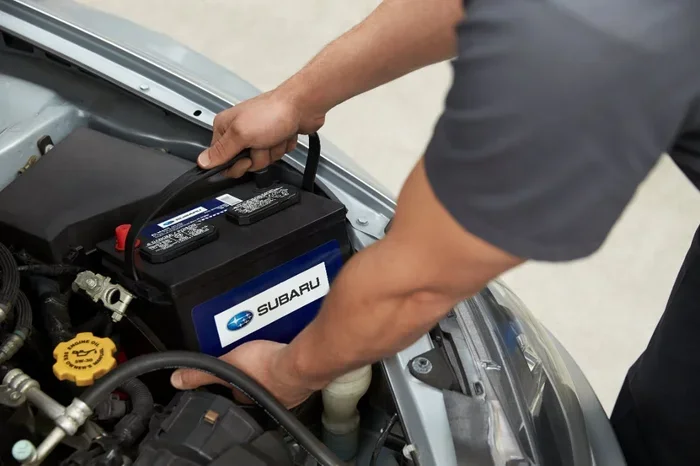
Place the new battery in the tray, making sure it sits securely. Connect the positive terminal first and tighten the nut firmly. Then connect the negative terminal and tighten that nut as well. Give each connection a gentle tug to make sure they are snug.
Never overtighten the terminals. You can strip the threads or crack the battery post. A firm hand is all you need.
Step 7: Reset the ECU by Disconnecting the Negative Terminal
Here is the key step that actually resets the system. After connecting the new battery, disconnect the negative terminal again. Leave it disconnected for about 15 to 30 minutes. This fully drains any residual power from the ECU and forces it to reset to factory defaults.
While you wait, you can use this time to clean up your engine bay or check other fluid levels under the hood. This is also a good time to read any error codes with your OBD2 scanner if you have one.
After 15 to 30 minutes, reconnect the negative terminal. The ECU will now start fresh with the new battery as its baseline.
Step 8: Start the Engine and Let It Idle
Turn the key or press the start button. Your Subaru might take a second longer to crank than usual. That is completely normal. The ECU is relearning the engine parameters based on the new battery.
Let the car idle for about 10 to 15 minutes. Do not drive off immediately. During this idle period, the ECU adjusts the idle speed, fuel mixture, and transmission shift points to match the full power of your new battery.
Step 9: Clear Error Codes with an OBD2 Scanner
If you have an OBD2 scanner, now is the time to use it. Plug it into the diagnostic port under your dashboard. Read any stored codes and clear them. Most codes related to the battery swap will be battery voltage or charging system codes.
If you do not have a scanner, driving the car for 15 to 20 minutes usually clears minor codes on its own. However, a scanner gives you peace of mind and confirms everything is clean.
Step 10: Reprogram Your Key Fob if Needed
Some Subaru models require key fob reprogramming after a battery change. If your remote start or keyless entry is not working after the swap, do not panic. Try the reprogramming sequence for your specific model. In most cases, you cycle the key from off to on several times within a specific time window to resync the fob.
If you are interested in learning more about programming key fobs yourself, check out our article on whether you can program a key fob yourself for additional guidance.
Common Mistakes to Avoid When Resetting Your Subaru Battery
Even with the best instructions, mistakes happen. Here are the most common errors people make when resetting their Subaru battery after a replacement. Avoid these, and your reset will go smoothly.
Mistake 1: Reconnecting the Positive Terminal First
Always disconnect and reconnect the negative terminal first and last. Reconnecting positive first increases the risk of short circuits, which can damage your car’s electrical system or even cause sparks near the battery.
Mistake 2: Skipping the ECU Reset Wait Time
Some people reconnect everything and drive off immediately. The ECU needs that 15 to 30 minute wait time to fully reset. Skipping this step means the computer is still running on old learned values, which can cause rough idling and poor performance.
Mistake 3: Not Cleaning the Terminals
Corrosion on the old terminals can transfer to the new battery. This creates a poor connection that leads to slow cranking or intermittent electrical issues. Take the extra five minutes to clean everything thoroughly.
Mistake 4: Forgetting to Reset the Clock and Radio
After a battery reset, your clock will likely revert to 12:00 and your radio may ask for a security code. Write down the code from your owner’s manual or Subaru’s website before you start the replacement. This saves you from frustration later.
Mistake 5: Ignoring Warning Lights After the Reset
If a warning light stays on after the reset, do not ignore it. The light is telling you something. Use your OBD2 scanner to read the code, or visit a trusted mechanic. Sometimes the light stays on because the ECU has not fully adapted yet, but it is always better to check.
How Long Does the Reset Process Take?
The full reset process takes about 30 to 45 minutes from start to finish. The actual hands-on work takes around 15 to 20 minutes. The remaining time is the ECU reset wait period and the idle warm-up drive.
If you are comparing this to professional service costs, doing it yourself saves you time and money. Most dealerships and auto shops charge between $100 and $200 for a battery reset and ECU recalibration. With the right tools, you can do it for free in your own driveway.
Just keep in mind that the process might take a little longer depending on your Subaru model. Newer models with more advanced computer systems may require additional programming steps. Older models tend to be more straightforward.
Subaru Models and Their Reset Variations
While the general reset process is the same across Subaru models, there are small variations worth noting. Here is a quick comparison of how different Subaru models handle the battery reset.
| Subaru Model | ECU Reset Method | Key Fob Resync Needed? | Radio Code Required? |
|---|---|---|---|
| Subaru Outback | Disconnect negative for 15-30 min | Yes, on models 2015+ | Yes, on most models |
| Subaru Forester | Disconnect negative for 15-30 min | Yes, on models 2013+ | Yes, on models 2009+ |
| Subaru Legacy | Disconnect negative for 15-30 min | No on most models | Yes, on models 2010+ |
| Subaru Impreza | Disconnect negative for 15-30 min | Yes, on models 2017+ | Yes, on most models |
| Subaru Crosstrek | Disconnect negative for 15-30 min | Yes, on models 2018+ | Yes, on most models |
These are general guidelines. Always refer to your specific model’s owner manual for the exact reset procedure. If you ever find yourself dealing with a car that won’t start and you hear no noise at all, our article on what it means when your car won’t start and makes no noise can help you diagnose the issue further.
Maintaining Your New Subaru Battery for Long Life
Resetting your battery is only part of the equation. Proper maintenance keeps your new battery healthy for years. Subaru batteries typically last between three and five years, but that lifespan depends heavily on how well you take care of them.
Tips for Extending Battery Life
- Drive your car regularly: Short trips that are under 15 minutes do not fully charge the battery. Try to take longer drives at least once a week
- Check terminals monthly: Look for any white or greenish buildup and clean it off promptly
- Avoid leaving electronics on when the engine is off: Lights, radio, and phone chargers drain the battery when the car is not running
- Inspect the battery tray: Make sure the battery sits securely and is not vibrating loose, which can damage the internal plates
- Test your battery annually: Many auto parts stores offer free battery testing. This helps you catch a weak battery before it dies completely
After you complete the reset, take your Subaru for a 15 to 20 minute drive. This allows the ECU to fully relearn your driving habits and adapt to the new battery’s performance. If you ever notice your check engine light coming on after a battery change, do not panic. It is often just the ECU recalibrating. But if the light stays on, get it checked.
Also, if you are dealing with a situation where your car won’t start and you are wondering if it is related to your battery health, you might want to check whether your car can still be driven after it overheats for guidance on handling unexpected car issues safely.
When to Seek Professional Help
Most battery resets are straightforward and can be done at home. But there are times when professional help is the right call. If you have followed all the steps and your Subaru still has warning lights, rough idling, or starting issues, it is time to see a mechanic.
A professional mechanic has access to advanced diagnostic tools that can read deeper ECU data. They can also check whether your alternator is charging the new battery properly. A weak alternator can cause a new battery to drain quickly, making it seem like the reset did not work.
On average, a Subaru dealership or independent mechanic will charge between $100 and $250 for a full battery reset and diagnostic check. This includes scanning for error codes, clearing them, and verifying that the charging system is working correctly.
If you are wondering about ECM reprogramming or whether you can handle it yourself, our article on whether you can reprogram your ECM yourself covers this topic in detail and might save you a trip to the shop.
Final Thoughts
Resetting your Subaru battery after a replacement is one of those simple maintenance tasks that makes a huge difference. It clears error codes, recalibrates your ECU, and ensures your car runs at its best with the new power source. The entire process takes less than an hour and requires only basic tools.
Do not skip this step just because your car seems to run fine right after the swap. The long-term benefits of a proper reset — smoother idling, better fuel economy, and fewer electrical gremlins — are well worth the extra effort. Your Subaru will thank you with reliable performance for miles to come.
Take your time, follow the steps in order, and enjoy the satisfaction of doing it yourself. And remember, if anything seems off after the reset, there are plenty of resources and professionals ready to help. A fresh battery paired with a proper reset is the best way to start your Subaru’s next chapter.
Frequently Asked Questions
Do I need an OBD2 scanner to reset my Subaru battery?
No, you do not need one. You can reset the ECU simply by disconnecting the negative terminal for 15 to 30 minutes after installing the new battery. However, an OBD2 scanner is helpful if you want to clear specific error codes or verify that the reset was successful.
How long should I drive my Subaru after resetting the battery?
Aim for at least 15 to 20 minutes of driving after the reset. This gives the ECU enough time to relearn your driving patterns and adapt to the new battery’s full power output. It also allows the transmission and idle systems to recalibrate properly.
Will resetting my Subaru battery erase my radio code?
Yes, in most Subaru models, a battery reset will clear the radio security code. You will need to re-enter the code when you turn the radio back on. Write down the code from your owner’s manual or the Subaru website before you start the battery replacement.
Can a dead battery damage my Subaru’s ECU?
In rare cases, a completely dead battery or a jump start with improper polarity can cause ECU issues. However, simply replacing a dead battery with a new one and resetting the system does not harm the ECU. The reset actually helps the ECU start fresh with accurate data.
Why does my Subaru key fob stop working after a battery change?
This happens because the car’s computer loses its pairing memory when the battery is disconnected. You will need to resync the key fob by following the reprogramming sequence in your owner’s manual. The process is usually simple and takes less than a minute.
How often should I clean my Subaru battery terminals?
Inspect your battery terminals at least once a month. Clean them whenever you notice white or greenish buildup. Regular cleaning prevents corrosion, ensures a strong electrical connection, and extends the life of your battery significantly.