How to Use Trip A and Trip B to Maximize Your Trips
Trip A and Trip B are powerful trip computer features found in most modern vehicles. They let you track two separate distances at the same time, making it easier to monitor fuel economy, plan road trips, and keep accurate mileage records. This guide shows you exactly how to use Trip A and Trip B to get the most out of every drive, from daily commutes to long-distance travel.
If you have ever glanced at your car dashboard and wondered what those small trip displays really do, you are not alone. Many drivers use Trip A and Trip B without fully understanding their potential. These two simple trip meters can change the way you track your drives, manage fuel costs, and plan your next adventure on the road.
Whether you are commuting to work, heading out on a weekend getaway, or just trying to understand your vehicle better, learning how to use Trip A and Trip B is a game changer. This guide walks you through everything you need to know in plain, simple language. By the end, you will wonder how you ever drove without making the most of these built-in features.
The beauty of Trip A and Trip B lies in their simplicity. You do not need to be a car expert or a tech wizard. A few minutes of reading and a little practice will have you using these tools like a pro. Let us dive in and explore how these two trip meters work and why they matter for every driver.
Key Takeaways
- Trip A tracks one journey while Trip B tracks another independently: You can monitor two separate distances without confusing your total odometer reading.
- Resetting Trip A and Trip B is simple and quick: Most vehicles let you reset with a single button press on the dashboard or steering wheel controls.
- These features are excellent tools for tracking fuel economy: By measuring distance between fill-ups, you can calculate your average fuel consumption accurately.
- Road trip planning becomes easier with separate trip tracking: Use Trip A for total distance and Trip B for daily segments or specific legs of your journey.
- Avoid common reset mistakes by always noting your starting point: A quick habit of recording your initial reading prevents data loss and confusion.
- Expert tips can help you unlock hidden benefits: Using Trip A and Trip B for mileage logs, insurance records, and maintenance scheduling adds real value.
📑 Table of Contents
- What Are Trip A and Trip B?
- How to Reset Trip A and Trip B
- Using Trip A and Trip B for Fuel Economy Tracking
- Road Trip Planning Made Easy with Trip A and Trip B
- Common Mistakes When Using Trip A and Trip B
- Expert Tips for Maximizing Your Trip A and Trip B Experience
- Final Thoughts: Making Trip A and Trip B Work for You
What Are Trip A and Trip B?
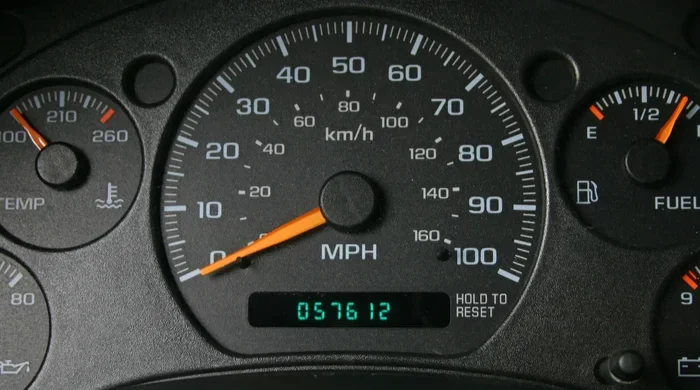
Trip A and Trip B are two independent distance trackers built into your vehicle’s trip computer. They sit right on your dashboard or instrument cluster and display the distance traveled for a specific journey. The main odometer shows your total mileage since the car was made, but Trip A and Trip B let you measure shorter segments independently.
Think of Trip A as your daily commute tracker. You reset it every morning when you leave for work and check it when you arrive. Now Trip B can track something completely different, like your weekend grocery run or a gym trip. Both meters run at the same time without interfering with each other or your total odometer reading.
Most cars manufactured after 2005 come equipped with these features. They are part of the trip computer system that also shows fuel level, average speed, and estimated range. The trip meter reset button is usually located on your steering wheel stalk or dashboard controls. If you are not sure where yours is, check your vehicle owner manual for the exact location.
How Trip A and Trip B Differ from the Main Odometer
The main odometer records every mile your car has ever driven. It is a permanent record that cannot be reset. Insurance companies and buyers look at this number to understand the true mileage of a vehicle. Trip A and Trip B, on the other hand, are completely temporary. You can reset them anytime you want. This makes them perfect for tracking specific journeys without affecting your permanent mileage record.
Here is a simple way to think about it. Your odometer is like a lifetime diary. Trip A and Trip B are like daily notes you write and erase when you want to start fresh. They serve a completely different purpose but work together to give you a full picture of your driving habits.
Why Every Driver Should Use These Features
Using Trip A and Trip B helps you stay organized behind the wheel. You get separate readings for different purposes without any extra effort. Whether you want to track fuel costs for a specific route or measure the distance of a single trip, these meters give you instant access to accurate data. They turn your dashboard into a personal driving assistant.
Many drivers also use these features for business purposes. Keeping a record of work-related travel becomes much easier when you can reset Trip A at the start of each workday. This simple habit can save you hours of manual record keeping and provide reliable data for expense reports or mileage reimbursement claims.
How to Reset Trip A and Trip B
Resetting your trip meters is one of the first skills you should learn. The process is straightforward on almost every vehicle, though the exact steps can vary slightly by make and model. Once you know how to do it, you will never forget.
Start by locating the trip reset controls on your vehicle. On most cars, you will find a small button on the steering wheel controls or the turn signal stalk. Some vehicles use a scroll wheel on the dashboard. Press and hold the button for about two seconds until the display flashes and resets to zero. That is all there is to it.
Here is a general step by step guide that works for most vehicles:
- Step 1: Press the trip button on your steering wheel or dashboard to switch the display to Trip A or Trip B.
- Step 2: Hold the reset button for two to three seconds.
- Step 3: Watch the display return to zero.
- Step 4: Start your journey and let the meter track your distance automatically.
If your vehicle has a digital display screen, you may need to scroll through menu options to find the trip reset function. Consult your owner manual for model specific instructions. Most modern cars make this process very intuitive and easy to handle while parked.
When Should You Reset Trip A and Trip B?
The best time to reset Trip A is at the beginning of a new journey or at the start of each day if you are tracking daily commutes. For Trip B, reset it whenever you begin a completely different type of trip. For example, reset Trip B before a weekend road trip so you can measure the total distance of that specific adventure.
Quick tip: always reset your trip meters right after you fill up your gas tank. This creates a clean baseline for tracking fuel economy. You will know exactly how far you drove on each tank and can compare results over time to spot trends in your fuel efficiency.
Common Reset Mistakes to Avoid
The most common mistake is forgetting to reset before a new trip. If you do not reset, your readings will mix with old data and become useless for tracking purposes. Another mistake is accidentally resetting Trip A when you meant to reset Trip B. Always double check which trip meter is currently displayed before pressing the reset button.
Some drivers also forget to note their starting odometer reading before a long trip. While Trip A and Trip B handle most tracking, having a backup record of your starting mileage is a smart habit. It protects you if you ever need to verify your trip distance for insurance or reimbursement purposes.
Using Trip A and Trip B for Fuel Economy Tracking
One of the best uses for Trip A and Trip B is tracking your fuel economy. Fuel economy tracking helps you understand how efficiently your vehicle uses gas. It also helps you spot changes in performance that might signal a maintenance issue. By using your trip meters alongside your fuel fill ups, you can gather valuable data without any extra tools.
The process is simple. Fill your tank completely and reset Trip A to zero. Drive normally until your next fill up. Record the distance shown on Trip A and the number of gallons you added. Divide the distance by the gallons used and you have your miles per gallon for that trip. Reset Trip A and repeat the process for your next tank.
Over time, these readings build into a personal fuel economy log. You can compare results across different seasons, routes, and driving styles. Many drivers discover that their fuel efficiency drops during winter months or when they drive more aggressively. This kind of insight is incredibly valuable for managing your budget and understanding your vehicle better.
Tracking Fuel Costs with Trip A and Trip B
You can take fuel tracking one step further by calculating your cost per mile. Simply multiply the gallons used by the price per gallon to get your total fuel cost for that trip. Then divide that cost by the distance traveled. This gives you a clear picture of what each mile costs you in fuel.
Use Trip A for tracking fuel economy on your daily commute. Use Trip B for tracking fuel costs on longer weekend trips or road visits. Keeping these two readings separate helps you understand the difference between short distance driving and long distance driving. You might be surprised to find that your fuel efficiency varies significantly between the two.
What Your Fuel Economy Numbers Can Tell You
Your trip meter readings can reveal important information about your vehicle’s health. If you notice a sudden drop in fuel economy, it could indicate problems like dirty fuel injectors, low tire pressure, or a failing oxygen sensor. By tracking your mileage consistently, you catch these issues early before they become expensive repairs.
Expert tip: compare your fuel economy readings every month. A gradual decline over several months is normal as your vehicle ages. But a sharp drop within a single tank warrants a closer look. Use your Trip A and Trip B data to pinpoint when the change started and what might have caused it.
Road Trip Planning Made Easy with Trip A and Trip B
Planning a road trip is exciting, but keeping track of distances can be tricky. Trip A and Trip B make this process much simpler. You can use one meter to track your total journey distance and the other to measure individual legs of your trip. This dual tracking approach gives you flexibility and precision that a single odometer simply cannot provide.
Before you hit the road, set both trip meters to zero. Use Trip A to record the total distance from your starting point to your final destination. Use Trip B to track each day’s driving or each specific segment of your route. At the end of each day, you will know exactly how far you drove and how much distance remains. This makes planning stops, rest breaks, and overnight stays much easier.
Road trip planning with trip meters also helps you estimate fuel costs in advance. By knowing the total distance and your average fuel economy, you can budget for gas before you leave home. This removes a lot of the guesswork and stress that often comes with long distance travel.
Splitting Your Journey into Manageable Segments
Long road trips can feel overwhelming when you think about the total distance. Breaking your journey into smaller segments makes it more manageable. Use Trip B to track each segment separately. Reset it at every rest stop or overnight location. This way, you always know exactly how far you have driven that day and how much is left.
For example, if you are driving from New York to Chicago, you might reset Trip B each time you stop for gas or a meal. By the end of the trip, you will have a detailed record of each day’s driving distance. This data is useful for planning future trips on the same route and for understanding your real world driving patterns.
Using Trip Data for Navigation and Timing
Trip meter readings help you estimate arrival times more accurately. If you know your average speed and the remaining distance, you can calculate how long the drive will take. This is especially helpful when you are navigating unfamiliar roads or dealing with traffic conditions that might slow you down.
Quick tip: check your Trip A reading at regular intervals during your journey. If the distance is not increasing as expected, you might be on the wrong route or stuck in heavy traffic. Your trip computer gives you real time feedback that helps you make better navigation decisions on the fly.
Common Mistakes When Using Trip A and Trip B
Even though Trip A and Trip B are simple tools, drivers still make mistakes that reduce their effectiveness. Knowing what these mistakes are helps you avoid them and get the most accurate readings from your trip meters.
The first mistake is forgetting to reset before a new trip. If you carry over old data, your readings become meaningless for tracking purposes. Always make it a habit to reset your trip meter right before you start a new journey. A quick reset takes just a few seconds and saves you from confusing data later on.
The second mistake is mixing up Trip A and Trip B. Some drivers reset the wrong meter and lose valuable data. To avoid this, develop a consistent system. For example, always use Trip A for your daily commute and Trip B for weekend trips or special journeys. Stick to this routine and you will never lose track of which meter tracks what.
Another common mistake is not recording your readings regularly. If you wait too long to write down your trip data, you might forget important details. Keep a small notebook in your glove box or use a phone app to log your readings after each trip. This habit pays off when you need to review your mileage for expense reports or maintenance schedules.
Some drivers also ignore the difference between trip distance and odometer distance. Your odometer shows total mileage while Trip A and Trip B show temporary segments. Confusing these two can lead to incorrect fuel calculations and inaccurate mileage records. Always double check which display you are reading before making any decisions based on the numbers.
Expert Tips for Maximizing Your Trip A and Trip B Experience
Getting the most out of your trip meters comes down to a few smart habits. These expert tips help you unlock the full potential of Trip A and Trip B and turn them into powerful tools for better driving.
First, use both meters simultaneously for different purposes. Track your daily commute on Trip A and your exercise routine or side trips on Trip B. This dual tracking approach gives you a complete picture of all your driving without any extra effort. You get two independent data streams from a single dashboard display.
Second, pair your trip meter readings with your maintenance schedule. Many service intervals are based on mileage. By tracking your distance with Trip A, you can predict exactly when your next oil change, tire rotation, or other maintenance task is due. This proactive approach keeps your vehicle running smoothly and prevents unexpected breakdowns.
Third, use Trip A and Trip B for insurance and tax purposes. If you use your vehicle for business, keeping accurate mileage records is essential. Reset Trip A at the start of each business trip and record the distance at the end. This simple habit provides reliable documentation that supports your claims and deductions.
Fourth, compare your readings across different vehicles. If you drive more than one car, use Trip A on each vehicle to compare fuel economy and driving patterns. This comparison helps you understand which vehicle is more efficient and where you might save money on fuel costs.
Fifth, share your trip data with family members. If multiple people drive the same vehicle, Trip A and Trip B can help divide the mileage fairly. One driver uses Trip A for personal trips while the other uses Trip B for work commutes. This transparency builds trust and makes shared vehicle ownership much smoother.
Quick Tips for Best Results
- Always reset your trip meters at the start of a new journey for clean, accurate readings.
- Record your Trip A and Trip B readings in a notebook or app for future reference.
- Use Trip A for routine tracking and Trip B for special trips or experiments.
- Check your trip meter displays every time you fill up your gas tank.
- Compare monthly fuel economy readings to spot trends and changes early.
- Reset Trip B before each leg of a road trip to track daily distances separately.
- Use your trip data to plan future trips and estimate fuel costs more accurately.
Comparison Table: Trip A vs Trip B Usage
| Feature | Trip A | Trip B |
|---|---|---|
| Primary Use | Daily commute tracking | Special trips or alternate routes |
| Reset Frequency | Daily or per journey | Per unique trip or weekly |
| Best For | Fuel economy on regular routes | Road trips and weekend drives |
| Data Independence | Tracks separately from Trip B | Tracks separately from Trip A |
| Odometer Interaction | No effect on main odometer | No effect on main odometer |
| Ideal for Business Miles | Yes, for regular work commutes | Yes, for occasional business trips |
Final Thoughts: Making Trip A and Trip B Work for You
Trip A and Trip B are more than just dashboard numbers. They are practical tools that help you understand your driving habits, manage fuel costs, and plan better journeys. Once you start using these features intentionally, you will wonder how you ever managed without them.
The key to success with Trip A and Trip B is consistency. Make it a habit to reset, record, and review your readings regularly. Over time, this simple practice builds a wealth of useful data that benefits your wallet, your vehicle maintenance, and your travel planning. You gain insights that most drivers never think to capture.
Start small if you need to. Pick one habit, like tracking fuel economy on your daily commute with Trip A, and build from there. As you become more comfortable, you will find creative ways to use both meters to their full potential. The more you use them, the more value you get from these built in vehicle features.
Remember, every trip you take is an opportunity to learn something new about your driving. Trip A and Trip B give you the data to make those lessons count. So the next time you get behind the wheel, take a moment to check your trip meters. You might be surprised by what those small numbers can teach you about your big adventures on the road.
Use Trip A and Trip B wisely, and they will reward you with better fuel economy, smarter trip planning, and a deeper connection to your vehicle. These simple features are waiting for you to put them to work. Start today and maximize every trip you take.
Frequently Asked Questions
What is the difference between Trip A and Trip B on a car?
Trip A and Trip B are two independent trip meters that track separate distances on your vehicle’s trip computer. Trip A usually tracks one type of journey, like your daily commute, while Trip B tracks another, such as weekend trips or road visits. Both reset independently and do not affect your main odometer reading.
How do I reset Trip A and Trip B on my vehicle?
To reset Trip A or Trip B, press and hold the trip reset button on your steering wheel or dashboard for about two seconds. The display will flash and return to zero. Check your vehicle owner manual for model specific instructions if you cannot find the reset controls.
Can I use Trip A and Trip B to track fuel economy?
Yes, absolutely. Reset Trip A to zero when you fill your tank completely. Drive normally and record the distance when you next fill up. Divide the distance by the gallons added to calculate your miles per gallon. This simple method gives you accurate fuel economy readings for each tank of gas.
What happens if I accidentally reset Trip A while driving?
If you accidentally reset Trip A, the distance for that trip is lost. This is why it is important to double check which trip meter is displayed before pressing the reset button. To avoid this mistake, always confirm the trip meter selection and take a quick photo of your reading before resetting.
Are Trip A and Trip B the same as the main odometer?
No, they are completely different. The main odometer records your vehicle’s total lifetime mileage and cannot be reset. Trip A and Trip B are temporary trackers that you can reset anytime. They are designed to measure specific segments of your driving without affecting your permanent mileage record.
Can I use Trip A and Trip B for business mileage tracking?
Yes, many drivers use Trip A for daily business commutes and Trip B for occasional work related trips. This separation makes it easy to organize your mileage records for expense reports or tax deductions. Reset the meter at the start of each business trip and record the distance at the end for accurate documentation.
=== CONCLUSION ===
Learning how to use Trip A and Trip B is one of the simplest yet most impactful things you can do as a driver. These two trip meters give you the power to track separate journeys, monitor fuel economy, plan road trips, and maintain accurate mileage records with ease. The knowledge you gain from these small dashboard displays adds real value to every drive you take.
Start using Trip A and Trip B with intention today. Reset them before each journey, record your readings, and review your data regularly. The habits you build around these features will save you money, improve your fuel efficiency, and make you a more informed driver. Your vehicle already has these tools built in. All you need to do is put them to work and maximize every trip.