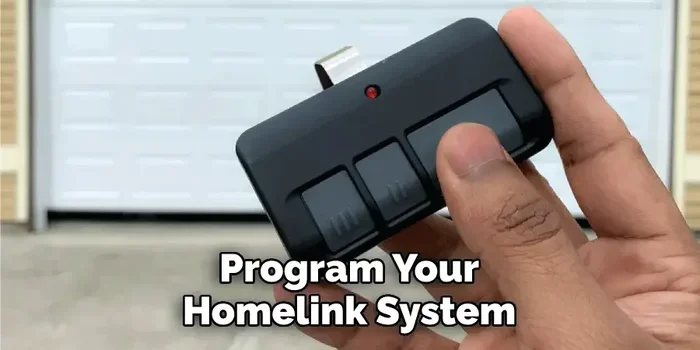
How to Set Up HomeLink and Program Your Garage Door
Learning how to Set Up HomeLink is one of the easiest ways to control your garage door right from your car. This guide walks you through every step of HomeLink programming, from erasing old codes to syncing your garage door opener with your vehicle. Whether you drive a Toyota, Ford, BMW, or any other HomeLink compatible vehicle, you will have your garage door working in minutes.
If you have ever fumbled for your garage door remote while carrying groceries, you know how frustrating it can be. HomeLink solves that problem by putting garage door control right inside your car. A small HomeLink button mounted on your visor or dashboard lets you open your door with a single tap.
Setting up HomeLink might seem intimidating at first, but the process is actually very straightforward. Most drivers can complete the entire HomeLink programming in under ten minutes. You do not need any special tools or technical skills. This guide covers everything you need to know, from the first button press to troubleshooting common issues.
Whether you are installing HomeLink for the first time or reprogramming an existing system, you will find clear instructions here. We also cover safety tips, compatibility checks, and expert advice that you will not find in most owner manuals. Let us get started.
Key Takeaways
- HomeLink replaces your handheld remote: It lets you open and close your garage door with a button inside your car.
- Programming is simple and universal: Most vehicles made after 2000 support HomeLink integration without extra hardware.
- Rolling code technology keeps your home secure: Modern garage door openers use encrypted signals that change every time you use them.
- You can erase and reprogram HomeLink anytime: Resetting takes just a few seconds if you need to start fresh.
- Common issues are easy to fix: Signal interference, dead batteries, and frequency mismatches cause most HomeLink problems.
- Safety sensors matter: Always test your garage door safety features after completing HomeLink setup.
📑 Table of Contents
What Is HomeLink and How Does It Work?
HomeLink is a wireless control system built into many modern vehicles. It acts as a universal garage door opener that communicates directly with your door receiver. Instead of carrying a separate handheld remote, you use your car’s integrated system to control your garage door, gate, or even your home lighting.
The system works by sending a radio frequency signal from your vehicle to your garage door opener. When you press the HomeLink button, the signal triggers the receiver installed in your garage. This is similar to how a handheld remote works, but the transmitter is built into your car.
How HomeLink Frequency and Signal Transmission Work
HomeLink operates on specific radio frequencies, typically around 315 MHz or 390 MHz depending on your vehicle and region. The signal travels from your car’s HomeLink transmitter to the garage door opener motor unit mounted in your garage ceiling.
Most modern garage door openers use rolling code technology, also called security code technology. This means the access code changes every time you use the system. Rolling code makes it nearly impossible for someone to intercept and copy your signal. This is a major security advantage over older fixed code systems.
Some older garage door openers still use fixed code technology. These older systems transmit the same code every time. If you have an older opener, you may need to use a HomeLink cloning module or switch to a newer opener for full compatibility.
HomeLink Compatible Vehicles and Models
Almost every major car manufacturer offers HomeLink as a factory option or standard feature. Toyota, Ford, Honda, BMW, Chevrolet, and many others include HomeLink integration in their vehicles. Even some luxury brands like Mercedes-Benz and Lexus offer this convenient feature.
If your vehicle does not have factory HomeLink, you can still add it. Universal HomeLink replacement modules are available and plug into your vehicle’s existing wiring. These aftermarket solutions cost between thirty and eighty dollars and are easy to install yourself.
How to Set Up HomeLink: Complete Step-by-Step Guide
Now that you understand what HomeLink does, let us walk through the actual setup process. Follow these steps carefully, and your garage door will be integrated with your vehicle in no time.
Step One: Prepare Your Vehicle and Garage Door Opener
Before you start programming, gather a few things. You need your garage door opener handheld remote, your vehicle owner manual for reference, and a ladder to access your garage door motor unit. Make sure your vehicle is parked in the garage with the ignition on.
Check the batteries in your handheld remote first. Weak batteries are the number one cause of HomeLink programming failures. Replace them with fresh batteries if they are more than two years old. This small step saves a lot of frustration later.
Step Two: Erase Existing HomeLink Settings
Start by clearing any existing HomeLink settings. This ensures a clean slate for programming. Press and hold the two outer HomeLink buttons on your visor for about twenty seconds. The indicator light will flash, then stay solid. Release the buttons.
Some vehicle models require you to press and hold all three HomeLink buttons simultaneously. Check your vehicle owner manual to confirm the exact method for your car model. Erasing old settings is essential when you are installing HomeLink for the first time or transferring the system to a new owner.
Step Three: Put Your Garage Door Opener in Programming Mode
Now go to your garage door motor unit. Locate the program button on the back or side of the motor unit. Press and release it. The indicator light on the motor unit will start flashing. This means the opener is ready to receive a new signal.
You usually have thirty to sixty seconds to complete the next step. Work quickly but carefully. If the light stops flashing, press the program button again and start over.
Step Four: Train HomeLink to Learn Your Remote Signal
Return to your vehicle. Press and hold the HomeLink button you want to use. Simultaneously, bring your handheld garage door remote close to the HomeLink visor unit. Press and hold both the HomeLink button and the handheld remote button at the same time.
Keep holding both buttons until the HomeLink indicator light changes from slow flashing to fast flashing. This usually takes about twenty seconds. The fast flashing light means HomeLink has successfully learned the signal from your handheld remote.
Release both buttons. Press the HomeLink button once to test it. Your garage door should respond immediately. If it does not, repeat the training process from Step Four.
Step Five: Test the HomeLink System
After programming, always test your HomeLink system thoroughly. Park your car outside the garage and try opening and closing the door using the HomeLink button. Test it at least three times to confirm consistent performance.
Also test the door from inside the garage using the wall-mounted control panel. This ensures the door responds to both your vehicle and your handheld remote. If either method fails, check your signal strength and battery levels.
Programming Your Garage Door Opener to HomeLink
Different garage door opener brands have slightly different programming procedures. Here is how to handle the most common brands.
Programming Genie Garage Door Openers
Genie openers use a Learn button located on the back of the motor unit. Press and release the Learn button, then enter your HomeLink training mode in your vehicle. Hold the HomeLink button and the Genie handheld remote together until the HomeLink light flashes rapidly.
Genie openers manufactured after 2011 typically use IntelliCode rolling code technology. These models require the same training process described above. Older Genie models may need you to enter a DIP switch code on the motor unit before programming.
Programming Chamberlain and LiftMaster Openers
Chamberlain and LiftMaster openers feature a Smart/Learn button on the motor unit. Press this button once, then return to your vehicle and activate the HomeLink button within thirty seconds. Hold the HomeLink button and your Chamberlain remote together until the HomeLink light flashes.
For Chamberlain models with MyQ technology, you may need to complete an additional Wi-Fi setup step through the MyQ app. This allows you to control your door from your smartphone in addition to using HomeLink in your car.
Programming Craftsman Openers
Craftsman openers use a purple Learn button. Press it once, then go to your vehicle and follow the standard HomeLink training steps. Craftsman openers made after 2011 support rolling code technology and work seamlessly with HomeLink.
If your Craftsman opener uses a wired console control, you may need to disconnect it temporarily during programming. Reconnect it once the HomeLink training is complete.
Common HomeLink Problems and How to Fix Them
Even when you follow the instructions perfectly, HomeLink setup issues can occur. Here are the most common problems and their solutions.
HomeLink Button Does Not Respond
If pressing the HomeLink button does nothing, the first thing to check is the indicator light. No light means the system may need to be reset. Try erasing the HomeLink settings and reprogramming from scratch.
Another common cause is signal interference. Other electronic devices near your garage door opener can disrupt the HomeLink frequency. Move any wireless cameras, baby monitors, or Wi-Fi extenders away from the motor unit and try again.
HomeLink Works Sometimes but Not Always
Intermittent HomeLink performance usually points to a weak signal. This can happen if your vehicle is parked too far from the garage door opener. Try parking closer to the door and programming again.
Dead batteries in your handheld remote can also cause inconsistent results. Replace the remote batteries with fresh ones. For vehicles with a HomeLink visor module, check that the module is securely connected and not loose.
Rolling Code Programming Fails
When rolling code programming fails, timing is often the issue. You must activate HomeLink training mode and send the remote signal within a very short window. Practice the hand movements before you start so you can work quickly.
Some vehicle models have a specific sequence for rolling code programming. For example, certain Ford vehicles require you to press the HomeLink button three times quickly before holding it. Consult your vehicle manual for model-specific instructions.
HomeLink Shows Solid Light but Door Does Not Open
A solid HomeLink light that does not blink during programming means the system did not successfully learn the remote signal. Repeat the training process, making sure both remotes are held very close together. The handheld remote should be within one inch of the HomeLink module.
If the problem persists, your garage door opener may need a signal booster. These small devices plug into the garage door motor unit and amplify the HomeLink signal. They cost around twenty dollars and solve most signal-related issues.
HomeLink Safety Tips and Best Practices
HomeLink makes your life more convenient, but safety should always come first. Follow these tips to keep your garage door system running safely and reliably.
Test Safety Sensors After Every Programming Session
Every garage door opener has safety sensors installed near the bottom of the garage door tracks. These sensors prevent the door from closing if something or someone is in the way. After you complete HomeLink setup, always test these sensors.
Place a piece of wood or a roll of paper towels in the door’s path. Close the door using the HomeLink button. The door should stop and reverse immediately. If it does not, adjust the sensor alignment or replace the sensors.
Keep Your HomeLink System Secure
Because HomeLink eliminates the need for a handheld remote, some people worry about security. Modern HomeLink systems with rolling code technology are very secure. The access code changes every time you use it, making it extremely difficult to hack.
You can further improve security by enabling the HomeLink lockout feature. This prevents anyone from reprogramming your HomeLink buttons without your knowledge. Check your vehicle manual for instructions on activating this feature.
Maintain Your Garage Door Opener Regularly
Keep your garage door opener well maintained for reliable HomeLink performance. Lubricate the moving parts every six months. Check the door balance and tension quarterly. Inspect the safety sensors monthly for dirt or misalignment.
A well maintained opener works better with HomeLink because the motor responds faster and more consistently. This reduces the chance of incomplete door cycles or delayed responses.
Use the HomeLink Emergency Release Feature
Every garage door opener includes an emergency release handle. This red cord hangs from the motor unit and allows you to manually operate the door during a power outage or system failure. Familiarize yourself with this feature before you need it.
If your HomeLink system ever fails, you can use the emergency release to open and close the door manually. Pull the cord to disengage the motor, then lift or lower the door by hand. Push the cord back in to reengage the motor when power returns.
Is HomeLink Worth Installing? Final Thoughts
After learning how to Set Up HomeLink and Program Your Garage Door, you will wonder how you ever managed without it. The convenience of controlling your garage door from your car is genuinely transformative. No more digging through your pockets for a handheld remote. No more standing outside in the rain trying to find the right button.
HomeLink also adds value to your vehicle. Buyers of used cars often look for vehicles with integrated garage door control. It is a small feature that makes a big impression. And since the setup process takes only minutes, there is no reason not to install it.
If you have a newer vehicle with factory HomeLink, take advantage of it. If your car does not have built-in HomeLink, consider an aftermarket universal HomeLink module. The cost is minimal compared to the daily convenience you gain. Your garage door opener and your car working together is one of those small upgrades that makes life noticeably easier.
Follow the steps in this guide carefully, test your system thoroughly, and maintain your opener regularly. You will enjoy years of reliable, hands-free garage door control every time you pull into your driveway.
Frequently Asked Questions
How long does it take to Set Up HomeLink?
Most drivers can complete HomeLink programming in five to ten minutes. The process is straightforward once you have your garage door opener remote and your vehicle parked in the garage. If you encounter signal interference or need to reset the system, it may take a little longer.
Can I program HomeLink without a handheld remote?
Yes, you can program HomeLink using your garage door opener’s built-in keypad or wall control panel instead of a handheld remote. However, you will need access to the motor unit in your garage to put it in programming mode. Some newer openers also support smartphone app integration as an alternative programming method.
What should I do if my HomeLink button stops working after programming?
First, check the batteries in your handheld garage door remote and replace them if needed. Next, erase the HomeLink settings and reprogram from scratch. If the problem continues, check for signal interference from nearby electronics or consider installing a HomeLink signal booster on your garage door motor unit.
Is HomeLink secure compared to a regular garage door remote?
Yes, HomeLink is very secure when used with rolling code technology. Rolling code systems generate a new access code every time you use the door, making it nearly impossible for someone to intercept and replicate your signal. Older fixed code systems are less secure, so consider upgrading your opener if it still uses that technology.
Can I use HomeLink to control things other than my garage door?
Absolutely. HomeLink can control gates, lighting systems, irrigation systems, and other automated home devices. Many homeowners use HomeLink buttons for gate access or to trigger outdoor lights. Check the HomeLink universal control settings in your vehicle manual for configuration options beyond garage doors.
Do I need a professional to install HomeLink in my car?
No, HomeLink installation and programming is designed to be a DIY process. Most vehicle owners can complete the setup themselves without any special tools or technical knowledge. If you prefer professional help, many auto dealerships and garage door service companies offer installation for a small fee.
=== CONCLUSION ===
Learning how to Set Up HomeLink and Program Your Garage Door is one of the most useful skills you can add to your vehicle ownership experience. The process is simple, fast, and incredibly convenient. From erasing old settings to training your opener signal, every step is designed to be user friendly.
By following the step-by-step instructions in this guide, you have everything you need to integrate your garage door with your car seamlessly. Remember to test your system thoroughly, maintain your opener regularly, and keep safety sensors working properly. A well programmed HomeLink system gives you hands-free convenience every time you arrive home.
Take a few minutes today to set up your HomeLink. Once it is working, you will never go back to searching for a handheld remote again. Your future self will thank you every time you pull into the garage with your arms full of groceries or packages.