How Do I Reset My Volkswagen Computer Step by Step
Resetting your Volkswagen computer is a straightforward process that can fix warning lights, clear error codes, and restore your car’s performance. Whether you own a VW Golf, Passat, or Tiguan, our step-by-step guide walks you through every method, from a simple battery disconnect to using an OBD scanner. You will learn the safest reset procedures, common mistakes to avoid, and expert tips to keep your Volkswagen running smoothly.
Have you ever sat in your Volkswagen and noticed a warning light glowing on the dashboard? Maybe it was the check engine light, or perhaps the service indicator just would not go away. Whatever the issue, resetting your Volkswagen computer might be the quick fix you need. Many car owners feel nervous about touching their vehicle’s electronic systems, but the truth is that most reset procedures are simple and safe when you follow the right steps.
In this guide, we walk you through every method to reset your VW computer step by step. Whether you drive a compact Golf or a spacious Tiguan, the process is more accessible than you might think. We also share practical tips, common mistakes to avoid, and expert insights that will save you time and money. If you ever enjoyed tinkering with toy cars as a kid, you might appreciate how modern Volkswagen maintenance has evolved from simple play into smart, computerized engineering — much like the journey described in 10 Lines On My Favourite Toy Car.
Key Takeaways
- Multiple Reset Methods: You can reset your VW computer using a battery disconnect, OBD scanner, or reset button depending on your model.
- Safety First: Always follow the correct procedure to avoid damaging your Volkswagen’s electrical system.
- Common Issues Fixed: A reset clears warning lights, resets service intervals, and resolves minor electronic glitches.
- Tools You Need: An OBD scanner, basic hand tools, and your VW owner’s manual make the process easy.
- Model-Specific Steps: Different Volkswagen models may require slightly different reset procedures.
- When to Seek Help: Some issues need a professional diagnostic scan at a VW dealership or certified mechanic.
📑 Table of Contents
- Why You Might Need to Reset Your Volkswagen Computer
- Tools and Preparation Before You Start
- Method 1: Battery Disconnect Reset (Most Common)
- Method 2: OBD-II Scanner Reset (Most Precise)
- Method 3: Dashboard Button Reset (Model-Specific)
- Common Mistakes to Avoid When Resetting Your VW Computer
- Expert Tips for a Successful Volkswagen Computer Reset
- When to Seek Professional Help for Your Volkswagen Computer
- How Often Should You Reset Your Volkswagen Computer?
- Frequently Asked Questions
- Conclusion
Why You Might Need to Reset Your Volkswagen Computer
Your Volkswagen relies on a central computer, often called the engine control module or ECU, to manage hundreds of functions. This computer monitors sensors, controls fuel injection, and adjusts timing to keep your engine running efficiently. Over time, the computer stores data and error codes that can affect performance or trigger dashboard warnings.
Here are the most common reasons you might need to perform a Volkswagen reset procedure:
- Check Engine Light: A stored fault code causes the light to stay on even after the issue is resolved.
- Service Interval Reset: Your VW displays a maintenance reminder that will not go away after service.
- Warning Lights: Multiple dashboard lights stay illuminated after a repair.
- Electronic Glitches: The infotainment system, sensors, or gauges behave unexpectedly.
- Battery Replacement: A new battery often requires the computer to relearn driving patterns.
- Performance Issues: Rough idling, poor fuel economy, or hesitation during acceleration.
Understanding why you need a reset helps you choose the right method. Not every situation requires the same approach, and using the wrong one can sometimes cause more problems than it solves.
Tools and Preparation Before You Start
Before you begin any car computer reset, gathering the right tools saves you frustration. You do not need expensive equipment for most resets, but having the basics on hand makes the process smoother.
Essential Tools for a VW Reset
- OBD-II Scanner: A diagnostic scanner reads and clears error codes from your Volkswagen’s ECU.
- Wrench Set: A basic set of wrenches helps you disconnect the battery safely.
- Owner’s Manual: Your VW manual contains model-specific reset instructions and fuse box diagrams.
- Clean Cloth: A soft cloth protects battery terminals and connectors from dirt and corrosion.
- Memory Saver (Optional): This device preserves your radio presets and settings during a battery disconnect.
Safety Precautions
Safety should always come first when working on your car’s electrical system. Make sure your Volkswagen is parked on a flat surface and the engine is completely off. Never disconnect the battery while the key is in the ignition. Wear gloves if you handle any electrical components, and work in a well-ventilated area. If you feel unsure about any step, it is perfectly fine to consult a professional mechanic.
Method 1: Battery Disconnect Reset (Most Common)
The battery disconnect method is the most popular way to reset a Volkswagen computer. It works by cutting power to the ECU, which clears stored codes and resets learned values. This method is effective across most VW models including the Golf, Jetta, Passat, and Tiguan.
Step-by-Step Instructions
- Turn Off the Engine: Park your Volkswagen and switch the ignition to the off position. Remove the key from the ignition.
- Open the Hood: Locate the battery, which is typically found in the engine bay on the left side in most VW models.
- Identify the Negative Terminal: The negative terminal is marked with a minus sign (-) and usually has a black cable.
- Disconnect the Negative Cable: Use a wrench to loosen the nut on the negative terminal clamp. Carefully lift the cable off the terminal and tuck it away from the battery.
- Wait 15 to 30 Minutes: This waiting period allows the ECU to fully discharge and reset. Some VW models may require up to 30 minutes for a complete reset.
- Reconnect the Cable: Place the negative cable back onto the terminal and tighten the nut securely.
- Start the Engine: Turn the key to start your Volkswagen. The dashboard lights may flash briefly, which is normal.
- Drive for 10 to 15 Minutes: The ECU needs time to relearn driving patterns after a battery disconnect reset.
When This Method Works Best
The battery disconnect reset is ideal for clearing minor error codes, resetting service intervals, and fixing dashboard warning lights that have no underlying mechanical cause. It is also the go-to method after installing a new battery. However, this method will not fix serious mechanical or electronic problems that require professional diagnostics.
Method 2: OBD-II Scanner Reset (Most Precise)
An OBD-II scanner offers a more targeted approach to resetting your Volkswagen computer. This tool connects directly to your car’s diagnostic port and communicates with the ECU. It allows you to read specific error codes, clear them individually, and verify that the reset was successful.
How to Use an OBD Scanner for a VW Reset
- Locate the Diagnostic Port: In Volkswagen vehicles, the OBD port is usually found under the dashboard on the driver’s side, near the steering column.
- Plug in the Scanner: Connect your OBD-II scanner to the port. The device should power on automatically.
- Turn the Ignition to On: Do not start the engine. Simply turn the key to the accessory or on position.
- Follow Scanner Prompts: Most scanners ask you to select your vehicle make, model, and year. Choose Volkswagen from the menu.
- Read Stored Codes: The scanner displays any fault codes stored in the ECU. Write these down for your records.
- Clear the Codes: Select the option to clear or erase codes. The scanner sends a reset command to the ECU.
- Turn Off and Restart: Switch the ignition off, wait a few seconds, then start the engine again.
- Verify the Reset: Check that the warning lights are off and no new codes appear on the scanner.
Choosing the Right Scanner
Basic OBD-II scanners cost between $20 and $50 and handle most standard resets. Advanced scanners with VW-specific software can access deeper systems and provide detailed diagnostic reports. If you frequently work on your Volkswagen, investing in a quality scanner pays for itself quickly.
Method 3: Dashboard Button Reset (Model-Specific)
Some Volkswagen models allow you to reset the computer or service indicator using buttons on the dashboard or steering wheel. This method varies significantly depending on your specific VW model and year.
Common VW Dashboard Reset Procedures
Here are a few examples of how different Volkswagen models handle resets:
- VW Golf (MK5 and MK6): Press and hold the trip button on the instrument cluster, then turn the ignition to position 2. Release the button after the service light starts flashing.
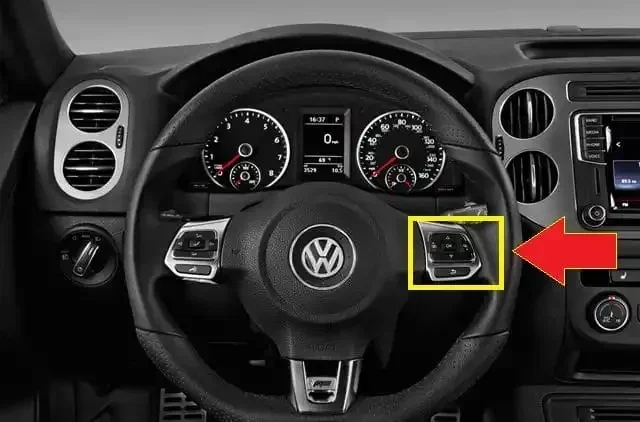
- VW Passat: Navigate to the service menu using the steering wheel controls, then select the reset option to clear the maintenance reminder.
- VW Tiguan: Use the infotainment system to access the vehicle settings menu, find the service interval reset, and follow the on-screen prompts.
Always refer to your owner’s manual for the exact procedure for your specific model. Using the wrong button sequence can sometimes activate other settings instead of performing the reset.
Common Mistakes to Avoid When Resetting Your VW Computer
Even simple reset procedures can go wrong if you skip steps or take shortcuts. Here are the most common mistakes Volkswagen owners make and how to avoid them.
Mistake 1: Disconnecting the Positive Terminal First
Always disconnect the negative terminal first. Removing the positive cable can cause sparks and potentially damage your Volkswagen’s electrical components. When reconnecting, attach the positive cable first and the negative cable last.
Mistake 2: Not Waiting Long Enough
Some owners reconnect the battery after only a minute or two. The ECU needs sufficient time to fully reset. Waiting at least 15 minutes, and ideally 30 minutes, ensures a complete reset cycle.
Mistake 3: Ignoring Underlying Problems
A reset clears warning lights and error codes, but it does not fix the root cause. If your check engine light returns after a reset, there is an underlying issue that needs professional attention. Use the reset as a diagnostic tool, not a permanent solution.
Mistake 4: Skipping the Relearn Phase
After a reset, your Volkswagen’s ECU needs time to relearn your driving habits. Avoid aggressive driving for the first 15 to 20 minutes after a reset. Gentle driving helps the ECU recalibrate sensors and fuel maps properly.
Expert Tips for a Successful Volkswagen Computer Reset
Getting the best results from your reset comes down to a few practical tips that experienced car owners and mechanics swear by.
Tip 1: Keep Your Owner’s Manual Handy
Your Volkswagen owner’s manual is one of the most underrated tools for car maintenance. It contains model-specific reset procedures, fuse locations, and troubleshooting guides. Before you attempt any reset, spend a few minutes reviewing the relevant section.
Tip 2: Record Your Codes Before Clearing
Always write down or photograph any error codes before performing a reset. These codes help mechanics diagnose problems faster if the issue returns. You can also research the codes online to understand what they mean before visiting a shop.
Tip 3: Perform Resets in Good Weather
Moisture and extreme temperatures can affect electrical connections. Perform your reset on a dry day when temperatures are moderate. Avoid resetting your VW computer during heavy rain or extreme heat.
Tip 4: Reset After Every Battery Change
If you replace your Volkswagen battery, always perform a computer reset afterward. This ensures the ECU relearns the correct parameters for your new battery and all electrical systems operate at peak efficiency.
Tip 5: Use Quality Replacement Parts
If your reset involves replacing any components like fuses or battery terminals, use high-quality parts. Cheap aftermarket parts can cause intermittent electrical issues that mimic computer problems.
When to Seek Professional Help for Your Volkswagen Computer
Most reset procedures are simple enough for any car owner to handle. However, there are situations where professional help is the safest and smartest choice.
You should visit a Volkswagen dealership or certified mechanic if:
- The check engine light returns immediately after a reset.
- Multiple warning lights appear simultaneously on the dashboard.
- Your Volkswagen fails to start after a reset procedure.
- You notice unusual noises, vibrations, or performance issues that persist.
- The ECU requires a software update or reprogramming.
- You are uncomfortable working with your vehicle’s electrical system.
Professional mechanics have access to advanced diagnostic equipment and Volkswagen-specific software that can identify problems a basic OBD scanner might miss. A Volkswagen diagnostic scan at a dealership can reveal deep system errors that require specialized tools to fix.
How Often Should You Reset Your Volkswagen Computer?
There is no set schedule for resetting your Volkswagen computer. Most owners only need to perform a reset when a specific issue arises, such as a persistent warning light or a service interval that will not reset. Regular Volkswagen maintenance including oil changes, filter replacements, and scheduled inspections keeps your car’s computer functioning properly without frequent resets.
Some owners choose to perform a reset every time they replace the battery or after installing new aftermarket electronics. This is a good practice that ensures your ECU adapts correctly to any changes in your vehicle’s systems.
Frequently Asked Questions
How long does it take to reset a Volkswagen computer?
A basic battery disconnect reset takes about 20 to 30 minutes including the waiting period. An OBD scanner reset can be completed in under 10 minutes. Dashboard button resets vary by model but usually take just a few minutes. The total time depends on the method you choose and your specific Volkswagen model.
Will resetting my VW computer erase my radio presets and settings?
Yes, a battery disconnect reset may erase your radio presets, clock settings, and some personalized features. To prevent this, use a memory saver device that keeps power to your electrical system while the battery is disconnected. An OBD scanner reset or dashboard button reset typically does not affect your settings.
Is it safe to reset the Volkswagen computer myself?
Yes, it is generally safe to perform a reset yourself as long as you follow the correct steps. The battery disconnect and OBD scanner methods are straightforward and do not require advanced mechanical skills. Always refer to your owner’s manual and take basic safety precautions when working around electrical components.
What should I do if the check engine light comes back after a reset?
If the check engine light returns after a reset, there is an underlying issue that needs attention. Use an OBD scanner to read the new fault codes and research what they mean. In most cases, a returning warning light indicates a mechanical or sensor problem that requires professional diagnosis and repair.
Do I need any special software to reset my Volkswagen ECU?
For a basic reset, you do not need special software. A standard OBD-II scanner handles most ECU resets. However, if your Volkswagen requires a software update or ECU reprogramming, you will need Volkswagen-specific diagnostic software that is typically available at dealerships and specialized repair shops.
Can resetting my VW computer improve fuel economy?
A reset can sometimes improve fuel economy if your ECU had stored inaccurate sensor data or learned poor driving patterns. After a reset, the ECU relearns your driving habits and adjusts fuel maps accordingly. However, a reset alone will not fix fuel economy issues caused by mechanical problems like worn spark plugs, clogged fuel injectors, or air leaks.
Conclusion
Resetting your Volkswagen computer is one of the most useful skills any VW owner can learn. Whether you choose the battery disconnect method, an OBD scanner, or a dashboard button sequence, the process is simpler than most people expect. A successful Volkswagen computer reset can clear annoying warning lights, reset service intervals, and restore your car’s optimal performance.
Remember to always prepare properly, follow safety precautions, and choose the right method for your specific situation. Avoid common mistakes like disconnecting the wrong terminal or ignoring underlying problems. With the tips and steps outlined in this guide, you have everything you need to handle a VW ECU reset confidently at home.
Regular maintenance and occasional resets keep your Volkswagen running smoothly for years to come. Trust your instincts, refer to your owner’s manual when needed, and do not hesitate to seek professional help for complex issues. Your Volkswagen is a well-engineered machine, and with proper care, it will continue to deliver the driving experience you expect.