How Do I Get My Remote to Work with These Simple Fixes
Struggling with a car remote that won’t respond? You are not alone, and the fix is usually simpler than you think. This guide walks you through how do I get my remote to work with easy battery checks, signal troubleshooting, and programming tips. Whether your remote lock is malfunctioning or your keyless entry has gone quiet, these solutions will get your remote back in action fast.
Have you ever stood in your parking lot, pressing the button on your car remote over and over, hoping it would suddenly work? It is frustrating, right? You are not alone. Millions of drivers face this exact problem every week. The good news is that getting your remote to work again is usually quick, easy, and costs almost nothing.
In this guide, we will walk you through every step to fix a remote control that is not responding. From simple battery swaps to signal troubleshooting, we cover it all. Whether your keyless entry has gone silent or your remote start is acting up, you will find the answer here. Let us dive in and get your remote working again.
Key Takeaways
- Battery replacement solves most remote problems quickly and cheaply.
- Signal interference from other electronics can block your remote’s range.
- Reprogramming your car key fob is often easier than you think.
- Cleaning the remote buttons removes grime that causes unresponsive keys.
- Checking your car battery level can explain why the remote stops working.
- Resetting the remote is a quick fix for many common issues.
- Knowing when to seek professional help saves time and money.
📑 Table of Contents
- Why Your Remote Might Not Be Working
- How to Replace Your Remote Battery
- Troubleshooting Signal and Range Issues
- Reprogramming Your Car Key Fob
- Resetting Your Remote Control
- When to Replace Your Remote
- Quick Tips to Keep Your Remote Working Longer
- Common Mistakes People Make with Car Remotes
- When to Call a Professional
- Final Thoughts
Why Your Remote Might Not Be Working
Before you start fixing things, it helps to understand what could be going wrong. Remotes are simple devices, but several things can stop them from working properly. Let us look at the most common reasons.
Dead or Weak Battery
The number one reason remotes fail is a dead battery. Car remotes use small coin-cell batteries that last about one to two years. When the battery gets low, the signal gets weaker. You might notice the remote works from close range but not from across the parking lot. This is a clear sign your key fob battery replacement is overdue.
Replacing the battery is easy. Most remotes have a small screw or a sliding back cover. Pop it open, swap the old battery for a new one, and you are done. More on this in the next section.
Signal Interference
Sometimes the problem is not your remote at all. Other electronic devices can cause signal interference. Cell phones, USB chargers, and even other car remotes nearby can confuse the signal. This is especially true in crowded parking lots or near large buildings.
Your car uses a radio frequency signal to communicate with the remote. If another device is sending out a similar frequency, the two signals can clash. The result? Your remote seems broken when it is really just confused. Moving away from other electronics and trying again often fixes this.
Dirty or Sticky Buttons
This one surprises people. Over time, grime, dirt, and oils from your fingers build up on the remote buttons. This can prevent the buttons from making proper contact. If some buttons work and others do not, dirt might be the culprit.
A quick cleaning can bring your remote back to life. Use a soft cloth slightly dampened with rubbing alcohol. Gently wipe around and on the buttons. Let it dry completely before testing again. This simple step fixes more problems than people realize.
Low Car Battery
Here is something many drivers overlook. If your car battery is low, your remote might not work properly. The car’s electrical system powers the receiver that picks up the remote signal. When the car battery is weak, that receiver cannot function well. This is why some remotes work fine in summer but fail in cold winter months when batteries struggle more.
Check your car battery voltage if you suspect this is the issue. A healthy car battery should read around 12.6 volts. If it is below 12.0, it is time for a charge or a replacement.
How to Replace Your Remote Battery
Replacing the remote battery is the first thing you should try. It is fast, cheap, and solves the problem most of the time. Here is how to do it right.
Step-by-Step Battery Replacement
- Find the right battery type. Most car remotes use CR2025 or CR2032 batteries. Check your car manual or look at the old battery to confirm.
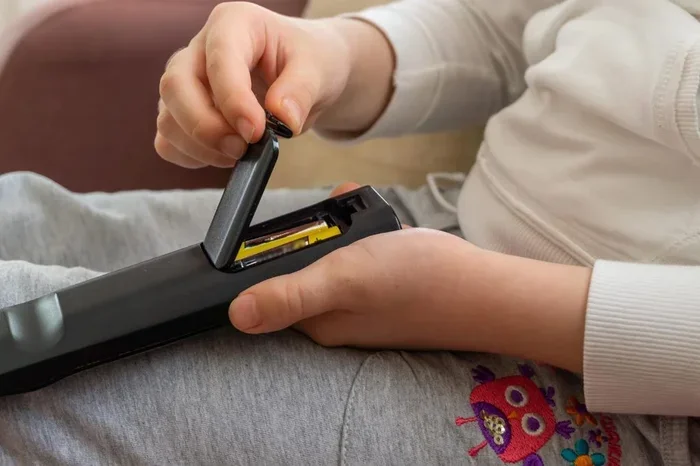
- Open the remote casing. Use a small flathead screwdriver or a coin to gently pry open the back cover. Be careful not to scratch the casing.
- Remove the old battery. Note which side faces up. Take the old battery out gently.
- Insert the new battery. Place the new battery in the same orientation as the old one. Push it in until it clicks.
- Close the remote. Snap the back cover back on. Make sure it clicks into place.
- Test the remote. Stand a few feet away and press the lock or unlock button.
If your remote still does not work after a fresh battery, do not worry. There are more fixes to try. The battery might not be the only problem.
Troubleshooting Signal and Range Issues
Sometimes the remote works, but only from very close range. Or it works sometimes and not others. Remote control troubleshooting for signal issues follows a clear path.
Check for Obstructions
Your remote sends a signal to your car. If something is blocking that signal, it will not reach. Keys, coins, or even your hand position can block the infrared sensor or the radio antenna on your car. Make sure nothing is covering the remote’s signal path when you press the button.
Move Away from Electronics
As mentioned earlier, signal interference is a real problem. Try stepping away from your phone, USB cables, or other electronic devices. Move to a clear area and test the remote again. You might be surprised how much difference a few feet makes.
Test from Different Angles
Some remotes work better from certain angles. Try pointing the remote directly at the car’s antenna area, usually near the rearview mirror or the driver’s side door. Hold the remote steady and press the button firmly. A weak press might not send a strong enough signal.
Check the Remote’s Range
Most car remotes work from about 30 to 60 feet away. If you are beyond that range, the remote will not work. Cold weather also reduces battery power and signal strength. If your remote works better in warm weather, the key fob range issues are likely temperature-related.
Reprogramming Your Car Key Fob
Sometimes the remote stops working because it has lost its pairing with the car. This happens after a battery change, a system reset, or even a power outage. Car key fob programming can fix this, and it is not as hard as it sounds.
How to Reprogram Most Remotes
Every car brand has a slightly different reprogramming process. Here are the general steps that work for most vehicles:
- Sit in the driver’s seat. Close all doors and windows.
- Turn the ignition on. Press the start button or turn the key to the “On” position. Do not start the engine.
- Press the lock button on the remote. Hold it for a few seconds until you hear a click or see the lights flash.
- Turn the ignition off. Remove the key or press the stop button.
- Repeat the process. Most cars require you to do this cycle three to five times.
- Test the remote. Once you complete the cycle, step outside and try locking and unlocking the car.
Check your car manual for the exact steps. Some newer cars have a different process that involves holding buttons on the door panel. If you are unsure, a quick search for your specific car model and year online will give you the exact steps.
When Reprogramming Does Not Work
If reprogramming fails, the remote itself might be faulty. The internal electronics could be worn out. In that case, you may need a car remote repair or a replacement remote. Before you buy a new one, try the next tip: resetting the remote.
Resetting Your Remote Control
A reset can clear out any glitches that are causing problems. Think of it like restarting your phone when it acts up. Here is how to reset most car remotes.
Soft Reset
A soft reset is the simplest approach. Remove the battery from the remote. Wait about 30 seconds. Put the battery back in. This clears any temporary memory issues and often fixes unresponsive remotes. It is the first thing I try whenever a remote gives me trouble.
Hard Reset
A hard reset goes deeper. It usually involves holding down a combination of buttons on the remote for 10 to 15 seconds. Some remotes have a small reset button on the inside that you press with a paperclip. Check your car manual or search online for the specific reset method for your remote model.
After the Reset
Once you have reset the remote, reprogram it using the steps in the previous section. This ensures the remote is properly paired with your car again. After that, test all the buttons. Lock, unlock, trunk release, and panic alarm if your remote has one.
If the reset works, you just saved yourself a trip to the dealership. If it does not, the remote hardware might be damaged, and it is time to consider a replacement.
When to Replace Your Remote
Sometimes the remote is simply too old or too damaged to fix. Here are signs that it is time for a new one.
- The remote works only when you are right next to the car.
- Buttons feel mushy or do not bounce back.
- The remote casing is cracked or water-damaged.
- You have tried new batteries, cleaning, and reprogramming, and nothing works.
- The remote is more than five years old and has never been replaced.
When you need a replacement, you have options. You can buy a new remote from the dealership, order one online, or visit an auto parts store. Programmable remotes are widely available and often cost between $20 and $80. Some even come pre-programmed for your specific car model.
Just make sure the replacement remote is compatible with your vehicle. Check the model number and year before purchasing. If you are unsure, ask a store associate or check with your dealership.
Quick Tips to Keep Your Remote Working Longer
Prevention is always better than cure. Here are some simple habits that keep your electronic key fob in great shape for years.
- Keep the remote dry. Water damage is a common cause of remote failure. Do not leave it in the rain or in a wet pocket.
- Store it away from heat. Direct sunlight and hot cars can damage the internal electronics. Keep it in a cool, dry place.
- Replace the battery on schedule. Do not wait until the remote stops working. Change the battery every year or two as a preventive measure.
- Clean the buttons regularly. A quick wipe every few months removes buildup before it causes problems.
- Avoid dropping the remote. Internal components are delicate. A hard drop can damage the circuit board or the buttons.
These small habits add up. A well-maintained remote can last many years without any issues. If you also use a 12V to 230V car inverter or a 12V car socket to 3 pin adapter in your vehicle, make sure these devices do not create interference near your remote’s receiver. Keeping your car’s electrical accessories organized helps reduce signal problems too.
And if you have kids who love playing with a toy car, you might want to keep their remotes separate from yours. Mixed signals from different remotes can sometimes confuse the car’s receiver. A simple separation solves this quietly.
Common Mistakes People Make with Car Remotes
There are a few mistakes that drivers make over and over. Avoiding these can save you a lot of frustration.
Ignoring the Warning Signs
When your remote starts working only from very close range, that is a warning sign. Do not ignore it. Replace the battery right away before the remote stops working completely. Catching the problem early saves you from being locked out of your car.
Using the Wrong Battery
Not all batteries are the same. Using the wrong type can damage the remote or cause it to work inconsistently. Always check the battery type recommended for your specific remote model. A quick look at the old battery or the car manual will tell you exactly what you need.
Forgetting to Reprogram After Battery Change
Some remotes lose their pairing when the battery is removed. Always test the remote after a battery change. If it does not work, go through the reprogramming steps. This small habit saves a lot of confusion later.
Assuming the Car Is the Problem
When the remote stops working, many people assume the car is broken. But in most cases, the remote itself is the issue. Start with the simplest fixes first. A new battery and a quick reset solve the problem about 80% of the time.
Not Having a Spare Remote
It is always smart to have a spare remote. If your primary remote fails, you are not stuck. A spare also gives you a backup while you get the main remote fixed or replaced. Keep one at home and one in the car if possible.
When to Call a Professional
Most remote problems are easy to fix at home. But sometimes you need expert help. Here is when to call a professional.
- The remote has been exposed to water and does not work after drying.
- The remote was dropped and the casing is cracked or broken.
- You have tried all the fixes and the remote still does not respond.
- Your car’s keyless entry system shows error messages.
- You need a new remote programmed to your specific car model.
A professional locksmith or car dealership can diagnose deeper issues. They have the tools and expertise to fix problems that go beyond simple battery swaps. It costs more than a DIY fix, but it gets the job done right when the remote is truly broken.
Final Thoughts
How do I get my remote to work is a question with a usually simple answer. Start with the battery. Then check for interference and clean the buttons. Reprogram the remote if needed. Reset it as a next step. Most of the time, one of these fixes solves the problem.
Keeping your remote in good shape means fewer surprises and less frustration. Follow the prevention tips, and your remote will keep working for years. And remember, if all else fails, a replacement remote is always an option. You do not have to live with a broken remote.
Take a few minutes today to check your remote. Replace the battery if it is due. Clean the buttons. Test the range. These small actions now will save you a lot of hassle later. Your future self will thank you the next time you are rushing to your car and the remote just works.
Frequently Asked Questions
Why does my car remote work sometimes but not others?
This is usually caused by a weak battery or signal interference. A low battery sends a weaker signal that may reach the car from close range but not from farther away. Try replacing the battery first. If that does not help, move away from other electronics and try again. Signal interference from cell phones or USB chargers is a common hidden cause.
How often should I replace my remote battery?
Most car remote batteries last between one and two years. Do not wait until the remote stops working. Replace the battery once a year as a preventive measure. This keeps your remote reliable and avoids being caught off guard. It is a quick and cheap fix that takes less than five minutes.
Can I use a universal remote for my car?
Some universal remotes are compatible with certain car models. However, most modern cars require a specific remote programmed to their system. A universal remote may not support all features like trunk release or panic alarm. Check compatibility before buying a universal option. Your dealership can also help you find the right remote for your car.
What should I do if my remote gets wet?
Remove the battery immediately. Dry the remote thoroughly with a soft cloth. Leave it in a dry place for at least 24 hours before putting the battery back in. If it still does not work, the internal electronics may be damaged. In that case, you will likely need a replacement remote. Keeping a spare remote is always a smart backup plan.
How do I know if my car battery is affecting the remote?
If your remote works fine in warm weather but fails in cold weather, a low car battery might be the cause. Check your car battery voltage with a multimeter. A healthy battery reads around 12.6 volts. If it is below 12.0 volts, the car battery may be weakening and affecting the remote receiver. Charge or replace the car battery to fix the issue.
Is it safe to reprogram the remote myself?
Yes, reprogramming a car remote is safe and does not require any special tools. Just follow the steps in your car manual carefully. The process varies by car brand but is generally straightforward. If you are unsure, search online for your specific car model and year. Most reprogramming takes only a few minutes and can save you a trip to the dealership.
=== CONCLUSION ===
Getting your remote to work again does not have to be complicated. Most problems come down to a dead battery, signal interference, or a simple reprogramming need. Start with the basics and work your way through the fixes we covered. You will likely solve the problem in minutes without spending a dime.
Keep your remote clean, dry, and well-maintained. Replace the battery before it dies completely. And always have a spare remote handy. These small habits make a big difference in keeping your car remote working reliably every day.
Now that you know how do I get my remote to work, you can handle the problem confidently the next time it happens. Try the fixes in this guide and see the difference for yourself. Your remote is one more thing you can take control of with just a little knowledge and a fresh battery.