Car Rental Receipt Template Plus Free Sample Download
A car rental receipt template is a ready-made document that records every detail of a vehicle rental transaction. This guide provides a free downloadable sample and step-by-step instructions to create your own. You’ll learn what fields to include, how to avoid common errors, and why a proper receipt protects both the rental company and the customer.
A car rental receipt template is a pre-designed document that captures all the details of a vehicle rental transaction. It serves as a proof of payment and a record of the agreement between the rental company and the customer. When you rent a car, the rental car receipt lists the dates, the vehicle, the charges, and the terms. A well-structured receipt protects both parties. It provides a clear car rental cost breakdown. You can use it for expense reports, tax deductions, or warranty claims. The template includes fields for the rental agreement number, the customer name, and the driver’s license details. It also records the vehicle’s condition at pickup and return. This document is the backbone of any car hire business. Without it, tracking transactions becomes a nightmare. A car rental receipt template saves time and reduces errors. It ensures that every rental car receipt looks professional. You can download a free rental receipt sample online. The template works for daily rentals, weekly rentals, and long-term leases. It adapts to any vehicle type, from economy cars to luxury SUVs. The core purpose is to document the rental car transaction clearly.
Key Takeaways
- Free Sample Download: Grab a ready-to-use car rental receipt template in PDF and Word formats.
- Complete Fields Guide: Know exactly what information must appear on every rental car receipt.
- Legal Protection: Understand how a detailed receipt serves as proof of payment and terms for both parties.
- Time-Saving Tips: Speed up your rental business with customizable templates and automation.
- Common Mistakes to Avoid: Don’t miss critical details like mileage, fuel policy, and damage deposits.
📑 Table of Contents
Why You Need a Professional Rental Car Receipt
A professional rental car receipt does more than just record a payment. It builds trust with your customers. When a customer sees a clean, detailed receipt, they feel confident. They know exactly what they are paying for. A clear car hire receipt reduces disputes. It explains every charge on the car rental bill. Customers can see the daily rate, the mileage fee, and any extras. They can verify the fuel policy and the damage deposit. This transparency prevents misunderstandings. It also helps your business stay organized. You can track your income easily. You can generate reports for tax season. A professional receipt also serves as a legal document. If a customer claims they never paid, the receipt is your evidence. It protects your rental business from fraud. It also protects the customer from overcharging. In many countries, you must provide a receipt for car rental transactions. It’s not just good practice; it’s often required by law. Using a vehicle rental invoice template ensures you meet these rules. A professional receipt also enhances your brand image. It shows you run a serious, organized operation. You can add your company logo and contact details. This small touch makes a big difference. Customers are more likely to return to a business that looks professional. They’ll also recommend you to friends. A simple car rental payment receipt can become a marketing tool. It reminds them of your service every time they look at it. So, never underestimate the power of a well-designed rental car receipt.
Essential Fields Every Car Rental Receipt Must Include
Every rental car receipt needs specific fields to be complete. Missing any of these can cause confusion or legal issues. Here are the essential sections you must include.
Customer and Rental Company Details
The first section of any receipt for car rental must include the customer’s name and contact information. You need the full name, phone number, and email address. If the rental is for a business, include the company name and address. Next, record the rental company’s details. Add your business name, address, and phone number. Include your license number if required. This creates a clear paper trail. It also helps with customer service follow-ups. The rental agreement number is crucial. It uniquely identifies each transaction. You can find this number in your rental management system. Use it on every car rental bill. This makes it easy to search for past rentals. It also helps with accounting and auditing. Always include the date the receipt was issued. This is different from the rental start date. The issue date shows when the transaction was finalized. It’s especially important for returns that happen after office hours.
Vehicle Identification and Condition
Describe the vehicle in detail. Include the make, model, and year. Record the vehicle identification number (VIN). This is the most important identifier. Also, note the license plate number. Document the vehicle’s condition at the start of the rental. Use a checklist or a simple description. Note any existing scratches, dents, or damage. Take photos and attach them to the receipt if possible. This protects you from false damage claims. When the car is returned, compare the condition. Note any new damage in the same section. The customer should sign off on the condition report. This is a key part of the car rental transaction. A clear vehicle record prevents many disputes. It’s the foundation of a fair rental car receipt.
Rental Period and Mileage
Record the exact start and end dates of the rental. Include the pickup time and return time. This determines the total rental days. Many rental companies charge by the day or by the hour. Be precise to avoid overcharging or undercharging. The mileage is equally important. Note the odometer reading at pickup and at return. Calculate the total miles driven. Apply the per-mile rate if applicable. Some rentals offer unlimited mileage, but you must state that clearly. The fuel policy is another critical detail. Was the car full at pickup? Was it full at return? Note the fuel level. If the customer returns the car with less fuel, charge the refueling fee. This should be itemized on the car rental cost breakdown. A clear mileage and fuel record makes the rental car receipt complete.
Charges, Taxes, and Payment Terms
List every charge separately. Start with the base daily rate. Multiply by the number of rental days. Add any extras like GPS, child seats, or additional drivers. Include the mileage fee if it’s not unlimited. Add the fuel charge if applicable. Then, list the taxes. Sales tax, airport concession fees, and local surcharges must be itemized. The total amount due should be prominent. Record the payment method. Was it a credit card, debit card, or cash? Note the last four digits of the card for verification. Include the payment date and the transaction ID. If there was a damage deposit, show the amount and the refund status. The rental car receipt should clearly state the payment terms. Was the payment made in full or partially? If partial, note the balance due. This section of the vehicle rental invoice is what customers refer to most often. Make it clear and easy to understand.
How to Create a Car Rental Receipt Template (Step-by-Step)
Creating your own car rental receipt template is simple. You don’t need expensive software. Follow these steps to build a professional template.
First, choose your format. Will you use a PDF, a Word document, or an Excel spreadsheet? Each has its pros and cons. I’ll compare them later. For now, decide what works best for your business.
Next, set up the header. Add your company logo, name, and contact information. The header should be clean and professional. It’s the first thing customers see.
Then, add the receipt number and date fields. These are essential for record-keeping. Use auto-numbering if your system supports it.
Now, create sections for the fields we discussed. Use tables or structured text boxes. Group the information logically. Customer details on the left, vehicle details on the right. Rental period and charges at the bottom.
Don’t forget the signature lines. The customer should sign to acknowledge the vehicle condition and the payment. This is a legal best practice.
Finally, save the template as a master file. You can duplicate it for each new rental. Use a consistent naming convention. For example, RCP-2024-001. This makes filing and retrieval easy.
A well-designed template speeds up your workflow. It ensures every rental car receipt is complete and accurate. It also gives your business a polished, professional look.
Common Mistakes When Using a Rental Receipt Template
Even with a great template, mistakes happen. Here are the most common ones to avoid.
- Leaving out the VIN or license plate number. This makes the receipt useless for identification. Always double-check these fields.
- Forgetting to record the fuel level at pickup and return. This leads to disputes over fuel charges. Be thorough and take photos.
- Not itemizing taxes and fees. Customers appreciate transparency. A single lump-sum tax charge can look suspicious. Break down every fee on the car rental bill.
- Using vague terms like “miscellaneous charges.” Be specific. List every extra clearly. A detailed car rental cost breakdown builds trust.
- Skipping the signature line. Without a signature, you have no proof that the customer agreed to the terms. Always include a signature field for both the customer and the agent.
- Using a template that’s too complex. Keep it simple. A cluttered receipt confuses customers. Aim for clarity and brevity.
Quick Tips for Customizing Your Template
- Use your brand colors and fonts. This reinforces your identity.
- Add a QR code that links to your website or feedback form.
- Include a thank-you note at the bottom. It’s a small touch that leaves a big impression.
- Save the template in a cloud folder. This allows you to access it from anywhere.
- Test print the template before using it. Make sure all fields fit on one page.
Free Car Rental Receipt Template Sample Download
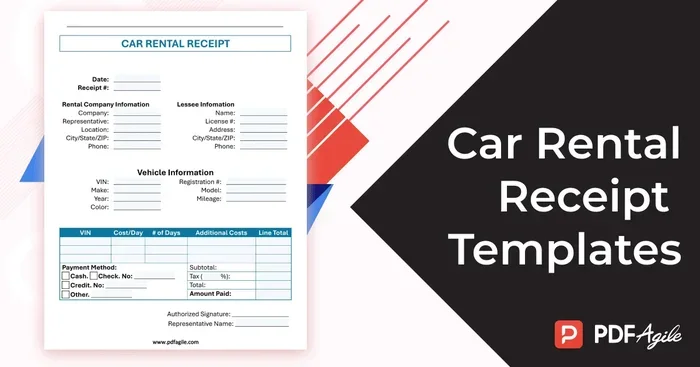
I want to offer a free sample. You can download our ready-made car rental receipt template right here. It’s available in PDF and Word formats. The template includes all the fields we covered. It’s fully customizable. You can add your logo and change the colors. The sample receipt shows a completed transaction. You can see exactly how each field should look. This rental receipt sample is perfect for small rental businesses. It’s also great for personal use. If you rent out your car to a friend, you need a record too. The template is free for personal and commercial use. Just download, edit, and print. No sign-up required. We believe in helping small businesses grow. A professional receipt doesn’t have to cost a fortune.
PDF vs. Word vs. Excel Templates
Choosing the right format matters. Here’s a quick comparison of the most common template types.
| Format | Best For | Pros | Cons |
|---|---|---|---|
| Final, non-editable receipts | Secure, preserves formatting, easy to email | Cannot be edited without specialized software | |
| Word (.docx) | Customizable, editable receipts | Easy to edit, familiar interface | Formatting can shift on different computers |
| Excel (.xlsx) | Calculations and bulk data | Auto-calculates totals, great for large fleets | Less visual appeal, steeper learning curve |
Quick Tips for Choosing the Right Format
- PDF: Use for sending final receipts to customers via email.
- Word: Use for in-house printing and custom branding.
- Excel: Use if you manage a large fleet and need automatic calculations.
Conclusion: Protect Your Rental Business with a Solid Receipt
A well-crafted car rental receipt template is more than just a piece of paper. It’s a legal safeguard, a financial record, and a branding opportunity. Every rental car receipt you issue should tell a clear story of the transaction. It should list the vehicle, the dates, the charges, and the terms. When you use a professional template, you protect your business from disputes and fraud. You also provide your customers with the transparency they deserve. A proper rental car receipt builds trust and encourages repeat business. Take the time to set up your template today. Download the free sample, customize it, and make it your own. Your rental business will run smoother, look more professional, and grow faster. Start with a solid car rental receipt template and watch your operations improve.
Frequently Asked Questions
What is a car rental receipt template used for?
A car rental receipt template is used to document the details of a vehicle rental transaction. It records the customer information, vehicle details, rental period, charges, and payment terms. It serves as proof of payment and a legal record for both the rental company and the customer.
Can I customize a free car rental receipt template?
Yes, most free templates are fully customizable. You can add your company logo, change the colors, and edit the fields to match your business needs. Templates are available in Word, PDF, and Excel formats for easy editing.
What information must be on a rental car receipt?
A rental car receipt must include the customer and company details, vehicle identification (make, model, VIN, license plate), rental dates and times, mileage at pickup and return, fuel levels, a breakdown of all charges and taxes, payment method, and signature lines for both parties.
Is a car rental receipt template legally binding?
While a receipt itself is not a contract, it serves as important evidence of the transaction and the agreed terms. When combined with a signed rental agreement, it strengthens your legal position. Always keep copies of all receipts and agreements for your records.
How do I create a car rental receipt template for my small business?
Start by choosing a format like Word or PDF. Add your company header, then create sections for customer details, vehicle info, rental dates, charges, and payment terms. Use a free sample as a starting point, customize it with your branding, and save it as a master file for future use.
What is the difference between a car rental receipt and a rental invoice?
A rental invoice is typically issued before or at the time of payment, requesting payment. A rental car receipt is issued after payment has been made, confirming that the transaction is complete. Both documents contain similar details, but the receipt serves as proof of payment.