Here Is How to Disable Auto Stop on Your GMC Sierra
Disabling the auto stop feature on your GMC Sierra is simple and can improve your daily driving comfort. This guide walks you through every method, from the dashboard button to permanent fixes. Whether you drive a GMC Sierra 1500 or a Sierra AT4, you will find clear instructions tailored to your truck.
Driving a GMC Sierra is a great experience. The truck feels strong, handles well, and gets the job done. But there is one feature that can frustrate many owners. The auto stop system shuts off the engine when you come to a complete stop. For some drivers, this feels annoying. For others, it raises concerns about engine wear. If you are tired of this feature, you are in the right place. Here is everything you need to know about how to disable auto stop on your GMC Sierra.
The auto stop feature goes by a few names. Some call it stop-start technology. Others refer to it as idle stop or engine shutdown. No matter what you call it, the purpose is the same. The system turns off the engine when the truck is idle. This helps save fuel and reduce emissions. On paper, that sounds great. But in real-world driving, it can feel annoying. The engine restarts every time you brake. It can feel jerky. It can also add stress to the starter motor and battery. This is why many Sierra owners look for a way to turn it off.
Before we dive into the steps, let us talk about why this feature exists. Automakers add auto stop systems to meet fuel economy standards. The idea is simple. A running engine at a standstill wastes fuel. By shutting it off, the truck uses less gas. In city traffic, this can make a noticeable difference. But not every driver likes it. Some prefer a smooth, uninterrupted ride. Others worry about the long-term effects on the engine. Whatever your reason, disabling auto stop is a valid choice.
Key Takeaways
- Easy Toggle Method: Most GMC Sierra models have a simple button to turn off auto stop temporarily.
- Permanent Disable Options: Some owners prefer a lasting fix using aftermarket tuning or module adjustments.
- Fuel Economy Impact: Turning off auto stop may slightly reduce fuel savings but improves driving comfort.
- Engine Health: Frequent auto stop cycles can increase wear on the starter motor and battery over time.
- Model-Specific Differences: The process varies slightly between GMC Sierra 1500, Sierra 1500 Classic, and AT4 trims.
- Safety First: Always consult your owner manual before making permanent changes to factory settings.
📑 Table of Contents
- Understanding the Auto Stop Feature on the GMC Sierra
- Method 1: Using the Dashboard Auto Stop Button
- Method 2: Disabling Auto Stop Through the Infotainment System
- Method 3: Using an Aftermarket Module or Tuner
- Method 4: Disabling Auto Stop Through a Custom Tune
- Common Mistakes When Disabling Auto Stop
- Does Disabling Auto Stop Affect Fuel Economy?
- Expert Tips for Managing the Auto Stop Feature
- Final Thoughts on Disabling Auto Stop on Your GMC Sierra
Understanding the Auto Stop Feature on the GMC Sierra
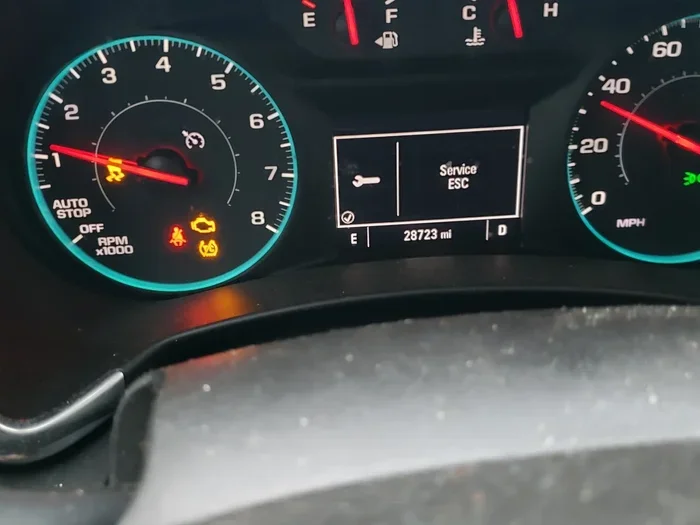
The GMC Sierra comes with a modern stop-start system. This system uses sensors to detect when the truck is fully stopped. It also checks if the transmission is in gear and if the driver has released the brake. When all conditions are met, the engine shuts off. The dashboard shows a light that says AUTO STOP or something similar. When you lift your foot off the brake, the engine restarts instantly.
Not all GMC Sierra models work the same way. The GMC Sierra 1500 has a slightly different system than the Sierra 1500 Classic. The AT4 trim may include additional settings. Your driving mode can also affect how the system behaves. For example, in four-low mode, the auto stop may disable itself. Understanding your specific model is the first step to finding the right solution.
How the System Works in Practice
When you approach a red light, the system becomes active. You slow down and press the brake pedal. Once the truck stops completely, the engine turns off. The tachometer drops to zero. The fuel injection stops. This saves a small amount of fuel with each stop. When the light turns green, you release the brake. The engine fires right back up. In heavy traffic, this cycle can repeat dozens of times during a single commute.
Some owners love this feature. They appreciate the fuel savings. Others hate it. The constant engine restarts feel unnatural. It can also make the truck feel less refined. The vibration during restart bothers some drivers. If you fall into this camp, you are not alone. Thousands of GMC Sierra owners search for ways to turn off auto stop every month.
Method 1: Using the Dashboard Auto Stop Button
The easiest way to turn off auto stop is with a physical button. Most GMC Sierra models have this button located on the dashboard. It is usually near the steering column or on the center console. The button may have a symbol that looks like a circled A with an arrow. Pressing it once disables the auto stop feature for the current driving session.
Here is how to do it step by step:
- Step 1: Start your GMC Sierra and let it idle.
- Step 2: Look for the AUTO STOP button on the dashboard.
- Step 3: Press the button once. You will see a light turn off.
- Step 4: Drive as normal. The engine will no longer shut off at stops.
This method works for most model years. It is a temporary fix, though. Every time you restart the truck, the system resets. You will need to press the button again. It is quick and easy, but it requires a small daily habit.
Where Is the Button Located?
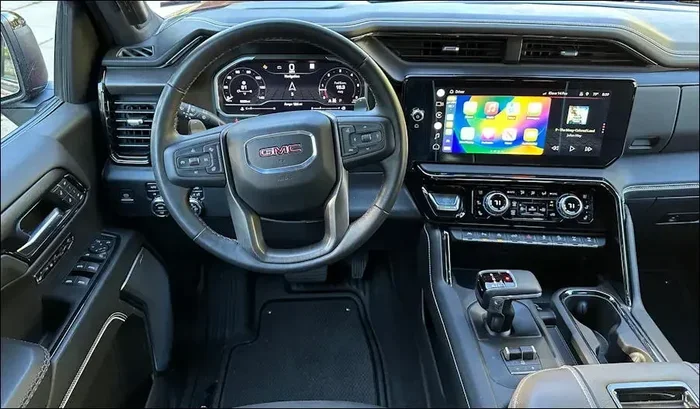
The exact location of the button depends on your model year. In newer GMC Sierra 1500 models, the button sits near the climate controls. On older models, it may be closer to the shift lever. Check your owner manual if you cannot find it. The manual will have a diagram showing the exact spot. Some trims, like the Sierra AT4, may place the button in a slightly different location.
One thing to keep in mind. The button only works when the truck is fully stopped. You cannot press it while driving. Also, the system may re-enable itself in certain conditions. For example, if the battery charge drops too low, the truck may reactivate auto stop to protect the electrical system.
Method 2: Disabling Auto Stop Through the Infotainment System
Some GMC Sierra models allow you to adjust the auto stop setting through the infotainment screen. This method gives you more control. You can choose whether the system turns on or off each time you start the truck.
Here is how to access the setting:
- Step 1: Press the Home button on your touchscreen.
- Step 2: Navigate to the Vehicle Settings menu.
- Step 3: Look for the Driver Assistance or Vehicle Options section.
- Step 4: Find the Auto Stop setting and toggle it off.
Not all GMC Sierra models have this option. Newer models with the latest infotainment system are more likely to include it. If you cannot find the setting, do not worry. There are other methods you can try.
Why Use the Infotainment Method?
The infotainment method has one big advantage. It remembers your preference. Unlike the dashboard button, this setting can persist between starts. You do not have to press a button every time you get behind the wheel. It is a more hands-off approach. This method is ideal for daily drivers who want a permanent solution without any extra effort.
Keep in mind that the exact menu path may vary. GMC updates the infotainment system across different model years. The Sierra 1500 from 2019 may have a different menu layout than the 2023 model. Use the search function on your screen if available. Type “auto stop” and the system should guide you to the right place.
Method 3: Using an Aftermarket Module or Tuner
For owners who want a more permanent solution, aftermarket modules are a popular choice. These small devices plug into your truck’s OBD-II port. They intercept the signal from the auto stop system and prevent it from activating. Once installed, the feature stays off until you remove the module.
Here is what you need to know about this method:
- Step 1: Purchase a compatible auto stop disable module.
- Step 2: Locate the OBD-II port under your dashboard.
- Step 3: Plug the module into the port.
- Step 4: Start the truck. The module will automatically disable auto stop.
These modules are affordable. Most cost between $50 and $150. They are easy to install. No cutting or wiring is required. You simply plug and play. Some popular brands include HyperTech, DiabloSport, and Bama Performance. Make sure to choose a module that is compatible with your specific GMC Sierra model year.
Pros and Cons of Aftermarket Modules
Like any solution, aftermarket modules have advantages and disadvantages. Here is a quick comparison:
- Pros: Permanent solution, easy to install, affordable, no ongoing costs.
- Cons: May void warranty if not properly disclosed, takes up the OBD-II port space.
Before purchasing a module, check your warranty status. If your truck is still under factory warranty, disabling auto stop could potentially cause issues with a warranty claim. It is always a good idea to consult your dealer first. You can also visit trusted resources to understand more about how engine systems interact with fuel economy features, similar to how a hybrid system switches between power sources at certain thresholds.
Method 4: Disabling Auto Stop Through a Custom Tune
For the most permanent and thorough solution, a custom engine tune is the way to go. A professional tuner can flash your GMC Sierra’s ECM with a custom tune. This tune removes the auto stop function entirely. It also allows you to adjust other performance settings at the same time.
Here is what to expect with this method:
- Step 1: Find a reputable tuning shop or mobile tuner.
- Step 2: Discuss your goals with the tuner.
- Step 3: Have the tuner flash a custom tune to your ECM.
- Step 4: Test drive the truck. Auto stop should now be permanently disabled.
Custom tuning costs more than an aftermarket module. You can expect to pay between $300 and $800 depending on the tune and the tuner. But the results are worth it for many owners. The tune not only disables auto stop but can also improve throttle response and overall driving feel. Just be aware that a custom tune may affect your factory warranty.
Popular Tuning Options for the GMC Sierra
Several tuning companies offer tunes for the GMC Sierra. HP Tuners, SCT, and EFI Live are among the most popular. These systems allow you to customize your truck’s performance in great detail. If you are interested in a tune, do your research. Read reviews and watch installation videos. Talk to other Sierra owners in online forums. They can recommend trusted tuners in your area.
It is also worth noting that the auto stop system is connected to other vehicle functions. For instance, the system works hand-in-hand with the transmission and battery management. When you disable auto stop, you are changing how these systems interact. A professional tuner understands these connections and can adjust the tune accordingly. This ensures your truck runs smoothly after the change.
Common Mistakes When Disabling Auto Stop
Disabling auto stop on a GMC Sierra is straightforward. But mistakes can happen. Here are some common errors to avoid:
- Forgetting to Re-Enable It for Inspections: Some states require functional emissions systems. Auto stop helps reduce emissions at idle. Be aware of local regulations before permanently disabling it.
- Using an Incompatible Module: Not all auto stop modules work with every Sierra model. Check compatibility before purchasing.
- Ignoring Battery Health: The auto stop system relies on a healthy battery. If your battery is weak, the system may reactivate on its own. Replace your battery if it is more than three years old.
- Not Consulting the Owner Manual: Every GMC Sierra is different. The owner manual contains model-specific instructions that can save you time and frustration.
Avoiding these mistakes ensures a smooth experience. Take your time and follow each step carefully. Rushing through the process can lead to errors or unintended consequences.
Does Disabling Auto Stop Affect Fuel Economy?
This is one of the most common questions among GMC Sierra owners. The short answer is yes, it can. The auto stop feature is designed to save fuel. When the engine is off at a stoplight, it uses zero fuel. Over a long commute with many stops, these savings add up.
However, the fuel savings from auto stop are relatively small. Most studies show a 3 to 5 percent improvement in city fuel economy. For some drivers, that number is not worth the annoyance. If you drive mostly on highways, the auto stop feature barely activates anyway. In that case, disabling it has almost no impact on your fuel economy.
Think about your driving habits. If you spend most of your time in stop-and-go city traffic, the fuel savings matter more. If you drive on open roads, disabling auto stop makes little difference in your gas mileage. The choice is really about comfort and personal preference.
Also, consider this. Modern engines are designed to handle frequent restarts. The auto stop feature does not cause significant engine wear in normal conditions. The manufacturers built the system to last the life of the vehicle. That said, if you already have an older battery or a worn starter, the extra cycles could shorten their lifespan. In that case, disabling auto stop might actually protect those components.
Expert Tips for Managing the Auto Stop Feature
Whether you choose to disable auto stop or keep it, here are some expert tips to get the most out of your GMC Sierra:
- Monitor Your Battery: A healthy battery is essential for the auto stop system to work properly. Have it tested regularly.
- Keep Your Software Updated: GMC occasionally releases updates that improve the auto stop system. Check for updates at your dealer.
- Drive in the Right Mode: Using four-low mode or towing mode can automatically disable auto stop in certain situations. This is useful when you do not want to press the button manually.
- Consider Your Driving Environment: In heavy traffic, auto stop can feel tedious. On long highway drives, it barely activates. Adjust your approach based on where you drive most often.
These simple tips help you maintain a great driving experience. They also keep your GMC Sierra running at its best for years to come.
Final Thoughts on Disabling Auto Stop on Your GMC Sierra
Now you know exactly how to disable auto stop on your GMC Sierra. You have several methods to choose from. You can use the dashboard button for a quick temporary fix. You can adjust the infotainment settings for a more persistent solution. Or you can go with an aftermarket module or custom tune for a permanent change. Each method has its pros and cons. Choose the one that fits your needs and budget.
The auto stop feature is useful. It saves fuel and reduces emissions. But it is not for everyone. Many GMC Sierra owners prefer a smoother, more traditional driving experience. Disabling it is perfectly fine. Your truck is yours to customize. Just make sure you do it safely and with full awareness of the consequences.
Take a moment to think about your daily driving routine. Do you sit in traffic for long periods? Does the auto stop restart bother you? If the answer is yes, one of the methods in this guide will work for you. You deserve to enjoy every minute behind the wheel of your GMC Sierra. Make the choice that feels right for you and your truck.
Frequently Asked Questions
Can I disable auto stop on a GMC Sierra 1500 Classic?
Yes, the GMC Sierra 1500 Classic has the same auto stop feature as the standard Sierra 1500. You can use the dashboard button or infotainment settings to turn it off. Check your owner manual for model-specific instructions.
Will disabling auto stop void my GMC warranty?
Using a dashboard button or infotainment setting will not void your warranty. However, aftermarket modules or custom tunes may affect coverage. Always check with your dealer before making permanent changes.
How much fuel does the auto stop feature actually save?
The auto stop feature saves roughly 3 to 5 percent in city fuel economy. The savings are modest and depend heavily on your driving conditions and commute length.
Is it safe to drive with auto stop disabled?
Yes, it is completely safe. Disabling auto stop does not affect the drivability or safety of your GMC Sierra. The truck functions normally in every other way.
Can I re-enable auto stop after disabling it?
Absolutely. If you used the dashboard button, simply press it again to re-enable the feature. If you used a module or tune, you will need to remove or reprogram it.
Does the auto stop system work in cold weather?
The system may not activate in very cold weather. GMC designed the auto stop to disable itself when engine temperature is too low. This protects the engine and ensures proper warm-up.