How to Change the Battery in a Cadillac Key Fob Today
Changing the battery in your Cadillac key fob is quick, easy, and costs just a few dollars. Most Cadillac key fobs use a common CR2032 coin cell battery that you can swap out in under five minutes. This guide walks you through every step, from spotting a dying battery to enjoying a fully working remote again.
There is nothing more frustrating than standing next to your car, pressing the button on your Cadillac key fob, and getting no response. Whether you are heading to work, running errands, or just trying to get home, a dead key fob battery can throw your entire day off balance. The good news is that fixing this problem is incredibly simple and something you can do yourself in just a few minutes.
This guide covers everything you need to know about how to change the battery in a Cadillac key fob. We will walk you through identifying the right battery, the tools you need, the step-by-step replacement process, and tips to keep your fob working longer. Whether you drive a Cadillac XT5, a Cadillac XT4, or any other model, this guide has you covered.
Replacing a key fob battery is one of the simplest maintenance tasks any car owner can handle. You do not need special skills, expensive tools, or a trip to the dealership. A fresh battery and a little patience are all it takes. Let us get into it.
Key Takeaways
- Easy DIY Fix: You can replace the battery yourself without visiting a dealer or locksmith.
- Common Battery Type: Most Cadillac key fobs use a CR2032 lithium coin cell battery.
- Quick Process: The entire battery swap takes less than five minutes with basic tools.
- Signs Matter: Recognizing early warning signs saves you from being locked out unexpectedly.
- Correct Technique: Using the right tools and following the steps prevents damage to your fob.
- Reset May Be Needed: Some Cadillac models require a simple reset after battery replacement.
- Preventive Tips: Proper handling extends your new battery life significantly.
📑 Table of Contents
- Signs Your Cadillac Key Fob Battery Is Dying
- What Battery Does a Cadillac Key Fob Use?
- Tools You Will Need
- Step-by-Step Guide to Changing the Battery
- Common Mistakes to Avoid
- How to Extend Your Key Fob Battery Life
- When Should You Replace the Entire Key Fob?
- Frequently Asked Questions
- Final Thoughts
Signs Your Cadillac Key Fob Battery Is Dying
Before you grab a new battery, it helps to confirm that the battery is actually the problem. Many people assume their Cadillac remote key is broken when it is really just a low battery. Here are the most common signs that your key fob battery needs replacing.
Increased Distance from the Car
One of the earliest warning signs is a noticeable decrease in range. If your key fob used to unlock your car from twenty feet away and now only works when you are standing right next to it, the battery is likely weakening. This happens because the signal power drops as the battery voltage decreases.
Delayed Response from the Fob
When you press the button, do you sometimes need to press it multiple times before the car responds? A dead key fob battery causes delayed or inconsistent responses. The car may take a second or two to recognize the signal, or it may not respond at all on the first press.
Push Button Start Won’t Work
If your Cadillac has a push-button start system, a weak fob battery can prevent the engine from starting. You might notice that the car does not detect the key fob when you are in the driver seat. This is a clear indicator that the key fob battery needs attention.
Warning Indicator on the Dashboard
Some newer Cadillac models display a warning message on the dashboard when the key fob battery is low. If you see a message about the remote key or key fob battery, do not ignore it. Replacing the battery at this stage prevents you from getting stranded.
The Fob Works Intermittently
Intermittent operation is another telltale sign. The fob might work perfectly in the morning but fail by afternoon. Temperature changes and battery drain patterns cause this inconsistent behavior. If your Cadillac key fob troubleshooting reveals sporadic performance, a battery replacement is the first thing to try.
What Battery Does a Cadillac Key Fob Use?
Knowing the correct battery type is essential before you start the replacement process. Using the wrong battery can damage your fob or result in poor performance.
The Most Common Battery: CR2032
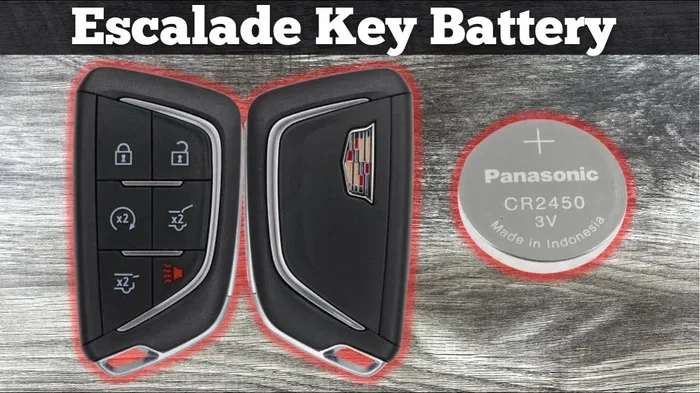
The vast majority of Cadillac key fobs use a CR2032 lithium coin cell battery. This is a 3-volt battery that is widely available at grocery stores, pharmacies, auto parts shops, and online retailers. The CR2032 is one of the most common battery types in the world, so you should have no trouble finding one.
Other Battery Types by Model
While the CR2032 is the standard, some older Cadillac models or specific fob designs may use a CR2025 battery. The difference between these two is thickness. The CR2032 is 3.2mm thick while the CR2025 is 2.5mm thick. Always check your owner manual or the existing battery before purchasing a replacement.
Where to Buy Replacement Batteries
You can buy Cadillac key fob batteries at many retail locations. Drugstores like CVS and Walgreens carry them. Supermarkets, hardware stores, and auto parts stores like AutoZone or O’Reilly also stock them. Online platforms like Amazon offer bulk packs if you want to keep spares on hand.
Quick Tip: Buy name-brand batteries from reputable manufacturers like Energizer or Duracell. Cheap off-brand batteries may have a shorter lifespan and could leak, potentially damaging your fob.
Tools You Will Need
One of the best things about replacing a Cadillac key fob battery is that you need very few tools. Most people already have everything they need at home.
- CR2032 or CR2025 battery: The replacement battery matched to your fob model.
- Small flathead screwdriver: A thin, precision flathead works best for prying open the fob shell.
- Tweezers: Helpful for handling the small battery and any tiny screws or clips.
- Soft cloth or towel: Placing this under your work area prevents small parts from rolling away.
- Optional: key removal tool: Some Cadillac fobs have a hidden mechanical key that requires a release tool.
You do not need any electrical tools or specialized equipment. This is a simple mechanical task that involves opening the fob casing, swapping the old battery for the new one, and snapping the case back together. The entire process mirrors what you would do with a 12v car socket replacement or any other simple car accessory swap. Keeping your workspace clean and well-lit makes the job even easier.
Step-by-Step Guide to Changing the Battery
Now that you have your battery and tools ready, let us walk through the actual replacement process. Follow these steps carefully and your Cadillac key fob will be working like new in no time.
Step 1: Prepare Your Workspace
Find a clean, flat surface with good lighting. Lay down a soft cloth to catch any small parts. Wash and dry your hands to avoid transferring oils or moisture to the fob or the new battery. Static electricity from your hands can sometimes affect electronic components, so touching a grounded metal surface first can help.
Step 2: Locate the Emergency Mechanical Key
Most Cadillac key fobs have a hidden mechanical key inside. Look for a small button or sliding latch on the side or bottom of the fob. Press or slide it to release the metal key blade. Set this aside in a safe place. Some fob models do not have this feature, and that is perfectly fine. You can still open the fob without it.
Step 3: Open the Fob Casing
Turn the fob over and look for a seam or crack along the middle where the two halves meet. Insert your small flathead screwdriver gently into the seam. Work it around the edges slowly. Do not force it. The casing is held together by small clips that can break if you are too aggressive. If the fob feels stuck, try rotating it slightly and finding a better entry point.
Expert Insight: Some Cadillac fob models use a screw instead of clips to hold the two halves together. If you see a tiny screw, use a compatible screwdriver to remove it before trying to pry the case open. This applies to many car accessories and components, similar to how you would handle a 12v to 230v car inverter installation where screws secure the housing.
Step 4: Remove the Old Battery
Once the fob is open, you will see the old battery sitting in a small compartment. Note which side is facing up. The positive side (marked with a plus sign and the number 2032) should be facing up. Use your tweezers or the tip of the screwdriver to gently lift the old battery out. Dispose of the old battery properly at a recycling center. Do not throw it in the regular trash.
Step 5: Insert the New Battery
Take your new CR2032 battery and place it in the compartment with the positive side facing up, just as the old battery was. Press it down gently until it clicks into place. Make sure it sits flat and secure. Do not force it. If the battery feels loose, double-check that you are using the correct type and size.
Quick Tip: Before closing the fob, test the new battery by pressing a button while the fob is still open. If the car responds, you know the battery is installed correctly. This saves you the frustration of closing everything up only to find it still does not work.
Step 6: Reassemble the Fob
Align the two halves of the fob casing carefully. Press them together firmly until the clips snap into place. You should feel a satisfying click when the halves are fully seated. If your fob had a screw, replace it now. Test all the buttons to confirm everything is working properly.
Step 7: Reset if Necessary
Some Cadillac models require a simple reset after a battery change. To do this, sit in your car with the driver door closed, insert the key into the ignition, turn it to the ON position without starting the engine, and wait about ten seconds. Turn the key back to OFF and remove it. This re-syncs the key fob with the car’s computer system.
If your fob still does not work after a battery replacement, it may need reprogramming. In that case, you might need to visit a Cadillac dealership or a qualified locksmith. However, most of the time, a fresh battery solves the problem entirely.
Common Mistakes to Avoid
Even though this is a straightforward task, there are a few common mistakes that people make when replacing their Cadillac key fob battery. Avoiding these will save you time and prevent damage.
- Using the wrong battery type: A CR2025 will not fit properly in a fob designed for a CR2032. Always double-check the battery model number.
- Forcing the fob open: Excessive force can crack the plastic casing or break the internal clips. Patience is key.
- Touching the battery contacts with metal: This can cause a short circuit. Use plastic tools or tweezers when handling the battery.
- Installing the battery backwards: The positive side must face up. Putting it in upside down will not damage anything but the fob will not work.
- Forgetting to reset the system: Some Cadillac models need a reset after battery replacement to recognize the fob again.
- Ignoring the old battery disposal: Lithium coin cell batteries should be recycled, not thrown in household waste. Many stores have battery recycling bins.
If you are dealing with any electrical components in your car, proper handling matters just as much as it does when you are working with something like a push-in wire connector or any other car electrical part. Gentle, deliberate movements protect both you and your vehicle.
How to Extend Your Key Fob Battery Life
Once you have replaced the battery, you want it to last as long as possible. Here are some practical tips to maximize the life of your new Cadillac key fob battery.
Avoid Extreme Temperatures
Lithium coin cell batteries do not perform well in extreme heat or cold. Do not leave your key fob in a hot car during summer or in a freezing car during winter. The ideal storage temperature is room temperature. If you live in an area with harsh climate extremes, keep your fob in a pocket close to your body.
Do Not Press Buttons Unnecessarily
Every button press uses a small amount of battery power. Avoid pressing the lock or unlock button repeatedly when the fob is not near the car. This drains the battery faster and shortens its overall lifespan.
Store the Fob Properly When Not in Use
If you have a spare key fob, store it in a cool, dry place away from direct sunlight. Do not toss it into a junk drawer with metal coins and keys, as this can cause accidental button presses and battery drain.
Replace Both Fobs at the Same Time
If you have two key fobs for your Cadillac and one battery is dying, consider replacing both batteries at the same time. This ensures both remotes work reliably and saves you from dealing with a second dead battery a few weeks later.
When Should You Replace the Entire Key Fob?
A battery change solves most key fob problems, but it is not a cure-all. There are situations where the entire fob needs to be replaced.
Physical Damage to the Fob
If your Cadillac remote key has been dropped, crushed, or exposed to water damage, the battery replacement may not fix the problem. Cracked casings, water-damaged circuit boards, and broken buttons all point to a fob that needs full replacement.
Persistent Signal Issues After Battery Change
If you have replaced the battery with a brand-new one and the fob still does not work, the problem may be with the internal electronics. Signal interference, faulty circuitry, or a damaged antenna inside the fob can all cause persistent issues.
Fob Is Several Years Old
Key fobs have a limited lifespan. If your fob is more than five or six years old, the internal components may be wearing out regardless of the battery. In this case, investing in a new fob makes more sense than repeatedly replacing batteries.
Programming Issues
Some Cadillac models require professional programming when a new fob is purchased. If you buy a replacement fob, you may need to visit a dealership or locksmith to have it programmed to your specific vehicle. This is different from a simple battery swap and requires specialized equipment.
When shopping for a replacement fob, make sure it is compatible with your specific Cadillac model and year. You can check with your local Cadillac dealer or purchase online from authorized retailers. The cost of a new fob varies depending on the model and features, with basic remotes being more affordable than smart key systems with advanced features.
Frequently Asked Questions
How often should I change the battery in my Cadillac key fob?
Most Cadillac key fob batteries last between two and three years under normal use. If you use your fob frequently or live in an area with extreme temperatures, you may need to replace the battery sooner. Watching for early warning signs like reduced range helps you stay ahead of a dead battery.
Can I use any brand of CR2032 battery for my Cadillac key fob?
Yes, you can use any reputable brand of CR2032 battery. Energizer, Duracell, and Panasonic are all reliable choices. Avoid generic or off-brand batteries as they tend to have shorter lifespans and may leak, which can damage the fob internals.
Do I need to reprogram my Cadillac key fob after changing the battery?
In most cases, no reprogramming is needed after a simple battery change. However, some Cadillac models may require a quick reset by turning the ignition to the ON position and back off. If the fob still does not work after a reset, you may need professional reprogramming at a dealership.
What should I do if my key fob still does not work after replacing the battery?
First, double-check that the battery is installed correctly with the positive side facing up. If the battery is correct and properly placed, try resetting the fob by following the ignition sequence. If neither of these works, the issue may be with the fob’s internal electronics, and you may need a replacement fob or professional diagnosis.
Is it expensive to replace a Cadillac key fob battery?
Not at all. A CR2032 battery costs between one and five dollars at most retail stores. Even if you factor in the cost of a small screwdriver or tweezers you might need, the total cost is minimal. This makes battery replacement one of the cheapest and easiest car maintenance tasks you can do yourself.
Can I change the battery in my Cadillac key fob myself, or do I need to visit a dealer?
You can absolutely change the battery yourself. The process is simple, requires no special tools, and takes less than five minutes. You do not need to visit a dealer or pay for a service appointment. Just follow the steps carefully and you will have your fob working again in no time.
Final Thoughts
Learning how to change the battery in a Cadillac key fob is one of the most useful skills any Cadillac owner can have. It saves you time, money, and the hassle of waiting at a dealership or locksmith. With just a replacement CR2032 battery and a small flathead screwdriver, you can bring your remote back to life in minutes.
Remember to pay attention to the early warning signs of a dying battery. Catching the problem early means you never have to deal with the frustration of a non-working fob when you are in a hurry. Keep a spare battery in your glove box, and you will always be prepared.
Whether your Cadillac is a sleek sedan, a rugged SUV, or a luxury coupe, the key fob battery replacement process remains the same. Follow the steps in this guide, avoid the common mistakes, and your remote will keep working reliably for years to come. A well-maintained Cadillac key fob is a small detail that makes a big difference in your daily driving experience.
Take a few minutes today to check your fob battery status. If it is showing signs of weakness, grab a replacement battery and follow the steps above. Your future self will thank you the next time you need to unlock your car in a hurry. A little preventive maintenance goes a long way toward keeping everything on your Cadillac running smoothly, just like keeping your car’s electrical systems in top shape, whether you are dealing with a 12v car socket or a complex keyless entry system.