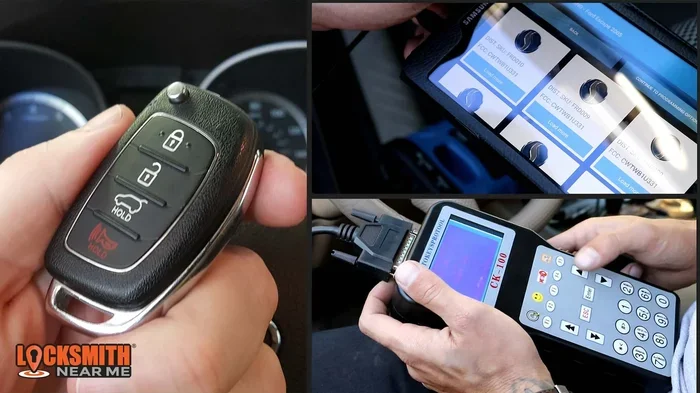
How Do I Program a Key Fob at Home Simple Steps Inside
Programming a key fob at home is easier than most drivers think and can save you significant money. With the right preparation, your vehicle owner manual, and our simple steps, you can sync your car key fob without visiting a dealer or locksmith. This guide walks you through the entire key fob programming process so you can handle it confidently in your own garage.
Programming a key fob at home might seem like a task reserved for dealership technicians, but that is not always the case. Many car owners discover that they can handle this process themselves with the right guidance and a little patience. Whether you lost your only working remote, bought a replacement, or simply want a spare, learning how to sync your device is a valuable skill that pays off quickly.
The good news is that most modern vehicles come with built-in programming options. You do not need expensive tools or specialized training to get the job done. With a few household items and our detailed instructions, you can program a key fob at home in under thirty minutes. Let us walk you through everything you need to know, from preparation to testing.
Key Takeaways
- You Can Do It Yourself: Most vehicles allow you to program a key fob at home with basic tools and patience.
- Save Money: Avoid costly dealer fees by handling key fob programming in your own garage.
- Preparation Matters: Having the right tools and your vehicle manual ready makes the process smooth and fast.
- Common Issues Are Fixable: Most key fob problems have simple solutions you can handle at home.
- Know When to Call a Pro: Some vehicles or complex systems may need professional locksmith key programming.
- Maintenance Keeps It Working: Regular battery replacement and care extend your key fob’s lifespan significantly.
📑 Table of Contents
What Is a Key Fob and Why Does Programming Matter?
A key fob is a small remote device that lets you lock, unlock, and sometimes start your car without using a traditional metal key. Most vehicles made after 2000 come equipped with key fob technology. These handy devices communicate with your car through radio signals, creating a secure connection between you and your vehicle. The convenience of a remote key fob is something most drivers take for granted until it stops working.
When you buy a new or replacement fob, it usually does not work right out of the box. This is where key fob programming comes in. Programming tells the remote how to communicate with your specific car. Without this step, the fob simply will not respond when you press its buttons. Think of it like pairing a phone with a Bluetooth speaker — both devices need to learn each other’s language before they work together.
Understanding this process matters because it saves you time and money. Many dealerships charge anywhere from fifty to two hundred dollars just to program a single remote. By learning how to do it yourself, you skip that cost entirely. Plus, having a working spare fob gives you peace of mind if you ever lose your primary one. A key fob not working in an emergency is a stressful situation you can easily prevent with a backup remote.
Tools and Preparation You Need Before Starting
Before you dive into programming, gathering the right tools makes a big difference. You do not need anything fancy, but having these items ready will keep the process smooth and frustration-free.
What You Will Need
- Your new or replacement key fob — make sure it is the correct model for your vehicle
- Your vehicle owner manual — this is your best friend for specific instructions
- A working key fob (if you have one) — some systems require at least one programmed remote to add another
- A fresh battery for the new fob — typically a CR2025 or CR2032 coin cell
- Your car keys — you may need to insert a physical key during the process
- A quiet, distraction-free space — near your vehicle with all doors closed
Check Your Vehicle Compatibility
Not all cars use the same programming method. Some vehicles have a simple button sequence, while others require specialized diagnostic equipment. The car owner manual will tell you exactly what your model needs. If you no longer have the physical manual, you can usually find a digital version on the manufacturer’s website.
It is also worth noting that the weight and specifications of your vehicle can sometimes affect how electronic systems perform. For instance, whether your car is 000 lbs heavy for a car can influence the strength and range of your key fob signal. Heavier vehicles with more electronic systems may require a slightly stronger fob signal to communicate properly with the receiver.
Take a few minutes to read through the relevant section of your manual before you start. This small step prevents frustration later on. You should also verify whether your aftermarket key fob is compatible with your vehicle. Universal remotes work with many cars, but some brands use proprietary technology that only pairs with original equipment manufacturer remotes.
Step-by-Step Guide to Program a Key Fob at Home
Now for the part you have been waiting for. Below, we walk you through the general steps to program a key fob at home. Keep in mind that exact steps vary by make and model, so always cross-reference with your owner manual.
Step 1: Get Inside and Close All Doors
Start by sitting in the driver’s seat. Close all doors, the trunk, and the hood. Some vehicles will only allow programming when all doors are shut. This safety feature ensures that no one can interfere with the process while you are working.
Turn the ignition to the “On” position without starting the engine. In most cars, this means turning the key to the second position or pressing the start button without pressing the brake pedal. You should see the dashboard lights come on. This step activates the car ignition electrical systems that are needed for programming.
Step 2: Enter Programming Mode
Entering programming mode is the most critical step. The method differs depending on your vehicle. Here are common sequences for popular brands:
- For many Ford vehicles: Turn the ignition from “Off” to “On” three times within ten seconds. The doors should lock and unlock to confirm you are in programming mode.
- For many Toyota vehicles: Close all doors, then open and close the driver’s door twice. Turn the key to “On” and back to “Off,” then open and close the door again.
- For many Honda vehicles: Turn the ignition to “On,” then press the “Lock” button on a working fob within five seconds. Turn to “Off” and repeat the cycle.
- For many Chevrolet vehicles: Press and hold the “Unlock” button on the driver’s door, then turn the key to “On” and back to “Off” three times within ten seconds.
Your owner manual will provide the exact sequence for your specific model. Do not rush through these steps — timing matters. If you miss the window, you need to start the process over from the beginning.
It is interesting to note how modern vehicles handle complex transitions automatically. Much like how at what speed hybrids switch to gas depends on the car’s internal computer, key fob programming mode is also controlled by the vehicle’s electronic system. Both processes showcase how today’s cars manage sophisticated automated functions seamlessly.
Step 3: Press the Lock or Unlock Button
Once you are in programming mode, pick up your new key fob. Within the time window (usually ten to thirty seconds), press the “Lock” or “Unlock” button. You should hear the doors lock or the lights flash, confirming the car has accepted the new remote.
Some vehicles require you to press multiple buttons in sequence. Others simply need a single press. Listen for beeps or watch for dashboard lights — these are your confirmation signals. If you do not hear or see anything, try pressing the button again within the time window.
Step 4: Repeat for Additional Fobs
If you are programming more than one new fob, repeat Step 3 for each additional remote. Most systems require you to program each fob individually while still in programming mode. After the last fob is accepted, turn the ignition off to exit programming mode.
Test each fob from a distance to make sure all buttons work correctly. Walk about twenty feet away and try locking and unlocking. This confirms the key fob range is functioning properly. A sync key fob process that works at a distance means your key fob signal is strong and your programming was successful.
Step 5: Exit Programming Mode
Turn the ignition off and remove the key. Wait about thirty seconds, then test all fobs from outside the vehicle. If everything works, you have successfully completed the process. If a fob does not respond, try the entire sequence again from the beginning.
Some vehicles exit programming mode automatically after a set period of inactivity. Others require you to turn the ignition off and wait for the doors to lock and unlock once more. Either way, always test your work before walking away.
Common Problems When You Try to Program a Key Fob at Home
Even with careful preparation, things do not always go smoothly. Here are the most common issues drivers face and how to solve them quickly.
The Fob Does Not Respond
If your new fob does not seem to work during programming, the first thing to check is the battery. A weak battery is the number one culprit. Replace it with a fresh one and try again. Also, make sure you are within the correct distance from the vehicle — usually within arm’s reach during programming.
Another common cause is incorrect timing. Programming mode windows are often very short, sometimes only ten seconds. If you miss the window, you need to start the process over from the beginning. Practice the ignition sequence a few times before you actually press the fob buttons. Patience is your best friend here.
The Car Does Not Enter Programming Mode
Sometimes the vehicle simply refuses to enter programming mode. This usually happens when a step is done out of order or too slowly. Double-check the sequence in your owner manual. Some vehicles require you to complete the entire sequence within a specific timeframe.
It is also worth understanding how interconnected your vehicle’s systems are. Understanding at what point a hybrid switches to gas helps you appreciate how deeply integrated modern car computers are. Your key fob system is connected to the same central computer that manages engine functions, so any glitch in the main system can affect programming.
Only One Button Works
If the lock button works but the unlock button does not (or vice versa), try reprogramming the fob. Sometimes only one channel gets programmed during the initial attempt. A second key fob reprogramming cycle often fixes this issue. Make sure you are pressing the correct button for each channel during the programming window.
Key Fob Works But Has Limited Range
A fob that only works when you are standing right next to the car may have a weak signal. This can happen if the battery is low or if the fob was programmed incorrectly. Try replacing the battery first, then reprogram if needed. Also, check for any physical damage to the fob casing that might be affecting the antenna inside.
The Wrong Key Fob Was Purchased
This sounds obvious but happens more often than you think. Make sure your replacement fob matches your vehicle’s make, model, and year exactly. Even small differences between model years can cause incompatibility. When in doubt, check the part number against your vehicle’s specifications before attempting any programming.
When Should You Call a Professional?
While many drivers successfully program a key fob at home, there are situations where professional help makes sense. Knowing when to call a locksmith or dealer can save you from wasted effort and frustration.
Vehicles With Advanced Security Systems
Some high-end or newer vehicles require specialized diagnostic tools for key fob programming. Luxury brands and models with advanced smart key systems often fall into this category. If your owner manual states that a dealer scan tool is required, it is best to seek professional help rather than risk damaging your vehicle’s computer.
You Do Not Have a Working Fob
If you have lost all key fobs and only have a physical key, programming a new remote becomes much more complicated. Most vehicles require at least one programmed fob to add additional ones. In this case, a locksmith with mobile programming capabilities is your best option. They can come to you and handle the programming on the spot.
Aftermarket Fobs That Will Not Sync
While aftermarket key fobs work with many vehicles, some brands use proprietary technology that only pairs with OEM remotes. If you have tried multiple times and the fob simply will not sync, the remote may not be compatible with your car. A professional can help you find the right replacement and handle the programming for you.
In these situations, a professional locksmith who offers locksmith key programming services can often help. They have the tools and expertise to handle even the most challenging vehicles. Expect to pay between fifty and one hundred fifty dollars for professional programming, which is still less than most dealer fees. Always ask for a quote upfront so there are no surprises.
Tips to Keep Your Key Fob Working Perfectly
Once you have successfully programmed your key fob, a little maintenance goes a long way. Follow these simple tips to keep your remote working reliably for years to come.
Replace the Battery Regularly
Most key fob batteries last between two and three years. Do not wait until the fob stops working to replace it. When you notice the range getting shorter or buttons becoming sluggish, swap in a fresh battery. Keeping a spare battery in your glove box is a smart habit that prevents unexpected problems.
Protect the Fob from Physical Damage
Key fobs are small and easily dropped or knocked around. A protective case or pouch helps prevent damage. Avoid storing your fob near strong magnets or electronic devices that could interfere with the signal. Also, try not to drop it on hard surfaces, as the internal circuit board can crack.
Keep a Spare Fob Programmed
Always keep at least one backup fob programmed and stored in a safe place. If your primary fob fails or gets lost, having a spare means you are not stranded. Programming a second fob takes only a few extra minutes during the initial setup. A universal key fob can serve as a good backup option for many vehicle models.
Understand Your Vehicle’s Smart Key System
If your car has a push button start feature, your key fob plays an even more critical role. The vehicle constantly communicates with the fob to verify its presence before allowing ignition. Keep the fob close to the start button or designated sensor area when trying to start the car. This transponder key technology adds an extra layer of security but also means you need to keep your fob in good working order.
Modern vehicles are truly impressive pieces of technology. The way your car and fob communicate involves sophisticated vehicle security systems and wireless technology. Understanding these systems helps you appreciate why proper programming matters so much and why regular maintenance keeps everything running smoothly.
Conclusion
Programming a key fob at home is a practical skill that saves you time, money, and hassle. With the right preparation and our step-by-step guidance, most drivers can handle this task without any professional help. The key is to read your vehicle manual carefully, follow each step precisely, and not rush the process.
Remember that every vehicle is slightly different, so what works for one car may not work for another. Your owner manual is the ultimate guide for your specific model. If you run into persistent issues, do not hesitate to reach out to a qualified locksmith or dealership technician. There is no shame in asking for help when you need it.
Take the time to program your spare fob today. Having a backup ready means you are always prepared, no matter what happens. With these simple steps, you are now equipped to handle key fob programming confidently and independently. A little effort now saves you from a big headache later.
Frequently Asked Questions
Can I program a key fob at home without any special tools?
Yes, in most cases you can program a key fob at home using only your vehicle owner manual and a fresh battery for the new fob. No special diagnostic tools are needed for the majority of vehicles made after 2005. The process typically involves a simple button sequence on your key fob and ignition.
How long does it take to program a key fob at home?
Most drivers complete the process in fifteen to thirty minutes. The actual programming takes only a few minutes, but reading through your owner manual and gathering your tools beforehand adds a little time. Once you have done it once, subsequent programming sessions are much faster.
What should I do if my key fob programming fails?
If your key fob programming fails, start by checking the battery in the new fob and making sure you followed each step in the correct order. Timing is critical, so practice the ignition sequence before pressing the fob buttons. If it still does not work, try reprogramming from scratch or consult a professional locksmith.
Is it cheaper to program a key fob at home or at a dealership?
Programming at home is significantly cheaper since it costs nothing but your time. Dealerships typically charge between fifty and two hundred dollars for key fob programming. Even a locksmith’s mobile programming service usually costs less than a dealer visit. Doing it yourself is the most budget-friendly option.
Can I program a universal key fob to work with my car?
Yes, many universal key fobs can be programmed to work with various vehicle models. However, compatibility varies, so check the packaging and your vehicle specifications before purchasing. Some universal remotes require additional setup steps that are different from OEM fob programming.
Do I need to reprogram my key fob after replacing the battery?
No, replacing the battery in your key fob does not erase the programming. Your remote should continue working exactly as it did before. If the fob stops working after a battery change, it usually means the new battery is not seated correctly or is the wrong type.