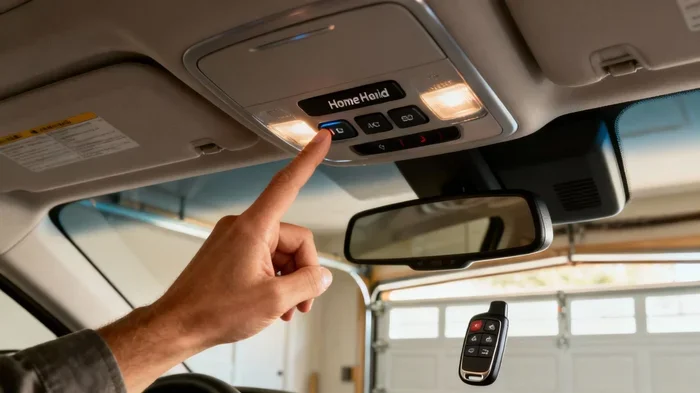
Can You Add HomeLink to Your Vehicle in Just Minutes
Yes, you can add HomeLink to your vehicle, even if it did not come with the system from the factory. The HomeLink garage door opener lets you control your garage door, gate, or entry gate right from your car with the push of a button. Adding HomeLink to a vehicle takes just minutes and requires only a few basic tools and a compatible universal transmitter. Whether you drive a new sedan or an older SUV, this guide walks you through every step so you can enjoy the convenience of garage door automation without visiting a dealer.
If you have ever walked out to your car in the rain carrying grocery bags and wished you could open your garage door without fumbling for the remote, you are not alone. The HomeLink garage door opener is one of the most convenient vehicle features ever invented. It lets you control your garage door, gate, or entry system with a simple button press right from your dashboard.
But what if your car did not come with HomeLink from the factory? Can you add HomeLink to a vehicle? The short answer is yes. The longer answer is that it depends on your vehicle model, the type of garage door system you have, and the installation method you choose. This guide covers everything you need to know about adding HomeLink to your vehicle in just a few minutes.
Whether you drive a brand-new truck or a classic sedan, you have options. Aftermarket HomeLink kits are widely available, easy to install, and surprisingly affordable. Let us walk through the process step by step so you can start enjoying this vehicle convenience feature as soon as today.
Key Takeaways
- You can add HomeLink to almost any vehicle: aftermarket kits work with most cars, trucks, and SUVs regardless of the model year.
- Installation takes just 10 to 20 minutes: no dealer visit is needed, and the process is straightforward for most car owners.
- Universal HomeLink transmitters are affordable: you can find reliable kits for under $50, making this a budget-friendly upgrade.
- Rolling code and fixed code compatibility matters: make sure your new HomeLink module supports your garage door opener’s frequency.
- Professional installation is optional: if you are not comfortable with DIY, a technician can handle the job in under an hour.
- HomeLink adds resale value: buyers love vehicles with garage door integration, so this is a smart long-term investment.
📑 Table of Contents
- What Is HomeLink and Why Does It Matter?
- Can You Add HomeLink to Any Vehicle?
- What You Need to Add HomeLink to Your Vehicle
- Step-by-Step Guide to Installing HomeLink
- Common Problems and How to Fix Them
- Benefits of Adding HomeLink to Your Vehicle
- When to Call a Professional
- How Much Does It Cost to Add HomeLink?
- Final Thoughts
What Is HomeLink and Why Does It Matter?
The HomeLink universal transceiver is a small electronic system built into your vehicle that communicates wirelessly with your garage door opener. Instead of carrying a separate remote control, you can press a button on your visor or console to open, close, or stop your garage door. The system uses rolling code technology or fixed code signals to send a secure command to your garage door receiver.
HomeLink has been around for decades, and it remains one of the most popular vehicle integration systems on the market. Here is why it matters:
- Hands-free convenience: open your garage without ever leaving the driver seat.
- No extra remote needed: you eliminate the clutter of multiple garage door remotes.
- Works with gates and gates: HomeLink controls not just garage doors but also driveway gates and entry barriers.
- Smart home compatibility: many modern HomeLink systems integrate with smart home platforms for garage door automation.
- Quick access: you can program up to three different garage doors or gates into one HomeLink system.
For most drivers, HomeLink is a small feature that makes a huge difference in daily life. It is the kind of thing you do not think about until you do not have it.
Can You Add HomeLink to Any Vehicle?
The good news is that HomeLink compatible vehicles are not the only ones that can benefit from this technology. You can add HomeLink to most vehicles, even older models. The key is choosing the right installation method for your specific car.
OEM vs. Aftermarket HomeLink
When we talk about adding HomeLink, there are two main paths: OEM (original equipment manufacturer) and aftermarket. OEM HomeLink comes pre-installed in the vehicle and is wired directly into the car’s electrical system during manufacturing. Aftermarket HomeLink kits are universal devices you can install yourself or have a professional mount.
Here is a quick comparison of the two approaches:
- OEM HomeLink: factory-installed, seamless integration, often includes a vehicle information display screen.
- Aftermarket HomeLink: universal fit, affordable, easy to install, works with almost any vehicle.
Most people looking to add HomeLink to a vehicle will go the aftermarket route. These universal kits come with a compact transmitter module that plugs into your car’s existing wiring or mounts discreetly under the dashboard. They are designed to work with the vast majority of garage door openers on the market today.
Vehicles That Support Aftermarket HomeLink Installation
Almost every car, truck, van, and SUV on the road today can support an aftermarket HomeLink installation. Here are some common examples:
- Sedans and coupes: Honda Civic, Toyota Camry, Ford Focus, Chevrolet Malibu.
- SUVs and crossovers: Toyota RAV4, Ford Explorer, Honda CR-V, Jeep Grand Cherokee.
- Trucks: Ford F-150, Chevrolet Silverado, Ram 1500, Toyota Tacoma.
- Older vehicles: cars from the 1990s and 2000s can often accept aftermarket kits with basic wiring.
The only real limitation is if your vehicle has a severely restricted electrical system or if the manufacturer uses proprietary wiring that blocks universal integration. In those rare cases, a HomeLink replacement module or a professional installer can find a workaround.
What You Need to Add HomeLink to Your Vehicle
Before you start the installation process, make sure you have everything you need. Gathering your tools and materials ahead of time saves you frustration and keeps the job moving fast.
Required Tools and Materials
- Universal HomeLink transmitter kit: brands like LiftMaster, Chamberlain, and Genie make reliable universal options.
- Wire stripper and crimper: for connecting the HomeLink module to your vehicle’s wiring harness.
- Electrical tape and zip ties: to keep wires tidy and secure.
- Multimeter (optional): helps you verify power connections during installation.
- Your garage door remote: you need the original remote or the manufacturer’s model number to program the HomeLink system.
Understanding Your Garage Door Opener
Not all garage door openers are the same. Before you buy a HomeLink kit, check what type of garage door opener you have. Most modern openers use rolling code technology, which changes the access code every time you use the remote. Older openers may use fixed code signals, which stay the same.
Your HomeLink transmitter must match your opener type. Most universal kits support both rolling code and fixed code systems, but it is always smart to double-check the product description. Look for terms like auto-detect frequency and universal garage door transmitter on the packaging.
Step-by-Step Guide to Installing HomeLink
Installing a HomeLink universal transceiver in your vehicle is simpler than most people think. You do not need to be a mechanic or an electronics expert. With the right kit and a little patience, you can complete the job in about 15 minutes.
Step 1: Choose Your Installation Location
Most HomeLink kits come with a small module that mounts inside the vehicle. Common locations include:
- Under the dashboard on the driver side.
- Behind the visor mirror area.
- Inside the overhead console or headliner.
Choose a spot that is hidden from view but close to the vehicle’s wiring harness. You want the module to be secure and out of the way but still easy to access if you ever need to reprogram it.
Step 2: Connect the Power Wires
Most aftermarket HomeLink kits draw power from your vehicle’s existing electrical system. You will need to tap into a constant 12-volt power source and a ground wire. Use your wire stripper to prepare the connections, then attach the HomeLink module using the included wiring harness.
Quick Tip: Many HomeLink kits come with a vehicle-specific wiring adapter that makes this step much easier. Check your kit’s manual for the correct wire colors and connection points for your vehicle make and model.
Step 3: Mount the Transmitter Module
Once the wires are connected, mount the transmitter module in your chosen location. Use the included adhesive pad or small screws to hold it in place. Make sure the module is not blocking any air vents or moving parts inside the vehicle.
Step 4: Program the HomeLink System
Programming is the most important step. Here is how it works:
- Press and hold the two outer HomeLink buttons on your visor for 20 seconds until the indicator light flashes.
- Release the buttons and immediately place your garage door remote near the HomeLink module.
- Press and hold the HomeLink button you want to program while slowly bringing the garage door remote close.
- Wait for the HomeLink indicator light to stay solid, which means the signal was successfully learned.
- Repeat for additional buttons if you have multiple garage doors or gates.
If your garage door opener uses rolling code technology, you may need to press a “learn” button on the garage door motor unit during the programming process. Check your garage door opener’s manual for specific instructions.
Step 5: Test the System
Once programming is complete, sit in your driver seat and press the HomeLink button you just programmed. Your garage door should respond immediately. Test all programmed buttons to make sure each one controls the correct door or gate.
Common Mistake: Do not drive away before testing. Make sure the system works reliably before you rely on it in real-world conditions.
Common Problems and How to Fix Them
Even a straightforward HomeLink programming job can hit a few snags. Here are the most common issues and how to solve them.
- HomeLink button does not respond: Check the power connections. A loose wire or bad ground is the most common cause.
- Signal interference: Other wireless devices in your vehicle can sometimes interfere with the HomeLink signal. Move your phone or tablet away from the module during programming.
- Garage door opens but does not close: This usually means the rolling code was not fully synced. Repeat the programming steps from the beginning.
- Multiple buttons control the same door: This happens if you accidentally programmed the same signal to two different buttons. Clear the module and reprogram one button at a time.
If you run into a problem that does not fit these fixes, consult the HomeLink kit manual or reach out to the manufacturer’s support team. Most kits come with a toll-free helpline and detailed troubleshooting guides.
Benefits of Adding HomeLink to Your Vehicle
So why go through the trouble of adding HomeLink to a vehicle? The benefits go far beyond just opening your garage door with a button press.
Daily Convenience
Think about your morning routine. You walk out to your car, grab your keys, and now you can open the garage door before you even step out of the vehicle. In winter, this means you are not standing in the cold fumbling with a remote. In summer, you stay cool in the air-conditioned car a little longer.
Enhanced Home Security
Garage door automation also improves your home security. With HomeLink, you can close your garage door from inside your car without walking outside. This is especially valuable at night or when you are carrying items that leave your hands full.
Increased Property Value
HomeLink is a feature that buyers notice. When you sell your vehicle, having a factory-installed or professionally added HomeLink system can make your car more attractive on the used market. It signals that the vehicle has been well-equipped and cared for.
Integration with Smart Home Ecosystems
Many modern HomeLink systems can connect to smart home platforms like Amazon Alexa, Google Home, and Apple HomeKit. This means you can control your garage door from your phone, set up automation routines, and monitor your garage status remotely. Car garage connectivity is becoming a standard expectation for tech-savvy homeowners.
When to Call a Professional
While most car owners can handle a HomeLink installation on their own, there are times when professional help makes sense. If your vehicle has a complex wiring setup, if you are uncomfortable working with electrical connections, or if you have tried DIY installation and run into persistent issues, a professional can get the job done right.
Many mobile electronics shops and car audio installers offer HomeLink installation services for a flat fee. The job typically takes under an hour, and the installer will handle everything from wiring to programming. This is a great option if you want the convenience without the DIY effort.
How Much Does It Cost to Add HomeLink?
The cost of adding HomeLink to your vehicle depends on the route you choose. Aftermarket universal HomeLink kits range from $25 to $60 for most models. These kits include everything you need for a DIY installation.
If you choose professional installation, expect to pay between $100 and $200 for labor, depending on your location and the complexity of your vehicle’s wiring. Some dealerships also offer HomeLink installation, but their prices tend to be higher, often $200 to $400 for parts and labor combined.
Overall, adding HomeLink to a vehicle is one of the most affordable vehicle upgrades you can make. The convenience and peace of mind it provides far outweigh the small investment.
Final Thoughts
Can you add HomeLink to a vehicle? Absolutely. Whether your car came with the system or not, an aftermarket HomeLink kit gives you all the same benefits at a fraction of the cost. The installation process is straightforward, the tools are basic, and the results are immediate.
You do not need to be a tech expert or a professional mechanic. With the right kit, a few simple tools, and this guide, you can add garage door automation to your vehicle in just minutes. The HomeLink garage door opener transforms your daily routine and adds real value to your car.
So go ahead and make the upgrade. Your future self, standing in the rain with arms full of groceries, will thank you.
Frequently Asked Questions
Can I add HomeLink to an older vehicle?
Yes, you can add HomeLink to older vehicles using a universal aftermarket kit. Most kits from the 1990s through today support basic wiring integration. Check that your vehicle has a 12-volt power source and a ground wire available, and you will be able to install the system yourself in under 20 minutes.
Do I need any special tools to install HomeLink?
No special tools are required for most HomeLink installations. A basic wire stripper, crimper, and electrical tape are all you need. Many aftermarket kits include a vehicle-specific wiring adapter that eliminates the need for cutting or splicing your car’s original wires.
Will adding HomeLink void my vehicle warranty?
In most cases, adding an aftermarket HomeLink kit does not void your vehicle warranty. However, if the installation causes damage to your electrical system, the manufacturer may deny a related claim. To stay safe, follow the installation instructions carefully or have a professional handle the job.
Can HomeLink control more than just garage doors?
Yes, HomeLink can control gates, entry barriers, and other automated access systems. Most universal HomeLink transmitters work with any device that uses a rolling code or fixed code wireless signal. Just make sure your gate operator is compatible with the HomeLink frequency before you begin programming.
How long does HomeLink programming take?
Programming your HomeLink system typically takes between 5 and 10 minutes per door. The process involves syncing the HomeLink module with your garage door opener’s rolling code or fixed code signal. If you have multiple doors or gates, plan for an extra 5 minutes per additional device.
What is the difference between HomeLink and a universal garage door remote?
A universal garage door remote is a handheld device you carry in your pocket. HomeLink is a built-in vehicle system that mounts inside your car and operates with the push of a button on your visor or console. Aftermarket HomeLink kits bring this built-in convenience to any vehicle, replacing the need for a separate handheld remote.
=== CONCLUSION ===
Adding HomeLink to your vehicle is one of the easiest and most rewarding upgrades you can make. It takes just minutes, costs very little, and delivers real convenience every single day. Whether you choose a DIY installation or hire a professional, the result is the same: you gain seamless garage door automation right from your driver seat.
With a universal HomeLink kit, you unlock the power of car garage connectivity without the hassle of carrying extra remotes or walking outside in bad weather. The process is simple, the tools are basic, and the payoff is immediate.
So if you have been wondering whether you can add HomeLink to your vehicle, the answer is a clear yes. Grab a kit, follow the steps in this guide, and start enjoying the convenience of HomeLink garage door opener technology today.